

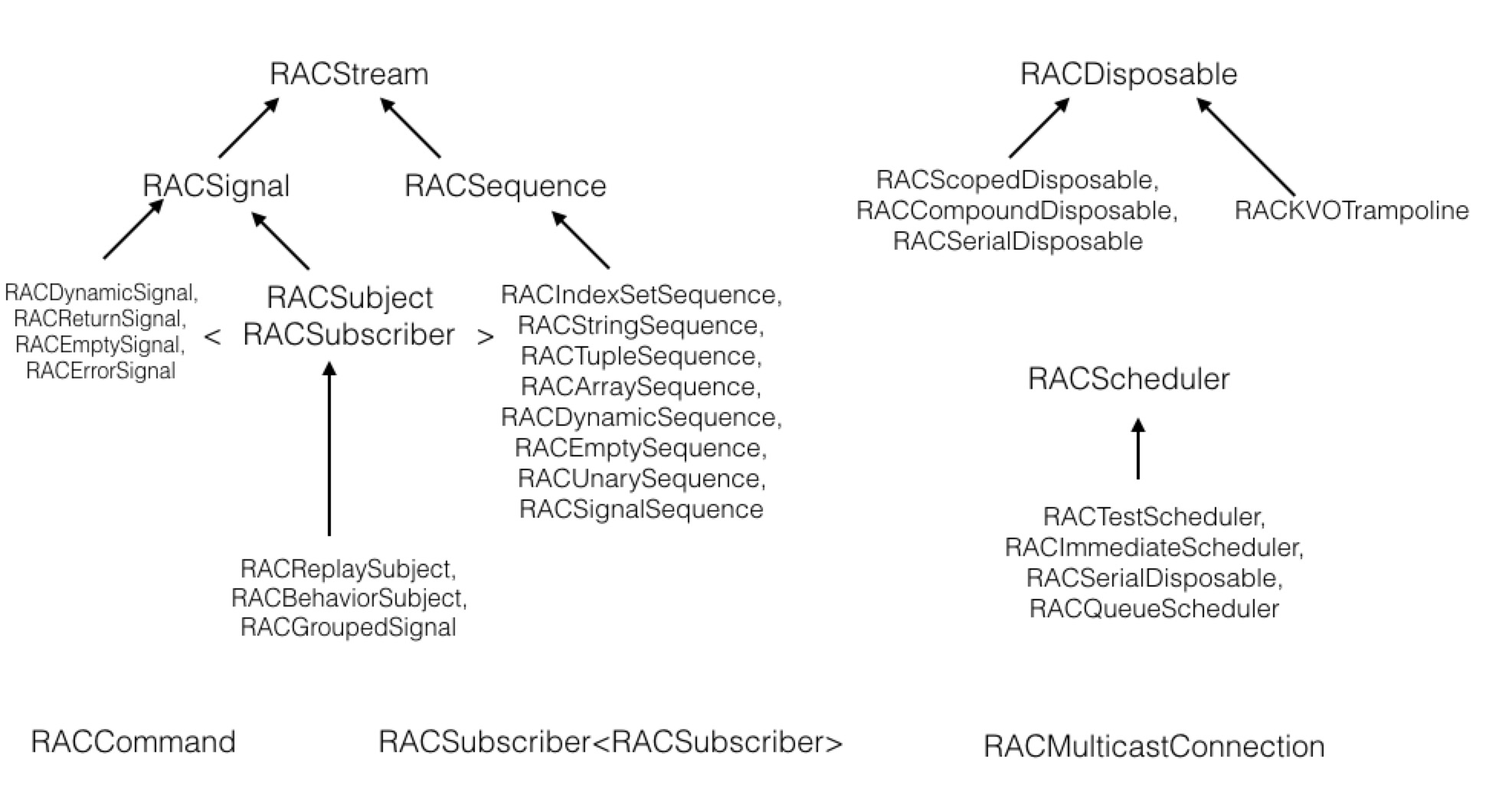
由于新入职的团队使用的是RAC,因此需要熟悉一下RAC的类图和大致的实现。 类图大致如下:
RACSequence
和Cocoa内置的集合对象(NSArray,NSSet)类似,内部不能包含nil,是RACStream(一个抽象类,用于表示为信号流的值)的子类,RACSequence是拉力驱动(被动)的数据流,因此默认是惰性求值,并且当调用map或falttenMap之类的方法时,block对内部的对象求值只会进行一次。
借用RAC官方Demo
 NSArray *strings = @[ @"A", @"B", @"C" ];
    RACSequence *sequence = [strings.rac_sequence map:^(NSString *str) {
        NSLog(@"%@", str);
        return [str stringByAppendingString:@"_"];
    }];

    // Logs "A" during this call.
    NSString *concatA = sequence.head;

    // Logs "B" during this call.
    NSString *concatB = sequence.tail.head;

    // Does not log anything.
    NSString *concatB2 = sequence.tail.head;

    RACSequence *derivedSequence = [sequence map:^(NSString *str) {
        return [@"_" stringByAppendingString:str];
    }];
    //  Does not log anything, and concatA2 value is A_ ,NOT _A_
    NSString *concatA2 = sequence.head;
RACSignal
RACSignal是专注于解决通过订阅信号来异步进行事件传输
RAC是线程安全的,因此可以在任意线程进行signal发送,但是一个订阅者只能串行的处理一个信号,而不能并发的处理多个信号。
因此-subscribeNext:error:completed:的 block不需要进行synchronized。
bind
利用一段代码来测试bind函数的调用顺序,由于代码结构复杂,所以在bind模块对应的block都会标有数字,方便描述调用顺序。
 RACSignal *sourceSig = [RACSignal createSignal:^RACDisposable *(id<RACSubscriber> subscriber) {
        //doSomething
        //...
        //...block1
        NSLog(@"\nbegin---\n%@\n---end",@"dosomething");
        [subscriber sendNext:@"hello world"];
//        [subscriber sendCompleted];
        return nil;
    }];

    RACSignal *bindSig = [sourceSig bind:^RACStreamBindBlock{
        //block2
        return ^(id value, BOOL *stop) {
            //block3
            //这里对value进行处理
            return [RACSignal return:value];
        };
    }];

    [bindSig subscribeNext:^(id x) {
        //block4
        NSLog(@"\nbegin---\n%@\n---end",x);
    }];
1.createSignal:的作用是将传的:^RACDisposable *(id<RACSubscriber> subscriber)这个block存到sourceSig的didSubscribe字段中(block1)

2.bind:通过调用createSignal:返回一个新的信号bindSig,bind: 的参数是一个没有入参,返回值为RACStreamBindBlock的block(block2)。
RACStreamBindBlock入参和出参如下:
typedef RACSignal * _Nullable (^RACSignalBindBlock)(ValueType _Nullable value, BOOL *stop);
通过改变传入进来的Value(也就是改变block3的内部实现 ),从而实现了flattenMap:,skip:,takeUntilBlock:,distinctUntilChanged:等高级操作。
- (RACSignal *)bind:(RACSignalBindBlock (^)(void))block {
    //返回bindSig,并将block保存至didSubscribe
	return [[RACSignal createSignal:^(id<RACSubscriber> subscriber) {
		//省略didSubscribe内部代码
	}] setNameWithFormat:@"[%@] -bind:", self.name];
}
3.当bindSig 调用subscribeNext:,生成一个RACSubscriber,并将nextBlock保存在_next中
- (RACDisposable *)subscribeNext:(void (^)(id x))nextBlock {
	NSCParameterAssert(nextBlock != NULL);

	RACSubscriber *o = [RACSubscriber subscriberWithNext:nextBlock error:NULL completed:NULL];
	return [self subscribe:o];
}
然后bindSig调用subscribe:,入参就是这个subscribe
4.在subcribe:中,调用bindSig保存的didSubscribe ,执行一长串代码(block5)
return [[RACSignal createSignal:^(id<RACSubscriber> subscriber) {
                //block5
		RACStreamBindBlock bindingBlock = block();
                 //这里的self是sourceSig
		NSMutableArray *signals = [NSMutableArray arrayWithObject:self];

		RACCompoundDisposable *compoundDisposable = [RACCompoundDisposable compoundDisposable];

		void (^completeSignal)(RACSignal *, RACDisposable *) = ^(RACSignal *signal, RACDisposable *finishedDisposable) {
		        //block6
			BOOL removeDisposable = NO;

			@synchronized (signals) {
				[signals removeObject:signal];

				if (signals.count == 0) {
					[subscriber sendCompleted];
					[compoundDisposable dispose];
				} else {
					removeDisposable = YES;
				}
			}

			if (removeDisposable) [compoundDisposable removeDisposable:finishedDisposable];
		};

		void (^addSignal)(RACSignal *) = ^(RACSignal *signal) {
	        	//block7
			@synchronized (signals) {
				[signals addObject:signal];
			}

			RACSerialDisposable *selfDisposable = [[RACSerialDisposable alloc] init];
			[compoundDisposable addDisposable:selfDisposable];
                        //4.订阅newSig,然后将newSig的值传给bindSig的订阅者,执行block8
			RACDisposable *disposable = [signal subscribeNext:^(id x) {
			        //block8
			        //这里是subscriber对应的是bindSig
				[subscriber sendNext:x];
				//5.然后执行block4
			} error:^(NSError *error) {
				[compoundDisposable dispose];
				[subscriber sendError:error];
			} completed:^{
				@autoreleasepool {
					completeSignal(signal, selfDisposable);
				}
			}];

			selfDisposable.disposable = disposable;
		};

		@autoreleasepool {
			RACSerialDisposable *selfDisposable = [[RACSerialDisposable alloc] init];
			[compoundDisposable addDisposable:selfDisposable];
                         //1.先执行block1,然后执行block9
			RACDisposable *bindingDisposable = [self subscribeNext:^(id x) {
				// Manually check disposal to handle synchronous errors.
				//block9
				if (compoundDisposable.disposed) return;

				BOOL stop = NO;
				//对sourceSig传的值进行处理,再包装在新值(可为nil)简称newSig
				//2.再执行block3
				id signal = bindingBlock(x, &stop);

				@autoreleasepool {
				    //3.假如block3返回的sig不为nil执行block7
					if (signal != nil) addSignal(signal);
				    //假如block3返回的sig为nil或者stop指针为YES,执行block6
					if (signal == nil || stop) {
						[selfDisposable dispose];
						completeSignal(self, selfDisposable);
					}
				}
			} error:^(NSError *error) {
				[compoundDisposable dispose];
				[subscriber sendError:error];
			} completed:^{
				@autoreleasepool {
					completeSignal(self, selfDisposable);
				}
			}];

			selfDisposable.disposable = bindingDisposable;
		}

		return compoundDisposable;
	}] setNameWithFormat:@"[%@] -bind:", self.name];
总结一下bind的作用:生成一个新的信号bindSig,订阅源信号sourceSig,当sourceSig发送一个值时,bindSig通过订阅收到这个值后,根据上层传的RACStreamBindBlock转换value,发送给bindSig的subscriber。
ATTENTION
由于RACSignal是冷信号,所以每次有新的订阅都会触发副作用(对应的block),这意味着 singal对应的block会执行多次。
__block int missilesToLaunch = 0;

// Signal that will have the side effect of changing `missilesToLaunch` on
// subscription.
RACSignal *processedSignal = [[RACSignal return:@"missiles"]
	map:^(id x) {
		missilesToLaunch++;
		return [NSString stringWithFormat:@"will launch %d %@", missilesToLaunch, x];
	}];

// This will print "First will launch 1 missiles"
[processedSignal subscribeNext:^(id x) {
	NSLog(@"First %@", x);
}];

// This will print "Second will launch 2 missiles"
[processedSignal subscribeNext:^(id x) {
	NSLog(@"Second %@", x);
}];
假如想冷信号执行一次,就得转换成热信号。比如网络请求肯定只需要一次就好,所以在业务场景中通过multicast使用,可以避免冷信号的的多次调用
// This signal starts a new request on each subscription.
RACSignal *networkRequest = [RACSignal createSignal:^(id<RACSubscriber> subscriber) {
    AFHTTPRequestOperation *operation = [client
        HTTPRequestOperationWithRequest:request
        success:^(AFHTTPRequestOperation *operation, id response) {
            [subscriber sendNext:response];
            [subscriber sendCompleted];
        }
        failure:^(AFHTTPRequestOperation *operation, NSError *error) {
            [subscriber sendError:error];
        }];

    [client enqueueHTTPRequestOperation:operation];
    return [RACDisposable disposableWithBlock:^{
        [operation cancel];
    }];
}];

// Starts a single request, no matter how many subscriptions `connection.signal`
// gets. This is equivalent to the -replay operator, or similar to
// +startEagerlyWithScheduler:block:.
// single中除了Subject之外的都是冷信号,Subject是热信号。
RACMulticastConnection *connection = [networkRequest multicast:[RACReplaySubject subject]];
[connection connect];

[connection.signal subscribeNext:^(id response) {
    NSLog(@"subscriber one: %@", response);
}];

[connection.signal subscribeNext:^(id response) {
    NSLog(@"subscriber two: %@", response);
}];
当我们需要在nextBlock之前需要加一些副作用代码,就可以调用-doNext,这时候会先调用这里的block,再调用subscriber的sendNext。
UI事件
RAC(self.label,text,@"nil的值") = [RACSignal createSignal:^RACDisposable *(id<RACSubscriber> subscriber) {
        __block int i = 0;
        [[self.button rac_signalForControlEvents:UIControlEventTouchDown] subscribeNext:^(id x) {
            i ++;
            if (i > 3) {
                [subscriber sendNext:nil];
            }
            else {
                [subscriber sendNext:@"123"];
            }

        }];
        return nil;
        }];
通知
当我们用RAC来改写NSNotification的时候用rac_addObserverForName:
比如我们需要监听网络状态时
    //当网络发生变化后,RAC这个宏会进行keypath绑定,会将self.NetWorkStatus 赋予新值,这时其他利用RACObserve会收到这个变化并作出对应改
    RAC(self, NetWorkStatus) = [[[[NSNotificationCenter defaultCenter]
                                   rac_addObserverForName:kRealReachabilityChangedNotification object:nil]
                                  map:^(NSNotification *notification) {
                                      return @([notification.object currentReachabilityStatus]);
                                  }]
                                distinctUntilChanged];

    //RACObserve接受新值并订阅信号
    [RACObserve(self , NetWorkStatus) subscribeNext:^(NSNumber *networkStatus) {

        @strongify(self);
        if (networkStatus.integerValue == RealStatusNotReachable || networkStatus.integerValue == RealStatusUnknown) {
            [self.viewModel showErrorView];
        }else{
            [self.viewModel request];
        }
    }];
协议
   @weakify(self);
    [[self
      rac_signalForSelector:@selector(webViewDidStartLoad:)
      fromProtocol:@protocol(WebViewDelegate)]
    	subscribeNext:^(RACTuple *tuple) {
            @strongify(self)
            if (tuple.first == self.webView){
                dispatch_main_async_safe(^{
                    [self showStatusWithMessage:@"Loading..."];
                });
            }
        }];
网络事件(耗时事件)
    __block int callCount = 0;
    这里因为订阅了两次,所以会调用两次block,因此假如是io类操作,最好将networkSig包装成RACSubject然后通过multicast广播
    self.networkSig = [RACSignal createSignal:^RACDisposable *(id<RACSubscriber> subscriber) {
        __block int i = 0;
        callCount ++;
        //打印两次
        NSLog(@"\nbegin---\n callCount ==%d\n---end",callCount );
        dispatch_after(dispatch_time(DISPATCH_TIME_NOW, (int64_t)(1.f * NSEC_PER_SEC)), dispatch_get_main_queue(), ^{
            i++;
            [subscriber sendNext:@(i)];
        });
        return nil;
    }];


    [self.networkSig subscribeNext:^(id x) {
        NSLog(@"\nbegin---\nfirst i ====  %@\n---end", x);
    }];

    [self.networkSig subscribeNext:^(id x) {
        NSLog(@"\nbegin---\nsecond i ====  %@\n---end", x);
    }];
改进后:
    __block int callCount = 0;
    self.networkSig = [RACSignal createSignal:^RACDisposable *(id<RACSubscriber> subscriber) {
        __block int i = 0;
        callCount ++;
        //只会打印一次
        NSLog(@"\nbegin---\n callCount ==%d\n---end",callCount );
        dispatch_after(dispatch_time(DISPATCH_TIME_NOW, (int64_t)(1.f * NSEC_PER_SEC)), dispatch_get_main_queue(), ^{
            i++;
            [subscriber sendNext:@(i)];
        });
        return nil;
    }];

    RACSubject *subject = [RACSubject subject];
    RACMulticastConnection *multicastConnection = [self.networkSig multicast:subject];
    [multicastConnection connect];

    [multicastConnection.signal subscribeNext:^(id x) {
        NSLog(@"\nbegin---\nfirst i ====  %@\n---end", x);
    }];

    [multicastConnection.signal subscribeNext:^(id x) {
        NSLog(@"\nbegin---\nsecond i ====  %@\n---end", x);
    }];
KVO
 //实现self.navigationItem.title 和 self.viewModel.title的单向绑定
 RAC(self.navigationItem,title) = RACObserve(self.viewModel, title);
RACCommand
创建RACCommand的时候需要返回一个signal,当调用execute:,signal必须调用sendCompleted或sendError:,command才能进行下次execute:
初学者可能会想当然如下写代码
    //1.先绑定self.button的keypath:enable
    RAC(self.button,enabled) = [RACSignal combineLatest:@[self.userNameField.rac_textSignal,self.passwordField.rac_textSignal]
                                                 reduce:^id(NSString *userName,NSString *password){
                                                     return @(userName.length >= 8 && password.length >= 6);
                                                 }];
    //2.然后设置button的点击事件
    self.button.rac_command = [[RACCommand alloc] initWithSignalBlock:^RACSignal *(id input) {
        return [self login];
    }];
这时候运行程序的时候报错
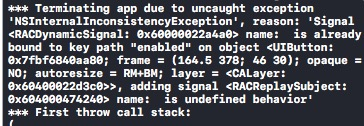
RAC()这个宏和button.rac_command都会调用setKeyPath:onObject:nilValue:这个方法。
首次调用时,会通过objc_setAssociatedObject将keypath保存起来,当重复调用相同的keypath的时候会触发NSCAssert
正确的做法是
    RACSignal *buttonEnabled = [RACSignal combineLatest:@[self.userNameField.rac_textSignal,self.passwordField.rac_textSignal]
                                                 reduce:^id(NSString *userName,NSString *password){
                                                     return @(userName.length >= 8 && password.length >= 6);
                                                 }];
    self.button.rac_command = [[RACCommand alloc] initWithEnabled:buttonEnabled signalBlock:^RACSignal *(id input) {
        return [self login];
    }];

