概述
在实际项目或者生活中,总会遇到一类问题,比如一个需求,有多种解决方案,又或者比如从上海到北京,有多种方式可以选择,高铁,飞机,火车等等,就是实现某一个功能有多种算法或者策略,我们可以根据环境或者条件的不同选择不同的算法或者策略来完成该功能,前面说了从上海到北京,如果是有钱的土豪,可以选择飞机,如果是一般的家庭,可以选择高铁,如果钱不够,可以选择火车,可见选择什么策略需要根据具体环境决定,上面的例子中,有多少钱就代表了一种环境.策略模式是一系列的算法定义,并将每一个算法封装起来,而且使它们还可以相互替换,策略模式让算法独立于使用它的客户而独立变化,可以根据具体的情况增加或者减少策略,解耦代码。
适用性
一般情况下,当存在以下情况时使用Strategy模式
● 许多相关的类仅仅是行为有异。“策略”提供了一种用多个行为中的一个行为来配置一个类的方法。即一个系统需要动态地在几种算法中选择一种。
● 需要使用一个算法的不同变体。例如,你可能会定义一些反映不同的空间或者时间权衡的算法。当这些变体实现为一个算法的类层次时 ,可以使用策略模式。
● 算法使用客户不应该知道的数据。可使用策略模式以避免暴露复杂的、与算法相关的数据结构。
● 一个类定义了多种行为 , 并且这些行为在这个类的操作中以多个条件语句的形式出现。将相关的条件分支移入它们各自的Strategy类中以代替这些条件语句,比如可以替代以前的的if ,elseif语句。
结构
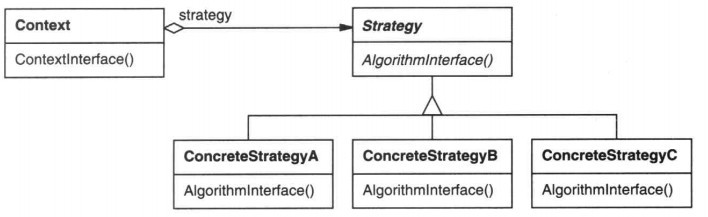
● 抽象策略类(Strategy):定义所有支持的算法的公共接口,抽象也是可以的,但一般以接口为为主。
● 具体策略类(ConcreteStrategy):以Strategy接口实现某具体算法,通常在复杂项目中有多个具体的实现。
● 环境类(Context):用一个ConcreteStrategy对象来配置,维护一个对Strategy对象的引用。可定义一个接口来让Strategy访问它的数据,一般在环境类可以决定了使用什么样的策略。
下面看一个例子:
假设从上海到北京旅游,有一个旅行的接口:
public interface Travel {
    void onTravel();
}
然后分别有飞机,高铁,自驾车3中具体的方式(就是具体的策略)
public class Fly implements Travel {
    @Override
    public void onTravel() {
        System.out.println("飞机出发");
    }
}

public class ChrTravel implements Travel {
    @Override
    public void onTravel() {
        System.out.println("高铁出发");
    }
}

public class Car implements Travel {
    @Override
    public void onTravel() {
        System.out.println("自驾车出发");
    }
}
然后定义一个环境类,在这里通过参数可以决定了使用哪种策略:
public class TravelContext {
    private Travel mTravel;

    //决定了使用哪种策略
    public TravelContext(Travel mTravel) {
        this.mTravel = mTravel;
    }

    public void onTravel() {
        mTravel.onTravel();
    }

}
下面是运行的代码:
public class TravelClient {
    public static void main(String[] args){
        Travel trave;
        trave=new Fly();
        TravelContext travelClient=new TravelContext(trave);
        travelClient.onTravel();

        trave=new ChrTravel();
        TravelContext travelClient1=new TravelContext(trave);
        travelClient1.onTravel();

        trave=new Car();
        TravelContext travelClient2=new TravelContext(trave);
        travelClient2.onTravel();
    }
}
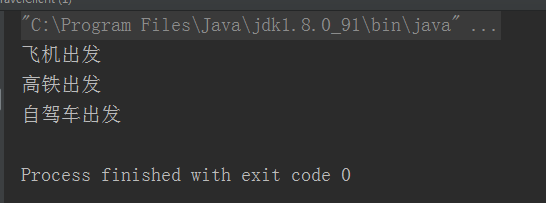
好了,从上海到北京,有3中具体的方式(策略)来解决这个问题
策略模式优缺点
优点:
● 策略模式提供了管理相关的算法族的办法。策略类的等级结构定义了一个算法或行为族。恰当使用继承可以把公共的代码转移到父类里面,从而避免重复的代码。
● 策略模式提供了可以替换继承关系的办法。继承可以处理多种算法或行为。如果不是用策略模式,那么使用算法或行为的环境类就可能会有一些子类,每一个子类提供一个不同的算法或行为。但是,这样一来算法或行为的使用者就和算法或行为本身混在一起。决定使用哪一种算法或采取哪一种行为的逻辑就和算法或行为的逻辑混合在一起,从而不可能再独立演化。继承使得动态改变算法或行为变得不可能。
● 使用策略模式可以避免使用多重条件转移语句。多重转移语句不易维护,它把采取哪一种算法或采取哪一种行为的逻辑与算法或行为的逻辑混合在一起,统统列在一个多重转移语句里面,比使用继承的办法还要原始和落后。
缺点:
● 客户端必须知道所有的策略类,并自行决定使用哪一个策略类。这就意味着客户端必须理解这些算法的区别,以便适时选择恰当的算法类。换言之,策略模式只适用于客户端知道所有的算法或行为的情况。
● 策略模式造成很多的策略类,每个具体策略类都会产生一个新类。有时候可以通过把依赖于环境的状态保存到客户端里面,而将策略类设计成可共享的,这样策略类实例可以被不同客户端使用。换言之,可以使用享元模式来减少对象的数量,实际上所有的设计模式都有一个共同的特点,就是子类过多,特别是复杂项目的时候,尤其突出,可以考虑进一步的封装实现,就是在策略模式内部再封装。
策略模式在Android中源码的体现
策略模式在Android中可以说是广泛应用的,拿我们熟悉的属性动画里面的TimeInterpolator时间插值器来说吧,TimeInterpolator是一个接口,其代码如下:
public interface TimeInterpolator {

    /**
     * Maps a value representing the elapsed fraction of an animation to a value that represents
     * the interpolated fraction. This interpolated value is then multiplied by the change in
     * value of an animation to derive the animated value at the current elapsed animation time.
     *
     * @param input A value between 0 and 1.0 indicating our current point
     *        in the animation where 0 represents the start and 1.0 represents
     *        the end
     * @return The interpolation value. This value can be more than 1.0 for
     *         interpolators which overshoot their targets, or less than 0 for
     *         interpolators that undershoot their targets.
     */
    float getInterpolation(float input);
}
一般我们在代码中可以这样写:
        ObjectAnimator animator=ObjectAnimator.ofFloat(button,"alpha",1f,0f);
        animator.setInterpolator(new LinearInterpolator());
        animator.setDuration(2000);
        animator.start();

        public void setInterpolator(TimeInterpolator value) {
        if (value != null) {
            mInterpolator = value;
        } else {
            mInterpolator = new LinearInterpolator();
        }
    }
        默认是线性变化的
上面这段设置时间插值器的代码就是类似于例子中设置具体哪种交通方式去北京的意思, 目前的话系统中有好几种已经实现的插值器了,比如LinearInterpolator,AccelerateInterpolator,AccelerateDecelerateInterpolator等等,我们也可以自定义一个新的TimeInterpolator,比如下面简单的代码:
public class CustomInterpolator implements android.view.animation.Interpolator {
    @Override
    public float getInterpolation(float input) {
        return input*2;
    }
}
可以看到新的值是原来的2倍,大家运行的时候就可以看到效果了
除了属性动画,策略模式在Android其他方面也是很多利用的,比如support包,其实也是利用了策略模式的,有空的同学可以去研究一下,这里就不再详述了。
策略模式在Android实际项目中的应用
除了Android源码广泛利用了策略模式以外,实际的项目中也会经常用到这个策略模式的,下面举一个实际的例子来说一下,以图片加载例子来说,众所周知,现在的框架很多,比如Picasso,Glide,Fresco,等等,特别是新的框架出来之后,很多人都愿意在项目中尝试使用一下,但如果为了使用新的框架而重新写一套代码就很不划算了,这个时候就可以利用策略模式了,首先定义一个加载图片的接口:
public interface ImageLoaderProvider {
    void loadImage(Context ctx, ImageConfig img);
}
ImageConfig是加载的一些配置,比如有些在wifi下才加载,或者加载大图,中图,缩略图等等,简单的代码如下:
public class ImageConfig {
    private int type;
    private String url;
    private int placeHolder;
    private ImageView imageView;
    private int strategy;//加载策略,是否在wifi下才加载或者其他的策略,比如加载大图,中图,或者是小图等等

    private ImageConfig(ImageConfig imageConfig) {
        this.type = imageConfig.type;
        this.url = imageConfig.url;
        this.placeHolder = imageConfig.placeHolder;
        this.imageView = imageConfig.imageView;
        this.strategy = imageConfig.strategy;
    }

    private ImageConfig(){

    }

    public int getType() {
        return type;
    }

    public String getUrl() {
        return url;
    }

    public int getPlaceHolder() {
        return placeHolder;
    }

    public ImageView getImageView() {
        return imageView;
    }

    public int getStrategy() {
        return strategy;
    }


    public static class Builder {
        private ImageConfig imageConfig;

        public Builder() {
            this.imageConfig = new ImageConfig();
        }
        public Builder type(int type) {
            imageConfig.type = type;
            return this;
        }

        public Builder url(String url) {
            imageConfig.url = url;
            return this;
        }

        public Builder placeHolder(int placeHolder) {
            imageConfig.placeHolder = placeHolder;
            return this;
        }

        public Builder imgView(ImageView imgView) {
            imageConfig.imageView = imgView;
            return this;
        }

        public Builder strategy(int strategy) {
            imageConfig.strategy = strategy;
            return this;
        }

        public ImageConfig build(){
            return new ImageConfig(imageConfig);
        }

    }
}
可以看到目前仅仅是判断是否在wifi下才加载,当然实际情况可以适当扩展,但原理不变。
假如第一个是 Picasso框架的,下面写一个实现的类,代码如下:
public class PicassoImageLoaderProvider implements ImageLoaderProvider {
    private ImageView imageView;

    @Override
    public void loadImage(Context ctx, ImageConfig config) {

        // 一般实现,或者根据具体的一些另外的策略加载,比如是否在wifi下自动加载等,根据业务具体决定
        Picasso
                .with(ctx)
                .load(config.getUrl())
                .tag("Picasso") //参数为 Object
                .placeholder(config.getPlaceHolder())
                .into(target);
        imageView = config.getImageView();
    }

    private Target target = new Target() {
        @Override
        public void onBitmapLoaded(Bitmap bitmap, Picasso.LoadedFrom from) {
            //加载成功后会得到一个bitmap,可以自定义操作
            imageView.setImageBitmap(bitmap);
        }

        @Override
        public void onBitmapFailed(Drawable errorDrawable) {
            // 加载失败进行相应处理
        }

        @Override
        public void onPrepareLoad(Drawable placeHolderDrawable) {

        }
    };
}
可以看到实现了加载接口,这里可以根据实际的业务扩展方法,第二个是Glide加载实现:
public class GlideImageLoaderProvider implements ImageLoaderProvider {
    @Override
    public void loadImage(Context ctx, ImageConfig config) {
        boolean flag = SettingUtils.getOnlyWifiLoadImg();
        //如果不是在wifi下加载图片,直接加载
        if (!flag) {
            loadNormal(ctx, config);
            return;
        }
        int strategy = config.getStrategy();
        //这里1表示的是wifi加载
        if (strategy == 1) {
            int netType = NetUtils.getNetWorkType(ctx);
            //如果是在wifi下才加载图片,并且当前网络是wifi,直接加载
            if (netType == NetUtils.NETWORKTYPE_WIFI) {
                loadNormal(ctx, config);
            } else {
                //如果是在wifi下才加载图片,并且当前网络不是wifi,加载缓存
                loadCache(ctx, config);
            }
        } else {
            //如果不是在wifi下才加载图片
            loadNormal(ctx, config);
        }

    }

    /**
     * 加载图片,这里需要注意的是默认加载的是全尺寸的,这样的话很容易导致OOM的发生,需要进行适当的压缩
     */
    private void loadNormal(Context ctx, final ImageConfig config) {
        Glide.with(ctx)
                .load(config.getUrl())
                .override(ProjectConfig.IMAGE_WIDTH, ProjectConfig.IMAGE_HEIGHT)
                .placeholder(config.getPlaceHolder())
                .into(new SimpleTarget<GlideDrawable>() {

                    @Override
                    public void onLoadFailed(Exception e, Drawable errorDrawable) {
                        config.getImageView().setImageResource(R.drawable.ic_icon_share_sp);
                    }

                    @Override
                    public void onResourceReady(GlideDrawable resource, GlideAnimation<? super GlideDrawable> glideAnimation) {
                        config.getImageView().setImageDrawable(resource);
                    }
                });
    }


    /**
     * 加载缓存图片
     */
    private void loadCache(Context ctx, ImageConfig config) {
        Glide.with(ctx).using(new StreamModelLoader<String>() {
            @Override
            public DataFetcher<InputStream> getResourceFetcher(final String model, int i, int i1) {
                return new DataFetcher<InputStream>() {
                    @Override
                    public InputStream loadData(Priority priority) throws Exception {
                        throw new IOException();
                    }


                    @Override
                    public void cleanup() {

                    }

                    @Override
                    public String getId() {
                        return model;
                    }


                    @Override
                    public void cancel() {

                    }
                };
            }
        })
                .load(config.getUrl())
                .override(ProjectConfig.IMAGE_WIDTH, ProjectConfig.IMAGE_HEIGHT)
                .placeholder(config.getPlaceHolder())
                .diskCacheStrategy(DiskCacheStrategy.ALL)
                .into(config.getImageView());
    }
}
这个是我项目中用到的,适当扩展了一些需要的方法,第三个是Fresco加载实现:
public class FrescoImageLoaderProvider implements ImageLoaderProvider {

    private static volatile FrescoImageLoaderProvider sInstance;

    public static FrescoImageLoaderProvider getInstance() {
        if (sInstance == null) {
            synchronized (FrescoImageLoaderProvider.class) {
                if (sInstance == null) {
                    sInstance = new FrescoImageLoaderProvider();
                }
            }
        }
        return sInstance;
    }

    @Override
    public void loadImage(Context ctx, ImageConfig config) {

        //这里可以根据一些其他策略进行加载,比如wifi环境下加载或者不加载之类,具体业务决定

        DraweeController controller = Fresco.newDraweeControllerBuilder()
                .setUri(config.getUrl())
                .setAutoPlayAnimations(true)
                .setControllerListener(listener)
                .build();
        SimpleDraweeView simpleDraweeView = (SimpleDraweeView) config.getImageView();
        simpleDraweeView.setController(controller);
    }

    //图片加载监听
    ControllerListener listener = new BaseControllerListener() {

        /**
         * 当图片加载成功时会执行的方法
         * @param id
         * @param imageInfo
         * @param animatable
         */
        @Override
        public void onFinalImageSet(String id, Object imageInfo, Animatable animatable) {
            super.onFinalImageSet(id, imageInfo, animatable);
        }


        /**
         * 图片加载失败时调用的方法
         * @param id
         * @param throwable
         */
        @Override
        public void onFailure(String id, Throwable throwable) {
            super.onFailure(id, throwable);
        }


        /**
         *  如果加载的图片使用渐进式,这个方法将会被回调
         */
        @Override
        public void onIntermediateImageFailed(String id, Throwable throwable) {
            super.onIntermediateImageFailed(id, throwable);
        }
    };
}
可以看到都实现了加载的接口,那么下面写一个环境类,代码如下:
public class ImageLoaderContext {
    private ImageLoaderProvider mImageLoaderProvider;

    public void setImageLoaderProvider(ImageLoaderProvider mImageLoaderProvider) {
        this.mImageLoaderProvider = mImageLoaderProvider;
    }

    public void loadImage(Context ctx, ImageConfig img) {
        mImageLoaderProvider.loadImage(ctx, img);
    }

    //一些简单的配置
    public void loadImg(Context context, ImageView imageView, String url) {
        ImageConfig config = new ImageConfig.Builder()
                .imgView(imageView)
                .url(url)
                .strategy(1)//比如说默认是大图
                .placeHolder(R.drawable.ic_back_icon_sp)
                .build();
        loadImage(context, config);
    }
}
这里决定了最终需要使用哪种加载框架,如果某天需要换另一种,只需要实现了接口并且在这里替换掉就好,而ImageConfig又可以进行单独的配置和扩展,在一些更加复杂的场合,会对这个环境类和具体的实现类进行进一步的封装,但都坚持一个类一个职责的原则,跟前面的ImageConfig是一样的,可以配置更多更复杂的选项。
实际的运行结果就不演示了,实际上会发现,设计模式这种玩意,基本都是来自生活中的场景,个人认为对于设计模式,一定要理解,理解了写代码才有思路,今天的文章就写到这里了,感觉大家阅读。