

一、创建项目
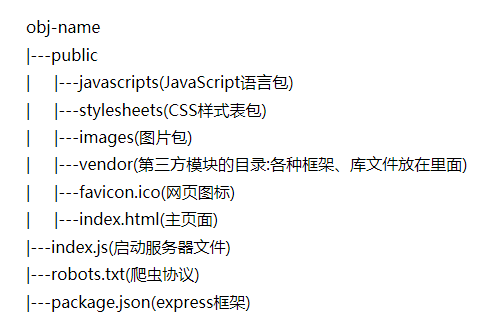
第一步的附件:用DOS命令建立Web项目(项目规范)
Win+R                             //打开运行  => cmd进入DOS终端
mkdir                             //创建目录
notepad  index.html               //创建文件    记事本notepad
cd \                              //回到根目录
cd..                              //返回上一级
cd 目录名称                        //切换到指定目录
dir                               //显示列表
tab                               //自动补全目录或文件名
↑                                 //查看运行过的历史命令
dl                                //删除文件
cd                                // w+tab键 当前目录下自动补全
二、部署node.js
三、写index.html文件
<!DOCTYPE html>
<!--[if lt IE 7]><html class="no-js lt-ie9 lt-ie8 lt-ie7"> <![endif]-->
<!--[if IE 7]><html class="no-js lt-ie9 lt-ie8"> <![endif]-->
<!--[if IE 8]><html class="no-js lt-ie9"> <![endif]-->
<!--[if gt IE 8]><!--> <html class="no-js" > <!--<![endif]-->
<head>
    <meta charset="utf-8">
    <!--[if IE]><meta http-equiv="X-UA-Compatible" content="IE=edge,chrome=1"><![endif]-->
    <meta name="description" content="">
    <meta name="keywords" content="">
    <meta name="viewport" content="width=device-width">
    <title>one:: ,</title>

    <!--以后创建站点会用-->
    <!--<base href="/" />-->
    <link rel="stylesheet" href="stylesheets/index.css">
    <script src="javascripts/ceshi.js"></script>
</head>
<body>   <!--基于H5特性的页面布局-->
    <header>
        <nav></nav>
    </header>

    <main>  <!-- 一个文档中只能有一个main标签 -->
        <article>
            <section>
                <figure></figure>
            </section>
        </article>
    </main>

    <footer></footer>
</body>
</html>
HTML框架规范后的好处:
- 提升可访问性
- 对SEO友好
- 结构清晰,利于维护
