####什么是form表单? form表单是用来收集用户输入信息的表单。一般形式为:
<form>
.
form elements
.
</form>
具体介绍可参考w3cform表单 接下来以一个常规用户登录页面作为示例介绍form表单的应用:
<form action="/test" method="post">
        <div class="username">
            <label for="username">姓名:</label>
            <input type="text" id="username" name="username" placeholder="用户名">
        </div>
        <div class="password">
            <label for="password">密码:</label>
            <input type="password" id="password" name="password" value="123456">
        </div>
        <div class="sex">
            <label>性别:</label>
            <input type="radio" name="sex" value="男" checked>男
            <input type="radio" name="sex" value="女">女
        </div>
        <div class="like">
            <label>取向:</label>
            <input type="radio" name="like" value="男">男
            <input type="radio" name="like" value="女" checked>女
        </div>
        <div class="hobby">
            <label>爱好:</label>
            <input type="checkbox" id="hobby1" name="like" value="dota">
            <label for="hobby1">男</label>
            <input type="checkbox" id="hobby2" name="like" value="旅游" checked>
            <label for="hobby2">旅游</label>
            <input type="checkbox" id="hobby3" name="like" value="宠物" checked>
            <label for="hobby3">宠物</label>
        </div>
        <div class="textarea">
            <label>评论:</label>
            <textarea cols="60" rows="20" name="article">ddd</textarea>
        </div>
        <div class="select">
        	<label for="car">我的car:</label>
            <select name="car">
                <option value="萨博" selected>萨博</option>
                <option value="奥迪">奥迪</option>
                <option value="奔驰">奔驰</option>
            </select>
        </div>
        <input type="submit" name="" value="提交">
    </form>
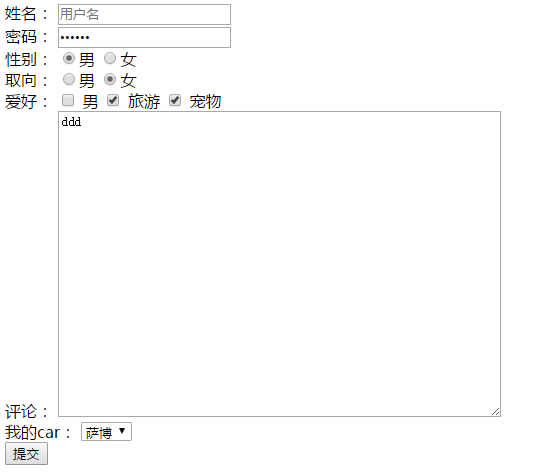
页面效果如下:
####从input标签开始介绍 对form表单来说,input标签是最重要也是最常用的form表单元素,该标签有多个type类型,每种类型又对应着不同的功能,首先来举几个例子。
- type = "text",文本类输入框,一般用于输入账号等明文信息
      <label for="username">姓名:</label> //输入框名称,for属性对应input的id,添加for属性后,当点击label标签时,相当点击了其for属性对应id的input
      <input type="text" id="username" name="username" placeholder="用户名">  //name属性指代该输入信息名称,表单提交时该信息对应的name值。placeholder为提示信息,不会影响表单提交数据

- type = "password",密码输入框,以暗文展示。
<label for="password">密码:</label>
<input type="password" id="password" name="password" value="123456">  //value值设置时,改输入框的默认输入值即value值

- type = "radio",单选框,一般用于选择性别等单选信息,name值相同的radio标签是一组,且只能单选,value值及该标签的值
<label>性别:</label>
<input type="radio" name="sex" value="男" checked>男 //设置checked属性,相当于设为默认选中状态
 <input type="radio" name="sex" value="女">女

- type = "checkbox",多选框,和单选框类似,唯一区别是可以多选。
            <label>爱好:</label>
            <input type="checkbox" id="hobby1" name="like" value="dota">
            <label for="hobby1">男</label>
            <input type="checkbox" id="hobby2" name="like" value="旅游" checked>
            <label for="hobby2">旅游</label>
            <input type="checkbox" id="hobby3" name="like" value="宠物" checked>
            <label for="hobby3">宠物</label>

- textarea标签,该标签为独立标签,为文本域,用来输入多行文本,此处要注意的是该标签不是自闭和标签。
<label>评论:</label>
<textarea cols="60" rows="20" name="article">ddd</textarea> //cols="60"指该文本域宽度为60列,rows="20"指该完本高度为20行,标签内的内容为初始值,不设则为空
- select标签,下拉选择框,其中每个option对呀下拉框的值
            <label for="car">我的car:</label>
            <select name="car">
                <option value="萨博" selected>萨博</option> //默认选项
                <option value="奥迪">奥迪</option>
                <option value="奔驰">奔驰</option>
            </select>
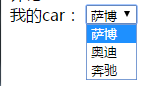
- 提交,当我们填写完表单信息后,需要将填写完成的表单内容提交到服务器,此时需要一个提交按钮
<input type="submit"> //input的type属性设为submit,这就是一个提交按钮,点击之后会把表单内容提交
<button>submit</button>  //另外,直接使用button标签也具备提交功能
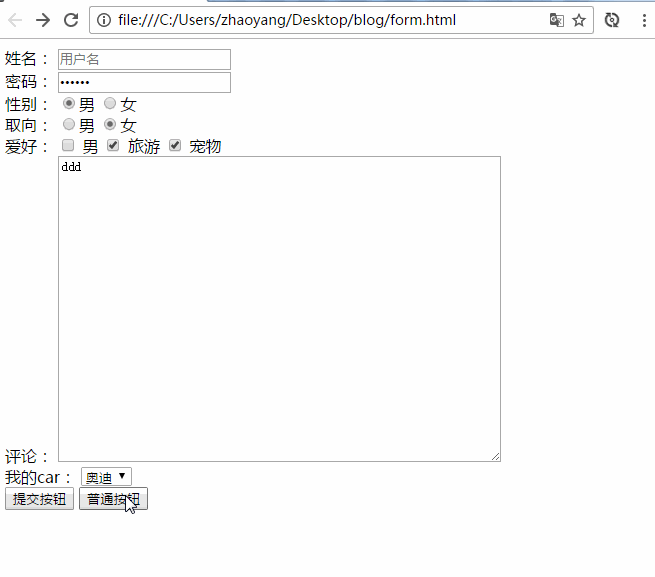
- 但是,当我们仅仅只是需要一个按钮而不需要表单进行提交操作时,该怎么办呢?小菜一碟!此时只需要把type值设为button即可,这样我们就得到一个不具备提交功能的按钮啦。
<input type="button">
####最后,再回到form 当我们点击提交按钮之后,表单内容会被浏览器通过我们设置的提交方式来提交给我们指定的地址,那么提交方式和地址从哪里来的呢?我们在回头看看示例的form标签。form标签的action属性指定我们的表单数据提交的地址,method指定提交方式。
<form action="/test" method="post"><form>
form表单的提交方式有两种,get和post。这两种方式有什么区别呢? 1.本质
Get是向服务器发索取数据的一种请求,而Post是向服务器提交数据的一种请求
2.服务器端获取值的方法
get方式提交的数据,服务器端使用request.QueryString获取变量的值
post方式提交的数据,服务器端使用request.Form获取数据
3.安全性
get方式安全性低,post方式较安全。但是post方式执行效率要比get方式差一些。
4.机制
get是把参数数据队列加到提交表单的action属性所指的URL中,如:http://www.xxx.com?sessonid=db23434&name=hongten&age=20。 在URl中,值和表单南日各个字段一一对应,并且这些在URl中对用户来说是可见的,即用户时可以看到的。如:name=hongten。
post是通过HTTP post机制,将表单内各个字段与其内容放置在HTML HEADER内一起传送到action属性所指的URL地址,对于用户来说,这是透明的。
5.大小
URL不存在参数上限的问题,HTTP协议规范没有对URL长度进行限制。这个限制是特定的浏览器及服务器对它的限制。IE对URL长度的限制是2083字节(2K+35)。对于其他浏览器,如Netscape、FireFox等,理论上没有长度限制,其限制取决于操作系统的支持。
get提交在浏览器中url的体现:

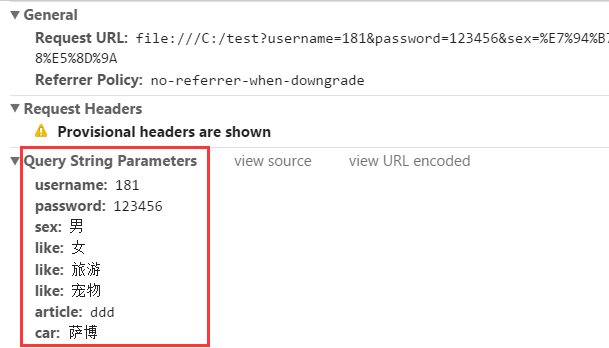
可以看到,使用get方式提交,我们输入的内容(包括隐私的密码),都体现在url中。
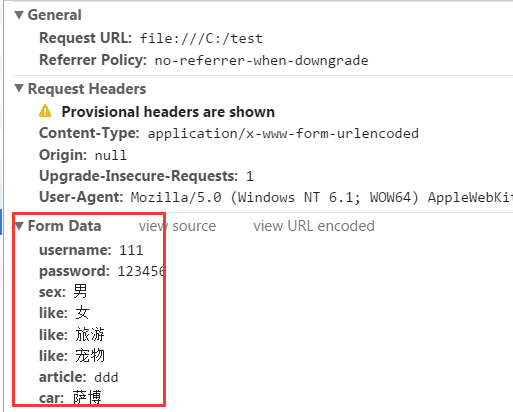
post提交在浏览器中url的体现:

今天就介绍到这里,如有错误,欢迎纠正。