

文档
private属性作用域扩大到 extension , 防止fileprivate的滥用- 可以把类型和协议用
&组合在一起作为一个类型使用,优化代码结构 Associated Type可以追加Where约束语句keyPath:Swift 3
let barKeyPath = #keyPath(Foo.bar)
var bar = foo.value(forKeyPath: barKeyPath)
foo.setValue("BAR", forKeyPath: barKeyPath)
Swift 4
let barKeyPath = \Foo.bar
 var bar = foo[keyPath: barKeyPath]
 foo[keyPath: barKeyPath] = "BAR"
swift 4: 更安全,控制 value 的 anyObject 类型,并且不需要类继承 NSObject
- 下标支持泛型
- 以及一些系统优化: unicode count 计算,字符串处理速度
- String.Charactor.startIndex -> String.startIndex 去掉 charactor 中间属性,直接取 string 的属性
- String 当做 Collection 来用(即 String 拥有 Collection 的属性) eg: string.reversed() string.filter string.map …
多行字符串字面量,省去繁琐换行操作
  let joke = """
     Q: Why does \(name) have \(n) \(character)'s in their name?
     A: I don't know, why does \(name) have \(n) \(character)'s in their name?
     Q: Because otherwise they'd be called \(punchline).
     """
Encoding and Decoding让归档更简单只能, 继承 Codeable 协议的对象都可 实现 let encoded = try? JSONEncoder().encode(swift) 将 对象归档为Data,相反解档
看完文档,正式开始
迁移顺序
第一步: 自动迁移。按照 Xcode 9 提示,选择
automatic mergation。
注意:
(1) 当一个 workSpace 中有多个 target , 优先迁移多个 target,。有错误先不要着急改,等自动迁移完成后再一步步改错,否则改动会导致迁移其他 target 出错。
(2) 如果用 cocoapods 管理的第三方库,自动迁移的时候会提示选择需要迁移的 framework, 因为 Swift 4.0 是兼容 Swift 3.2 的,考虑到有些第三方库没有及时迁移到 4.0 ,所以此时可以不勾选第三方库的迁移选项,仅迁移当前项目即可。第二步: 更新升级项目 config
第三步: 修改 error, 项目不会一次性显示所有 error ,每次改完编译会出新 error
第四步: 最后再修改 warning
Error
- 报错
Ambiguous reference to member '+'+号表达不明确,将表达式拆分 accesses to 0x7f887f904430, but modification requires exclusive access可能会有多个原因,如果是 KVO 报此错误,是因为 Swift 4 使用了新的 KVO 方法。 参照 Swift 新的 KVO 方法
或: github 实例// MARK: - Property fileprivate var _observation: NSKeyValueObservation? //MARK: - Lifecycle _observation = LCKXMPPActivity.sharedInstance.observe(\.status, options: [.initial, .old]) { (child, change) in // }status为LCKXMPPActivity中声明为@objc dynamic的属性@objc open dynamic var status: LCKXMPPStatus遇到一个很很很奇怪的问题,
_observation对象如果不声明为全局的话,observe方法并不会被status的的改变而触发
属性字符串
NSAttriburedStringSwift 3 let attributes = [NSStrikethroughStyleAttributeName : NSUnderlineStyle.styleSingle.rawValue, NSForegroundColorAttributeName: UIColor.kTitleColor4] as [String : Any] Swift 4 let attributes: [NSAttributedStringKey: Any] = [NSAttributedStringKey.strikethroughStyle: NSUnderlineStyle.styleSingle.rawValue, NSAttributedStringKey.foregroundColor: UIColor.kTitleColor4]attributedString的key统一通过NSAttributedStringKey调用,并且NSAttributedString(string: <#T##String#>, attributes: <#T##[NSAttributedStringKey : Any]?#>)接受的类型是[NSAttributedStringKey : Any]类型
warning
swap(&a, &b)-->swapAt(Index:Int, Index: Int)init(colorLiteralRed:green:blue:alpha:)-->init(red:green:blue:alpha:)redundant conformance of XXX to protocol YYY协议声明重复,查看当前所继承的协议是否有重复,或者查看子类是否又继承了一遍The use of Swift 3 @objc inference in Swift 4 mode is deprecated.
首先在设置里如图所示: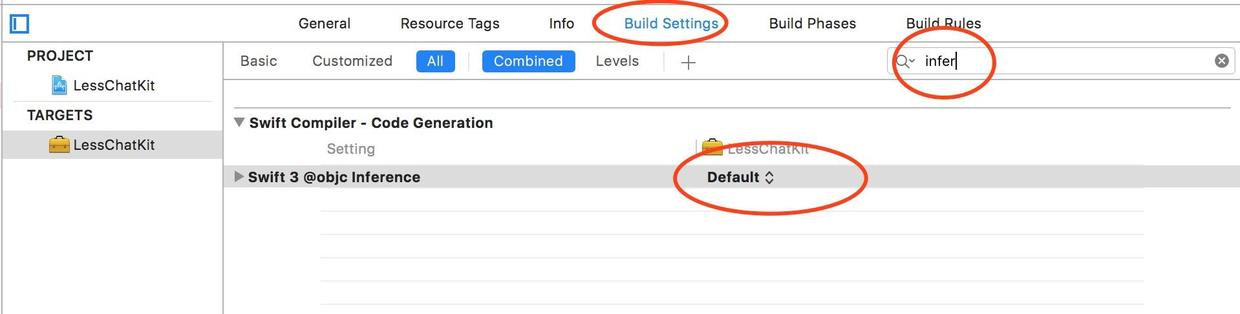
inference.png
Swift 4 中不再默认[推断]为 OC 的方法加上@objc属性,所以需要 swift 调用 OC 的地方手动加上objc.
参见资料: stackoverflow evgeniiMultiple Closures with Trailing Closure Violation: Trailing closure syntax should not be used when passing more than one closure argument. (multiple_closures_with_trailing_closure)warning: ObjectiveManager.shared.finishObjective(objectiveID: "2", keyResults: [], success: { // }) { _ in // } success: ObjectiveManager.shared.finishObjective(objectiveID: "2", keyResults: [], success: { // }, failure: { _ in // })尾随闭包的问题,参见资料: Apple
Declarations in extensions cannot override yet
override用户添加新方法,但不能修改原方法,所以讲override的方法不能放在extension中. 父方法前加 @objcThis block declaration is not a prototype
修改strict prototypessetno或者 OC 的block一个一个慢慢改吧,这里是混编 OC 的问题。
参照资料 stackoverflow- 当 OC 调用 swift 时报错
No known class method for selector所调用的方法前加@objc 'substring(from:)' is deprecated: Please use String slicing subscript with a 'partial range from' operator.String的substring属性在 Swift 4 新的实现let newStr = str.substring(to: index) --> let newStr = String(str[..<index])str[..<str.index(str.startIndex, offsetBy: 8)]
参照资料: stackoverflow- tableview height for header & footer 不调用, 因为
estimatedSectionHeaderHeight在 iOS 11 不再有默认值。解决方案: 设置tableview.estimatedSectionHeaderHeight = 0或者
实现viewForFooterInSection代理返回 nil, footer 同理
有些问题可能忘写了,以及不清楚的地方请留言讨论
持续更新,可以收藏关注先。。。
下一篇 iOS 11 以及 iPhone X 适配(11 已完成, X 还在挣扎中)
最后
写这篇博客的时候,并没有女朋友喂我水果吃 = =
