当我们没有服务器,又想要一个 Webhook 来触发我们一系列的操作的时候。我们就可以考虑使用 Serverless,我们不需要一直就这么支付一个服务器的费用。通过 Serverless,我们就可以轻松完成这样的工作,并且节省大量的费用。
> GitHub 上的 Webhook 允许我们构建或设置在 GitHub.com 上订阅某些事件的 GitHub 应用程序。当触发这些事件之一时,我们将向 webhook 配置的 URL 发送 HTTP POST 有效内容。
比如说,当我们 PUSH 了代码,我们想触发我们的持续集成。这个时候,就可以通过一个 Webhook 来做这样的事情。
Serverless GitHub Webhook
同样的,对于这个示例来说,我们还将采用官方的示例——毕竟自己从头写要花费大量的时间。
首先,安装服务到本地:
serverless install -u https://github.com/serverless/examples/tree/master/aws-node-github-webhook-listener -n github-webhook
然后,替换 serverless.yml 文件中的REPLACE-WITH-YOUR-SECRET-HERE:
provider:
  name: aws
  runtime: nodejs4.3
  environment:
    GITHUB_WEBHOOK_SECRET: REPLACE-WITH-YOUR-SECRET-HERE
你可以先随便填写一个值,或者采用什么任意的加密算法,来生成相关的密钥。
注意:请保存好这个密钥。
然后执行部署:
serverless deploy
.................................
Serverless: Stack update finished...
Serverless: Invoke aws:info
Service Information
service: github-webhook
stage: dev
region: us-east-1
stack: github-webhook-dev
api keys:
  None
endpoints:
  POST - https://kx2zlcnt51.execute-api.us-east-1.amazonaws.com/dev/webhook
functions:
  githubWebhookListener: github-webhook-dev-githubWebhookListener
Serverless: Invoke aws:deploy:finalize
这个时候,就会生成相应的 Lambda 函数的地址,将地址填入到 GitHub 相关项目的配置中。
如,我想为我的 Serverless 项目:https://github.com/phodal/serverless-guide,设置一个 Hook 监控。
只需要再将密钥和 API 地址填入 GitHub 后台里。在这里,就是:https://github.com/phodal/serverless-guide/settings/hooks
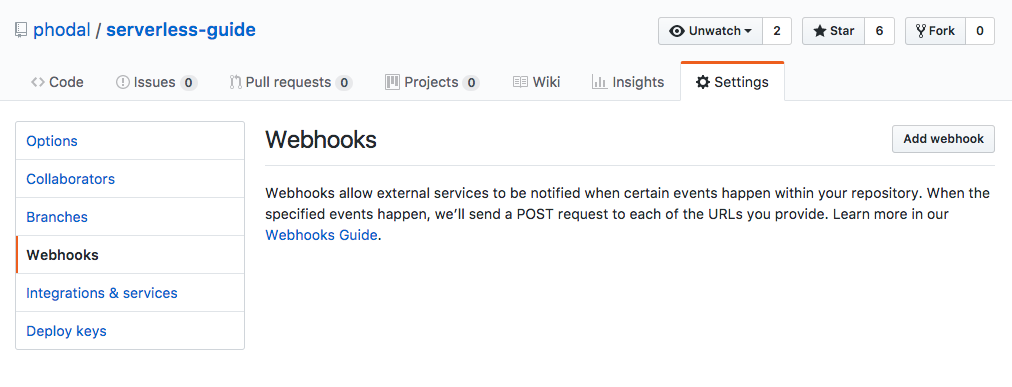
可以勾上 push 等事件用来测试。
然后,可以 push 代码,并观查日志。
serverless logs -f githubWebhookListener -t
代码
这里的配置代码 serverless.yml,也相对比较简单:
配置:
service: github-webhook

provider:
  name: aws
  runtime: nodejs4.3
  environment:
    GITHUB_WEBHOOK_SECRET: blablabla

functions:
  githubWebhookListener:
    handler: handler.githubWebhookListener
    events:
      - http:
          path: webhook
          method: post
          cors: true
主要逻辑都是在 handler.js 文件中:
const crypto = require('crypto');

function signRequestBody(key, body) {
  return `sha1=${crypto.createHmac('sha1', key).update(body, 'utf-8').digest('hex')}`;
}

module.exports.githubWebhookListener = (event, context, callback) => {
  var errMsg; // eslint-disable-line
  const token = process.env.GITHUB_WEBHOOK_SECRET;
  const headers = event.headers;
  const sig = headers['X-Hub-Signature'];
  const githubEvent = headers['X-GitHub-Event'];
  const id = headers['X-GitHub-Delivery'];
  const calculatedSig = signRequestBody(token, event.body);

  if (typeof token !== 'string') {
    errMsg = 'Must provide a \'GITHUB_WEBHOOK_SECRET\' env variable';
    return callback(null, {
      statusCode: 401,
      headers: { 'Content-Type': 'text/plain' },
      body: errMsg,
    });
  }

  if (!sig) {
    errMsg = 'No X-Hub-Signature found on request';
    return callback(null, {
      statusCode: 401,
      headers: { 'Content-Type': 'text/plain' },
      body: errMsg,
    });
  }

  if (!githubEvent) {
    errMsg = 'No X-Github-Event found on request';
    return callback(null, {
      statusCode: 422,
      headers: { 'Content-Type': 'text/plain' },
      body: errMsg,
    });
  }

  if (!id) {
    errMsg = 'No X-Github-Delivery found on request';
    return callback(null, {
      statusCode: 401,
      headers: { 'Content-Type': 'text/plain' },
      body: errMsg,
    });
  }

  if (sig !== calculatedSig) {
    errMsg = 'X-Hub-Signature incorrect. Github webhook token doesn\'t match';
    return callback(null, {
      statusCode: 401,
      headers: { 'Content-Type': 'text/plain' },
      body: errMsg,
    });
  }

  /* eslint-disable */
  console.log('---------------------------------');
  console.log(`Github-Event: "${githubEvent}" with action: "${event.body.action}"`);
  console.log('---------------------------------');
  console.log('Payload', event.body);
  /* eslint-enable */

  // Do custom stuff here with github event data
  // For more on events see https://developer.github.com/v3/activity/events/types/

  const response = {
    statusCode: 200,
    body: JSON.stringify({
      input: event,
    }),
  };

  return callback(null, response);
};
简单地来说,都是一堆异常处理,然后才是我们的功能函数。
测试
起先我刚测试的时候,没有配置好密钥,出现了一个 401 错误:
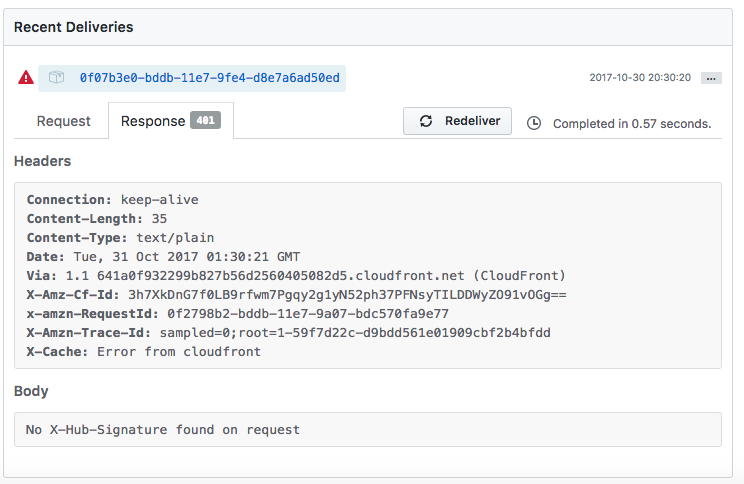
重新发了请求之后:
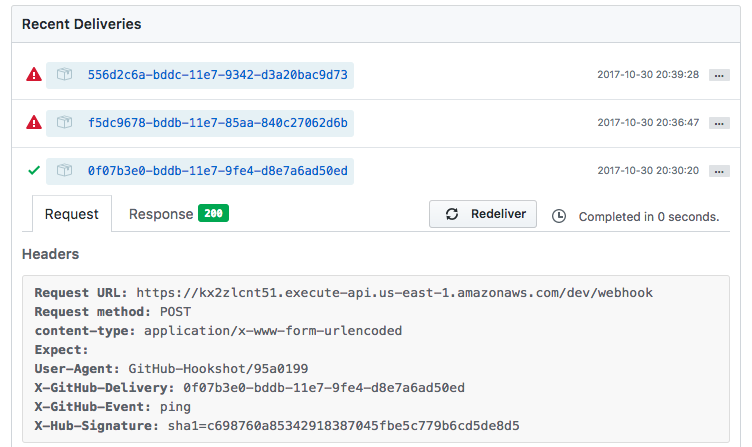
完了记得执行:
serverless remove
下一步
当完成了这一步,我就可以准备制作一个 Serverless 到 S3 的博客系统,只要一 PUSH 代码,就自动构建。