nginx模块依赖:nginx的一些模块需要第三方支持,例如gzip模块需要zlib库,rewrite模块需要pcre库,ssl功能需要openssl库。
根据需求添加不同模块
例添加echo模块:
1.下载并安装nginx
详情请看:blog.csdn.net/dushiwodecu…
2.查看nginx已安装的模块
/usr/local/nginx/sbin/nginx -V- 旧版本模块
./configure --prefix=/usr/local/nginx --with-http_ssl_module --with-http_v2_module --with-http_stub_status_module --with-pcre3.选择与nginx版本所符合的模块版本
echo:github.com/openresty/e…
当前nginx版本为:1.12.2,选择echo版本为0.614.下载模块
wget https://github.com/openresty/echo-nginx-module/archive/v0.61.tar.gz5.解压模块
tar -zxvf v0.61.tar.gz -C /usr/local/nginxgz6.为nginx添加模块
6.1.切换到nginx的源码目录(即解压后的目录)
cd /usr/local/nginxgz/nginx-1.12.26.2.添加新模块
./configure --prefix=/usr/local/nginx --add-module=/usr/local/nginxgz/echo-nginx-module-0.61 --with-http_ssl_module --with-http_v2_module --with-http_stub_status_module --with-pcre7.重新编译
make
make install
8.测试
- Linux上的测试
8.1.修改配置文件
8.1.1.修改nginx.conf,添加测试域名模块
server{
      server_name echo.chen.com;
      listen 80;
      location /{
              echo "it is echo module...";
      }
 }
8.1.2.修改Linux host文件
echo '192.168.1.111 echo.chen.com' >> /etc/hosts8.2.重启nginx
/usr/local/nginx/sbin/nginx -s reload - 注:若是重启nginx之后还没能访问到,直接reboot,重启虚拟机等即可
8.3.访问测试

- Windows上浏览器测试
8.1.修改配置文件
8.1.1.修改nginx.conf,添加测试域名模块
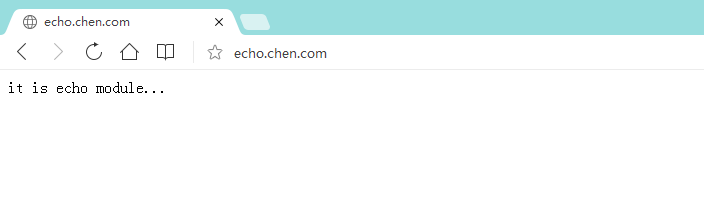
server{ server_name echo.chen.com; listen 80; location /{ default_type 'text/html'; echo "it is echo module..."; } } - 注: 如果没有这个default_type,浏览器访问则会一直下载文件而不是输出在浏览器上
8.1.2.修改Windows host文件
192.168.1.111 echo.chen.com8.2.重启nginx
/usr/local/nginx/sbin/nginx -s reload - 注:若是重启nginx之后还没能访问到,直接reboot,重启虚拟机等即可
8.3.测试访问浏览器