一. 常用消息队列工具
目前常用的消息队列大概有三种类型,RabbitMQ等AMQP系列, Kafka, Redis等kev value系列,它们的使用场景分别是:
1.RabbitMQ: 相对重量级高并发的情况,比如数据的异步处理 任务的串行执行等.
2.Kafka: 基于Pull的模式来处理,具体很高的吞吐量,一般用来进行 日志的存储和收集.
3.Redis: 轻量级高并发,实时性要求高的情况,比如缓存,秒杀,及时的数据分析(ELK日志分析框架,使用的就是Redis).
二. SpringBoot基于Redis集成消息队列
2.1. 发布者(Publisher)
- 2.1.1.maven依赖
<dependency> <groupId>org.springframework.boot</groupId> <artifactId>spring-boot-starter-data-redis</artifactId> </dependency> <dependency> <groupId>org.springframework.boot</groupId> <artifactId>spring-boot-starter-web</artifactId> </dependency> <dependency> <groupId>org.springframework.boot</groupId> <artifactId>spring-boot-starter-test</artifactId> <scope>test</scope> </dependency> - 2.1.2.配置-application.yml
spring: redis: database: 1 #索引(默认为0) host: localhost #地址 port: 6379 #端口号 #password: #连接密码(默认空) pool: max-idle: 8 #连接池中的最大空闲连接 min-idle: 0 #连接池中的最小空闲连接 max-active: 8 #连接池最大连接数(使用负值表示没有限制) max-wait: -1 #连接池最大阻塞等待时间(使用负值表示没有限制) #sentinel: #master: mymaster # 哨兵监听的Redis server的名称 #nodes: 127.0.0.1:26379,127.0.0.1:26479,127.0.0.1:26579 #哨兵的配置列表 timeout: 0 #连接超时时间(毫秒) server: port: 1001 - 2.1.3.配置-PublisherConfig
/**
* redis消息队列配置-Publisher
* @author 陈梓平
* @date 2017/10/24.
*/
@Configuration
public class PublisherConfig {
  /**
   * Redis的模板 作为发布者
   * @param connectionFactory
   * @return
   */
  @Bean
  public StringRedisTemplate template(RedisConnectionFactory connectionFactory){
      return new StringRedisTemplate(connectionFactory);
  }
}
2.1.4.测试
2.1.4.1 配置Controller
/**- Controller
- @author 陈梓平
@date 2017/10/24.
*/
@RestController
@RequestMapping
public class PublisherController {@Autowired
private PublisherService publisherService;@GetMapping(value = "pub/{id}")
public String pubMsg(@PathVariable String id){return publisherService.pubMsg(id);}
}
2.1.4.2 配置业务层
/**- 业务发布层
- @author 陈梓平
@date 2017/10/24.
*/
@Service
public class PublisherServiceImpl implements PublisherService {
private static final Logger log = LoggerFactory.getLogger(PublisherServiceImpl.class);
@Autowired
private StringRedisTemplate stringRedisTemplate;@Override
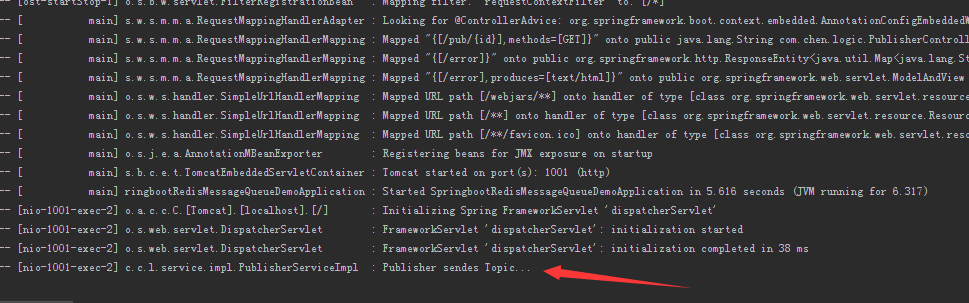
public String pubMsg(String id) {if ("1".equals(id)){ stringRedisTemplate.convertAndSend("phone","18888888888"); log.info("Publisher sendes Topic... "); return "success"; }else { return "no my phone"; }}
}2.2. 订阅者(Subscriber)
<dependency>
<groupId>org.springframework.boot</groupId>
<artifactId>spring-boot-starter-data-redis</artifactId>
</dependency>
<dependency>
<groupId>org.springframework.boot</groupId>
<artifactId>spring-boot-starter-web</artifactId>
</dependency>
<dependency>
<groupId>org.springframework.boot</groupId>
<artifactId>spring-boot-starter-test</artifactId>
<scope>test</scope>
</dependency>
spring:
redis:
database: 1 #索引(默认为0)
host: localhost #地址
port: 6379 #端口号
#password: #连接密码(默认空)
pool:
max-idle: 8 #连接池中的最大空闲连接
min-idle: 0 #连接池中的最小空闲连接
max-active: 8 #连接池最大连接数(使用负值表示没有限制)
max-wait: -1 #连接池最大阻塞等待时间(使用负值表示没有限制)
#sentinel:
#master: mymaster # 哨兵监听的Redis server的名称
#nodes:
127.0.0.1:26379,127.0.0.1:26479,127.0.0.1:26579 #哨兵的配置列表
timeout: 0 #连接超时时间(毫秒)
server:
port: 1002
2.2.3.配置-SubscriberConfig
/**
* redis消息队列配置-订阅者
* @author 陈梓平
* @date 2017/10/24.
*/
@Configuration
public class SubscriberConfig {
/**
* 创建连接工厂
* @param connectionFactory
* @param listenerAdapter
* @return
*/
@Bean
public RedisMessageListenerContainer container(RedisConnectionFactory connectionFactory,
MessageListenerAdapter listenerAdapter){
RedisMessageListenerContainer container = new RedisMessageListenerContainer();
container.setConnectionFactory(connectionFactory);
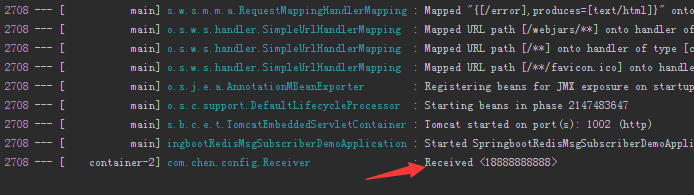
container.addMessageListener(listenerAdapter,new PatternTopic("phone"));
return container;
}
/**
* 绑定消息监听者和接收监听的方法
* @param receiver
* @return
*/
@Bean
public MessageListenerAdapter listenerAdapter(Receiver receiver){
return new MessageListenerAdapter(receiver,"receiveMessage");
}
/**
* 注册订阅者
* @param latch
* @return
*/
@Bean
public Receiver receiver(CountDownLatch latch){
return new Receiver(latch);
}
/**
* 计数器,用来控制线程
* @return
*/
@Bean
public CountDownLatch latch(){
return new CountDownLatch(1);//指定了计数的次数 1
}
}
测试
地址栏输入:http://localhost:1001/pub/1
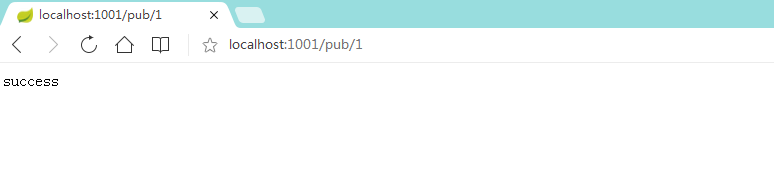
控制台输出: