设计理念
Android3.0(API11)开始引入Fragment,主要是为了在大屏幕上更好的支持动态和灵活的UI设计。以平板为例,有足够大的空间容纳更多的组件,管理起来无疑过于麻烦。Fragment可以分割Activity的layout,并且具有自己的生命周期,从而使得组件独立管理成为可能。正因为fragment具有独立的生命周期,所以可以定义自己的layout和行为,从而一个fragment可以在多个activity中重复调用。所以我们在设计fragment的时候,要尽量追求模块化和可重用性。一般在平板和TV上普遍使用。
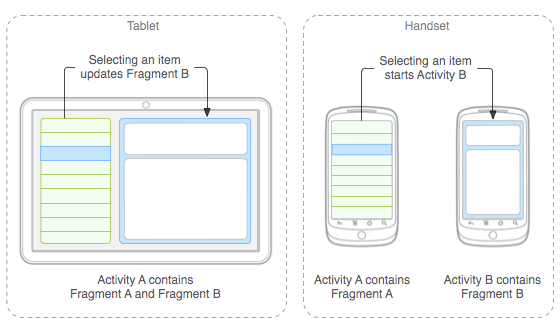
举例如下:在平板上,activity使用一个fragment展示文章列表,使用另一个fragment展示文章内容;在手机上,activity使用一个fragment展示文章列表,点击跳转到另一个activity展示。
Fragment创建
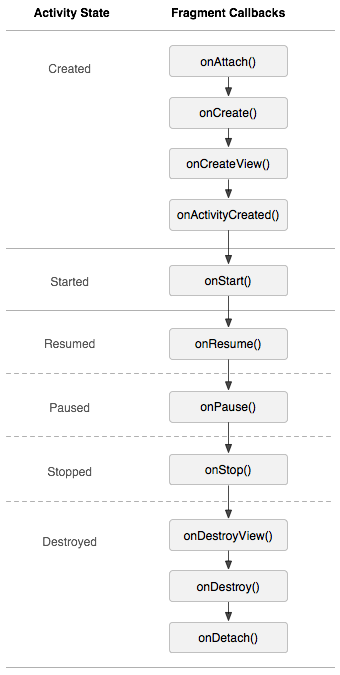
fragment的生命周期和activity非常类似,都有onCreate()、onStart()、onStop()、onPause()回调方法。fragment一般至少要实现三个回调方法:
- onCreate():fragment创建时调用,主要初始化一些重要的组件
- onCreateView():fragment绘制界面时调用(setContentView(id)),如果fragment有界面的话需要返回一个view;如果fragment没有UI,直接返回空即可
- onPause():用户离开fragment,一般要保存数据(用户可能不会再回来)
fragment类型
常见的有三种fragment,分别是DialogFragment、ListFragment、PreferenceFragment
- DialogFragment:展示浮动对话框
- ListFragment:展示一列数据
- PreferenceFragment:以列表形式展示首选项对象的层级关系
创建fragment
fragment一般具有自己的UI,并成为activity UI的一部分。为了给fragment创建UI,必须实现onCreateView()回调方法,并返回一个view(fragment的根layout)。
如果fragment是ListFragment的子类,onCreateView()默认返回ListView,不需要重写。
public static class ExampleFragment extends Fragment {
    @Override
    public View onCreateView(LayoutInflater inflater, ViewGroup container,
                             Bundle savedInstanceState) {
        // Inflate the layout for this fragment
        return inflater.inflate(R.layout.example_fragment, container, false);
    }
}
container是activity的layout,fragment的layout将会被插入其中;savedInstanceState即保存的fragment被异常销毁前的状态;inflate()有三个参数:
- id:flagment的view的资源id
- container:activity的layout,fragment的layout将插入其中
- false:false表示fragment仅为container提供layout 参数(动态添加、删除、替代fragment时使用);true表示container成为fragment layout的父view(在activity布局文件中定义fragment使用)
把fragment添加到activity中
一般来说,fragment的layout会被嵌入成为activity view层级的一部分。有两种方式可以把fragment添加到activity的layout中:1.静态加载;2.动态加载。
静态加载:在activity layout中声明fragment,代码如下:
<?xml version="1.0" encoding="utf-8"?>
<LinearLayout xmlns:android="http://schemas.android.com/apk/res/android"
 xmlns:app="http://schemas.android.com/apk/res-auto"
 xmlns:tools="http://schemas.android.com/tools"
 android:layout_width="match_parent"
 android:layout_height="match_parent"
 app:layout_behavior="@string/appbar_scrolling_view_behavior"
 tools:context="com.example.chaos.myapplication.MainActivity"
 tools:showIn="@layout/activity_main">

 <fragment
     android:id="@+id/fragment_person_list"
     android:name="com.example.chaos.myapplication.PersonListFragment"
     android:layout_width="0dp"
     android:layout_height="match_parent"
     android:layout_weight="1" />

 <fragment
     android:id="@+id/fragment_person_detail"
     android:name="com.example.chaos.myapplication.DetailFragment"
     android:layout_width="0dp"
     android:layout_height="match_parent"
     android:layout_weight="1" />
</LinearLayout>
系统创建该activity的layout时,会将指定的fragment全部实例化并分别调用他们的onCreateView()回调。然后检索fragment的layout,并将onCreateView()返回的view取代
<fragment>元素直接插入activity的layout中。
activity重启时,需要恢复fragment的数据,这就要求fragment要有个唯一的标识符(否则无法管理fragment)。有三种方式可以为fragment赋予唯一的id
- 使用android:id属性赋予id
- 使用android:tag属性赋予唯一标签
- 如果id和tag都没提供的话,系统模式使用container view的id
2.. 动态加载:动态添加fragment到ViewGroup中
只要在activity在运行,都可以添加fragment到activity的layout中,只需要指定ViewGroup存放fragment就行。
为了在activity中操作fragment的事务(add、remove、replace),必须使用FragmentTransaction()。代码如下:
FragmentManager fragmentManager = getFragmentManager();
FragmentTransaction fragmentTransaction = fragmentManager.beginTransaction();
添加fragment使用add()方法,指定ViewGroup和要添加的fragment,对fragmentTransaction做的任何改动都要执行commit()方法才能生效。
ExampleFragment fragment = new ExampleFragment();
fragmentTransaction.add(R.id.fragment_container, fragment);
fragmentTransaction.commit();
添加一个没有UI的fragment
并非所有fragment都必须有UI,fragment也可以用来执行后台操作,此时,无需UI也可以。该如何添加一个没有UI的fragment呢?
首先,需要先通过findFragmentByTag()找到,因为tag是唯一能标识它的(只能通过add(fragment,string)主动设置tag)。
如果findFragmentByTag()返回null的话,需要通过add(fragment,string)为fragment主动设置tag并添加。
Fragment管理
fragment的管理是由FragmentManager实现的,可以在activity中通过getFragmentManager()获取FragmentManager。FragmentManager的功能如下:
- 使用findFragmentById()(针对在activity layout提供一个UI的fragment)和findFragmentByTag()(针对没有UI的fragment)获取activity中已存在的fragment
- 调用popBackStack()将fragment从返回栈弹出(类似于用户点击back)
- 调用addOnBackStackChangedListener()注册监听器监听返回栈的变化
静态加载的fragment一定具有id或tag;动态加载的id一定具有container view的id或tag(fragment如果没有唯一标识符,则无法进行有效管理),动态加载一共有三个方法:
add(Fragment fragment, String tag):适用于有UI和无UI的fragmentadd(@IdRes int containerViewId, Fragment fragment):适用于有UI的fragmentadd(@IdRes int containerViewId, Fragment fragment,String tag);:适用于有UI的fragment所以没有UI的fragment,只能通过findFragmentByTag()获取;有UI的fragment可以通过id或tag获取。
也可以使用FragmentManager打开FragmentTransaction,从而操作fragment的事务,如添加或移除。
Fragment事务处理
一个事务就是一系列变化,事务具有原子性、一致性、隔离性、持久性。可以使用FragmentTransaction实现事务,也可以把事务放到由activity管理的返回栈中,便于用户返回之前的fragment的状态.
可以从FragmentManager获取FragmentTransaction实例
FragmentManager fragmentManager = getFragmentManager();
FragmentTransaction fragmentTransaction = fragmentManager.beginTransaction();
FragmentTransactioni可以借由add()、remove()、replace()实现对事务的操作,而且每次操作必须实现commit()才能生效。
如果想把fragment加入到返回栈,以便用户退回到fragment原先的状态的话,需要在commit()之前调用addBackStack()方法:
 DetailFragment detailFragment = new DetailFragment();
 fragmentTransaction.add(detailFragment,"");
 fragmentTransaction.addToBackStack(null);
 fragmentTransaction.commit();
为了检索返回栈中的fragment,必须监听onBackPressed()事件,否则的话如果栈中存在其他activity的话,就会直接返回到其他activity中;如果没有activity的话,就会直接退出应用。
@Override
    public void onBackPressed() {
        if (getFragmentManager().getBackStackEntryCount() > 0){
            getFragmentManager().popBackStack();
        }else {
            super.onBackPressed();
        }
    }
添加改变到Transaction中的顺序无关紧要,除非:
- 最后调用了commit()方法
- 添加了多个改变到同一个container中,添加的顺序决定了container中view层级的顺序
如果没有调用addBackStack(),当remove一个fragment时,commit之后会立刻销毁,用户无法返回;如果添加到返回栈中,remove一个fragment时,commit之后会处于stop状态,用户可以返回到之前的状态(resume)
commit()这个操作运行在主线程中,也就意味着调用commit()之后要排序执行,并不会立刻执行事务。如果想立刻执行的话,可以在commit()之前调用excutePendingTransactions(),不过一般并无此必要。
commit()必须在onSaveInstanceState()之前调用,因为在此之后,activity不会保存数据,导致commit()调用会抛出异常;如果允许状态数据丢失的话,可以调用 commitAllowingStateLoss()。
与Activity的通信
虽然fragment作为对象的实现和activity存在很大不同,但是作为activity的一部分,fragment又和activity紧密联系。
- 从fragment中调用activity
View listView = getActivity().findViewById(R.id.list); - 从activity中调用fragment
DetailFragment detailFragment1 = (DetailFragment) getSupportFragmentManager().findFragmentById(R.id.fragment_person_detail);为activity创建接口
常见的模型:activity包含两个fragment,左边fragment显示标题列表,右边fragment显示内容。点击左侧的fragment的标题,更新右侧的fragment内容。实现方式就是在左边fragment创建接口,并在接口中实现传值方法,activity实现该接口,监听方法,然后将接受到的值传给右边的fragment。
fragment创建接口和方法:
public static class FragmentA extends ListFragment {
    ...
    // Container Activity must implement this interface
    public interface OnArticleSelectedListener {
        public void onArticleSelected(Uri articleUri);
    }
    ...
}
把activity转换成接口,从而实现activity监听
public static class FragmentA extends ListFragment {
    OnArticleSelectedListener mListener;
    ...
    @Override
    public void onAttach(Activity activity) {
        super.onAttach(activity);
        try {
            mListener = (OnArticleSelectedListener) activity;
        } catch (ClassCastException e) {
            throw new ClassCastException(activity.toString() + " must implement OnArticleSelectedListener");
        }
    }
    ...
}
在fragment的onListItemClick事件中调用传值方法给activity
public static class FragmentA extends ListFragment {
    OnArticleSelectedListener mListener;
    ...
    @Override
    public void onListItemClick(ListView l, View v, int position, long id) {
        // Append the clicked item's row ID with the content provider Uri
        Uri noteUri = ContentUris.withAppendedId(ArticleColumns.CONTENT_URI, id);
        // Send the event and Uri to the host activity
        mListener.onArticleSelected(noteUri);
    }
    ...
}
Fragment生命周期
和activity一样,fragment也有三种基本状态:
- 运行态:fragment在正在运行的activity中处于可见状态
- 暂停态:另一个activity位于前台并获取焦点,fragment所在的activity仍然可见(前台activity半透明或没有全部覆盖fragment所在activity)
- 停止态:fragment所在activity处于stop状态,或者fragment被remove掉,但是添加到返回栈中了。处于暂停态的fragment仍然存活(系统仍然保留状态信息和成员变量),但是已不再可见,且activity被销毁时,fragment也会被销毁。
fragment和activity生命周期的一个最大差别在于二者在返回栈中的存储。activity的返回栈是由系统管理的;fragment的返回栈是由activity管理的(当fragment被remove时,调用addBackStack())。
fragment如果需要context对象的话,可以调用getActivity(),但是这个方法要在onAttach()之后、onDetach()之前调用才有效,否则将会返回null。