

SCPromptView
SCPromptView : 显示在顶部的提示控件
Swift版
你的star是我最大的动力
已适配iPhoneX
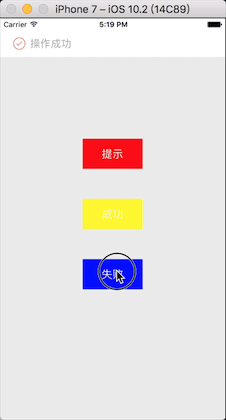
##安装
###手动安装
下载源码,将SCPromptView文件夹拖进项目
###CocoaPod
pod 'SCPromptView'##使用
SCPromptView 的用法,与tableView相似
####创建view
#import "SCPromptView.h"

@interface TestPromptView : SCPromptView

@end
#import "TestPromptView.h"

@interface TestPromptView()
/**
 *   label
 */
@property (nonatomic,strong)UILabel *textLabel;
@end

@implementation TestPromptView
//初始化子控件
-(void)sc_setUpCustomSubViews{
    self.backgroundColor=  [UIColor colorWithRed:(arc4random()%255)/255.f green:(arc4random()%255)/255.f blue:(arc4random()%255)/255.f alpha:1];
    UILabel *textLabel = [[UILabel alloc]initWithFrame:self.contentView.bounds];
    textLabel.textColor = [UIColor whiteColor];
    textLabel.textAlignment = NSTextAlignmentCenter;
    [self.contentView addSubview:textLabel];
    self.textLabel = textLabel;
}
//读取参数
-(void)sc_loadParam:(id)param{
    NSString *text = param;
    self.textLabel.text = text;
}
@end
重写两个基础方法
####注册
SCPROMPT_REGISTER([TestPromptView class],@"test")
SCPROMPT_REGISTER([ResultPromptView class], @"result")
####发送显示命令
///随机颜色显示
-(void)clickBtn:(id)sender{
    NSString * text =[NSString stringWithFormat:@"%d",_num];
    SCPROMPT_SHOW(@"test",text)
    _num++;
}
##其他Api
@protocol SCPromptViewDelegate <NSObject>
@required
/**
 *  @brief 添加自定义的子控件
 */
-(void)sc_setUpCustomSubViews;
/**
 *  @brief 子控件读取数据
 */
-(void)sc_loadParam:(id)param;

@optional
/**
 *  @brief 显示时间
 */
-(NSTimeInterval)sc_showTime;
/**
 *  @brief 出现动画时间
 */
-(NSTimeInterval)sc_showAnimationDuration;
/**
 *  @brief 隐藏动画时间
 */
-(NSTimeInterval)sc_hideAnimationDuration;
/**
 *  @brief 即将执行由手势触发的隐藏
 *  @return yes 隐藏 / no 不隐藏
 */
-(BOOL)sc_willHideByTap;

@end
SCPromptView
SCPromptView : A prompt view which show in the top of the screen .
your star is my biggest motivation
##Install
###Manually
Download the source code , copy folder SCPromptView into your project.
###CocoaPod
pod 'SCPromptView'##Usage
The usage of SCPromptView is similar to the usage of UITableView.
####Create Custom View
#import "SCPromptView.h"

@interface TestPromptView : SCPromptView

@end
#import "TestPromptView.h"

@interface TestPromptView()
/**
 *   label
 */
@property (nonatomic,strong)UILabel *textLabel;
@end

@implementation TestPromptView
//setUp subviews
-(void)sc_setUpCustomSubViews{
    self.backgroundColor=  [UIColor colorWithRed:(arc4random()%255)/255.f green:(arc4random()%255)/255.f blue:(arc4random()%255)/255.f alpha:1];
    UILabel *textLabel = [[UILabel alloc]initWithFrame:self.contentView.bounds];
    textLabel.textColor = [UIColor whiteColor];
    textLabel.textAlignment = NSTextAlignmentCenter;
    [self.contentView addSubview:textLabel];
    self.textLabel = textLabel;
}
//loadParam which you deliver via command
-(void)sc_loadParam:(id)param{
    NSString *text = param;
    self.textLabel.text = text;
}
@end
Override two basic function.
####Register
SCPROMPT_REGISTER([TestPromptView class],@"test")
SCPROMPT_REGISTER([ResultPromptView class], @"result")
####发送显示命令
///show random color
-(void)clickBtn:(id)sender{
    NSString * text =[NSString stringWithFormat:@"%d",_num];
    SCPROMPT_SHOW(@"test",text)
    _num++;
}
##Other Api
@protocol SCPromptViewDelegate <NSObject>
@required
/**
 *  @brief 添加自定义的子控件
 */
-(void)sc_setUpCustomSubViews;
/**
 *  @brief 子控件读取数据
 */
-(void)sc_loadParam:(id)param;

@optional
/**
 *  @brief 显示时间
 */
-(NSTimeInterval)sc_showTime;
/**
 *  @brief 出现动画时间
 */
-(NSTimeInterval)sc_showAnimationDuration;
/**
 *  @brief 隐藏动画时间
 */
-(NSTimeInterval)sc_hideAnimationDuration;
/**
 *  @brief 即将执行由手势触发的隐藏
 *  @return yes 隐藏 / no 不隐藏
 */
-(BOOL)sc_willHideByTap;

@end