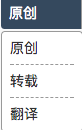
一款可配置风格简单的下拉列表
开发目标:
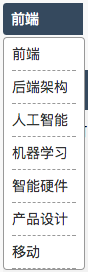 开发一款如图所示的下拉列表,可以发布成vue组件
知识准备:
- [x] vue2.0
- [x] css
- [x] vscode or whatever you like
- [x] ajax or axios 这里我用的是jquery.ajax 习惯了,大家用的顺手就用哪个
开发步骤:
- 设计样式
此处忽略,大家可自行设计,贴上我的css样式
.cus-blogtype {
    position: relative;
    width: 80px;
}

.cus-blogtype .pd-selected{
    background: rgb(53,73,94);
    width: 64px;
    border-top-left-radius: 4px;
    border-bottom-left-radius: 4px;
    padding: 0 8px;
    color: white;
    line-height: 32px;
    height: 32px;
    font-size: 14px;
}

.cus-blogtype .pd-select-options {
    z-index: 1000;
    position: absolute;
    top: 34px;
    left: 0;
    width: 64px;
    padding: 0 8px;
    background: white;
    border: solid 1px #999;
    border-radius: 4px;
    color: #333;
    height: auto;
}

.cus-blogtype .pd-select-option {
    width: 100%;
    height: 32px;
    line-height: 32px;
    font-size: 14px;
    border-bottom: dashed 1px #999;
}

.cus-blogtype .pd-select-option:hover {
    background: #f8f8f8;
}
2.明确需求
标题中的可配置,指的是什么呢?
本文中的可配置,指的是
- [] 可动态获取列表的值
- [] 可动态指定列表展示的文字
- [] 可动态指定列表选中后的值
- [] 可指定列表初始选中的值
3.根据上一节的需求,我们可以大概写下如下代码
Vue.component('selector', {
    template: '',
    options:['selecton', 'url', 'akey', 'avalue'],
    data: function() {
        return {

        }
    },
    methods: {

    }
})
4.搞定第1条需求:可动态获取列表的值
Vue.component('selector', {
    template: '',
    options:['selecton', 'url', 'akey', 'avalue'],
    created: function() {
        var self = this
        console.log('component selector has been created')
        $.ajax({
            url: self.url,
            method: 'get',
            success: function(e) {
                if (e.code == 0) {
                    self.options = e.data
                }
            },
            error: function(e) {
                console.log(e)
            }
        })
    },
    data: function() {
        return {
            options: []
        }
    },
    methods: {

    }
})
5.搞定第2、3条需求:可动态指定列表展示的文字以及动态指定列表选中后的值
废话不多说,直接上代码
Vue.component('selector', {
    template: '',
    options:['selecton', 'url', 'akey', 'avalue'],
    created: function() {
        var self = this
        console.log('component selector has been created')
        $.ajax({
            url: self.url,
            method: 'get',
            success: function(e) {
                if (e.code == 0) {
                    self.options = e.data.map(function(item) {
                        return {key: item[self.akey], value: item[self.avalue]}
                    })
                }
            },
            error: function(e) {
                console.log(e)
            }
        })
    },
    data: function() {
        return {
            options: []
        }
    },
    methods: {

    }
})
6.搞定第4条需求:可指定列表初始选中的值
目前的设计是,组件初始化的时候拿到options里面的selecton值,然后去匹配,匹配成功后展示
Vue.component('selector', {
    template: '',
    options:['selecton', 'url', 'akey', 'avalue'],
    created: function() {
        var self = this
        console.log('component selector has been created')
        $.ajax({
            url: self.url,
            method: 'get',
            success: function(e) {
                if (e.code == 0) {
                    self.options = e.data.map(function(item) {
                        return {key: item[self.akey], value: item[self.avalue]}
                    })
                }

                if (self.selecton) {
                    for (var i = 0; i < self.options.length;i++) {
                        if (self.options[i].key.toString() == self.selecton ) {
                            self.selected = i
                            break;
                        }
                    }
                }
            },
            error: function(e) {
                console.log(e)
            }
        })
    },
    data: function() {
        return {
            options: [],
            selected: 0
        }
    },
    methods: {

    }
})
7.无图无真相,咱们把template 完善一下
Vue.component('selector', {
    template: '\
    <div>\
        <div @click="show" v-if="options.length" class="pd-selected">{{options[selected].value}}</div>\
        <div v-if="options.length" v-show="showState" class="pd-select-options">\
            <div v-for="option,index in options" @click="choose(index)" class="pd-select-option">{{option.value}}</div>\
        </div>\
    </div>',
    options:['selecton', 'url', 'akey', 'avalue'],
    created: function() {
        var self = this
        console.log('component selector has been created')
        $.ajax({
            url: self.url,
            method: 'get',
            success: function(e) {
                if (e.code == 0) {
                    self.options = e.data.map(function(item) {
                        return {key: item[self.akey], value: item[self.avalue]}
                    })
                }

                if (self.selecton) {
                    for (var i = 0; i < self.options.length;i++) {
                        if (self.options[i].key.toString() == self.selecton ) {
                            self.selected = i
                            break;
                        }
                    }
                }
            },
            error: function(e) {
                console.log(e)
            }
        })
    },
    data: function() {
        return {
            options: [],
            selected: 0
        }
    },
    methods: {

    }
})
8.再给组件加上一些方法,就可以工作了
Vue.component('selector', {
    template: '\
    <div>\
        <div @click="show" v-if="options.length" class="pd-selected">{{options[selected].value}}</div>\
        <div v-if="options.length" v-show="showState" class="pd-select-options">\
            <div v-for="option,index in options" @click="choose(index)" class="pd-select-option">{{option.value}}</div>\
        </div>\
    </div>',
    options:['selecton', 'url', 'akey', 'avalue'],
    created: function() {
        var self = this
        console.log('component selector has been created')
        $.ajax({
            url: self.url,
            method: 'get',
            success: function(e) {
                if (e.code == 0) {
                    self.options = e.data.map(function(item) {
                        return {key: item[self.akey], value: item[self.avalue]}
                    })
                }

                if (self.selecton) {
                    for (var i = 0; i < self.options.length;i++) {
                        if (self.options[i].key.toString() == self.selecton ) {
                            self.selected = i
                            break;
                        }
                    }
                }
            },
            error: function(e) {
                console.log(e)
            }
        })
    },
    data: function() {
        return {
            options: [],
            selected: 0,
            showState: false
        }
    },
    methods: {
        choose: function(index) {
            this.selected = index
            this.showState = !this.showState
        },
        show: function() {
            this.showState = !this.showState
        }
    }
})
9.大功告成,目前该组件已经在我的网站已经成功投入使用咯
<selector ref="blogTopic"
  class="cus-topiclist"
  selecton=""
  url="/api/v1/topic/list?limit=10&page=1&sort=1"
  akey="_id"
  avalue="title">
</selector>
- [x] 可动态获取列表的值
- [x] 可动态指定列表展示的文字
- [x] 可动态指定列表选中后的值
- [x] 可指定列表初始选中的值