Android弹幕实现:基于B站弹幕开源系统(1)
如今的视频播放,流行在视频上飘弹幕。这里面做的相对比较成熟、稳定、使用量较多的弹幕系统,当推B站的弹幕系统,B站的弹幕系统已经作为开源项目在github上,其项目地址:github.com/Bilibili/Da…
以B站开源的弹幕项目为基础,现给出一个简单的例子,实现发送简单的文本弹幕。
第一步,首先要在
android的build.gradle文件中引入B站的项目:
- repositories {
- jcenter()
- }
- dependencies {
- compile 'com.github.ctiao:DanmakuFlameMaster:0.7.3'
- compile 'com.github.ctiao:ndkbitmap-armv7a:0.7.3'
- }
repositories {
    	jcenter()
}


dependencies {

	compile 'com.github.ctiao:DanmakuFlameMaster:0.7.3'
	compile 'com.github.ctiao:ndkbitmap-armv7a:0.7.3'

}
第二步,写一个布局文件,引入B站的弹幕view:
- <?xml version="1.0" encoding= "utf-8"?>
- <LinearLayout xmlns:android="http://schemas.android.com/apk/res/android"
- android:layout_width="match_parent"
- android:layout_height="match_parent"
- android:orientation="vertical">
- <Button
- android:id="@+id/show"
- android:layout_width="wrap_content"
- android:layout_height="wrap_content"
- android:text="显示弹幕" />
- <Button
- android:id="@+id/hide"
- android:layout_width="wrap_content"
- android:layout_height="wrap_content"
- android:text="隐藏弹幕" />
- <Button
- android:id="@+id/sendText"
- android:layout_width="wrap_content"
- android:layout_height="wrap_content"
- android:text="发送文本弹幕" />
- <Button
- android:id="@+id/pause"
- android:layout_width="wrap_content"
- android:layout_height="wrap_content"
- android:text="暂停弹幕" />
- <Button
- android:id="@+id/resume"
- android:layout_width="wrap_content"
- android:layout_height="wrap_content"
- android:text="重启弹幕" />
- <master.flame.danmaku.ui.widget.DanmakuView
- android:id="@+id/danmakuView"
- android:layout_width="match_parent"
- android:layout_height="match_parent" />
- </LinearLayout>
<?xml version="1.0" encoding="utf-8"?>
<LinearLayout xmlns:android="http://schemas.android.com/apk/res/android"
    android:layout_width="match_parent"
    android:layout_height="match_parent"
    android:orientation="vertical">

    <Button
        android:id="@+id/show"
        android:layout_width="wrap_content"
        android:layout_height="wrap_content"
        android:text="显示弹幕" />

    <Button
        android:id="@+id/hide"
        android:layout_width="wrap_content"
        android:layout_height="wrap_content"
        android:text="隐藏弹幕" />

    <Button
        android:id="@+id/sendText"
        android:layout_width="wrap_content"
        android:layout_height="wrap_content"
        android:text="发送文本弹幕" />

    <Button
        android:id="@+id/pause"
        android:layout_width="wrap_content"
        android:layout_height="wrap_content"
        android:text="暂停弹幕" />

    <Button
        android:id="@+id/resume"
        android:layout_width="wrap_content"
        android:layout_height="wrap_content"
        android:text="重启弹幕" />

    <master.flame.danmaku.ui.widget.DanmakuView
        android:id="@+id/danmakuView"
        android:layout_width="match_parent"
        android:layout_height="match_parent" />

</LinearLayout>
第三步,写上层Java代码(该处java代码改造自B站弹幕github上的demo代码):
- package zhangphil.danmaku;
- import android.app.Activity;
- import android.graphics.Color;
- import android.os.Bundle;
- import android.util.Log;
- import android.view.View;
- import android.widget.Button;
- import java.util.HashMap;
- import master.flame.danmaku.danmaku.model.BaseDanmaku;
- import master.flame.danmaku.danmaku.model.DanmakuTimer;
- import master.flame.danmaku.danmaku.model.IDisplayer;
- import master.flame.danmaku.danmaku.model.android.DanmakuContext;
- import master.flame.danmaku.ui.widget.DanmakuView;
- public class MainActivity extends Activity {
- private DanmakuView mDanmakuView;
- private DanmakuContext mContext;
- private AcFunDanmakuParser mParser;
- @Override
- protected void onCreate(Bundle savedInstanceState) {
- super.onCreate(savedInstanceState);
- setContentView(R.layout.activity_main);
- mDanmakuView = (DanmakuView) findViewById(R.id.danmakuView);
- Button show = (Button) findViewById(R.id.show);
- Button hide = (Button) findViewById(R.id.hide);
- Button sendText = (Button) findViewById(R.id.sendText);
- Button pause = (Button) findViewById(R.id.pause);
- Button resume = (Button) findViewById(R.id.resume);
- show.setOnClickListener(new View.OnClickListener() {
- @Override
- public void onClick(View v) {
- mDanmakuView.show();
- }
- });
- hide.setOnClickListener(new View.OnClickListener() {
- @Override
- public void onClick(View v) {
- mDanmakuView.hide();
- }
- });
- sendText.setOnClickListener(new View.OnClickListener() {
- @Override
- public void onClick(View v) {
- //每点击一次按钮发送一条弹幕
- sendTextMessage();
- }
- });
- pause.setOnClickListener(new View.OnClickListener() {
- @Override
- public void onClick(View v) {
- mDanmakuView.pause();
- }
- });
- resume.setOnClickListener(new View.OnClickListener() {
- @Override
- public void onClick(View v) {
- mDanmakuView.resume();
- }
- });
- init();
- }
- private void init() {
- mContext = DanmakuContext.create();
- // 设置最大显示行数
- HashMap<Integer, Integer> maxLinesPair = new HashMap<>();
- maxLinesPair.put(BaseDanmaku.TYPE_SCROLL_RL, 8); // 滚动弹幕最大显示5行
- // 设置是否禁止重叠
- HashMap<Integer, Boolean> overlappingEnablePair = new HashMap<>();
- overlappingEnablePair.put(BaseDanmaku.TYPE_SCROLL_RL, true);
- overlappingEnablePair.put(BaseDanmaku.TYPE_FIX_TOP, true);
- mContext.setDanmakuStyle(IDisplayer.DANMAKU_STYLE_STROKEN, 10) //描边的厚度
- .setDuplicateMergingEnabled(false)
- .setScrollSpeedFactor(1.2f) //弹幕的速度。注意!此值越小,速度越快!值越大,速度越慢。// by phil
- .setScaleTextSize(1.2f) //缩放的值
- //.setCacheStuffer(new SpannedCacheStuffer(), mCacheStufferAdapter) // 图文混排使用SpannedCacheStuffer
- // .setCacheStuffer(new BackgroundCacheStuffer()) // 绘制背景使用BackgroundCacheStuffer
- .setMaximumLines(maxLinesPair)
- .preventOverlapping(overlappingEnablePair);
- mParser = new AcFunDanmakuParser();
- mDanmakuView.prepare(mParser, mContext);
- //mDanmakuView.showFPS(true);
- mDanmakuView.enableDanmakuDrawingCache(true);
- if (mDanmakuView != null) {
- mDanmakuView.setCallback(new master.flame.danmaku.controller.DrawHandler.Callback() {
- @Override
- public void updateTimer(DanmakuTimer timer) {
- }
- @Override
- public void drawingFinished() {
- }
- @Override
- public void danmakuShown(BaseDanmaku danmaku) {
- Log.d("弹幕文本", "danmakuShown text=" + danmaku.text);
- }
- @Override
- public void prepared() {
- mDanmakuView.start();
- }
- });
- }
- }
- private void sendTextMessage() {
- addDanmaku(true);
- }
- private void addDanmaku(boolean islive) {
- BaseDanmaku danmaku = mContext.mDanmakuFactory.createDanmaku(BaseDanmaku.TYPE_SCROLL_RL);
- if (danmaku == null || mDanmakuView == null) {
- return;
- }
- danmaku.text = "zhangphil @ csdn :" + System.currentTimeMillis();
- danmaku.padding = 5;
- danmaku.priority = 0; // 可能会被各种过滤器过滤并隐藏显示
- danmaku.isLive = islive;
- danmaku.setTime(mDanmakuView.getCurrentTime() + 1200);
- danmaku.textSize = 20f * (mParser.getDisplayer().getDensity() - 0.6f); //文本弹幕字体大小
- danmaku.textColor = getRandomColor(); //文本的颜色
- danmaku.textShadowColor = getRandomColor(); //文本弹幕描边的颜色
- //danmaku.underlineColor = Color.DKGRAY; //文本弹幕下划线的颜色
- danmaku.borderColor = getRandomColor(); //边框的颜色
- mDanmakuView.addDanmaku(danmaku);
- }
- @Override
- protected void onPause() {
- super.onPause();
- if (mDanmakuView != null && mDanmakuView.isPrepared()) {
- mDanmakuView.pause();
- }
- }
- @Override
- protected void onResume() {
- super.onResume();
- if (mDanmakuView != null && mDanmakuView.isPrepared() && mDanmakuView.isPaused()) {
- mDanmakuView.resume();
- }
- }
- @Override
- protected void onDestroy() {
- super.onDestroy();
- if (mDanmakuView != null) {
- // dont forget release!
- mDanmakuView.release();
- mDanmakuView = null;
- }
- }
- /**
- * 从一系列颜色中随机选择一种颜色
- *
- * @return
- */
- private int getRandomColor() {
- int[] colors = {Color.RED, Color.YELLOW, Color.BLUE, Color.GREEN, Color.CYAN, Color.BLACK, Color.DKGRAY};
- int i = ((int) (Math.random() * 10)) % colors.length;
- return colors[i];
- }
- }
package zhangphil.danmaku;

import android.app.Activity;
import android.graphics.Color;
import android.os.Bundle;
import android.util.Log;
import android.view.View;
import android.widget.Button;

import java.util.HashMap;

import master.flame.danmaku.danmaku.model.BaseDanmaku;
import master.flame.danmaku.danmaku.model.DanmakuTimer;
import master.flame.danmaku.danmaku.model.IDisplayer;
import master.flame.danmaku.danmaku.model.android.DanmakuContext;
import master.flame.danmaku.ui.widget.DanmakuView;

public class MainActivity extends Activity {

    private DanmakuView mDanmakuView;
    private DanmakuContext mContext;

    private AcFunDanmakuParser mParser;

    @Override
    protected void onCreate(Bundle savedInstanceState) {
        super.onCreate(savedInstanceState);
        setContentView(R.layout.activity_main);

        mDanmakuView = (DanmakuView) findViewById(R.id.danmakuView);

        Button show = (Button) findViewById(R.id.show);
        Button hide = (Button) findViewById(R.id.hide);
        Button sendText = (Button) findViewById(R.id.sendText);
        Button pause = (Button) findViewById(R.id.pause);
        Button resume = (Button) findViewById(R.id.resume);

        show.setOnClickListener(new View.OnClickListener() {
            @Override
            public void onClick(View v) {
                mDanmakuView.show();
            }
        });

        hide.setOnClickListener(new View.OnClickListener() {
            @Override
            public void onClick(View v) {
                mDanmakuView.hide();
            }
        });

        sendText.setOnClickListener(new View.OnClickListener() {
            @Override
            public void onClick(View v) {
                //每点击一次按钮发送一条弹幕
                sendTextMessage();
            }
        });

        pause.setOnClickListener(new View.OnClickListener() {
            @Override
            public void onClick(View v) {
                mDanmakuView.pause();
            }
        });

        resume.setOnClickListener(new View.OnClickListener() {
            @Override
            public void onClick(View v) {
                mDanmakuView.resume();
            }
        });


        init();
    }

    private void init() {
        mContext = DanmakuContext.create();

        // 设置最大显示行数
        HashMap<Integer, Integer> maxLinesPair = new HashMap<>();
        maxLinesPair.put(BaseDanmaku.TYPE_SCROLL_RL, 8); // 滚动弹幕最大显示5行

        // 设置是否禁止重叠
        HashMap<Integer, Boolean> overlappingEnablePair = new HashMap<>();
        overlappingEnablePair.put(BaseDanmaku.TYPE_SCROLL_RL, true);
        overlappingEnablePair.put(BaseDanmaku.TYPE_FIX_TOP, true);

        mContext.setDanmakuStyle(IDisplayer.DANMAKU_STYLE_STROKEN, 10) //描边的厚度
                .setDuplicateMergingEnabled(false)
                .setScrollSpeedFactor(1.2f) //弹幕的速度。注意!此值越小,速度越快!值越大,速度越慢。// by phil
                .setScaleTextSize(1.2f)  //缩放的值
                //.setCacheStuffer(new SpannedCacheStuffer(), mCacheStufferAdapter) // 图文混排使用SpannedCacheStuffer
//        .setCacheStuffer(new BackgroundCacheStuffer())  // 绘制背景使用BackgroundCacheStuffer
                .setMaximumLines(maxLinesPair)
                .preventOverlapping(overlappingEnablePair);

        mParser = new AcFunDanmakuParser();
        mDanmakuView.prepare(mParser, mContext);

        //mDanmakuView.showFPS(true);
        mDanmakuView.enableDanmakuDrawingCache(true);

        if (mDanmakuView != null) {
            mDanmakuView.setCallback(new master.flame.danmaku.controller.DrawHandler.Callback() {
                @Override
                public void updateTimer(DanmakuTimer timer) {
                }

                @Override
                public void drawingFinished() {

                }

                @Override
                public void danmakuShown(BaseDanmaku danmaku) {
                    Log.d("弹幕文本", "danmakuShown text=" + danmaku.text);
                }

                @Override
                public void prepared() {
                    mDanmakuView.start();
                }
            });
        }
    }

    private void sendTextMessage() {
        addDanmaku(true);
    }

    private void addDanmaku(boolean islive) {
        BaseDanmaku danmaku = mContext.mDanmakuFactory.createDanmaku(BaseDanmaku.TYPE_SCROLL_RL);
        if (danmaku == null || mDanmakuView == null) {
            return;
        }

        danmaku.text = "zhangphil @ csdn :" + System.currentTimeMillis();
        danmaku.padding = 5;
        danmaku.priority = 0;  // 可能会被各种过滤器过滤并隐藏显示
        danmaku.isLive = islive;
        danmaku.setTime(mDanmakuView.getCurrentTime() + 1200);
        danmaku.textSize = 20f * (mParser.getDisplayer().getDensity() - 0.6f); //文本弹幕字体大小
        danmaku.textColor = getRandomColor(); //文本的颜色
        danmaku.textShadowColor = getRandomColor(); //文本弹幕描边的颜色
        //danmaku.underlineColor = Color.DKGRAY; //文本弹幕下划线的颜色
        danmaku.borderColor = getRandomColor(); //边框的颜色

        mDanmakuView.addDanmaku(danmaku);
    }

    @Override
    protected void onPause() {
        super.onPause();
        if (mDanmakuView != null && mDanmakuView.isPrepared()) {
            mDanmakuView.pause();
        }
    }

    @Override
    protected void onResume() {
        super.onResume();
        if (mDanmakuView != null && mDanmakuView.isPrepared() && mDanmakuView.isPaused()) {
            mDanmakuView.resume();
        }
    }

    @Override
    protected void onDestroy() {
        super.onDestroy();
        if (mDanmakuView != null) {
            // dont forget release!
            mDanmakuView.release();
            mDanmakuView = null;
        }
    }

    /**
     * 从一系列颜色中随机选择一种颜色
     *
     * @return
     */
    private int getRandomColor() {
        int[] colors = {Color.RED, Color.YELLOW, Color.BLUE, Color.GREEN, Color.CYAN, Color.BLACK, Color.DKGRAY};
        int i = ((int) (Math.random() * 10)) % colors.length;
        return colors[i];
    }
}
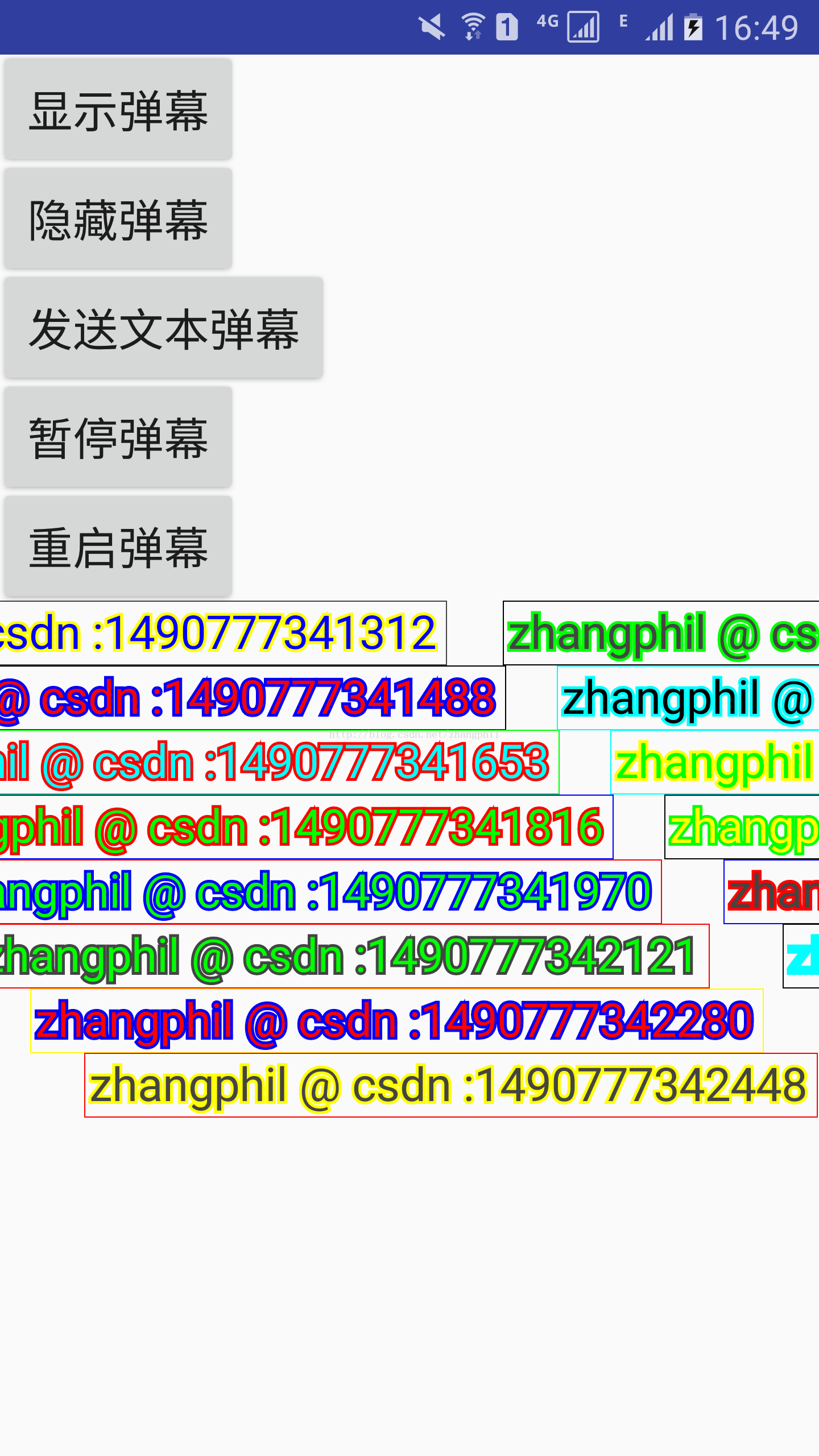
代码运行结果如图:
需要特别注意的是本例使用了一个叫做AcFunDanmakuParser的弹幕parser,这个解析器得自己写,自己基于json数据格式实现。该类写好基本就可以拿来稳定使用,现给出AcFunDanmakuParser的全部源代码:
- package zhangphil.danmaku;
- import org.json.JSONArray;
- import org.json.JSONException;
- import org.json.JSONObject;
- import master.flame.danmaku.danmaku.model.BaseDanmaku;
- import master.flame.danmaku.danmaku.model.android.Danmakus;
- import master.flame.danmaku.danmaku.parser.BaseDanmakuParser;
- import master.flame.danmaku.danmaku.parser.android.JSONSource;
- import master.flame.danmaku.danmaku.util.DanmakuUtils;
- /**
- * Created by phil on 2017/3/29.
- */
- public class AcFunDanmakuParser extends BaseDanmakuParser {
- public AcFunDanmakuParser() {
- }
- public Danmakus parse() {
- if (this.mDataSource != null && this.mDataSource instanceof JSONSource) {
- JSONSource jsonSource = (JSONSource) this.mDataSource;
- return this.doParse(jsonSource.data());
- } else {
- return new Danmakus();
- }
- }
- private Danmakus doParse(JSONArray danmakuListData) {
- Danmakus danmakus = new Danmakus();
- if (danmakuListData != null && danmakuListData.length() != 0) {
- for (int i = 0; i < danmakuListData.length(); ++i) {
- try {
- JSONObject e = danmakuListData.getJSONObject(i);
- if (e != null) {
- danmakus = this._parse(e, danmakus);
- }
- } catch (JSONException var5) {
- var5.printStackTrace();
- }
- }
- return danmakus;
- } else {
- return danmakus;
- }
- }
- private Danmakus _parse(JSONObject jsonObject, Danmakus danmakus) {
- if (danmakus == null) {
- danmakus = new Danmakus();
- }
- if (jsonObject != null && jsonObject.length() != 0) {
- for (int i = 0; i < jsonObject.length(); ++i) {
- try {
- String c = jsonObject.getString("c");
- String[] values = c.split(",");
- if (values.length > 0) {
- int type = Integer.parseInt(values[ 2]);
- if (type != 7) {
- long time = ( long) (Float.parseFloat(values[0]) * 1000.0F);
- int color = Integer.parseInt(values[ 1]) | -16777216;
- float textSize = Float.parseFloat(values[ 3]);
- BaseDanmaku item = this.mContext.mDanmakuFactory.createDanmaku(type, this.mContext);
- if (item != null) {
- item.setTime(time);
- item.textSize = textSize * (this.mDispDensity - 0.6F);
- item.textColor = color;
- item.textShadowColor = color <= -16777216 ? - 1 : -16777216;
- DanmakuUtils.fillText(item, jsonObject.optString("m", "...."));
- item.index = i;
- item.setTimer(this.mTimer);
- danmakus.addItem(item);
- }
- }
- }
- } catch (JSONException var13) {
- } catch (NumberFormatException var14) {
- }
- }
- return danmakus;
- } else {
- return danmakus;
- }
- }
- }
package zhangphil.danmaku;

import org.json.JSONArray;
import org.json.JSONException;
import org.json.JSONObject;

import master.flame.danmaku.danmaku.model.BaseDanmaku;
import master.flame.danmaku.danmaku.model.android.Danmakus;
import master.flame.danmaku.danmaku.parser.BaseDanmakuParser;
import master.flame.danmaku.danmaku.parser.android.JSONSource;
import master.flame.danmaku.danmaku.util.DanmakuUtils;

/**
 * Created by phil on 2017/3/29.
 */

public class AcFunDanmakuParser extends BaseDanmakuParser {

    public AcFunDanmakuParser() {

    }

    public Danmakus parse() {
        if (this.mDataSource != null && this.mDataSource instanceof JSONSource) {
            JSONSource jsonSource = (JSONSource) this.mDataSource;
            return this.doParse(jsonSource.data());
        } else {
            return new Danmakus();
        }
    }

    private Danmakus doParse(JSONArray danmakuListData) {
        Danmakus danmakus = new Danmakus();
        if (danmakuListData != null && danmakuListData.length() != 0) {
            for (int i = 0; i < danmakuListData.length(); ++i) {
                try {
                    JSONObject e = danmakuListData.getJSONObject(i);
                    if (e != null) {
                        danmakus = this._parse(e, danmakus);
                    }
                } catch (JSONException var5) {
                    var5.printStackTrace();
                }
            }

            return danmakus;
        } else {
            return danmakus;
        }
    }

    private Danmakus _parse(JSONObject jsonObject, Danmakus danmakus) {
        if (danmakus == null) {
            danmakus = new Danmakus();
        }

        if (jsonObject != null && jsonObject.length() != 0) {
            for (int i = 0; i < jsonObject.length(); ++i) {
                try {
                    String c = jsonObject.getString("c");
                    String[] values = c.split(",");
                    if (values.length > 0) {
                        int type = Integer.parseInt(values[2]);
                        if (type != 7) {
                            long time = (long) (Float.parseFloat(values[0]) * 1000.0F);
                            int color = Integer.parseInt(values[1]) | -16777216;
                            float textSize = Float.parseFloat(values[3]);
                            BaseDanmaku item = this.mContext.mDanmakuFactory.createDanmaku(type, this.mContext);
                            if (item != null) {
                                item.setTime(time);
                                item.textSize = textSize * (this.mDispDensity - 0.6F);
                                item.textColor = color;
                                item.textShadowColor = color <= -16777216 ? -1 : -16777216;
                                DanmakuUtils.fillText(item, jsonObject.optString("m", "...."));
                                item.index = i;
                                item.setTimer(this.mTimer);
                                danmakus.addItem(item);
                            }
                        }
                    }
                } catch (JSONException var13) {

                } catch (NumberFormatException var14) {

                }
            }

            return danmakus;
        } else {
            return danmakus;
        }
    }
}