

原文地址:Pixel accurate collision detection with Javascript and Canvas
我正在开发一个又要使用碰撞检测的游戏。我通常会使用简单高效的盒模型碰撞检测。盒子模型的主要原则就是把所有的物体都抽象成正方形,如果两个正方形有重叠,就认为是一次碰撞。这通常是一个简单的游戏所需要的。但是因为这种模型我之前用过多次,我想尝试一些更深刻更准确的方法。
我选择从像素级层面来看是否发生了碰撞。首先我要了解“像素是什么”。我尝试的元素透明度都不为0,换句话说,所有的可见像素都被看做一个碰撞点。为了提高算法效率,我预先创建了一张图片的像素映射图。换句话说,就是一个数组内包含了屏幕上的所有可见像素。
- /* 描述像素图的伪代码 */
- var pixelMap = [];
- for( var y = 0; y < image.width; y++ ) {
- for( var x = 0; x < image.height; x++ ) {
- // 获取当前位置的元素
- var pixel = ctx.getImageData( x, y, 1, 1 );
- // 判断透明度不为0
- if( pixel.data[3] != 0 ) {
- pixelMap.push( { x:x, y:y } );
- }
- }
- }
- return pixelMap;
    /* 描述像素图的伪代码 */
    var pixelMap = [];
    for( var y = 0; y < image.width; y++ ) {
    	for( var x = 0; x < image.height; x++ ) {
    		// 获取当前位置的元素
    		var pixel = ctx.getImageData( x, y, 1, 1 );
    		// 判断透明度不为0
    		if( pixel.data[3] != 0 ) {
    			pixelMap.push( { x:x, y:y } );
    		}
    	}
    }
    return pixelMap;
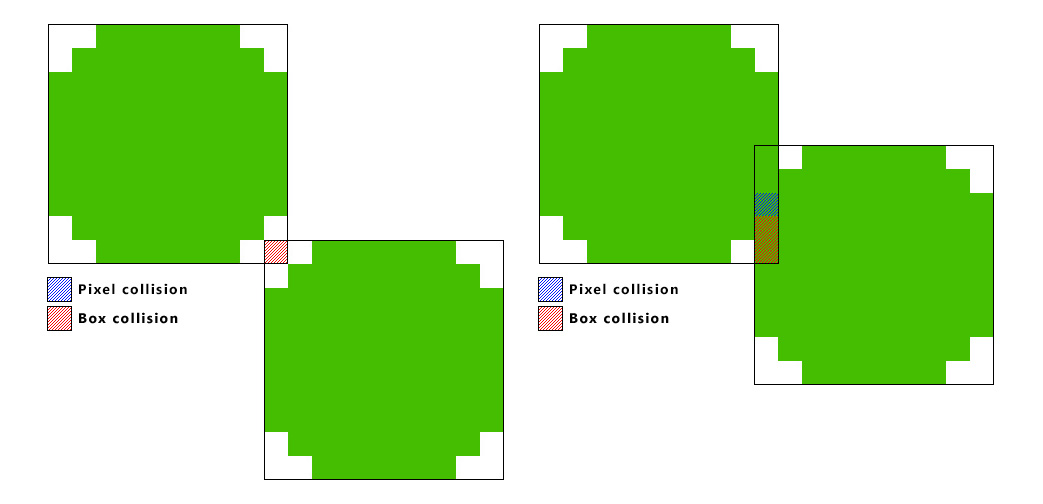
用这种方法,一张小图片会变得很大。一张40X40的像素块会有1600像素,所以如果我在一个很大的canvas上做碰撞检测将会非常缓慢。测试之前我先将盒子模型重叠起来,如果点击测试返回true,我会进一步测试是否有像素重叠。这意味着我们只需要测试一次。
- /* 盒模型测试, 碰撞返回 true */
- function hitBox( source, target ) {
- /* 源物体和目标物体都包含 x, y 以及 width, height */
- return !(
- ( ( source.y + source.height ) < ( target.y ) ) ||
- ( source.y > ( target.y + target.height ) ) ||
- ( ( source.x + source.width ) < target.x ) ||
- ( source.x > ( target.x + target.width ) )
- );
- }
    /* 盒模型测试, 碰撞返回 true */
    function hitBox( source, target ) {
    	/* 源物体和目标物体都包含 x, y 以及 width, height */
    	return !(
    		( ( source.y + source.height ) < ( target.y ) ) ||
    		( source.y > ( target.y + target.height ) ) ||
    		( ( source.x + source.width ) < target.x ) ||
    		( source.x > ( target.x + target.width ) )
    	);
    }
- /* 像素碰撞检测的伪代码 */
- function pixelHitTest( source, target ) {
- // 循环源图像的所有像素
- for( var s = 0; s < source.pixelMap.length; s++ ) {
- var sourcePixel = source.pixelMap[s];
- // 添加位置偏移
- var sourceArea = {
- x: sourcePixel.x + source.x,
- y: sourcePixel.y + source.y,
- width: 1,
- height: 1
- };
- // 循环目标图像的所有像素
- for( var t = 0; t < target.pixelMap.length; t++ ) {
- var targetPixel = target.pixelMap[t];
- // 添加位置偏移
- var targetArea = {
- x: targetPixel.x + target.x,
- y: targetPixel.y + target.y,
- width: 1,
- height: 1
- };
- /* 使用之前提到的 hitbox 函数 */
- if( hitBox( sourceArea, targetArea ) ) {
- return true;
- }
- }
- }
- }
    /* 像素碰撞检测的伪代码 */
    function pixelHitTest( source, target ) {
    	// 循环源图像的所有像素
    	for( var s = 0; s < source.pixelMap.length; s++ ) {
    		var sourcePixel = source.pixelMap[s];
    		// 添加位置偏移
    		var sourceArea = {
    			x: sourcePixel.x + source.x,
    			y: sourcePixel.y + source.y,
    			width: 1,
    			height: 1
    		};

    		// 循环目标图像的所有像素
    		for( var t = 0; t < target.pixelMap.length; t++ ) {
    			var targetPixel = target.pixelMap[t];
    			// 添加位置偏移
    			var targetArea = {
    				x: targetPixel.x + target.x,
    				y: targetPixel.y + target.y,
    				width: 1,
    				height: 1
    			};

    			/* 使用之前提到的 hitbox 函数 */
    			if( hitBox( sourceArea, targetArea ) ) {
    				return true;
    			}
    		}
    	}
}当我把物体画出来,我几乎没有时间测试物体是否发生了碰撞。如果我们想要一个平滑的60帧动画(我相信大多数浏览器倾向于requestAnimationFrame函数),除了浏览器进程和帧渲染的时间,理论上我们测试两帧的时间只有16.6ms(实际的时间更少)。
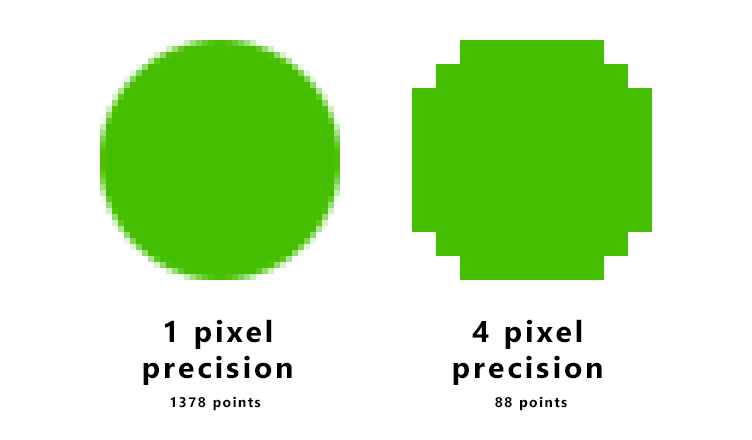
为了解决这个问题,我们可以使用更大的分辨率。我们可以测试一组像素而不是单个像素。所以如果我们在像素图渲染器和像素碰撞测试中使用更大的分辨率,我们必须把计算量降到一个合理的数字上。
- /* 描绘更大分辨率像素图的伪代码 */
- function generateRenderMap( image, resolution ) {
- var pixelMap = [];
- for( var y = 0; y < image.width; y=y+resolution ) {
- for( var x = 0; x < image.height; x=x+resolution ) {
- // 获取当前位置的像素群
- var pixel = ctx.getImageData( x, y, resolution, resolution );
- // 判断像素群的透明度不为0
- if( pixel.data[3] != 0 ) {
- pixelMap.push( { x:x, y:y } );
- }
- }
- }
- return {
- data: pixelMap,
- resolution: resolution
- };
- }
- /* 像素碰撞测试伪代码 */
- function pixelHitTest( source, target ) {
- // 源对象和目标对象包含两张属性
- // { data: a render-map, resolution: The precision of the render-map}
- // 循环源对象的所有像素
- for( var s = 0; s < source.pixelMap.data.length; s++ ) {
- var sourcePixel = source.data.pixelMap[s];
- // 添加位置偏移
- var sourceArea = {
- x: sourcePixel.x + source.x,
- y: sourcePixel.y + source.y,
- width: target.pixelMap.resolution,
- height: target.pixelMap.resolution
- };
- // 循环源对象的所有像素
- for( var t = 0; t < target.pixelMap.data.length; t++ ) {
- var targetPixel = target.pixelMap.data[t];
- // 添加位置偏移
- var targetArea = {
- x: targetPixel.x + target.x,
- y: targetPixel.y + target.y,
- width: target.pixelMap.resolution,
- height: target.pixelMap.resolution
- };
- /*使用之前提到的 hitbox 函数 */
- if( hitBox( sourceArea, targetArea ) ) {
- return true;
- }
- }
- }
- }
    /* 描绘更大分辨率像素图的伪代码 */
    function generateRenderMap( image, resolution ) {
    	var pixelMap = [];
    	for( var y = 0; y < image.width; y=y+resolution ) {
    		for( var x = 0; x < image.height; x=x+resolution ) {
    			// 获取当前位置的像素群
    			var pixel = ctx.getImageData( x, y, resolution, resolution );

    			// 判断像素群的透明度不为0
    			if( pixel.data[3] != 0 ) {
    				pixelMap.push( { x:x, y:y } );
    			}
    		}
    	}
    	return {
    		data: pixelMap,
    		resolution: resolution
    	};
    }

    /* 像素碰撞测试伪代码 */
    function pixelHitTest( source, target ) {

    	// 源对象和目标对象包含两张属性
    	// { data: a render-map, resolution: The precision of the render-map}

    	// 循环源对象的所有像素
    	for( var s = 0; s < source.pixelMap.data.length; s++ ) {
    		var sourcePixel = source.data.pixelMap[s];
    		// 添加位置偏移
    		var sourceArea = {
    			x: sourcePixel.x + source.x,
    			y: sourcePixel.y + source.y,
    			width: target.pixelMap.resolution,
    			height: target.pixelMap.resolution
    		};

    		// 循环源对象的所有像素
    		for( var t = 0; t < target.pixelMap.data.length; t++ ) {
    			var targetPixel = target.pixelMap.data[t];
    			// 添加位置偏移
                var targetArea = {
    				x: targetPixel.x + target.x,
    				y: targetPixel.y + target.y,
    				width: target.pixelMap.resolution,
    				height: target.pixelMap.resolution
    			};

    			/*使用之前提到的 hitbox 函数 */
    			if( hitBox( sourceArea, targetArea ) ) {
    				return true;
    			}
    		}
    	}
    }
