


之前使用编译器调试的时候,每次只是用常规的几个调试命令。但是本着折腾的原则,今天把 所有的调试命令 及功能都罗列出来。
语歌 博客
速览表在最后:
下面举例常见比较重要的命令:
再下面有更详细的示范
如果想要了解更多编译器调试的命令: 传送门
接下来看一下常用的调试命令用法:
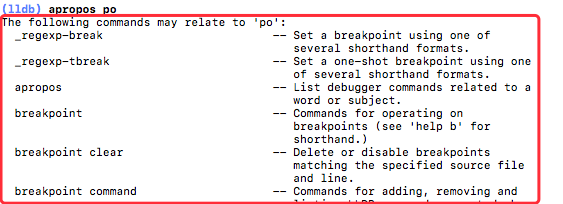
1.apropos
列出与某个单词或主题相关的调试器命令。
e.g(lldb) apropos po
2.breakpoint
看截图文档:(lldb) breakpoint
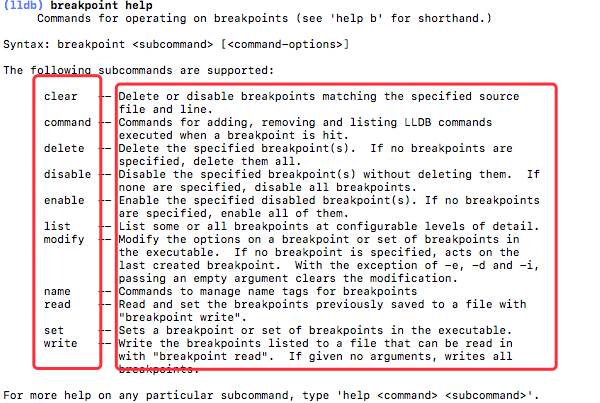
可以简写为 br
功能非常强大,下面还有详细的描述
3.breakpoint
重要
4.print
(lldb) print sums 可以简写成 (lldb) p sums
既: print 写成 p
代码中这样:
var sums = ["0.00","0.00","0.00","0.00"]
调试窗口这样:
结果:
(lldb) print sums
([String]) $R14 = 4 values {
  [0] = "0.00"
  [1] = "0.00"
  [2] = "0.00"
  [3] = "0.00"
}
如果你想在命令行打印进制数:
| 输入参数 | 表示进制 (e.g) |
|---|---|
| p/x 66 | (x表示16进制)(Int) $R17 = 0x0000000000000042 |
| p/t 6 | (t表示2进制)(Int) $R20 = 0b0000000000000000000000000000000000000000000000000000000000000110 |
| p/c "s" | (c表示字符)(String) $R24 = "s" |
5.expression
直接改变其值,点击继续运行,运行的结果就是本次赋值后的结果
(lldb) expression sums = ["10.00","0.00","0.00","0.00"]示例:

更多的用法:
以对象的方式来打印:expression -o -- sums可以直接简写成这样: e -o -- sums
其中:e -o -- sums 可以写成 po ,而且作用是等效的。
process
与进程交互的命令,当然是配合其后面的参数来达到相应的目的 执行 (lldb) process help 如下:
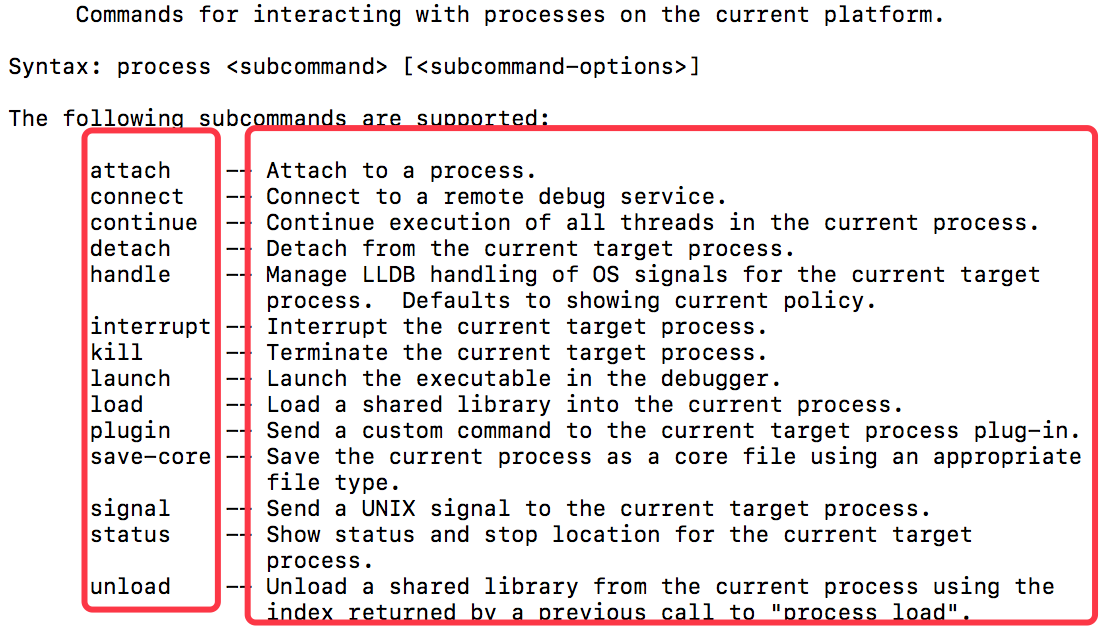
举个常见栗子:continue -- Continue execution of all threads in the current process.
就是继续执行程序,当遇到断点的时候,在 LLDB 中执行就是继续执行程序
thread
与进程交互的命令,当然是配合其后面的参数来达到相应的目的 执行 (lldb) thread help 如下:
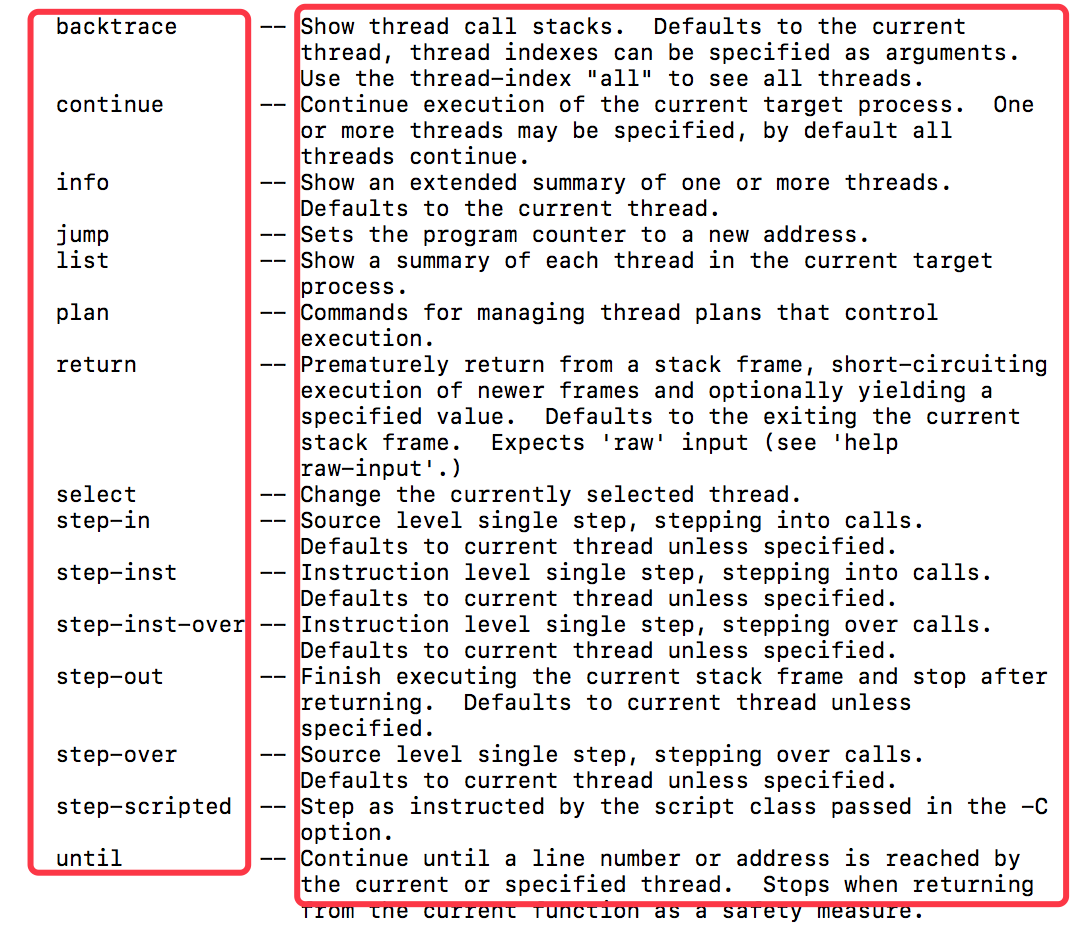
其搭配的参数命令执行的作用后面描绘的相当清楚。
这里要重点介绍几个:
* **`(lldb) thread return`** 过早的从堆栈中返回,立即执行返回命令,退出当前堆栈。可以伪装一些返回信息等等。从写一些函数的行为等等。frame
同样是配合其参数完成调试
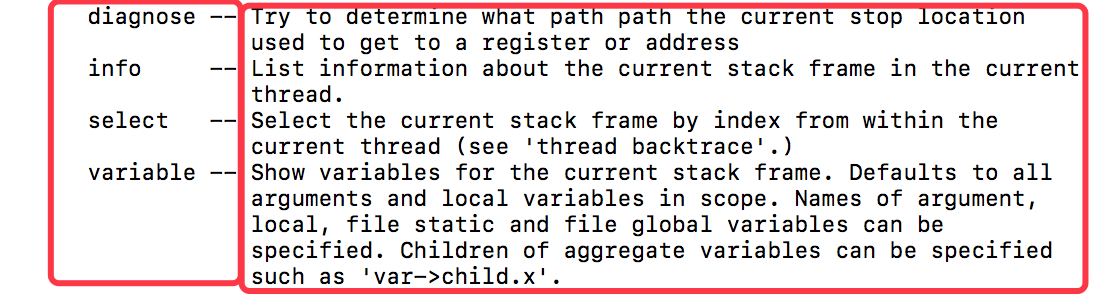
常用的一条命令:
lldb) frame info打印出当前: 工程名字-类名字-函数名字-所在的行数
其它的作用参照参数后面的解释
看完上面的命令,接下来看编译器调试的几个 常用按钮
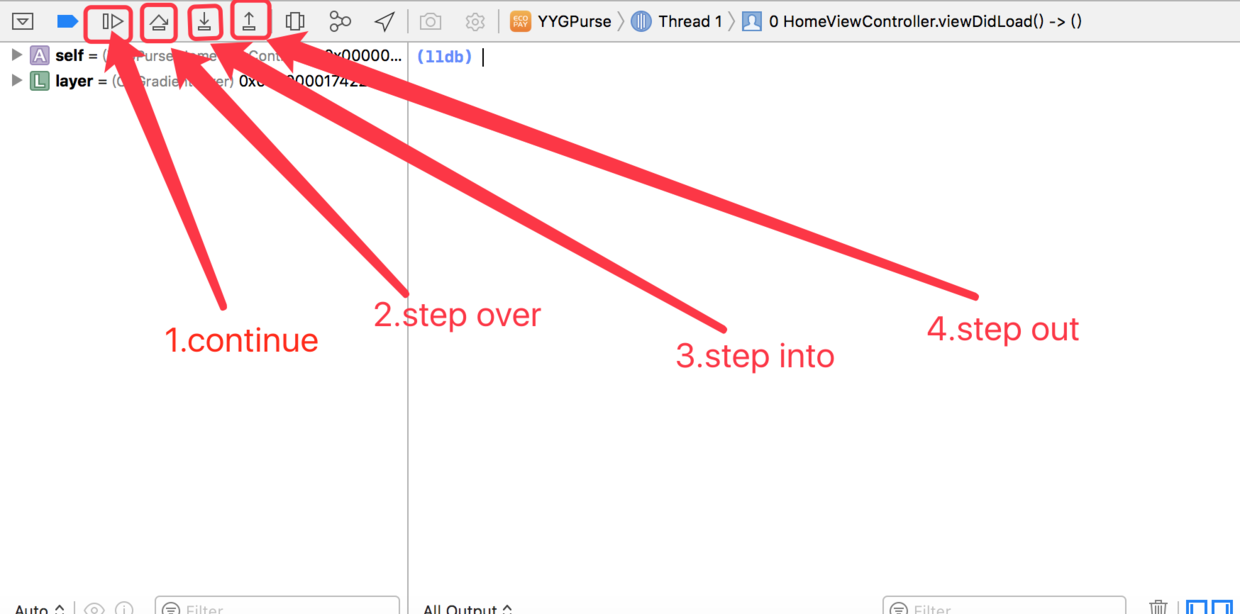
由图中可以看出用于调试的 4 个按钮
第一个
continue如遇到如图所示,就点击后程序就正常运行,如果有其它断点,就会跳到下一个断点.ps: 点击它与在
LLDB调试框里面输入
(lldb) process continue作用是一样的。
c作用效果也是一样的第二个
step over当遇到一个断点暂停后,点击该按钮程序就会一行一行的执行,即使遇到了函数的调用也不会进入函数里面去,而是直接跳过这个函数的执行,如下图:
stepOve
在115行打了一个断点,然后点击该按钮,他会执行116行,再点击后会执行117行,而不会去执行116所调用的函数 里面的行。
ps: 在程序当中与该按钮作用相同的LLDB命令参数是一样的命令是:(lldb) n(lldb) next(lldb) thread step-over
作用效果是一样的第三个
step into.它才是真正意义上的一行一行的执行命令,即使遇到函数的执行,也会跳 进该函数里面去一行一行的执行代码。就是说你想进入函数里面的时候用它
ps: 在程序当中与该按钮作用相同的LLDB命令参数是一样的命令是:
(lldb) thread step-in
(lldb) step
(lldb) s- 第四个
step out如果你进入了一个函数,运行一两行之后你想跳过该函数就用这个按钮。其实它的运行就是一个 堆栈的结束。
快速查看 Xcode 的所有断点
如图这是通过点击查看工程文件中所有的断点
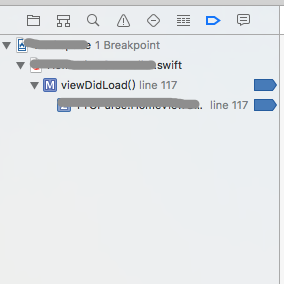
那么通过 LLDB 命令来查看所有的断点:(lldb) br list 或者 (lldb) br li 也可以达到相同的目的
在调试器中通过 LLDB 快速创建断点
使用下面的命令完成了 115行 断点的设定(lldb) breakpoint set -f ViewController.swift -l 115
这个时候我们执行 continue 按钮会发现跳到 115行断点了。
我们通过大列表查看 b 其介绍是:
Set a breakpoint using one of several shorthand formats.
设置断点的命令是:(lldb) b ViewController.swift:127 在127 处设置了断点
Xcode UI 画面上有条件的执行 断点
如图:
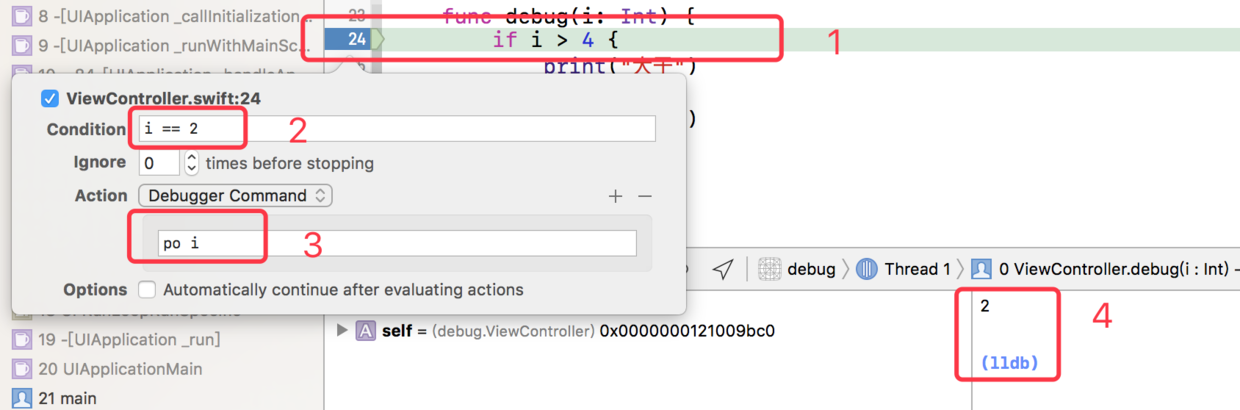
由图可看:
第1步:我们在 line 24 的地方打了一个断点。
第2步:我们看到标 2 的框框,这里 i==2 表示当 i等于2的时候才会执行这个断点
第3步:我们看到标 3 的框框,这里表示当执行这个断点的时候,LLDB 会执行 po i 的命令
第4步:我们看到标 4 的框框,当i为2 的时候执行了断点的打印操作
其中 ignore 表示该断点第几次才会真正执行,比如 设置 ignore 为 2 那么该断点会在第三次调用的时候触发。
那么这里要说明的就是:断点程序会先 比较 函数执行到该断点的 次数。然后 再比较条件 ,条件满足后 执行 LLDB 命令 语句
其中的 + 号可以支持多个 LLDB 命令。
其他的断点条件及执行的命令,依次类推。
Action 后面的更多作用!
如图:
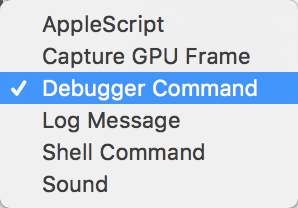
1.AppleScript
苹果的一种脚本语言,可以在此开始运行
2.Capture GPU Frame
Unity游戏 方面的调试。暂时没有研究 😄
3.Debugger Command
相当于在 LLDB 上直接使用命令
4.Log Message
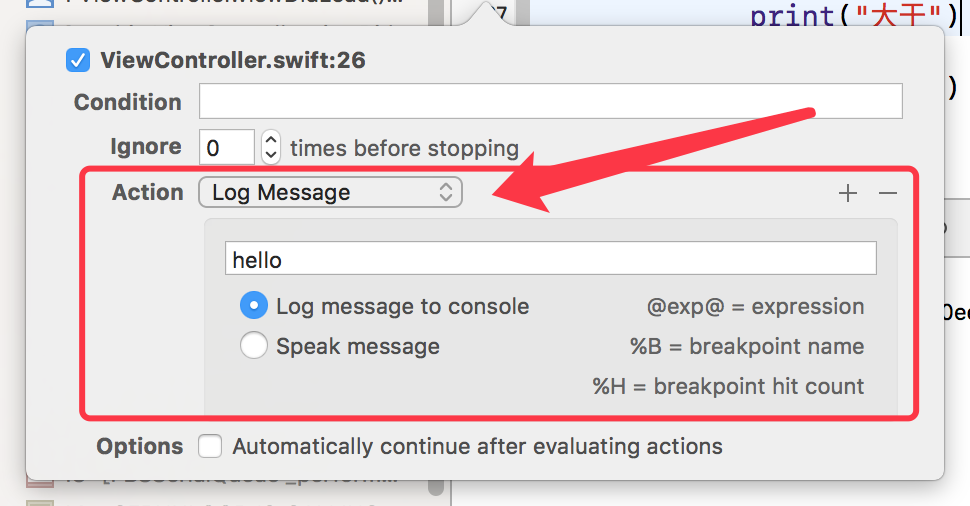
当执行到该断点的时候 LLDB 栏中会直接打印这个 hello 的信息
5.Shell Command
如图:
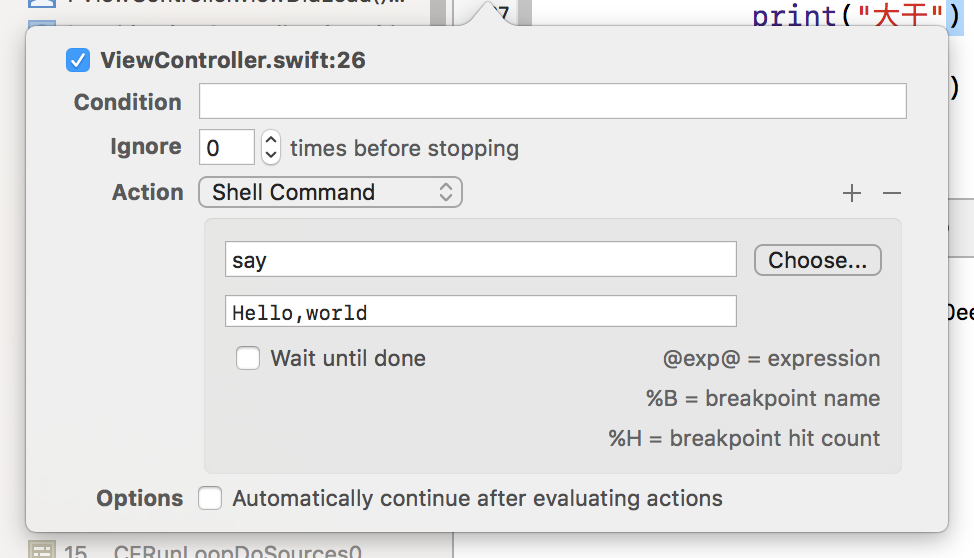
当执行该断点的时候,电脑会读
Hello world
6.Sound
选择相应的声音遇到该断点会发出相应的声音,也是挺有意思的。
一些 LLDB 及控制台插件,配合插件及脚本开发将大大提高开发效率。
随便打个断点:
命令行输入: (lldb) help
快速查询所以的命令 一览表
| 命令 | 命令作用描述 | |||
|---|---|---|---|---|
| apropos | -- List debugger commands related to a word or subject.(列出与某个单词或主题相关的调试器命令。) | |||
| breakpoint | -- Commands for operating on breakpoints (see 'help b' for shorthand.)(断点的相关操作,详细看下面) | |||
| bugreport | -- Commands for creating domain-specific bug reports.(创建某个特点作用域的bug 命令) | |||
| command | -- Commands for managing custom LLDB commands. | |||
| disassemble | -- Disassemble specified instructions in the current target. Defaults to the current function for the current thread and stack frame. | |||
| expression | -- Evaluate an expression on the current thread. Displays any returned value with LLDB's default formatting.(直接改变其值,点击继续运行) | |||
| frame | -- Commands for selecting and examing the current thread's stack frames.(通过命令来检查当前堆栈的相关信息。结合后面的命令参数) | |||
| gdb-remote | -- Connect to a process via remote GDB server. If no host is specifed, localhost is assumed. | |||
| gui | -- Switch into the curses based GUI mode. | |||
| help | -- Show a list of all debugger commands, or give details about a specific command. | |||
| kdp-remote | -- Connect to a process via remote KDP server. If no UDP port is specified, port 41139 is assumed. | |||
| language | -- Commands specific to a source language. | |||
| log | -- Commands controlling LLDB internal logging. | |||
| memory | -- Commands for operating on memory in the current target process. | |||
| platform | -- Commands to manage and create platforms. | |||
| plugin | -- Commands for managing LLDB plugins. | |||
| process | -- Commands for interacting with processes on the current platform.(配合其包含的命令继续执行 执行 process help 即可看到) |
|||
| quit | -- Quit the LLDB debugger. | |||
| register | -- Commands to access registers for the current thread and stack frame. | |||
| script | -- Invoke the script interpreter with provided code and display any results. Start the interactive interpreter if no code is supplied. | |||
| settings | -- Commands for managing LLDB settings. | |||
| source | -- Commands for examining source code described by debug information for the current target process. | |||
| target | -- Commands for operating on debugger targets. | |||
| thread | -- Commands for operating on one or more threads in the current process.(在当前进程中操作一个或多个线程的命令,结合其下面的参数进行。下面有其搭配参数详细说明) | |||
| type | -- Commands for operating on the type system. | |||
| version | -- Show the LLDB debugger version.(查看开发语言的版本) | |||
| watchpoint | -- Commands for operating on watchpoints. | |||
| add-dsym | -- Add a debug symbol file to one of the target's current modules by specifying a path to a debug symbols file, or using the options to specify a module to download symbols for. | |||
| attach | -- Attach to process by ID or name. | |||
| b | -- Set a breakpoint using one of several shorthand formats. | |||
| bt | -- Show the current thread's call stack. Any numeric argument displays at most that many frames. The argument 'all' displays all threads. | |||
| c | -- Continue execution of all threads in the current process. | |||
| call | -- Evaluate an expression on the current thread. Displays any returned value with LLDB's default formatting. | |||
| continue | -- Continue execution of all threads in the current process. | |||
| detach | -- Detach from the current target process. | |||
| di | -- Disassemble specified instructions in the current target. Defaults to the current function for the current thread and stack frame. | |||
| dis | -- Disassemble specified instructions in the current target. Defaults to the current function for the current thread and stack frame. | |||
| display | -- Evaluate an expression at every stop (see 'help target stop-hook'.) | |||
| down | -- Select a newer stack frame. Defaults to moving one frame, a numeric argument can specify an arbitrary number. | |||
| env | -- Shorthand for viewing and setting environment variables. | |||
| exit | -- Quit the LLDB debugger. | |||
| f | -- Select the current stack frame by index from within the current thread (see 'thread backtrace'.) | |||
| file | -- Create a target using the argument as the main executable. | finish | -- Finish executing the current stack frame and stop after returning. Defaults to current thread unless specified. | |
| image | -- Commands for accessing information for one or more target modules. | |||
| j | -- Set the program counter to a new address. | |||
| jump | -- Set the program counter to a new address. | |||
| kill | -- Terminate the current target process. | |||
| l | -- List relevant source code using one of several shorthand formats. | |||
| list | -- List relevant source code using one of several shorthand formats. | |||
| n | -- Source level single step, stepping over calls. Defaults to current thread unless specified.(相当于一行一行的执行函数) | |||
| next | -- Source level single step, stepping over calls. Defaults to current thread unless specified.(与 n 的作用几乎一致) | |||
| nexti | -- Instruction level single step, stepping over calls. Defaults to current thread unless specified. | |||
| ni | -- Instruction level single step, stepping over calls. Defaults to current thread unless specified. | |||
| p | -- Evaluate an expression on the current thread. Displays any returned value with LLDB's default formatting.(可以打印程序中相关参数的值,其属性状态) | |||
| parray | -- Evaluate an expression on the current thread. Displays any returned value with LLDB's default formatting.(与 p 相同) | |||
| po | -- Evaluate an expression on the current thread. Displays any returned value with formatting controlled by the type's author.(与 p 的区别是打印的值所带的参数相对简洁一点) | |||
| poarray | -- Evaluate an expression on the current thread. Displays any returned value with LLDB's default formatting.(与 p 相同) | |||
| -- Evaluate an expression on the current thread. Displays any returned value with LLDB's default formatting.(与 p 相同) | ||||
| q | -- Quit the LLDB debugger. | |||
| r | -- Launch the executable in the debugger. | |||
| rbreak | -- Sets a breakpoint or set of breakpoints in the executable. | |||
| repl | -- Evaluate an expression on the current thread. Displays any returned value with LLDB's default formatting. | |||
| reveal_load_dev | -- Evaluate an expression on the current thread. Displays any returned value with LLDB's default formatting. | |||
| reveal_load_sim | -- Evaluate an expression on the current thread. Displays any returned value with LLDB's default formatting. | |||
| reveal_start | -- Evaluate an expression on the current thread. Displays any returned value with LLDB's default formatting. | |||
| reveal_stop | -- Evaluate an expression on the current thread. Displays any returned value with LLDB's default formatting. | |||
| run | -- Launch the executable in the debugger. | |||
| s | -- Source level single step, stepping into calls. Defaults to current thread unless specified.(一步一步执行,即使遇到函数也会进入该函数一步一步执行代码) | |||
| si | -- Instruction level single step, stepping into calls. Defaults to current thread unless specified. | |||
| sif | -- Step through the current block, stopping if you step directly into a function whose name matches the TargetFunctionName. | |||
| step | -- Source level single step, stepping into calls. Defaults to current thread unless specified. | |||
| stepi | -- Instruction level single step, stepping into calls. Defaults to current thread unless specified. | |||
| t | -- Change the currently selected thread. | |||
| tbreak | -- Set a one-shot breakpoint using one of several shorthand formats. | |||
| undisplay | -- Stop displaying expression at every stop (specified by stop-hook index.) | |||
| up | -- Select an older stack frame. Defaults to moving one frame, a numeric argument can specify an arbitrary number. | |||
| x | -- Read from the memory of the current target process. | |||

