前言
前一阵子遇到了个需求:商户与其账户是一对多的,因此需要分两个表(商户 & 账户),先创建商家再为其创建账户,账户创建需要商家的 id。
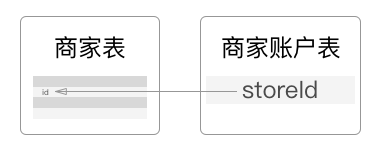
对于这类需求,之前一直用 Modal、Table 和 Button 组合的 antd 自定义表单控件来完成:
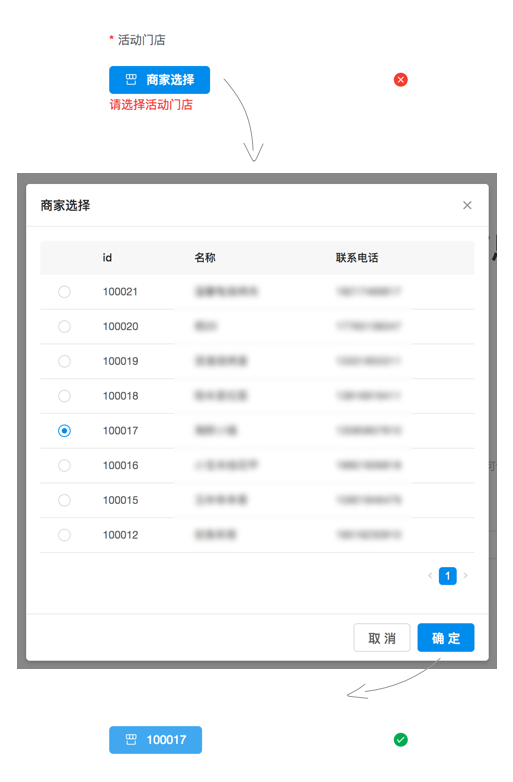
可仔细一想,以后商户量特别大怎么办,难道要一页一页人工去找么?不行,至少得在表格上加个搜索,但这样组件过于复杂,不利于复用 & 维护。于是又翻了翻 ant design 的文档,看到了两个 Select 组件的例子:
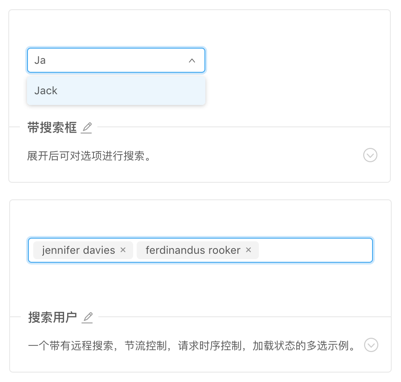
搜索可选项 & 单选,远程搜索 & 多选
嗯...结合一下就成了:远程搜索 & 单选组件。
其实这个组件做起来不难,但在设计与实现中遇到了几个有意思的问题,因此想把这些问题分享出来,希望能引起大家的思考。
Demo
Note:
Demo 内的资源较大,用流量的同学请谨慎打开。JSFiddle 里的 babel parser 在 iOS9 的 Safari 会报错,Android 及 iOS10 都可以运行,无法正常显示的同学请用 PC 端访问 fiddle.jshell.net/SebastianBl…
100 lines SearchSelect Comonent - JSFiddle
SearchSelect 组件实现
JS 语法环境:
- babel presets: babel-preset-stage-2, babel-preset-react
- babel plugins: transform-decorators-legacy
其中 stage-2 包含:
后续的代码中用到了目前(2017.6.22)实验性的 ES 特性:Class property、async await 和 Decorator。
一、组件功能
- 远程搜索关键词;
placeholder/size/style/value属性传递;- Option 组件显示商家 logo 和名称;
- 搜索防抖:用
debounce函数来避免大量重复请求; - 搜索请求取消:用
axios.CancelToken来取消无用的请求。
二、基本的 antd 自定义表单控件
为了能让组件配合 ant design 的表单验证功能,我们需要参考 ant design 文档中的自定义表单控件 来实现。
1. options
假设服务端搜索接口返回的数据为:
JSON[{
"id": 100001,
"logo": "https://static.example.com/imgs/J2ahNQ.jpg",
"name": "Chrome"
}, {
"id": 100002,
"logo": "https://static.example.com/imgs/HxG29a.jpg",
"name": "Safari"
}, {
"id": 100003,
"name": "Null"
}]
options 的 render 函数为:
React JSXconst nameStyle = { marginLeft: 8 }
const optionStyle = {
display: 'flex',
alignItems: 'center'
}
const options = array.map(item => (
<Option key={item.id}>
<div style={optionStyle}>
{
item.logo
? <Avatar src={item.logo} size='small' />
: <Avatar icon='shop' size='small' />
}
<span style={nameStyle}>{item.name}</span>
</div>
</Option>
))
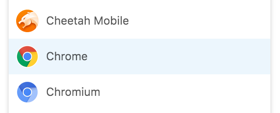
Option 由 Avatar 组件和 flex 样式组合
2. 自定义表单控件
import { Select, Spin, Avatar } from 'antd'
import axios, { CancelToken } from 'antd'
import _debounce from 'lodash.debounce'

const { Option } = Select
const loadingStyle = {
  display: 'flex',
  justifyContent: 'center'
}
const nameStyle = { marginLeft: 8 }
const optionStyle = {
  display: 'flex',
  alignItems: 'center'
}

class SearchSelect extends React.Component {
  static defaultProps = {
    placeholder: '输入关键字搜索'
  }

  state = {
    value: null,
    loading: false,
    data: []
  }

  constructor (props) {
    super(props)

    this.state.value = props.value ? [props.value] : []
  }

  componentWillReceiveProps (nextProps) {
    if ('value' in nextProps) {
      const value = nextProps.value ? [nextProps.value] : []
      this.setState({ value })
    }
  }

  onSearch = value => {
    console.log(value)
  }

  onChange = value => {
    const { onChange } = this.props
    if (typeof onChange === 'function') onChange(value)
  }

  renderOptions () {
    return this.state.data.map(item => (
      <Option key={item.id}>
        <div style={optionStyle}>
          {
            item.logo
              ? <Avatar src={item.logo} size='small' />
              : <Avatar icon='shop' size='small' />
          }
          <span style={nameStyle}>{item.name}</span>
        </div>
      </Option>
    ))
  }

  getNotFoundContent () {
    if (!this.state.loading) return null
    return <div style={loadingStyle}><Spin size='small' /></div>
  }

  render () {
    const { placeholder, style, size } = this.props

    return (
      <Select
        showSearch
        filterOption={false}
        defaultActiveFirstOption={false}
        value={this.state.value}
        style={style}
        size={size}
        placeholder={placeholder}
        notFoundContent={this.getNotFoundContent()}
        onSearch={this.onSearch}
        onChange={this.onChange}
      >
        {this.renderOptions()}
      </Select>
    )
  }
}
简单介绍下 Select 的几个特殊 props:
- showSearch:使单选模式可搜索;
- filterOption:筛选 options 值;
- defaultActiveFirstOption:默认高亮第一个选项;
- notFoundContent:当下拉列表为空时显示的内容。
注意:
在
constructor和componentWillReceiveProps里修改 value,用props.value ? [props.value] : []而不是props.value || ''是有原因的:
尽管 Select 组件的 mode 为空,但value无论是''/null/undefined都会使placeholder隐藏。这是 rc-select 在初始化 value 时的逻辑问题,用空数组可以避免,有兴趣的同学可以提个 issue。
三、搜索方法
搜索要实现两个 feature:
- 防抖:避免频繁输入(onChange)时带来的重复请求;
- 中断请求:尽管有防抖,如果在网络较差的环境下,且用户输入过慢(超过防抖时间)仍会有多余请求,为了避免这些多余请求(成功)的后续副作用,需要中断先前的多余请求。
1. 防抖装饰器
关于 JS 装饰器和介绍,可以看这篇文章:Decorators in ES7
JavaScriptfunction debounce (wait) {
return function debounceDecorator (target, key, descriptor) {
descriptor.value = _debounce(descriptor.value, wait)
return descriptor
}
}
用函数工厂生成防抖装饰器
debounce(600) 会返回装饰器函数,我们再用 @debounce(600) 来装饰类方法,即可修改为有防抖功能的类方法。
2. 装饰器的问题
写 "babel script"1 的时候,我偏爱用 Class properties 来给方法赋值(懒得写 bind),然而在用 @debounce(600) 修饰时,发现被修饰的方法没有任何防抖效果……
class Foo {
@debounce(600)
bar = _ => {
// 调用 this.bar() 不会延时
}
}
和朋友讨论了一下,发现是使用 Class properties 造成的问题,先看一看 decorators 的概要:
Decorators make it possible to annotate and modify classes and properties at design time.
装饰器可以在类的设计阶段注解/修改类及其属性。
类的「设计阶段」包含类的声明、初始化和分配阶段,装饰器的运作方式大致可以分解为(下面做法不完善,实际实现较复杂,可以参考 babel 转换的代码):
JavaScript// Syntax
class Foo {
@debounce(600)
bar () { }
}
// 解语法糖 (ES6)
let Foo = (function () {
function Foo () { }
Foo.prototype.bar = function bar () { }
let descriptor = debounce(600)(
Foo.prototype,
'bar',
descriptor = Object.getOwnPropertyDescriptor(Foo.prototype, 'bar')
) || descriptor
if (descriptor) Object.defineProperty(Foo.prototype, 'bar', descriptor)
return Foo
}())
- 声明
Foo函数; - 在其原型链上增加属性名为
bar的函数; - 用
Object.getOwnPropertyDescriptor取得Foo.prototype上bar属性的描述符; - 用装饰器修饰描述符,并返回这个新的描述符;
- 若描述符确实存在,修改原型上属性
bar的描述符。
Note:
class 和 let/const 一样,不会进行声明提升(Declaration hoisting),根本原因是在语法设计时考虑到声明提升坑比较多,为避免用户出错,因此将声明与初始化阶段解耦,并增加临时死区(Temporal dead zone)来禁止对变量的访问,具体可见这篇文章 JavaScript variables lifecycle: why let is not hoisted。
而 Class properties 经过 babel 转换后为: 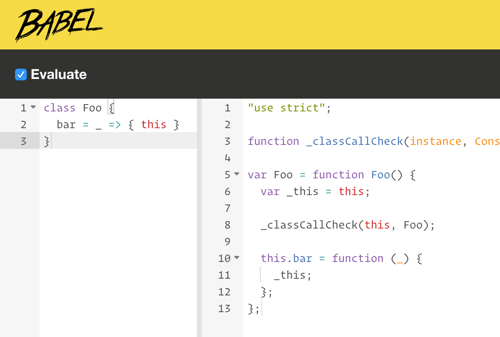
这表明 Class properties 语法只会在类的实例化阶段执行,所以 @debounce(600) 收到的只是个 value 为 undefined 的描述符(descriptor),且返回的也是相同的描述符,不会对类属性产生任何修饰效果。
因此正确做法应该是:停止使用 Class properties 语法,在构造器中用 bind 绑定方法上下文,代码如下
class Foo {
constructor () {
this.bar = this.bar.bind(this)
}
@debounce(600)
bar () { this }
}
题外话:
推荐大家用 Airbnb 的规范:为每个需要用到this的方法手动bind(this)(高瞻远瞩爱彼迎 😂),不过,我还是会继续使用 Standard Style。
3. async await 与 axios
真正应用 fetch 还需要很多封装,因此我选择用 axios 作为请求库。
其实 async await 语法糖使用起来很简单,只要你掌握了 Promise 的精髓就可以很好理解了,这里附一篇文章,不了解的同学看一看:Understanding JavaScript’s async await。
JavaScriptclass SearchSelect extends React.Component {
// ...省略部分代码
constructor (props) {
super(props)
this.onSearch = this.onSearch.bind(this)
}
@debounce(600)
async onSearch (value) {
this.setState({ loading: true })
try {
const config = {
params: { q: value.trim() }
}
const { data = [] } = await axios.get('api/search', config)
if (result.length > 0) this.setState({ data })
} catch (err) {
console.error(err)
} finally {
this.setState({ loading: false })
}
}
}
看起来像同步代码的异步请求
4. 用 CancelToken 来中断 ajax 请求
前面提到了「尽管有防抖,如果在网络较差的环境下,用户输入过慢(超过防抖时间)还是会有多余请求,因此需要中断先前的无用搜索。」,ajax 中断本身很好做到:
对于原生的 XMLHttpRequest 来说,直接调用 xhr.abort() 即可:
var xhr = new XMLHttpRequest()
xhr.open('GET', '/api/example')
xhr.send()
xhr.abort()
jQuery v2 版本的 $.ajax 也是类似的:
var jqXHR = $.ajax({ /* ... */ })
jqXHR.abort()
但是,一旦涉及到 Promise/A+,ajax 中断的实现就很麻烦了。
如返回纯 Promise 对象(不附加其他方法)的 jQuery v3 $.ajax,是这样实现中断的:
var xhr = new window.XMLHttpRequest()
var promise = $.ajax({
/* ... */
xhr: function () {
return xhr
}
})
xhr.abort()
究其原因是目前的 Promise/A+ 规范未规定如何取消处在 pending 状态的 promise 对象,没有规定,也就没有实现。
因此 axios 为了更贴近规范,基于 "cancelable-promises" 提案实现了 CancelToken,用法详见 Cancellation。
JavaScript然而 Cancelable promises 在去年(2016)12 月份的时候被撤下了提案。
因为遭到了在 TC39 委员会内部分谷歌员工的抵制,作为提出者的 Domenic Denicola 无奈只能撤回了此提案,并且未能发表任何撤销的理由(有关此事件的讨论),至今(2017.6)社区还在 讨论 cancellation 的问题。
import axios, { CancelToken } from 'axios'
class SearchSelect extends React.Component {
// ...省略部分代码
source // source 作为实例属性
constructor (props) {
super(props)
this.onSearch = this.onSearch.bind(this)
}
@debounce(600)
async onSearch (value) {
// 如果 `this.source` 还存在,
// 则上一次请求还未完成,取消上次请求
if (this.source) this.source.cancel()
// 生成新的 cancelToken
const source = this.source = CancelToken.source()
let isCanceled // canceled flag
this.setState({ loading: true })
try {
const config = {
params: { q: value.trim() },
cancelToken: source.token // 传入 token
}
const { data = [] } = await axios.get('api/search', config)
if (result.length > 0) this.setState({ data })
} catch (err) {
if (axios.isCancel(err)) { // 请求被取消
isCanceled = true
} else {
console.error(err)
}
} finally {
if (!isCanceled) {
// 若请求正常结束
// 重置 source,并结束 loading 动画
this.source = null
this.setState({ loading: false })
}
}
}
}
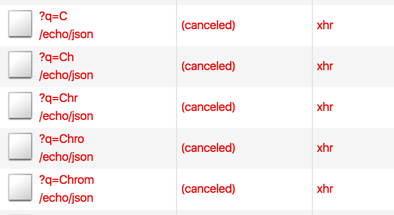
中断多余的 ajax 请求
对 Cancelable promises 有兴趣的,可以看看这篇:Promise Cancellation Is Dead — Long Live Promise Cancellation!
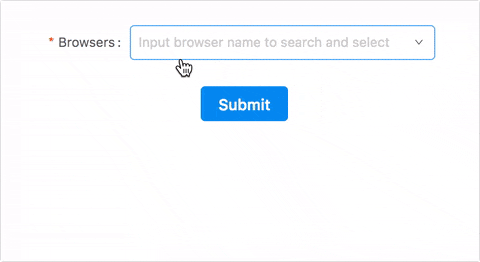
至此,(大概)100 行的搜索选择组件已完成,效果如下:
import { Select, Spin, message, Avatar } from 'antd'
import _debounce from 'lodash.debounce'
import axios, { CancelToken } from 'axios'
const { Option } = Select
const loadingStyle = { display: 'flex', justifyContent: 'center' }
const nameStyle = { marginLeft: 8 }
const optionStyle = { isplay: 'flex', alignItems: 'center' }
function debounce (wait) {
  return function debounceDecorator (target, key, descriptor) {
    descriptor.value = _debounce(descriptor.value, wait)
    return descriptor
  }
}
class SearchSelect extends React.Component {
static defaultProps = {
placeholder: '输入关键字搜索'
}
source
state = {
value: null,
loading: false,
data: []
};
constructor (props) {
super(props)
this.onSearch = this.onSearch.bind(this)
this.state.value = props.value ? [props.value] : []
}
componentWillReceiveProps (nextProps) {
if ('value' in nextProps) {
const value = nextProps.value ? [nextProps.value] : []
this.setState({ value })
}
}
@debounce(600)
async onSearch (q) {
if (this.source) this.source.cancel()
const source = this.source = CancelToken.source()
let isCanceled
this.setState({ loading: true })
try {
const config = {
params: { q: q.trim() },
cancelToken: source.token
}
const { data = [] } = await axios.get('api/search', config)
if (result.length > 0) this.setState({ data })
} catch (err) {
if (axios.isCancel(err)) {
isCanceled = true
} else {
console.error(err)
}
} finally {
if (!isCanceled) {
this.source = null
this.setState({ loading: false })
}
}
}
onChange = value => {
const { onChange } = this.props
if (typeof onChange === 'function') onChange(value)
}
renderOptions () {
return this.state.data.map(item => (
<Option key={item.id}>
<div style={optionStyle}>
{
item.logo
? <Avatar src={item.logo} size='small' />
: <Avatar icon='shop' size='small' />
}
<span style={nameStyle}>{item.name}</span>
</div>
</Option>
))
}
getNotFoundContent () {
if (!this.state.loading) return null
return <div style={loadingStyle}><Spin size='small' /></div>
}
render () {
const { placeholder, style, size } = this.props
return (
<Select
showSearch
filterOption={false}
defaultActiveFirstOption={false}
value={this.state.value}
style={style}
size={size}
placeholder={placeholder}
notFoundContent={this.getNotFoundContent()}
onSearch={this.onSearch}
onChange={this.onChange}
>
{this.renderOptions()}
</Select>
)
}
}
export default SearchSelect
不过,在一些特殊条件下,组件表现的不是很完美,这和 ant design 对 Select 组件的实现有关,下面来说一下 ant design 组件的问题。
关于 ant design
1. Select 组件不缓存 value
以上实现的搜索选择组件,在这几种情况下的展现不太完美:
- 低速网络
- 当搜索了 "Chro" 后,options 为 [Chrome, Chromium],选中 Chrome;
- 再搜索 "Saf",当搜索数据展示后,清空搜索内容;
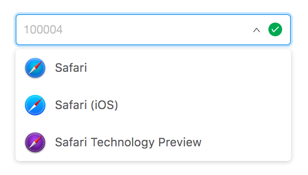
- 此时 options 没有选中的 Chrome 的数据,且网速较慢暂时没有返回关键字为空的搜索数据,Select 会直接展示其
value:
- 受限接口
- 若服务端接口只返回匹配到的前 10 条数据(理应如此);
- 在搜索并选中 option 后,再次搜索空关键字内容;
- 若返回的 10 条数据中没有选中的 option,一样会出现上图的情况。
目前已经提了 issue,还待反馈。
2. 缺少搜索中提示
Select 组件在 options 数据为空才会展示 notFoundContent 组件,但在修改关键词继续搜索时,组件无任何加载中反馈,除非清空 options(state.data = []),但清空又会导致 Select 直接显示之前选中的 option value。
3. rc-select title 取值问题
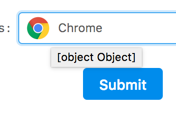 这个还是 rc-select 内部的逻辑问题。
总结
虽然组件实现不是很困难,但其中涉及到的部分知识点还是很值得深思的:
- Decorators 与 Class properties;
- class 不进行声明提升;
- Cancelable promises 与 CancelToken;
- 对组件的完善程度的思考,和开源库仍然存在的问题。
对于前端,我了解的不是特别深入,但也会尽量查阅资料,保证正确性,如果有错误的概念希望大家能在下方评论区指正。