第一部分:开发前的准备
1.了解EasyAR SDK+pokemon Go 的实现方式(教程链接)
2.了解unity+Hololens 的基本开发(教程链接)
3.资源链接:https://github.com/GeekLiB/Hololens-Pokemon-Go
4.效果预览:
第二部分:开发
首先我们新建unity项目,把相关的模型拖到场景中,进行position于Sc
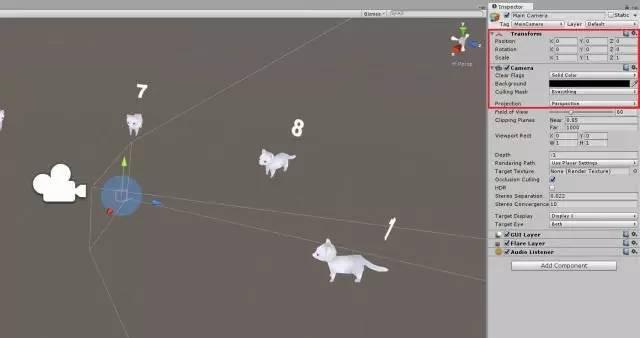
ale 的设置,设置效果如图:
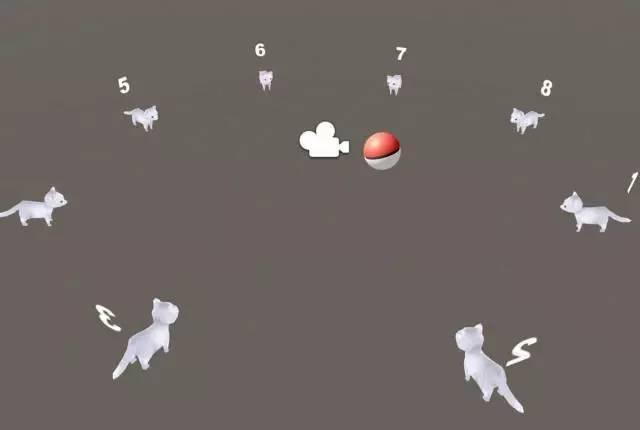
向往常一样,我们要对Hololens 的Camera 进行设置
Position ——[0,0,0]
Clear Flags——Solid Color
Background——[0,0,0,0]( or #00000000)
第三部分:手势
首先我们新建个脚本,命名为PlayerInput。然后导入Hologram 功能
using UnityEngine.VR.WSA.Input;
为了实现视频中的案例,我们通过类似空中点击这样的手势与模型进行交互。这在Hololens 是最常态的一种手势交互手段,类似于鼠标左键。
微软为我们提供了GestureRecognizer类。GestureRecognizer类封装了手指检测。
GestureRecognizer gestureRecognizer;
GestureRecognizer可以检测Tap,Hold和ManipulationTranslate手势,然后我们注册手势。
void Awake()
{
gestureRecognizer = new GestureRecognizer();
gestureRecognizer.SetRecognizableGestures(
GestureSettings.Tap |
GestureSettings.Hold |
GestureSettings.ManipulationTranslate);
gestureRecognizer.TappedEvent += Gr_TappedEvent;
gestureRecognizer.HoldStartedEvent += Gr_HoldStartedEvent;
gestureRecognizer.HoldCanceledEvent += Gr_HoldCanceledEvent;
gestureRecognizer.HoldCompletedEvent += Gr_HoldCompletedEvent;
gestureRecognizer.StartCapturingGestures();
}
在我们的案例中,主要是是Gr_TappedEvent的实现
private void Gr_TappedEvent(InteractionSourceKind source, int tapCount, Ray headRay)
{
// Air-Tap detected!
}
完整代码如下:链接:https://pan.baidu.com/s/1i5C7QFN 密码: 46ab
第四部分:与模型交互
接下来我们与模型的交互类似EasyAR + Pokemon,首先我们新建两个脚本:Pokeball.cs和Pokemon.cs,分别挂在Pokeball 与 Pokemon 对象上。
对于PokeBall实现的是点击之后运动,所以它的Throw 方法比较重要,你可以用Itween或DoTween ,或RigidBody 来实现。
在这里我们用rigidBody 来给它添加Velocity 与角速度实现其运动:
public void Throw(Vector3 velocity, Vector3 angularVelocity)
{
transform.parent = null;
rigidbody.isKinematic = false;
rigidbody.velocity = velocity;
rigidbody.angularVelocity = angularVelocity;
}
对于Pokemon 对象,我们主要实现的是碰撞检测:
public void Capture(Transform pokeball)
{
GetComponent().enabled = false;
StartCoroutine(Coroutine_Capture(pokeball));
}
IEnumerator Coroutine_Capture(Transform pokeball)
{
CanBeCaptured = false;
float delta = 0;
while (delta < 1f)
{
delta = Mathf.Min(1f, delta + Time.deltaTime * MOVE_TO_POKEBALL_SPEED);
transform.position = Vector3.Lerp(initialPosition, pokeball.position, delta);
transform.localScale = new Vector3(1f - delta, 1f - delta, 1f - delta);
yield return null;