现如今web前端工程化越来越重要,如果不掌握不夸张的说连正常开发都进行不下去了。webpack现在已经成为了前端打包工具的标准了,那么掌握webpack对于一个FE来必不可少的。
目前正在学习rxjs,觉得它真的很酷,而且在实际项目开发也发现了几个应用场景,因此正值放假就想着用ts写写rx。
那么开始把~
项目地址
bulldog478/typscript-rx-seed
知识点
- ts支持rx构建
- html-webpack-plugin
- devServer
过程
首先做好依赖包的安装工作,请看package.json
{
  "name": "hello",
  "version": "1.0.0",
  "main": "index.js",
  "license": "MIT",
  "dependencies": {
    "rxjs": "^5.2.1-smooth"
  },
  "devDependencies": {
    "awesome-typescript-loader": "^3.1.2",
    "html-webpack-plugin": "^2.28.0",
    "typescript": "^2.2.2",
    "webpack": "^2.3.2"
  }
}
{
"name": "hello",
"version": "1.0.0",
"main": "index.js",
"license": "MIT",
"dependencies": {
"rxjs": "^5.2.1-smooth"
},
"devDependencies": {
"awesome-typescript-loader": "^3.1.2",
"html-webpack-plugin": "^2.28.0",
"typescript": "^2.2.2",
"webpack": "^2.3.2"
}
}
这里没啥可说的,想用ts搞rxjs这些是最基本的依赖了。下面配置webpack.config.js
module.exports = {
    context: __dirname + "/src",
    entry: './index.ts',
    output: {
        filename: '[name].bundle.js',
        path: __dirname + '/dist',
        publicPath: '/dist'
    },
    module: {
        rules: [{
            test: /\.ts$/,
            use: 'awesome-typescript-loader'
        }]
    },
    resolve: {
        extensions: ['.ts', '.js']
    },

    devtool: 'source-map',
}
下面在index.ts中编写一个简单的rx测试程序
import { Observable } from 'rxjs'

var test$ = Observable.interval(1000)
test$.subscribe(x=>console.log('x', x))
下面我们先编译一下代码
webpack
会报一个`类型引用`无法找到的错误,
ERROR in [at-loader] ./node_modules/rxjs/operator/toPromise.d.ts:3:79
TS2693: 'Promise' only refers to a type, but is being used as a value here.
作者:诗瑶
链接:Typescript报错拾记 - 知乎专栏
应该是缺少Promise定义文件了,所以在tsconfig.json中的compilerOptions.lib加入es2015.promise即可
{
    "compilerOptions": {
        "target": "es5",
        "module": "commonjs",
        "sourceMap": true,
        "removeComments": true,
        "typeRoots": [
            "./node_modules/@types"
        ],
        "lib": [
            "dom",
            "es2015",
            "scripthost",
            "es2015.promise"
        ]
    },
    "include": [
        "./src/**/*"
    ],
    "exclude": [
        "node_modules"
    ]
}
<!DOCTYPE html>
<html>
  <head>
    <meta http-equiv="Content-type" content="text/html; charset=utf-8"/>
    <title><%= htmlWebpackPlugin.options.title %></title>
  </head>
  <body>
  </body>
</html>
{
    plugins: [new HtmlWebpackPlugin({
        title: 'Hello RxJS',
        filename: __dirname + '/index.html',
        template: './index.html',
        inject: 'body'
    })]
}
<!DOCTYPE html>
<html>
  <head>
    <meta http-equiv="Content-type" content="text/html; charset=utf-8"/>
    <title>Hello RxJS</title>
  </head>
  <body>
  <script type="text/javascript" src="/dist/main.bundle.js"></script></body>
</html>
var path = require('path')
var HtmlWebpackPlugin = require('html-webpack-plugin')
module.exports = {
    context: __dirname + "/src",
    entry: './index.ts',
    output: {
        filename: '[name].bundle.js',
        path: __dirname + '/dist',
        publicPath: '/dist'
    },
    module: {
        rules: [{
            test: /\.ts$/,
            use: 'awesome-typescript-loader'
        }]
    },
    resolve: {
        extensions: ['.ts', '.js']
    },

    devtool: 'source-map',

    plugins: [new HtmlWebpackPlugin({
        title: 'Hello RxJS',
        filename: __dirname + '/index.html',
        template: './index.html',
        inject: 'body'
    })],

    devServer: {
        contentBase: __dirname,
        port: 9001,
        publicPath: '/dist',
        filename: '[name].bundle.js',
        watchContentBase: true,
        watchOptions: {
            aggregateTimeout: 300,
            poll: 1000
        }
    }
}
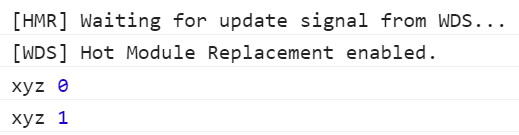
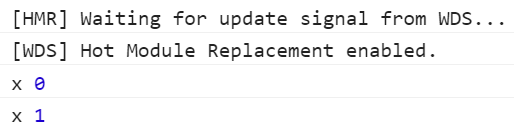 修改代码,ctrl+s,程序reload
 参考
参考