

如今出行类的App越来越常见,更多的应用将地图Sdk嵌入到自己的App中去,以实现基本的功能,如定位,路径规划,标注,导航等等。
今天我要分享的是Android一种通用的地图类解耦架构,将地图与业务解耦,上层的Fragment通过接口调用底层MapFragment实现地图的基础操作。
具体的实现类图如下图:
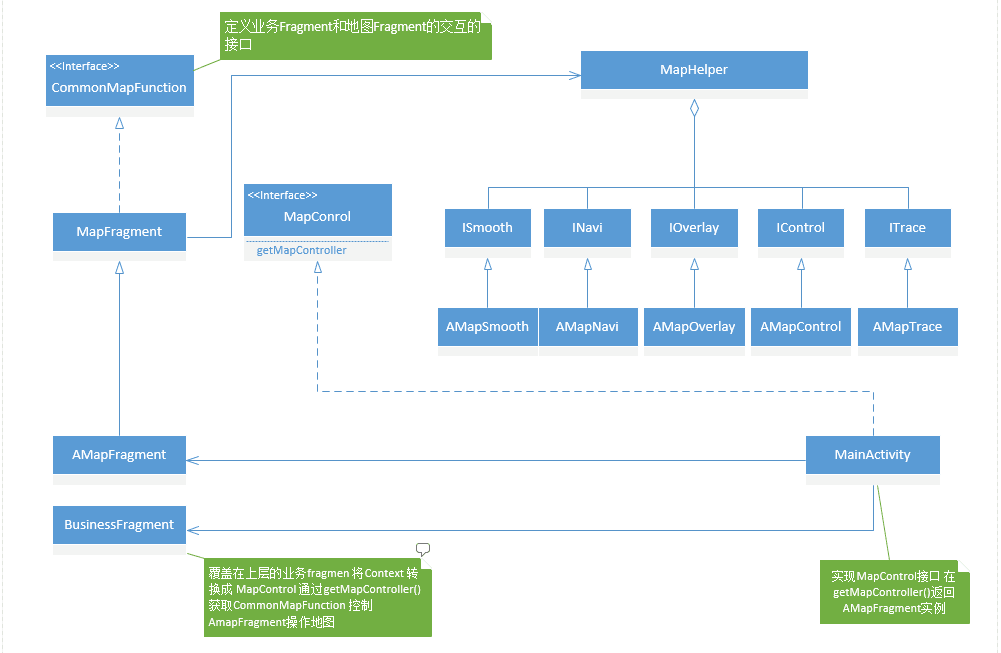
整体的架构大概可以分为三层:
第一层:地图结构抽象层 主要是地图的功能抽象,定义地图与外部交互的接口。
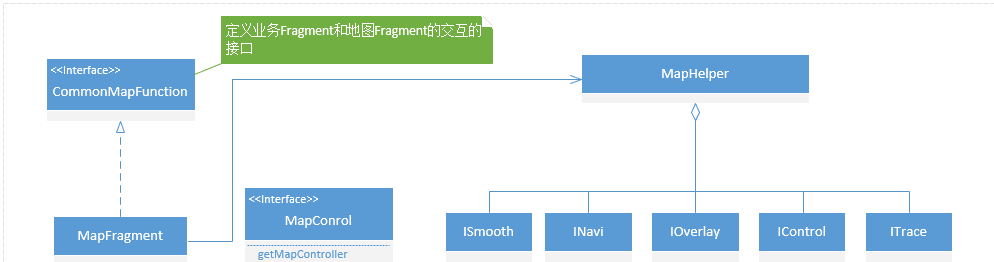
CommonMapFunction:定义了地图与顶层业务的交互接口,例如addMarker,searchRout,startNavi等等。
MapFragment:地图功能的抽象工具类,抽象地图的常见功能,关联MapHelper实现地图功能与具体地图Sdk的解耦。
MapHelper: 地图Sdk的具体载体,将地图功能抽象成五大块,分别是平滑移动(ISoomth),导航(INavi),覆盖物(IOverlay),控制(IControl ),轨迹纠偏(ITrace),并且定义相关的接口底层相应的Sdk实现。
MapControl:实现地图MapFragment和BusinessFragment的交互,由Activity实现 通过getMapController 返回一个实现了CommonFunction全部接口的地图实例Fragment对象,
第二层 :底层Sdk的具体地图功能实现。

主要是使用地图sdk实现地图的各种业务功能,如打点标注,导航等等。
第三层:对用户可见展示层
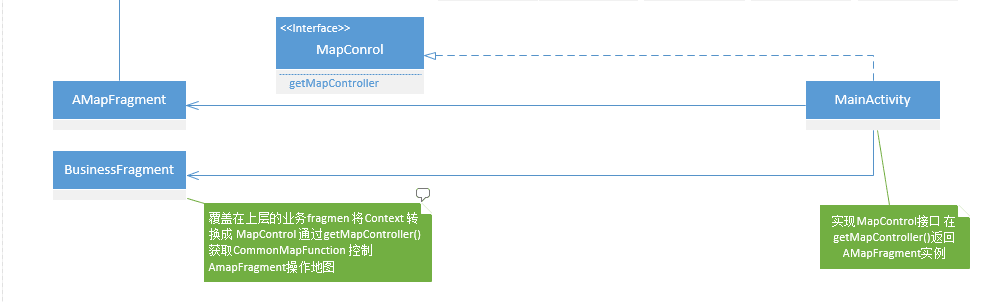
MainActivity:加载地图的具体活动窗口页面,将地图MapFragment置于底层,业务的BusinessFragment置于地图上方。实现了MapControl接口,通过getMapController 返回一个实现了CommonMapFunction的地图实例。主要代码如下:
public class MainActivity extends BaseActivity implements MapControl {

         public final static String FRAGMENT_TAG_MAP = "mapFragment";
         public final static String FRAGMENT_TAG_BUSSINESS = "bussinessFragment";

         MapFrament mapFrament = null;
         ZeusMornitorFragment mZeusMornitorFragment = null;

         @Override
         protected void onCreate(Bundle savedInstanceState) {
             setFullScreen();
             super.onCreate(savedInstanceState);
             mTitleView.setVisibility(View.GONE);
             final FragmentManager fragmentManager = getSupportFragmentManager();
             mapFrament = (MapFrament) fragmentManager.findFragmentByTag(FRAGMENT_TAG_MAP);
             if (mapFrament == null) {
                 mapFrament = MapFramentFactory.createMapFrament(MapFramentFactory.GAODE_MAP_CODE, new Bundle());
                 fragmentManager.beginTransaction()
                         .add(R.id.map_container, mapFrament, FRAGMENT_TAG_MAP)
                         .commit();
             }
             new Handler().postAtTime(new Runnable() {
                 @Override
                 public void run() {
                     mZeusMornitorFragment = (ZeusMornitorFragment) fragmentManager.findFragmentByTag(FRAGMENT_TAG_BUSSINESS);
                     if (mZeusMornitorFragment == null) {
                         mZeusMornitorFragment = ZeusMornitorFragment.getInstance(getIntent().getExtras());
                         fragmentManager.beginTransaction()
                                 .add(R.id.fragment_container, mZeusMornitorFragment, FRAGMENT_TAG_BUSSINESS)
                                 .commit();
                     }
                 }
             }, 200);
         }
         @Override
         @Override
         public CommonMapFunction getMapController() {
             return mapFrament;
         }
     }
AmapFragment:地图的具体实例,本文高德地图,实现了继承自MapFragment,实现了CommonFunction的全部接口,并且在MainActivity中通过接口MapControl 的getMapController返回。
BusinessFragment:覆盖在地图上面的界面展示,与服务端或者是其它的页面进行通信,然后操作地图实现相应的功能。通过getContext获取MainActivity的实例并强转成MapControl对象通过getMapController 获取地图操作的实例对象。代码如下:
@Override
     public void onAttach(Context context) {
         super.onAttach(context);
         if (context instanceof MapControl) {
             mapController = (MapControl) context;
         }
     private void otherMethod(){
           mapController.getMapController().setOnFiveMapTouchListener(this);
           }
最后提出几点需要注意的地方:
一.开发过程中注意坐标系的转换,国测局,百度地图,高德地图,用的不是同一个坐标系,在需要转化使用时,需要一定的转换,参见demo里的MapUtil类。
二.在初始化地图时,如果需要立马在地图进行操作如打一个点之类的,因为BusinessFragment和AMapFragment是并行运行的,因此可能打点的时候地图尚未加载完成,这时候要引入缓存队列,比如AddMarker的时候要先判断地图是否加载完成,没有则将数据存入一个缓存队列里,然后在onMapLoaded 的回调里去将缓存里的数据恢复操作到地图上。
@Override
     public void onMapLoaded() {
             isMapReady = true;
             showMyLoactionMarker();
             // 显示因为地图没有加载成功时添加到缓存的数据
             gotoMyLocation();
             addMarkerByMarkerHolder();
         }
     }
@Override
public void addCarStateMarker(FiveLatLng fiveLatLng, String title, int status, int pistionStyle) {
/**
* 如果地图未加载完成则将点缓存
*/
if (isMapReady) {
FiveMarker fiveMarker = mapHelper.getmIOverLay().addMarker(fiveLatLng, inflatCarStausView(title, status));
} else {
currentCarMarkerHolder = new MarkerHolder(fiveLatLng, title, status);
}
}Demo Github地址 https://github.com/pukaicom/MapLibForApp

