

PageObject
-
老马关于PageObject的定义
It should allow a software client to do anything and see anything that a human can
-
PageObject到底是个啥
将针对Page的
所有操作进行统一封装,如: 输入框中输入内容、点击按钮等
-
E2E的几个
痛点-
前端调整引起元素定位不到,如登录页面的
密码输入框的id被程序员不小心给删除了,执行E2E测试过程中就会无法定位到密码输入框,即使有错误提示,你就要找到所有的密码输入框并修改密码输入框元素定位 -
相同的页面操作,要在不同的地方使用,写N次,代码冗余,很不利于后期维护用户登录,这样的操作是最常见的。但我们经常会出现在每个需要
登录的地方,都写一遍用户登录
-
-
使用PageObject都可以解决
- 如果元素定位不到,只需要修改对应的页面的PageObject就好,
一处改动,关联的地方都OK了 - 将相同的页面操作,进行
抽离至PageObject中,大大减少代码的冗余
- 如果元素定位不到,只需要修改对应的页面的PageObject就好,
下面我们看一个实践: 如何将页面进行PageObject抽离
分离PageObject
原始代码
public class ExampleInstrumentedTest {
    public static final String STRING_TO_BE_TYPED_EMAIL = "EspressoDemo@mail.com";
    public static final String STRING_TO_BE_TYPED_EMAIL_PASSWORD = "123456";
    @Rule
    public ActivityTestRule mActivityRule = new ActivityTestRule<>(
            LoginActivity.class);
    @Test
    public void testAttemptLogin() {
        // Type text and then press the button.
        onView(withId(demo.test.espressodemo.R.id.email))
                .perform(typeText(STRING_TO_BE_TYPED_EMAIL), closeSoftKeyboard());
        onView(withId(demo.test.espressodemo.R.id.email))
                .check(matches(withText(STRING_TO_BE_TYPED_EMAIL)));
        onView(withId(demo.test.espressodemo.R.id.password))
                .perform(typeText(STRING_TO_BE_TYPED_EMAIL_PASSWORD), closeSoftKeyboard());
        onView(withId(demo.test.espressodemo.R.id.password))
                .check(matches(withText(STRING_TO_BE_TYPED_EMAIL_PASSWORD)));
        onView(withId(demo.test.espressodemo.R.id.email_sign_in_button))
                .perform(click());
    }
}从testAttemptLogin中可以看出测试流程是这样
- 第一步:
R.id.email输入内容STRING_TO_BE_TYPED_EMAIL,再验证输入内容是否为STRING_TO_BE_TYPED_EMAIL - 第二步:
R.id.password输入内容STRING_TO_BE_TYPED_EMAIL_PASSWORD,再验证输入内容是否为STRING_TO_BE_TYPED_EMAIL_PASSWORD - 第三步: 点击
R.id.email_sign_in_button按钮
这是一个最常见的E2E测试的编写方式,这样的编写方式,明显就
一步一步进入了我们上面提的 E2E的几个痛点中
分离手术
-
提取
登录PageObject:LoginPageObjectpublic class LoginPageObject { public static void inputEmail(String email){ onView(withId(demo.test.espressodemo.R.id.email)) .perform(typeText(email), closeSoftKeyboard()); onView(withId(demo.test.espressodemo.R.id.email)) .check(matches(withText(email))); } public static void inputPassword(String password){ onView(withId(demo.test.espressodemo.R.id.password)) .perform(typeText(password), closeSoftKeyboard()); onView(withId(demo.test.espressodemo.R.id.password)) .check(matches(withText(password))); } public static void clickLogin(){ onView(withId(demo.test.espressodemo.R.id.email_sign_in_button)) .perform(click()); } } -
使用
登录PageObject来实现之前的测试功能public class ExampleInstrumentedTest { public static final String email = "EspressoDemo@mail.com"; public static final String password = "123456"; @Rule public ActivityTestRule mActivityRule = new ActivityTestRule<>( LoginActivity.class); @Test public void testAttemptLogin() { // Type text and then press the button. LoginPageObject.inputEmail(email); LoginPageObject.inputPassword(password); LoginPageObject.clickLogin(); } }
至此,PageObject已经分离完成,我们肯定不会到此就结束的,
再把测试数据进行分离,便于整体数据的维护
- 提取
用户数据:UserInfo
public class UserInfo {
    public static final String email = "EspressoDemo@mail.com";
    public static final String password = "123456";
}再次调整测试代码
public class ExampleInstrumentedTest {
    @Rule
    public ActivityTestRule mActivityRule = new ActivityTestRule<>(
            LoginActivity.class);
    @Test
    public void testAttemptLogin() {
        // Type text and then press the button.
        LoginPageObject.inputEmail(UserInfo.email);
        LoginPageObject.inputPassword(UserInfo.password);
        LoginPageObject.clickLogin();
    }
}
走到这里,我们会发现,现在的测试很
清晰,也很好维护
测试仅有三步骤
Login输入邮箱地址Login输入密码Login点击登录按钮
有没有发现,这样的测试,更
符合业务.
总结
- 使用PageObject模型后,测试代码更加便于
维护,大大增加了可读性,减少了冗余代码 - PageObject就是将页面的操作行为,进行单独
分离和维护,统一管理 - PageObject/测试数据/测试脚本的关系
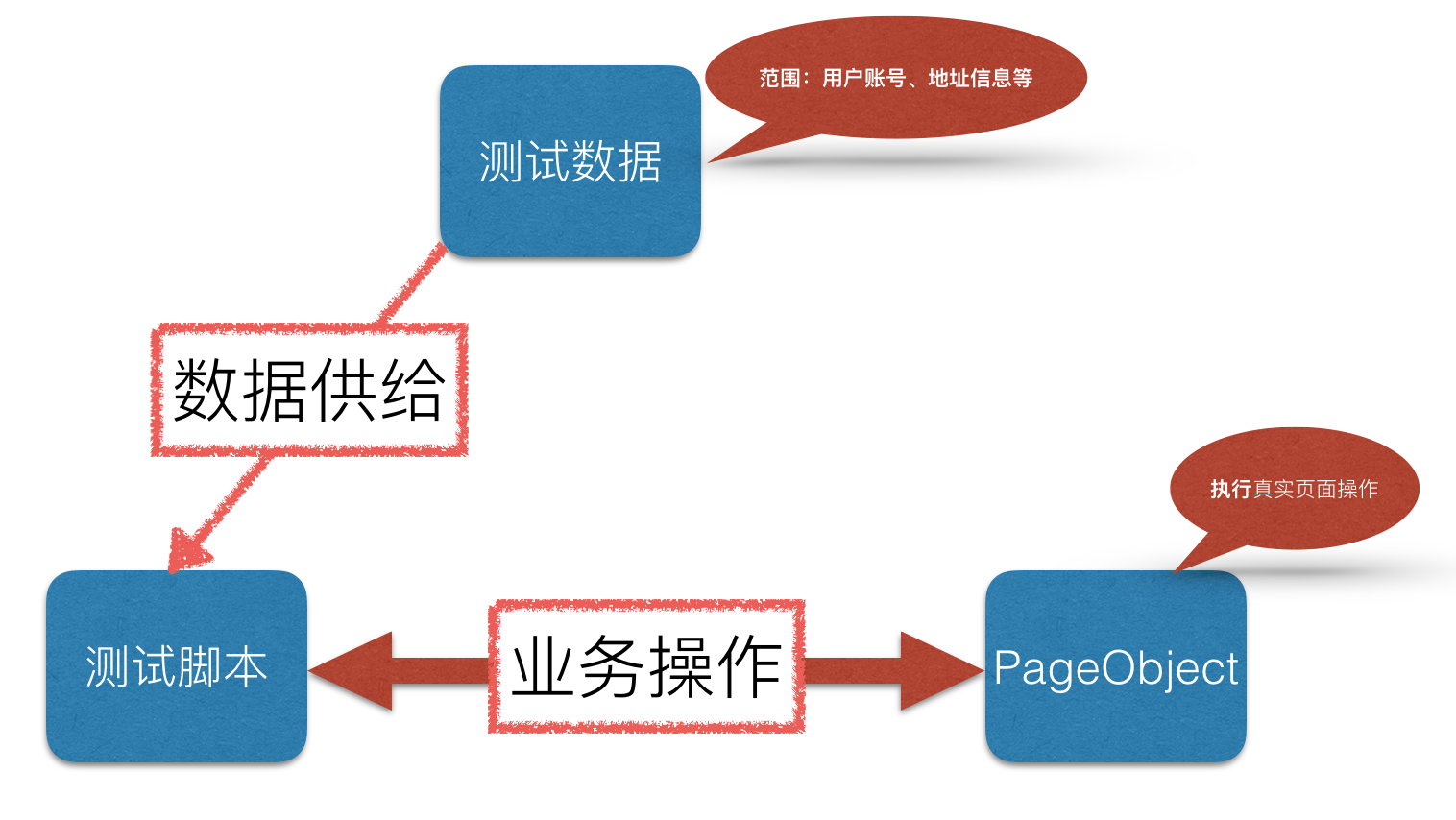 关系图
关系图 - 完整代码: github.com/aimer1124/E…

