

前言
最近在项目中的RN模块遇到一个需求,弹出一个Dialog,但是原生的Alert满足不了需求,只能自己去写一个,最后决定使用Modal去实现,话不多说,介绍开始,效果图如下:
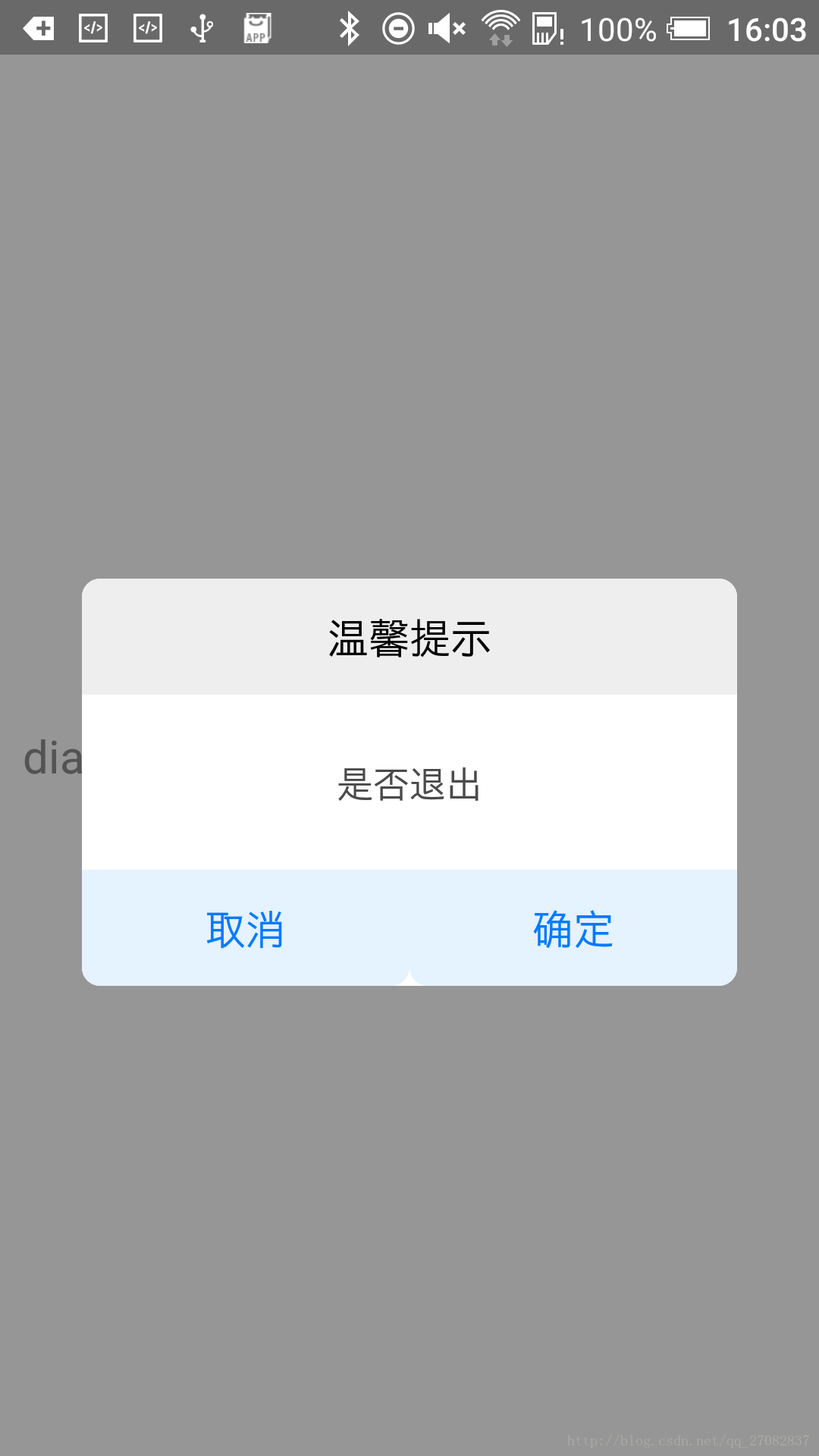
1.Modal介绍
 Modal视图在iOS原生开发中熟称:"模态视图",Modal进行封装之后,可以弹出来覆盖包含React Native跟视图的原生界面(例如:UiViewControllView,Activity)。在使用React Native开发的混合应用中使用Modal组件,该可以让你使用RN开发的内功呈现在原生视图的上面。

属性:
1.animationType enum('none', 'slide', 'fade') 动画类型  可选项为:none、slide、fade
2.onRequestClose function Android系统必须实现的方法  当modal隐藏时触发
3.onShow function    显示完回调方法
4.transparent bool 是否透明,默认不透明
5.visible  bool modal状态,隐藏还是显示
2.实现
在此是将modal封装成为一个组件以便后续在别的地方引用。
组件ModalDialog.js代码如下
/**
 * Created by peixuan.xie on 2017/2/28.
 */
import React, { Component } from 'react';
import {
    Modal,
    Text,
    TouchableHighlight,
    View ,
    StyleSheet,
    BackAndroid
} from 'react-native';

let Dimensions = require('Dimensions');
let SCREEN_WIDTH = Dimensions.get('window').width;//宽
let SCREEN_HEIGHT = Dimensions.get('window').height;//高


export default class ModalDialog extends Component {

    // 构造
    constructor(props) {
        super(props);
    }

    static propTypes = {
        _dialogTitle: React.PropTypes.string, //标题
        _dialogContent: React.PropTypes.string, //内容
        _dialogLeftBtnTitle: React.PropTypes.string,    //左按键标题
        _dialogRightBtnTitle: React.PropTypes.string,   //右按键标题
        _dialogLeftBtnAction: React.PropTypes.func.isRequired,  //左点击方法
        _dialogRightBtnAction: React.PropTypes.func.isRequired, //右点击方法
        _dialogVisible: React.PropTypes.bool,       //显示还是隐藏
    }

    static defaultProps = {
        _dialogTitle: '温馨提示',
        _dialogContent: '是否退出',
        _dialogLeftBtnTitle: '取消',
        _dialogRightBtnTitle: '确定',
        _dialogVisible: false,
    }

    render() {
        // onPress事件直接与父组件传递进来的属性挂接
        return (
            <Modal
                visible={this.props._dialogVisible}
                transparent={true}
                onRequestClose={() => {}} //如果是Android设备 必须有此方法
                >
                <View style={styles.bg}>
                    <View style={styles.dialog}>
                        <View style={styles.dialogTitleView}>
                            <Text style={styles.dialogTitle}>
                                {this.props._dialogTitle}
                            </Text>
                        </View>
                        <View style={styles.dialogContentView}>
                            <Text style={styles.dialogContent}>
                                {this.props._dialogContent}
                            </Text>
                        </View>

                        <View style={styles.dialogBtnView}>
                            <TouchableHighlight style={styles.dialogBtnViewItem} onPress={this.props._dialogLeftBtnAction}>
                                <Text style={styles.leftButton}>
                                    {this.props._dialogLeftBtnTitle}
                                </Text>
                            </TouchableHighlight>
                            <TouchableHighlight style={styles.dialogBtnViewItem} onPress={this.props._dialogRightBtnAction}>
                                <Text style={styles.rightButton}>
                                    {this.props._dialogRightBtnTitle}
                                </Text>
                            </TouchableHighlight>
                        </View>

                    </View>
                </View>
            </Modal>
        );
    }
}

const styles = StyleSheet.create({
    bg: {  //全屏显示 半透明 可以看到之前的控件但是不能操作了
        width: SCREEN_WIDTH,
        height: SCREEN_HEIGHT,
        backgroundColor: 'rgba(52,52,52,0.5)',  //rgba  a0-1  其余都是16进制数
        justifyContent: 'center',
        alignItems: 'center',
    },
    dialog: {
        width: SCREEN_WIDTH * 0.8,
        height: SCREEN_HEIGHT * 0.28,
        backgroundColor: 'white',
        borderRadius: 8,
    },
    dialogTitleView: {
        width: SCREEN_WIDTH * 0.8,
        height: SCREEN_HEIGHT * 0.08,
        justifyContent: 'center',
        alignItems: 'center',
        backgroundColor: '#EEEEEE',
        borderTopLeftRadius: 8,
        borderTopRightRadius: 8
    },
    dialogTitle: {
        textAlign: 'center',
        fontSize: 18,
        color: '#000000',
    },
    dialogContentView: {
        width: SCREEN_WIDTH * 0.8,
        height: SCREEN_HEIGHT * 0.12,
        justifyContent: 'center',
        alignItems: 'center',
    },
    dialogContent: {
        textAlign: 'center',
        fontSize: 16,
        color: '#4A4A4A',
    },
    dialogBtnView: {
        width: SCREEN_WIDTH * 0.8,
        height: SCREEN_HEIGHT * 0.08,
        flexDirection: 'row',
    },
    dialogBtnViewItem: {
        flex: 1,
        justifyContent: 'center',
        alignItems: 'center',
        backgroundColor: '#E5F2FF',
        borderBottomLeftRadius: 8,
        borderBottomRightRadius: 8,
    },
    leftButton: {
        fontSize: 18,
        color: '#007AFF',
        borderBottomLeftRadius: 8,
    },
    rightButton: {
        fontSize: 18,
        color: '#007AFF',
        borderBottomRightRadius: 8,
    }
});
调用代码如下:
ModalDialog.js
/**
 * Created by peixuan.xie on 2017/2/28.
 */
import React,{Component} from 'react';
import {
    Modal,
    Text,
    TouchableOpacity,
    View,
    StyleSheet
}from 'react-native';

import ModalDialog from '../component/ModalDialog.js'

export default class ModalDemo extends Component {

// 构造
    constructor(props) {
        super(props);
        // 初始状态
        this.state = {
            isDialogVisible: false
        };
    }

    showDialog(){
        this.setState({isDialogVisible:true});
    }

    hideDialog(){
        this.setState({isDialogVisible:false});
    }

    render() {
        return (
            <View style={styles.container}>
                <ModalDialog
                    _dialogVisible={this.state.isDialogVisible}
                    _dialogLeftBtnAction={()=> {this.hideDialog()}}
                    _dialogRightBtnAction={()=>{this.hideDialog()}}
                    />
                <TouchableOpacity onPress={()=>this.showDialog()}>
                    <Text style={styles.hello}>dialog</Text>
                </TouchableOpacity>

            </View>
        );
    }
}

var styles = StyleSheet.create({
    container: {
        flex: 1,
        justifyContent: 'center',
    },
    hello: {
        fontSize: 20,
        margin: 10,
        textAlign:'left'
    },
});项目源码地址:github.com/Jiepeixuan/…
参考:
【1】facebook.github.io/react-nativ…
【2】reactnative.cn/docs/0.42/m…
【3】blog.csdn.net/jj120522/ar…
【4】www.open-open.com/lib/view/op…
本文对你有帮助?欢迎扫码加入前端学习小组微信群:

