前言
UIProgressView是一个并不很常用的UI控件,其属性和方法也很少、简单明了。但是用过的朋友都知道,设置frame时高度并不会发生变化。其实高度可以这样调整:
progressView.transform = CGAffineTransformMakeScale(1.0f, 5.0f);当然,即使这样可能也无法满足项目需求。比如我,项目不仅要求进度条高度灵活变化而且还要在其上面显示文字。于是便想自己造个轮子XDProgressView,通过CALayer和UIView实现,尽可能的和系统原生的UIProgressView保持一致。
效果图
二者对比效果如下:
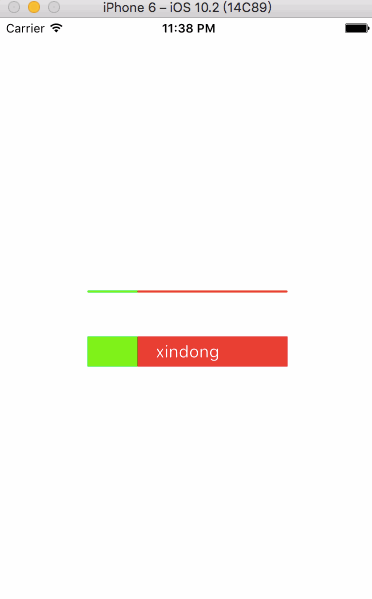
loadAnimation.gif
如果要问我XDProgressView和UIProgressView相比有什么不同?大致区别如下:
1. UIProgressView的下面这两个属性暂时没有去实现,个人觉得可有可无。
@property(nonatomic) UIProgressViewStyle progressViewStyle;
@property(nonatomic, strong, nullable) NSProgress *observedProgress
2.
XDProgressView可以由你心情任意设置高度,也可在上面显示文字。
代码
接口信息:
@interface XDProgressView : UIView

@property (nonatomic, assign) float progress; // 0.0 .. 1.0, default is 0.0. values outside are pinned.
@property (nonatomic, strong, nullable) UIColor *progressTintColor;
@property (nonatomic, strong, nullable) UIColor *trackTintColor;
@property (nonatomic, strong, nullable) UIImage *progressImage;
@property (nonatomic, strong, nullable) UIImage *trackImage;
@property (nonatomic, strong, nullable) NSString *text;
@property (nonatomic, strong, nullable) UIColor *textColor; // default is white color.
@property (nonatomic, strong, nullable) UIFont  *font; // default is 17.0.
@property (nonatomic, assign) NSTextAlignment textAlignment; // default is left.

- (void)setProgress:(float)progress animated:(BOOL)animated;

@end
部分源码:
+ (Class)layerClass {
    return [XDProgressLayer class];
}

- (void)setProgress:(float)progress animated:(BOOL)animated {
    if (_progress == progress) return;
    _progress = progress > 1.0 ? 1.0 : progress < 0.0 ? 0.0 : progress;
    XDProgressLayer *layer = (XDProgressLayer *)self.layer;
    layer.progress = _progress;
    [(XDProgressLayer *)self.layer setProgressWithAnimated:animated];
}
#pragma mark - Property
- (void)setProgress:(float)progress {
    [self setProgress:progress animated:NO];
}完整demo请戳这里XDProgressView......