

前言
一般情况下,如果前端工程师要调试 iOS 设备 Safari 浏览器上的表现,需要在 iOS 系统设置中为 Safari 开启 Web 检查器,并用 macOS 上的 Safari 开发者工具调试。但是早已习惯了强大的 Chrome DevTools 的我们,在使用 Safari 的开发者工具时,还是会有诸多不便。
因此 Google 利用 Apple 的 远程 Web 检查器服务 制作了可以将 Chrome DevTools 的操作转为 Apple 远程 Web 检查器服务调用的协议和工具:iOS WebKit Debug Proxy(又称 iwdp)。
下面就来简单介绍一下如何使用这个工具来让我们用 Chrome DevTools 调试 iOS Safari 页面。
环境依赖
- macOS/Linux (Linux 需要查看 Usage)
- Xcode
- Chrome
- ios-webkit-debug-proxy
$ brew update
$ brew install libimobiledevice
$ brew install ios-webkit-debug-proxy
How to Start
iwdp 支持 iOS 模拟器,也支持真机设备,但使用模拟器时,必须先启动模拟器,再启动代理(iwdp)。
启动 iOS 模拟器,或者直接用物理设备(iPhone/iPad):
Bash# Xcode changes these paths frequently, so doublecheck them
$ SDK_DIR="/Applications/Xcode.app/Contents/Developer/Platforms/iPhoneSimulator.platform/Developer/SDKs"
$ SIM_APP="/Applications/Xcode.app/Contents/Developer/Applications/Simulator.app/Contents/MacOS/Simulator"
$ $SIM_APP -SimulateApplication $SDK_DIR/iPhoneSimulator8.4.sdk/Applications/MobileSafari.app/MobileSafari
修改 iOS Safari 设置,并打开一个 Safari 浏览器选项卡:
Settings > Safari > Advanced > Web Inspector = ON
设置 > Safari > 高级 > Web 检查器 = 启用
开启代理
用 -f 可以选择指定的 DevTools UI 介面,这个介面可以是任意的,这里我们用 Chrome 自带的开发者工具:
$ ios_webkit_debug_proxy -f chrome-devtools://devtools/bundled/inspector.html
Listing devices on :9221
Connected :9222 to SIMULATOR (SIMULATOR)
Connected :9223 to Daft Punk (我的真机)
打开 http://localhost:9221/,如下: 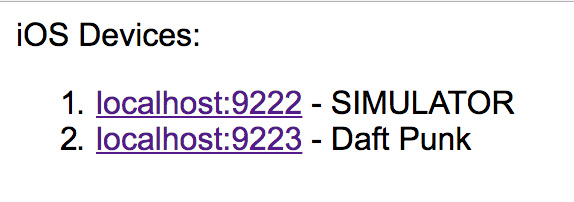
进入 SIMULATOR 的页面:
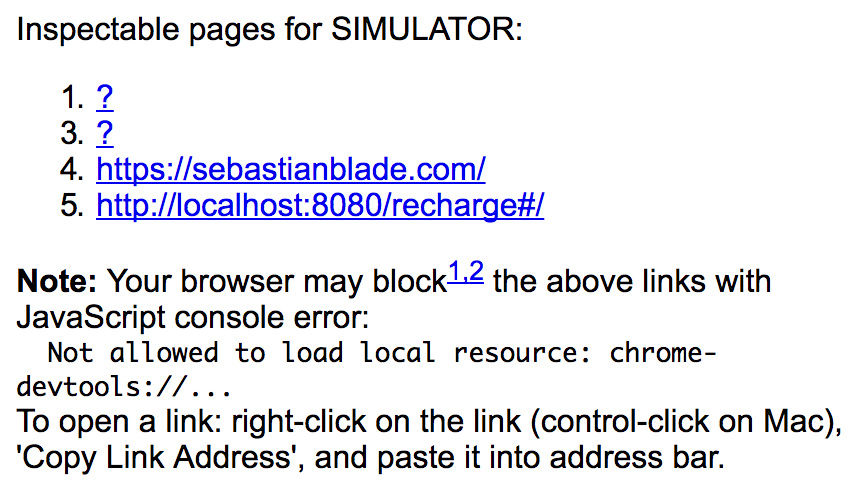
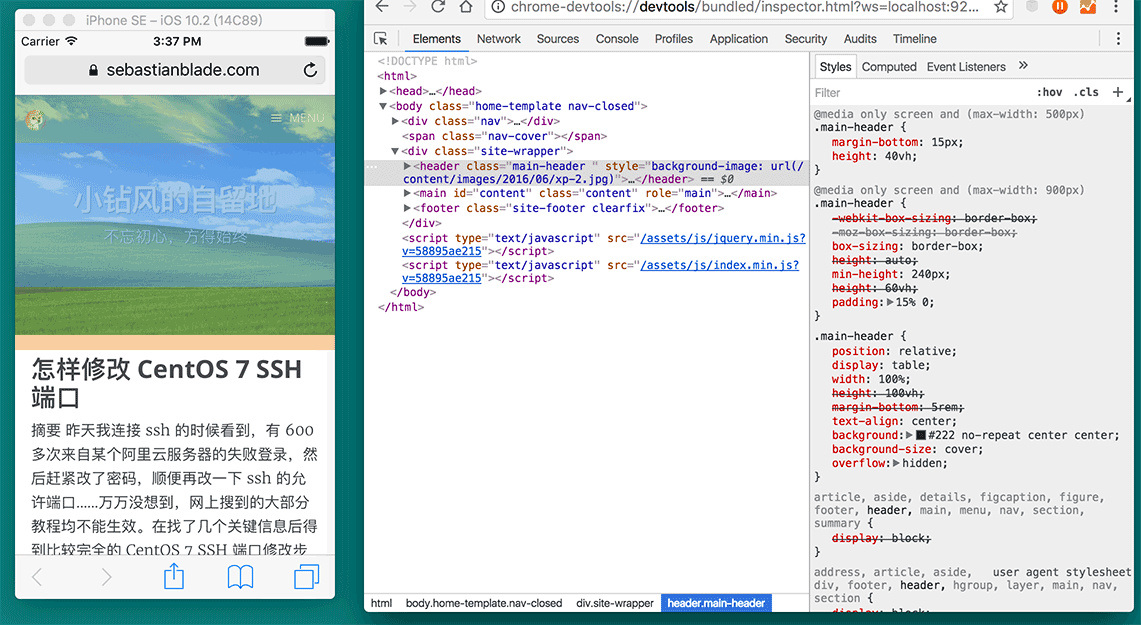
注意:因为 Chrome 不允许打开 chrome-devtools:// 协议的链接,所以需要我们复制链接在地址栏手动打开:
错误处理
问题 1:
Bash$ ios_webkit_debug_proxy
Listing devices on :9221
Could not connect to lockdownd. Exiting.: Permission deniedConnected :9222 to SIMULATOR (SIMULATOR)
Invalid message _rpc_reportConnectedDriverList: <dict>
<key>WIRDriverDictionaryKey</key>
<dict>
</dict>
</dict>
解决方式:
Bashsudo chmod +x /var/db/lockdown
问题 2:
Bash$ ios_webkit_debug_proxy
Listing devices on :9221
Connected :9222 to SIMULATOR (SIMULATOR)
Invalid message _rpc_reportConnectedDriverList: <dict>
<key>WIRDriverDictionaryKey</key>
<dict>
</dict>
</dict>
Disconnected :9222 from SIMULATOR (SIMULATOR)
send failed: Socket is not connected
解决方式,重装依赖工具:
Bash$ brew uninstall --force ignore-dependencies -libimobiledevice ios-webkit-debug-proxy
$ brew install libimobiledevice ios-webkit-debug-proxy
问题3:
Bash$ ios_webkit_debug_proxy
Listing devices on :9221
Connected :9222 to SIMULATOR (SIMULATOR)
send failed: Socket is not connected
recv failed: Operation timed out
解决方式,指定 UI 介面:
Bash$ ios_webkit_debug_proxy -f chrome-devtools://devtools/bundled/inspector.html
问题4:
连接 iOS 10 设备可能会出以下报错,无法连接设备:
Bash$ ios_webkit_debug_proxy -f chrome-devtools://devtools/bundled/inspector.html
Listing devices on :9221
Could not connect to lockdownd. Exiting.: Broken pipe
Unable to attach <id> inspector
更新最新的 libimobiledevice 即可:
Bash$ brew upgrade libimobiledevice --HEAD
