Learn how to animate buttons, labels, imageView without creating bunch of classes
 <img class="progressiveMedia-noscript js-progressiveMedia-inner" src="https://cdn-images-1.medium.com/max/2000/1*s_XZ1RzyZgyON36tM4zZCA.png">
You’ve heard knowledge without execution is like having teeth but only drinking milk. You ask, “Okay, enough of theories. How can I start using POP in my app?” 🤔
In order to drink the most juice out of your time with me, I expect my readers to understand Completion Handlers, and create basic implementation using Protocol. If you aren’t comfortable with them, I ask you to kindly leave and then watch some of my articles and videos below and come back after.
Prerequisite:
No Fear Closures Part 2: Completion Handlers (Medium)
Intro to Protocol Oriented Programming (Medium)
Protocol Oriented Programming Series (YouTube)
What I think you will learn
You will learn how to use Protocol to animate UI Components such as UIButton, UILabel, and UIImageView. I will also show you the differences between traditional methods vs the POP way.
😎
UI
The demo app called, “Welcome to My House Party”. I’ve made this app to verify if I’ve invited you to my house party. You have to enter your invitation code. There is no logic behind this app. If you press the button, things will animate regardless. There are four components that animate, passcodeTextField, loginButton, errorMessageLabel, and profileImageView.
There are two animations: 1. Buzzing 2. Popping (Flash)
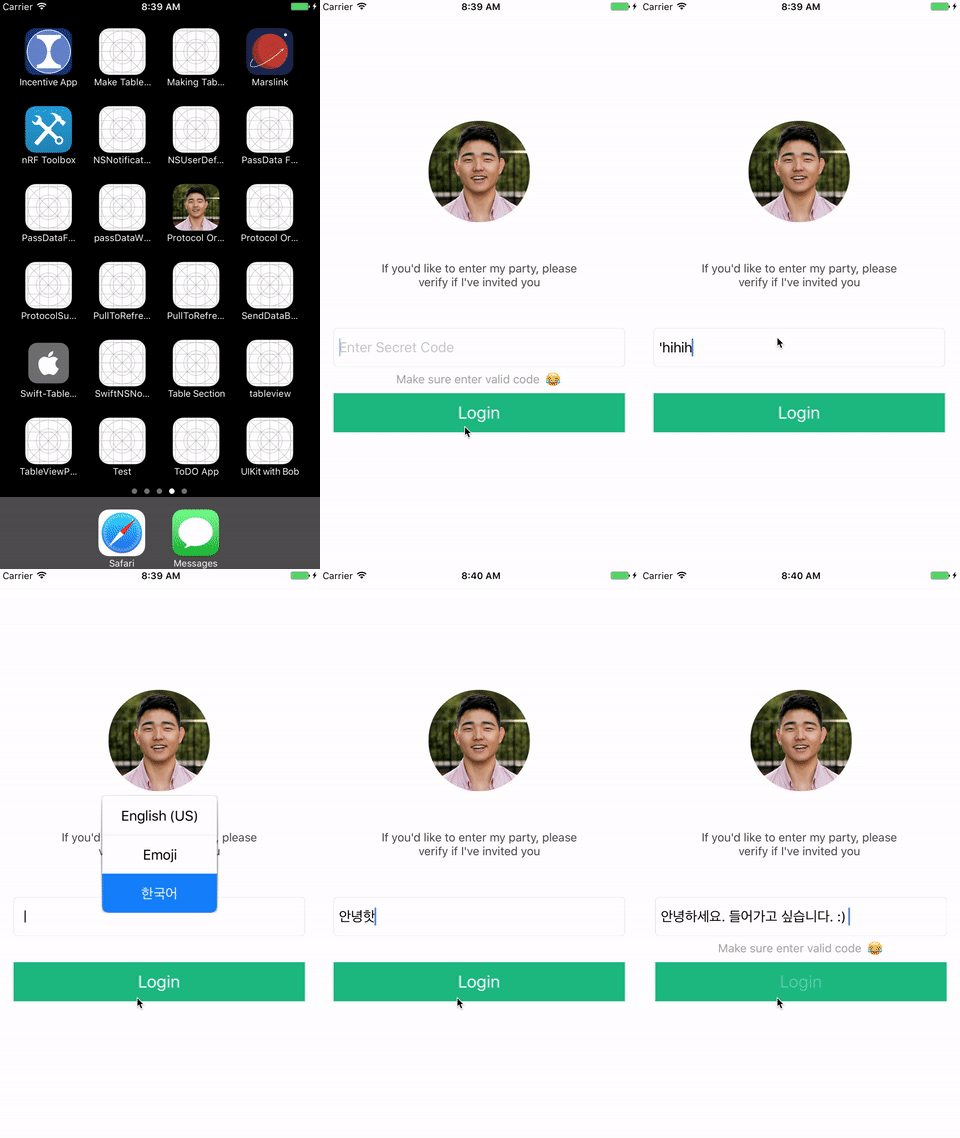
Don’t worry about getting it down. Just flow like water with me for now. If you are impatient, just scroll, download the source code, and you may dismiss.
Things Back Then
To fully grasp the power of POP in real apps, let’s compare with the traditional. Let’s say you want to animate UIButton and UILabel, You might subclass both and then add a method to it.
class BuzzableButton: UIButton {
 func buzz() { // Animation Logic }
}
class BuzzableLabel: UIButton {
func buzz() { // Animation Logic }
}
So, let it “buzz” when you tap on the login button
@IBOutlet wear var errorMessageLabel: BuzzableButton!
@IBOutlet wear var loginButton: BuzzableLabel!
@IBAction func didTapLoginButton(_ sender: UIButton) {
 errorMessageLabel.buzz()
 loginButton.buzz()
}
Do you see how we are repeating ourselves? The animation logic is at least 5 lines, and there is a “better” way to go about using extension. Since UILabel and UIButton belong to UIView,
we can add
extension UIView {
 func buzz() { // Animation Logic }
}
So, BuzzableButton and BuzzableLabel contains that buzz method. Now, we are no longer repeating ourselves.
class BuzzableButton: UIButton {}
class BuzzableLabel: UIButton {}
@IBOutlet wear var errorMessageLabel: BuzzableButton!
@IBOutlet wear var loginButton: BuzzableLabel!
@IBAction func didTapLoginButton(_ sender: UIButton) {
 errorMessageLabel.buzz()
 loginButton.buzz()
}
Okay, then why POP? 🤔
As you’ve seen, the errorMessageLabel, which states, “Please enter valid code 😂” also has one more animation to it. It appears and fades out. So, how do we go about with the traditional method?
There are two ways to go about this. First, you could, again, add another method to UIView
// Extend UIView
extension UIView {
 func buzz() { // Animation Logic }
 func pop() { // UILabel Animation Logic }
}
However, if we add methods to UIView, the pop method will be available to other UIComponents besides UILabel. We are inheriting the unnecessary functions, and those UIComponents become bloated by default
or to emphasize, as f.
The second way is by subclassing UILabel,
// Subclass UILabel
class BuzzableLabel: UILabel {
 func pop() { // UILabel Animation Logic }
}
This works okay. However, we might want to change the class name to BuzzablePoppableLabel to indicate clearly just by looking at the name.
Now, what if you want to add one more method to UILabel to clearly indicate what the label does, you might have to change the class name to, like BuzzablePoppableFlashableDopeFancyLovelyLabel. This isn’t sustainable.
Of course, I’m taking it pretty far.
Protocol Oriented Programming
Okay, you have come this far, and you haven’t recommended this article yet, gently tap that and continue.
Okay, enough of subclassing. Let’s create a protocol first. Buzzing first.
I didn’t insert code for animations since they are quite long, and gists aren’t natively supported by mobile apps.
protocol Buzzable {} extension Buzzable where Self: UIView {
func buzz() { // Animation Logic}
}
So, any UIComponents that conform to the Buzzable protocol would have the buzz method associated. Unlike extension only those who conform to the protocol will have that method. Also, where Self: UIView is used to indicate that the protocol should be only conformed to UIView or components that inherit from UIView
Now, that’s it. Let’s apply Buzzable to loginButton, passcodeTextField, errorMessageLabel, and profileImageView But, wait, how about Poppable?
Well, same thing.
protocol Poppable {}extension Poppable where Self: UIView {
func pop() { // Pop Animation Logic }
}
Now, it’s time to make it real!
 class BuzzableTextField: UITextField, Buzzable {}
class BuzzableButton: UIButton, Buzzable {}
class BuzzableImageView: UIImageView, Buzzable {}
class BuzzablePoppableLabel: UILabel, Buzzable, Poppable {}

class LoginViewController: UIViewController {
  @IBOutlet weak var passcodTextField: BuzzableTextField!
  @IBOutlet weak var loginButton: BuzzableButton!
  @IBOutlet weak var errorMessageLabel: BuzzablePoppableLabel!
  @IBOutlet weak var profileImageView: BuzzableImageView!

  @IBAction func didTabLoginButton(_ sender: UIButton) {
    passcodTextField.buzz()
    loginButton.buzz()
    errorMessageLabel.buzz()
    errorMessageLabel.pop()
    profileImageView.buzz()
  }
}
The cool thing about POP is that you can even apply pop to any other UIComponents without subclassing at all.
class MyImageView: UIImageVIew, Buzzable, Poppable Now, the name of the class can be more flexible because you already know available methods based on the protocols you conform, and the name of each protocol describe the class. So, you no longer have write something like, MyBuzzablePoppableProfileImage.
Too long, didn’t read:
No more Subclassing
Flexible Class Name
Feel caught up as a Swift Developer
Next Step
Once I get 200 likes on this article, and you want to learn how to apply POP to UITableView and UICollectionView, make sure follow me on Medium!
Resource
Last Remarks
I hope you’ve learned something new with me. If you have, please tap that ❤️ to indicate, “yes”. If you’ve found this implementation useful, make sure share so that iOS developers all around the world begin to use Protocol Oriented Views to write fewer lines of code and modularize. Come back on Sat 8am EST!
Swift Conference
Andyy Hope, a friend of mine, is currently organizing one of the largest and greatest Swift Conferences at Melbourne, Australia. It’s called Playgrounds. I just wanted to help out with spreading the word. There are speakers from mega-billion dollar companies such as Instagram, IBM, Meet up, Lyft, Facebook, Uber. Here is the website for more info.
Playgrounds 🐨 (@playgroundscon) | TwitterThe latest Tweets from Playgrounds 🐨 (@playgroundscon). ● Swift and Apple Developers Conference ● Melbourne, February…twitter.com
Shoutout
Thanks to my VIPs: Nam-Anh, Kevin Curry, David, Akshay Chaudhary for their support. I’ve met David this week in Seoul, Korea. He needed some help with Bluetooth… I’m like, “😨, let me try”.
Upcoming Course
I’m currently creating a course called, The UIKit Fundamentals with Bob on Udemy. This course is designed for Swift intermediates. It’s not one of those “Complete Courses”. It’s specific. Over 180 readers have sent me emails since last month. If interested, join me for free until released: bobleesj@gmail.com
Coaching
If you are looking for help to switch your career as an iOS developer or create your dream apps that would help the world, contact me for more detail.
Feel free to check out my recommended articles:
Pass Data between ViewControllers with NSNotification
Top 10 Ground Rules for iOS Developers