是怎样干掉支付宝的界面的
这边的产品需求,需要在某些场景下进行清场操作,将所有的ViewController堆栈清空,页面回滚到首页。我们内部的页面都能够完成这个操作。但是有些第三方的页面,怎么都搞不掉。比如支付宝的页面。因为是引入的SDK,没有代码,所以第一方案,向支付宝侧提出需求,要求提供一个函数接口,能够清退他们的界面,但是他们说不能满足该需求。所以,我们只能开始了黑科技之旅。
##首先寻找支付宝的View
因为我们的目标是干掉支付宝SDK自己弹出来的页面,那么我们第一件事情就是找到该页面。我们使用Xcode7.1的视图查看功能,找到了支付宝的View:
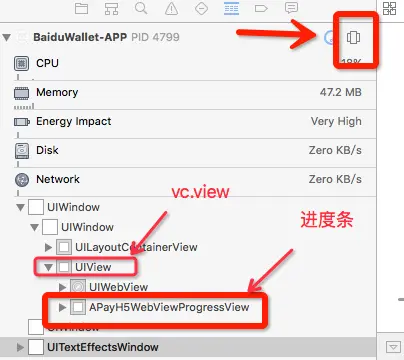
一个叫做APayH5WebViewProgressView的东西,一看就是支付宝WebView上的进度条。他的父View是个UIView,很明显这个是某个UIViewController的根view。而且这个View很奇怪的是直接加载了Window上面。好霸道!!!怪不得我们的界面都被盖住了。
也就是说现在我们只要把这个VC的view给remove掉就可以干掉支付宝的霸道的页面了。而现在这个页面没有什么特异性的信息。但是可以推理那个UIViewController一定是某个特殊的类,自有其类名。而且因为是直接addSubView在keywindow上的,则必然在某个地方会持有该VC的实例。发现支付宝的AlipaySDK是个单例,这可是个常驻内存的东西。如果什么东西要被持有的话,肯定和他脱不了干系。要不看看这个类的实例变量吧。
- (void) printClassIVar:(NSString*)name
{
    unsigned int count ;
    Ivar *list = class_copyIvarList(NSClassFromString(name), &count);
    for (int i = 0; i < count; i++) {
        Ivar p = *list;
        const char* name = ivar_getName(p);
        NSLog(@"name is %s \t  type is  %s", name, ivar_getTypeEncoding(p));
        list++;
    }
}
- (void) testAlipay
{
    [self printClassIVar:@"AlipaySDK"];
//
//    id value = [[AlipaySDK defaultService] valueForKey:@"bizContext"];
//

}
输出为:
 name is _schemeStr        type is  @"NSString"
 name is _executingOrderStr        type is  @"NSString"
 name is _completionBlock          type is  @?
 name is _route    type is  @"APayRoute"
 name is _processor        type is  @"APayProcessor"
 name is _alertOkAction    type is  @"NSDictionary"
 name is _alertCancelAction        type is  @"NSDictionary"
 name is _bizContext       type is  @"APayBizContext"
看到AlipaySDK这个单例持有的变量实例中有几个比较特殊:
- APayRoute
- APayBizContext
- APayProcessor
这三个类一看就是支付宝的类,我们用上面类似的方法,查看这三个类的属性变量,就真的发现了一个webViewController。
APayRoute的属性变量结构:
 name is _infostr          type is  @"nsstring"
 name is _schemestr        type is  @"nsstring"
 name is _resultblock      type is  @?
 name is _wapviewcontroller        type is
没错就是那个wapviewcontroller。不管怎样我们找到这个VC了。那么剩下的就是干掉他了。
##删掉界面
其实就是从AlipaySDK的单例这段内存开始,一直往下找实例。直到找到这个VC为止。
    id cla = NSClassFromString(@"AlipaySDK");
    if ([cla respondsToSelector:@selector(defaultService)]) {
        id defaultService = [cla performSelector:@selector(defaultService)];
        id value = [defaultService valueForKey:@"route"];
        if ([value isKindOfClass:NSClassFromString(@"APayRoute")]) {
            if ([value respondsToSelector:@selector(wapViewController)]) {
                UIViewController* vc = [value performSelector:@selector(wapViewController)];
                if (vc) {
                    [vc.view removeFromSuperview];
                }
            }
        }
    }
然后直接用removeFromSuperview删掉这个霸道的页面。
-
欢迎关注iOS开发公共账号 iOS开发知识 :扫描下方二维码关注

版权声明:转载请保留作者信息,恶意转载作者将保留追究法律责任的权利。BY:yishuiliunian