Supercharged transition engine for iOS. Build your custom view transitions with few lines of code or even no code at all. Inspired by Polymer's neon-animated-pages and Keynote's Magic Move.


Introduction
Hero is a library for building iOS view controller transitions. It provides an layer on top of the UIKit's cumbersome transition APIs. Making custom transitions an easy task for developers.
Features
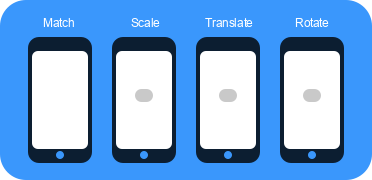
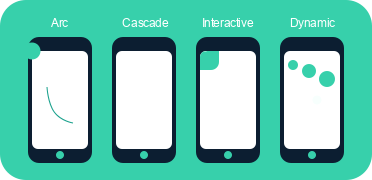
With Hero, you can easily mix & match these effects to build your own custom transition.
At its core, Hero is similar to Keynote's Magic Move. It checks the heroID property on all source and destinations views. Every matched view pairs are then automatically transitioned from it's old
state to it's new state.
Hero can also construct animations for unmatched views. It is easy to define these animations via the heroModifiers property. Hero will run these animations alongside the Magic Move animations. All
of these can by interactive, too.
Hero does not make any assumption about how the view is built or structured. It will not modify any of your views' states other than hidding them during the animation. This means that it works with autolayout, programmatic layout, UICollectionView, UITableView, UINavigationController etc...
NOTE: Hero won't work on iPhone 7 Simulators due to a bug by Apple. Try using other simulators or a real device when working with Hero.
Video Demo (Example Project)
Usage
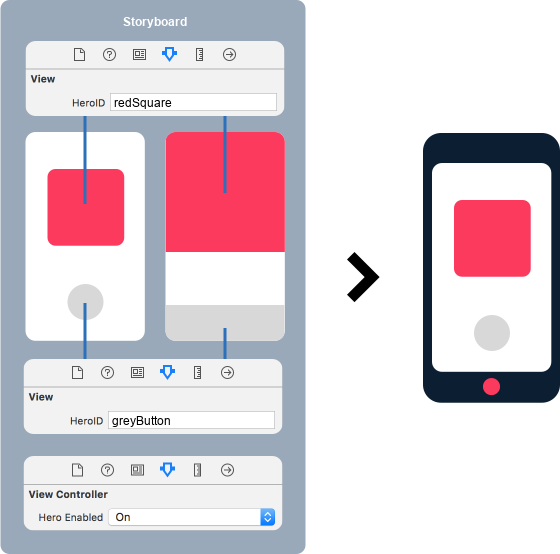
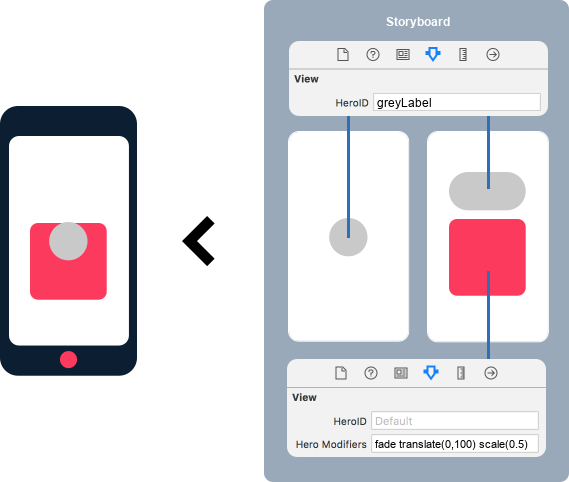
For detailed explaination about Hero ID, Hero Modifiers, and supported animations:
Read detailed usage guide
This library is completely new and under heavy development. Might not be stable for production use, but there will be more things to come.
License
Hero is available under the MIT license. See the LICENSE file for more info.