介绍
以编写Vue日志插件为例,讲述从插件的开发到部署。
最终结果在 Github vue-logger
开发
这里忽略 eslint、editorconfig
代码初始
不用一步到位开发插件,先抛开 Vue保证自己的代码能够运行
// this.$http.
var logger = {
  debug: false,
  prefix: 'Yunhuni:'
}

let levels = ['log', 'info', 'warn']
for (let level of levels) {
 logger[level] = function() {
  if (!this.debug) return;
  if (typeof console == "undefined") return;
  var slice = Array.prototype.slice;
  var args = slice.call(arguments, 0);
  args.unshift(this.prefix + level);
  console[level].apply(console, args);
 }
}

logger.log('aaaa')
logger.info('aaaa')
logger.warn('aaaa')
改装成 Vue 的插件
上面代码能跑了,然后再根据 Vue Plugin 文档 接入我们的代码
//@logger.js
const vLogger = {}
vLogger.install = function (Vue, options) {
  if (vLogger.installed) return
  var logger = {
    dev: true,
    prefix: '',
    levels: ['log', 'warn', 'debug']
  }
  if (options) {
    for (const key of Object.keys(options)) {
      if (key === 'levels') {
        logger[key] = logger[key].concat(options[key])
      } else {
        logger[key] = options[key]
      }
    }
  }
  for (const level of logger.levels) {
    logger[level] = function () {
      if (!this.dev || typeof console === 'undefined') return
      var args = Array.from(arguments)
      args.unshift(`[${this.prefix} :: ${level}]`.toUpperCase())
      console[level].apply(console, args)
    }
  }
  Vue.prototype.$log = logger
  Vue.log = logger
}
export default vLogger
使用
import vueLogger from './logger'
Vue.use(vueLogger, { prefix: new Date(), dev: true })

// @xxx.vue
this.$log.log('hello vue log') // => [MON DEC 05 2016 15:35:00 GMT+0800 (CST) :: LOG] hello world
Options
| Name | Type | Default |
|---|---|---|
| prefix | string | None |
| dev | boolean | true |
| levels | array | [‘log’, ‘warn’, ‘debug’] |
本地调试
本地安装调试 npm install <插件源码目录>,当然你也可以通过 npm link 来安装,参考地址
编写测试用例
使用 jasmine
// 测试 level
import Vue from 'vue'
import Logger from '../../src/index.js'

describe("this.$log", function() {

  Vue.use(Logger)
  const vm = new Vue()
  const str = 'hello world'

  it("level log out hello world", function() {
    expect(vm.$log.log).toBeDefined()
    vm.$log.log = jasmine.createSpy('log')
    vm.$log.log(str)
    expect(vm.$log.log).toHaveBeenCalledWith(str);
  });

  it("level debug out hello world", function() {
    expect(vm.$log.debug).toBeDefined()
    vm.$log.debug = jasmine.createSpy('debug')
    vm.$log.debug(str)
    expect(vm.$log.debug).toHaveBeenCalledWith(str);
  });

  describe("Vue log", function() {
    it("level debug out hello world", function() {
      expect(vm.$log.debug).toBeDefined()
      Vue.log.debug = jasmine.createSpy('debug')
      Vue.log.debug(str)
      expect(Vue.log.debug).toHaveBeenCalledWith(str);
    });
  });
});
// 测试 options
import Vue from 'vue'
import Logger from '../../src/index.js'

// reinstall plugin
Logger.installed = false

describe("Vue log option", function() {

  Vue.use(Logger, { dev: false, prefix: 'prefix', levels: ['info']})

  it("with dev false", function() {
    expect(Vue.log.dev).toBeDefined()
    expect(Vue.log.dev).toEqual(false);
  });

  it("with prefix 'prefix'", function() {
    expect(Vue.log.prefix).toEqual('prefix')
  });

  it("add level info", function() {
    expect(Vue.log.info).toBeDefined()
  });
});
部署
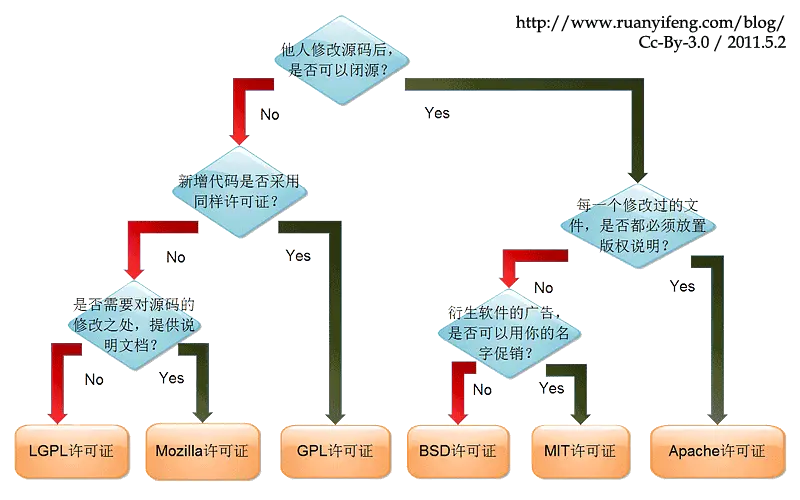
如何选择开源许可证
参考阮老师的文章
添加项目徵章
通过这些微章简单直白的了解该项目的状态。 可以在这个网站 获取你想要svg,一般格式如下
https://img.shields.io/npm//.svg
例如这里需要版本号,协议,下载次数,CI状态(circleci)




想要让图样点击可跳转
[](https://circleci.com/gh/Lluvio/vue-logger)
发布
首先需要在本地添加 npm 用户
npm adduser # 账号密码和你在 npm 官网注册的账号一致
如果存在 ~/.npmrc 可能会导致 npm adduser 失败。成功登入之后,直接执行 npm publish。发布成功之后可以在 npm 官网的个人首页查看已经发布项目。
如果想要指定特定标签,参考这里
最后
欢迎指正!