今天闲来没事,就进行自定义了一个alertView,进行简单的封装了一下。
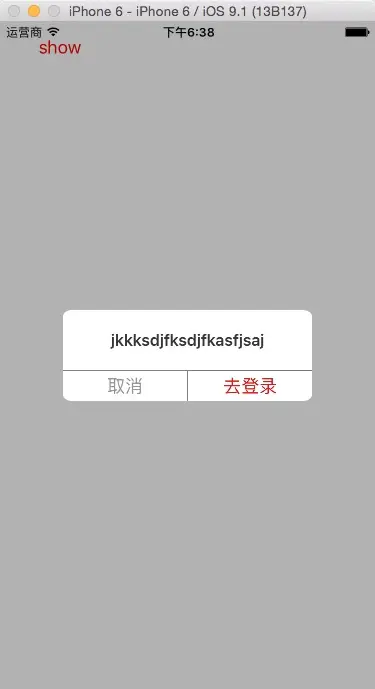
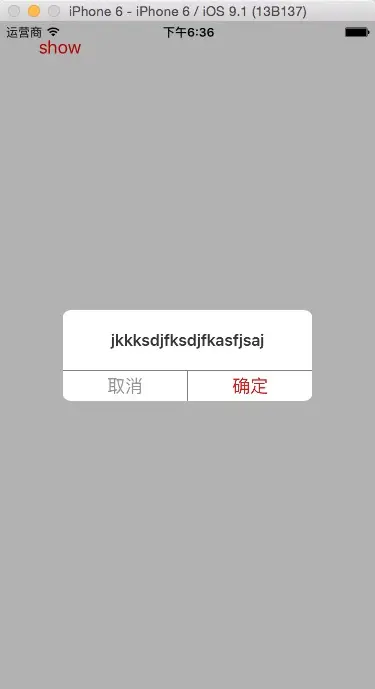
目前封装的alertView由title、cancelButton以及confirmButton组成,这里由协议和block两种方法进行实现。
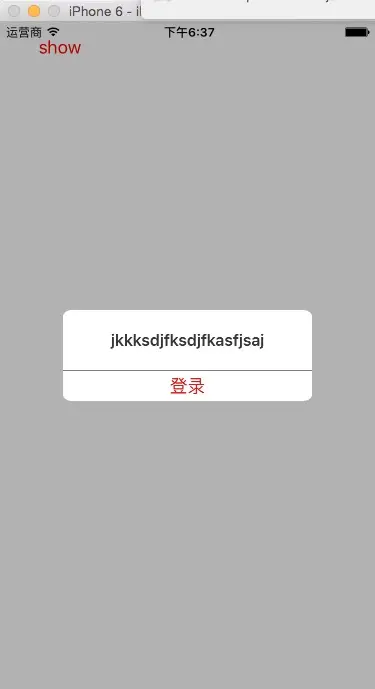
按钮可以自定义,可以显示一个。这个要持续进行更新,以后打算有时间进行细节的修改,以及进行图片等其他需求的增加。
具体直接上部分代码:
//
//  XFAlertView.m
//  AlertView
//
//  Created by Sheffi on 16/11/11.
//  Copyright © 2016年 Sheffi. All rights reserved.
//

#import "XFAlertView.h"

static CGFloat font = 16;
static CGFloat Normal_Label_H = 60;
static CGFloat Button_H = 30;
#define BOTTOMVIEW_W SCREEN_W/3*2
#define BUTTON_W (BOTTOMVIEW_W - 0.5)/2

@implementation XFAlertView


-(instancetype)initWithFrame:(CGRect)frame{

    self = [super initWithFrame:frame];
    if (self) {

    }
    return self;
}

//Handel UI Method
-(void)setUILayoutWithTitle:(NSString *)title andCancelButtonTitle:(NSString *)cancelButtonTitle andConfirmButtonTitle:(NSString *)confirmButtonTitle{
    CGFloat leftJianGe = (SCREEN_W - BOTTOMVIEW_W)/2;
    _bottomView = [[UIView alloc]init];
    [self addSubview:_bottomView];
    [self setFilletWith:_bottomView];
    _bottomView.backgroundColor = AlertViewColor;

    _titleLabel = [[UILabel alloc]initWithFrame:CGRectMake(0, 0, BOTTOMVIEW_W, Normal_Label_H)];
    _titleLabel.numberOfLines = 0;
    _titleLabel.backgroundColor = [UIColor whiteColor];
    _titleLabel.font = [UIFont boldSystemFontOfSize:font];
    _titleLabel.textAlignment = NSTextAlignmentCenter;
    _titleLabel.textColor = TitleTextColor;
    _titleLabel.text = title;
    [self size_heightToFitWith:_titleLabel];
    [_bottomView addSubview:_titleLabel];


    _cancelButton = [UIButton buttonWithType:UIButtonTypeCustom];
    _cancelButton.backgroundColor = [UIColor whiteColor];
    _cancelButton.tag = AlertActionCancel;
    CGFloat y = _titleLabel.frame.size.height + _titleLabel.frame.origin.y + 0.5;
    _cancelButton.frame = CGRectMake(0, y, BUTTON_W, Button_H);
   // [_cancelButton setTitle:CancelButtonText forState:UIControlStateNormal];
    [_cancelButton setTitleColor:CancelButtonTextColor forState:UIControlStateNormal];
    [_cancelButton addTarget:self action:@selector(alertButtonAction:) forControlEvents:UIControlEventTouchUpInside];
    [_bottomView addSubview:_cancelButton];


    _confirmButton = [UIButton buttonWithType:UIButtonTypeCustom];
    _confirmButton.frame = CGRectMake(_cancelButton.frame.size.width + _cancelButton.frame.origin.x + 0.5, y, BUTTON_W, Button_H);
    _confirmButton.tag = AlertActionConfirm;
    _confirmButton.backgroundColor = [UIColor whiteColor];
   // [_confirmButton setTitle:ConfirmButtonText forState:UIControlStateNormal];
    [_confirmButton setTitleColor:ConfirmButtonTextColor forState:UIControlStateNormal];
    [_confirmButton addTarget:self action:@selector(alertButtonAction:) forControlEvents:UIControlEventTouchUpInside];
    [_bottomView addSubview:_confirmButton];
    CGFloat height = _confirmButton.frame.size.height + _confirmButton.frame.origin.y - _titleLabel.frame.origin.y;
    _bottomView.frame = CGRectMake(leftJianGe, self.center.y - height / 2, BOTTOMVIEW_W, height);

    //判断按钮标题是否为空,如果只设置一个按钮标题则显示一个按钮;不设置,则显示默认的两个按钮(取消 确定)。
    if ([self isBlankString:cancelButtonTitle] || [self isBlankString:confirmButtonTitle]) {
        if ([self isBlankString:cancelButtonTitle] && [self isBlankString:confirmButtonTitle]) {
            [_cancelButton setTitle:CancelButtonText forState:UIControlStateNormal];
            [_confirmButton setTitle:ConfirmButtonText forState:UIControlStateNormal];
            return;
        }
        _cancelButton.hidden = YES;
        _confirmButton.frame = CGRectMake(0, y, BOTTOMVIEW_W, Button_H);
        [_confirmButton setTitle:[self isBlankString:cancelButtonTitle] ? confirmButtonTitle:cancelButtonTitle forState:UIControlStateNormal];
        _confirmButton.tag = [self isBlankString:cancelButtonTitle] ? AlertActionConfirm : AlertActionCancel;
        return;
    }
    _confirmButton.hidden = NO;
    _cancelButton.hidden = NO;
    [_confirmButton setTitle:confirmButtonTitle forState:UIControlStateNormal];
    [_cancelButton setTitle:cancelButtonTitle forState:UIControlStateNormal];
}

//Tap Button Method
-(void)alertButtonAction:(UIButton *)sender{
    [self hiddenAlertView];
    if ([_delegate respondsToSelector:@selector(alertActionWith:)]) {
        [_delegate alertActionWith:sender.tag];
    }
//    if (_tapAlertButtonBlock) {
//        _tapAlertButtonBlock(sender.tag);
//    }

}

+(XFAlertView *)alertShowInViewController:(UIViewController *)showVC andTitle:(NSString *)title andCancelButtonTitle:(NSString *)cancelButtonTitle andConfirmButtonTitle:(NSString *)confirmButtonTitle{
    XFAlertView *alertView = [[XFAlertView alloc]initWithFrame:CGRectMake(0, 0, SCREEN_W, SCREEN_H)];
    [alertView setUILayoutWithTitle:title andCancelButtonTitle:cancelButtonTitle andConfirmButtonTitle:confirmButtonTitle];
    alertView.backgroundColor = AlertViewColor;
    [showVC.view addSubview:alertView];
    [showVC.view bringSubviewToFront:alertView];
    return alertView;
}

//#pragma mark - **************** block
//static TapAlertButtonBlock _tapAlertButtonBlock;
//+(void)setAlertActionForBlock:(TapAlertButtonBlock)block{
//    _tapAlertButtonBlock = block;
//}

#pragma mark - **************** 自定义方法
//高度自适应
-(void)size_heightToFitWith:(UIView *)view{
    CGFloat width = view.frame.size.width;
    CGFloat height = view.frame.size.height;
    [view sizeToFit];
    view.frame = CGRectMake(view.frame.origin.x, view.frame.origin.y, width, view.frame.size.height
再来看几个效果图:
资源下载:download.csdn.net/detail/qq_3…
github下载:github.com/goingmyway1…
以上如有错误,请指出,非常感谢。
微信公众号:不靠谱程序猿 微信公众号:Sheffi_Programmer
Github:Sheffi(https://github.com/goingmyway1)
新浪微博:Sheffi567
掘金:Sheffi(https://juejin.cn/user/1486195449411421)·