转载请注明出处:blog.csdn.net/linglongxin… 【DylanAndroid的博客】
Android中常用的动画都在这里了,包含了基本的动画【透明度动画,缩放动画,旋转动画,位移动画】;还有就是这四种动画的组合实现;
还有布局动画,就是在加载布局时的动画;还有Activity跳转的动画。
效果图如下:
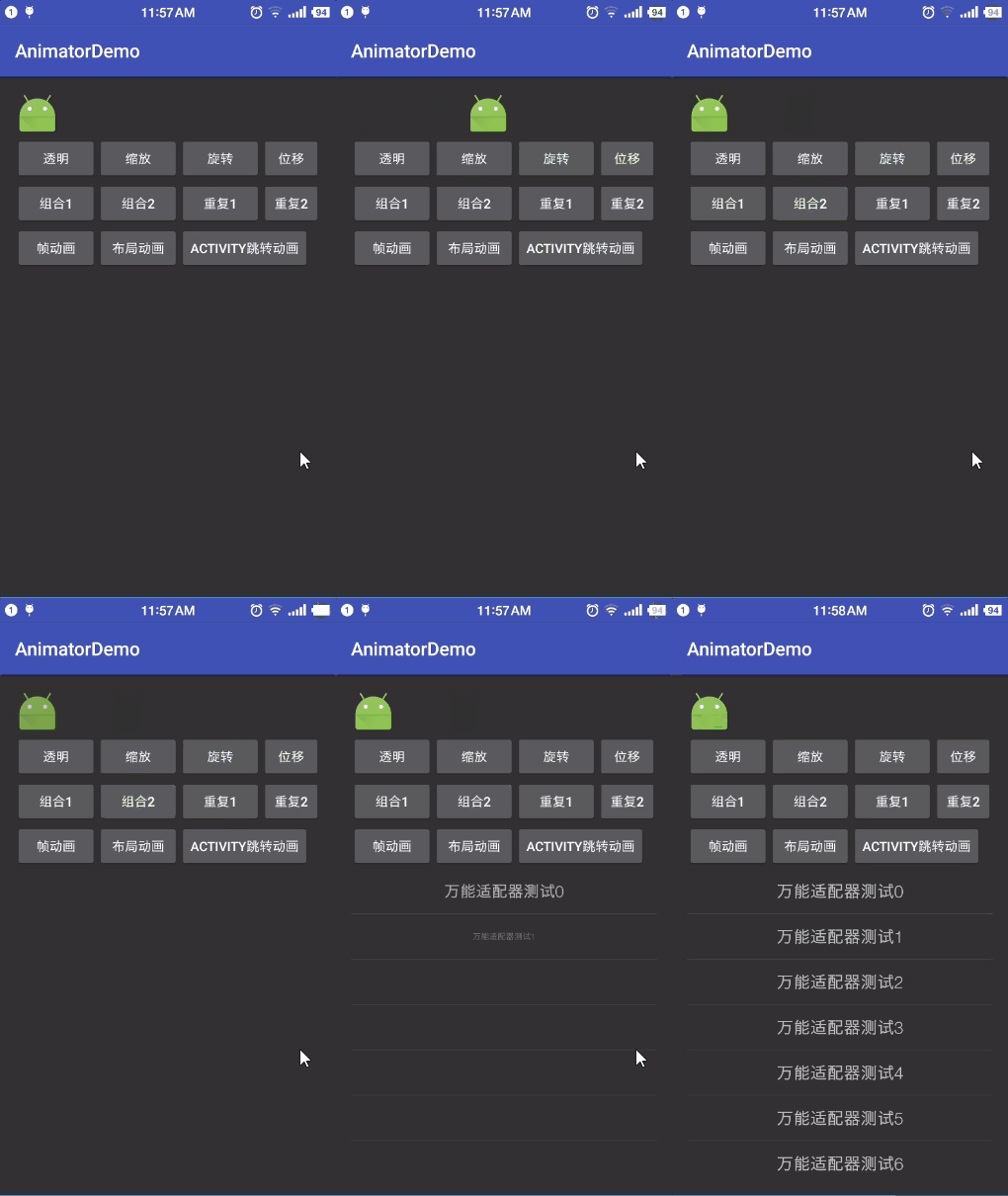
1. Android基础动画
- 透明度动画
   /**
    * 第一个参数fromAlpha为 动画开始时候透明度
    *第二个参数toAlpha为 动画结束时候透明度
     */
     Animation animation = new AlphaAnimation(0, 1);
     animation.setDuration(1000);
v.startAnimation(animation);- 缩放动画
 /**
 * 第一个参数fromX为动画起始时 X坐标上的伸缩尺寸
 * 第二个参数toX为动画结束时 X坐标上的伸缩尺寸
 * 第三个参数fromY为动画起始时Y坐标上的伸缩尺寸
 * 第四个参数toY为动画结束时Y坐标上的伸缩尺寸
 * 说明: 0.0表示收缩到没有;1.0表示正常无伸缩;值小于1.0表示收缩;值大于1.
 * 第五个参数pivotXType为动画在X轴相对于物件位置类型
 * 第六个参数pivotXValue为动画相对于物件的X坐标的开始位置
 * 第七个参数pivotXType为动画在Y轴相对于物件位置类型
 * 第八个参数pivotYValue为动画相对于物件的Y坐标的开始位置
 */
Animation animation = new ScaleAnimation(0, 1
animation.setDuration(1000);
iv.startAnimation(animation);- 旋转动画
    /**
     * 第一个参数fromDegrees为动画起始时角度
     * 第二个参数toDegrees为动画结束角度
     * 第三个参数pivotXType为动画在X轴相对于物件位置类型
     * 第四个参数pivotXValue为动画相对于物件的X坐标的开始位置
     * 第五个参数pivotXType为动画在Y轴相对于物件位置类型
     * 第六个参数pivotYValue为动画相对于物件的Y坐标的开始位置
     */
    Animation animation = new RotateAnima
    animation.setDuration(1000);
iv.startAnimation(animation);- 位移动画
    /**
     * 第一个参数fromDegrees为动画起始时角度
     * 第二个参数toDegrees为动画结束角度
     * 第三个参数pivotXType为动画在X轴相对于物件位置类型
     * 第四个参数pivotXValue为动画相对于物件的X坐标的开始位置
     * 第五个参数pivotXType为动画在Y轴相对于物件位置类型
     * 第六个参数pivotYValue为动画相对于物件的Y坐标的开始位置
     */
     Animation animation = new RotateAnima
     animation.setDuration(1000);
     iv.startAnimation(animation);
     /**
      * 第一个参数fromXDelta为动画起始时的x坐标
      * 第二个参数toXDelta为动画结束时的x坐标
      * 第三个参数fromYDelta为动画起始时的y坐标
      * 第四个参数toYDelta为动画结束时的y坐标
      */
      Animation animation = new Translat
      animation.setDuration(2000);
      /**设置插值器:先加速,后减速**/
      animation.setInterpolator(new Acce
      iv.startAnimation(animation);
2.组合动画
先播放缩放动画,完成后播放旋转动画
Animation animation = AnimationUtils.loadAnimation(this, R.anim.scale);
            iv.startAnimation(animation);
            final Animation animation2 = AnimationUtils.loadAnimation(this, R.anim.rotate);
            animation.setAnimationListener(new Animation.AnimationListener() {
                @Override
                public void onAnimationStart(Animation animation) {

                }

                @Override
                public void onAnimationEnd(Animation animation) {

                    iv.startAnimation(animation2);
                }

                @Override
                public void onAnimationRepeat(Animation animation) {

                }
            });
先播放旋转动画,完成后播放位移动画,在xml中设置第二个动画执行的等待时间
- 重复的透明度动画-闪烁
AlphaAnimation alphaAnimation = new AlphaAnimation(0.1f, 1.0f);
                alphaAnimation.setDuration(1000);
                alphaAnimation.setRepeatCount(10);
                /**倒序重复REVERSE  正序重复RESTART**/
                alphaAnimation.setRepeatMode(Animation.REVERSE);
iv.startAnimation(alphaAnimation);- 重复的位移动画-抖动
 Animation translateAnimation = new TranslateAnimation(-10, 10, 0, 0);
                translateAnimation.setDuration(100);
                translateAnimation.setRepeatCount(10);
                /**倒序重复REVERSE  正序重复RESTART**/
                translateAnimation.setRepeatMode(Animation.REVERSE);
                iv.startAnimation(translateAnimation);
3.帧动画
在drawable文件夹下建立文件
“`xml
4.布局动画
这是一个ListView的加载布局动画- 先建立动画文件,从透明到不透明并且大小从0到原大小
- 在activity中的用法
 ListView listView = (ListView) findViewById(R.id.listview);
        List datas = new ArrayList<>();
        for (int i = 0; i < 18; i++) {
            datas.add("万能适配器测试" + i);
        }
        LayoutAnimationController layoutAnimationController= new        LayoutAnimationController(AnimationUtils.loadAnimation(this, R.anim.zoom_in));
        layoutAnimationController.setOrder(LayoutAnimationController.ORDER_NORMAL);
        listView.setLayoutAnimation(layoutAnimationController);
        listView.setAdapter(new CommonAdapter(this, datas, R.layout.item) {

            @Override
            protected void convertView(View item, String s) {
                TextView textView = CommonViewHolder.get(item, R.id.textView);
                textView.setText(s);
            }
        });
5.Activity跳转动画
- 退出动画:从不透明到透明并且大小从原大小到0
- 进入动画:从透明到不透明并且大小从0到原大小
- 在Activity中的用法
  startActivity(new Intent(this,SecondActivity.class));
                overridePendingTransition(R.anim.zoom_in,R.anim.zoom_out);