

版权声明:本文为博主原创文章,未经博主允许不得转载。
一般我们都是这样使用setContentView:
    @Override
    protected  onCreate(Bundle savedInstanceState) {
        super.onCreate(savedInstanceState);
        setContentView(R.layout.activity_main);
    }
但setContentView是怎么把我们的布局加载显示到界面上的呢?我们进去setContentView看一下:
    public  setContentView( layoutResID) {
        getWindow().setContentView(layoutResID);
        initWindowDecorActionBar();
    }
这里的getWindow返回一个Window对象mWindow,然后调用其setContentView方法,不过Window是一个抽象类,因此这个mWindow一定是Window的某个子类对象(你可以打印它的Class对象直接看是什么类型),它在Activity的attach方法(这个方法在ActivityThread启动Activity时会被调用)中被初始化:
final  attach(Context context, ActivityThread aThread,
            Instrumentation instr, IBinder token, int ident,

        mWindow  PolicyManagermakeNewWindow(this);
再看PolicyManager的makeNewWindow方法:
    public static Window makeNewWindow(Context context) {
        return sPolicy.makeNewWindow(context);
    }
这个sPolicy是通过反射创建的,是一个com.android.internal.policy.impl.Policy对象,它的makeNewWindow方法:
    public Window makeNewWindow(Context context) {
        return  PhoneWindow(context);
    }
到这里就可以确定Activity的getWindow()返回的其实是一个PhoneWindow对象,注意PhoneWindow所在的包为com.android.internal.policy.impl。也就是说getWindow().setContentView(layoutResID);调用的就是PhoneWindow的setContentView方法:
    @Override
    public  setContentView( layoutResID) {
         (mContentParent == ) {
            installDecor();
        }  {
            mContentParent.removeAllViews();
        }
        //把我们的布局添加到mContentParent中
        mLayoutInflater.inflate(layoutResID, mContentParent);
        //这个cb其实就是我们的Activity对象
        final Callback cb = getCallback();
         (cb !=  && !isDestroyed()) {
            cb.onContentChanged();
        }
    }
代码逻辑并不复杂,就是把我们的布局添加到mContentParent(ViewGroup对象)中。它的赋值是在installDecor中进行的:
private  installDecor() {
         (mDecor  ) {
            mDecor  generateDecor();

        }
         (mContentParent  ) {
            mContentParent  generateLayout(mDecor);

        }
    }
先看mDecor是一个什么东西:
    protected DecorView generateDecor() {
        return  DecorView(getContext(), -);
    }
原来是一个DecorView对象,DecorView类继承自FrameLayout,它是PhoneWindow的内部类。
再来看generateLayout方法:
protected ViewGroup generateLayout(DecorView decor) {
        // Apply data from current theme.

        TypedArray a = getWindowStyle();

         (false) {
            System..println("From style:");
            String s = "Attrs:";
             ( i = ; i < com.android.internal.R.styleable.Window.length; i++) {
                s = s +  + Integer.toHexString(com.android.internal.R.styleable.Window[i]) +
                        + a.getString(i);
            }
            System..println(s);
        }

        mIsFloating = a.getBoolean(com.android.internal.R.styleable.Window_windowIsFloating, false);
         flagsToUpdate = (FLAG_LAYOUT_IN_SCREEN|FLAG_LAYOUT_INSET_DECOR)
                & (~getForcedWindowFlags());
         (mIsFloating) {
            setLayout(WRAP_CONTENT, WRAP_CONTENT);
            setFlags(, flagsToUpdate);
        }  {
            setFlags(FLAG_LAYOUT_IN_SCREEN|FLAG_LAYOUT_INSET_DECOR, flagsToUpdate);
        }

         (a.getBoolean(com.android.internal.R.styleable.Window_windowNoTitle, false)) {
            requestFeature(FEATURE_NO_TITLE);
        }   (a.getBoolean(com.android.internal.R.styleable.Window_windowActionBar, false)) {
            // Don't allow an action bar if there is no title.
            requestFeature(FEATURE_ACTION_BAR);
        }

         (a.getBoolean(com.android.internal.R.styleable.Window_windowActionBarOverlay, false)) {
            requestFeature(FEATURE_ACTION_BAR_OVERLAY);
        }

         (a.getBoolean(com.android.internal.R.styleable.Window_windowActionModeOverlay, false)) {
            requestFeature(FEATURE_ACTION_MODE_OVERLAY);
        }

         (a.getBoolean(com.android.internal.R.styleable.Window_windowFullscreen, false)) {
            setFlags(FLAG_FULLSCREEN, FLAG_FULLSCREEN & (~getForcedWindowFlags()));
        }

         (a.getBoolean(com.android.internal.R.styleable.Window_windowTranslucentStatus,
                false)) {
            setFlags(FLAG_TRANSLUCENT_STATUS, FLAG_TRANSLUCENT_STATUS
                    & (~getForcedWindowFlags()));
        }

         (a.getBoolean(com.android.internal.R.styleable.Window_windowTranslucentNavigation,
                false)) {
            setFlags(FLAG_TRANSLUCENT_NAVIGATION, FLAG_TRANSLUCENT_NAVIGATION
                    & (~getForcedWindowFlags()));
        }

         (a.getBoolean(com.android.internal.R.styleable.Window_windowOverscan, false)) {
            setFlags(FLAG_LAYOUT_IN_OVERSCAN, FLAG_LAYOUT_IN_OVERSCAN&(~getForcedWindowFlags()));
        }

         (a.getBoolean(com.android.internal.R.styleable.Window_windowShowWallpaper, false)) {
            setFlags(FLAG_SHOW_WALLPAPER, FLAG_SHOW_WALLPAPER&(~getForcedWindowFlags()));
        }

         (a.getBoolean(com.android.internal.R.styleable.Window_windowEnableSplitTouch,
                getContext().getApplicationInfo().targetSdkVersion
                        >= android.os.Build.VERSION_CODES.HONEYCOMB)) {
            setFlags(FLAG_SPLIT_TOUCH, FLAG_SPLIT_TOUCH&(~getForcedWindowFlags()));
        }

        a.getValue(com.android.internal.R.styleable.Window_windowMinWidthMajor, mMinWidthMajor);
        a.getValue(com.android.internal.R.styleable.Window_windowMinWidthMinor, mMinWidthMinor);
         (a.hasValue(com.android.internal.R.styleable.Window_windowFixedWidthMajor)) {
             (mFixedWidthMajor == ) mFixedWidthMajor =  TypedValue();
            a.getValue(com.android.internal.R.styleable.Window_windowFixedWidthMajor,
                    mFixedWidthMajor);
        }
         (a.hasValue(com.android.internal.R.styleable.Window_windowFixedWidthMinor)) {
             (mFixedWidthMinor == ) mFixedWidthMinor =  TypedValue();
            a.getValue(com.android.internal.R.styleable.Window_windowFixedWidthMinor,
                    mFixedWidthMinor);
        }
         (a.hasValue(com.android.internal.R.styleable.Window_windowFixedHeightMajor)) {
             (mFixedHeightMajor == ) mFixedHeightMajor =  TypedValue();
            a.getValue(com.android.internal.R.styleable.Window_windowFixedHeightMajor,
                    mFixedHeightMajor);
        }
         (a.hasValue(com.android.internal.R.styleable.Window_windowFixedHeightMinor)) {
             (mFixedHeightMinor == ) mFixedHeightMinor =  TypedValue();
            a.getValue(com.android.internal.R.styleable.Window_windowFixedHeightMinor,
                    mFixedHeightMinor);
        }

        final Context context = getContext();
        final  targetSdk = context.getApplicationInfo().targetSdkVersion;
        final boolean targetPreHoneycomb = targetSdk < android.os.Build.VERSION_CODES.HONEYCOMB;
        final boolean targetPreIcs = targetSdk < android.os.Build.VERSION_CODES.ICE_CREAM_SANDWICH;
        final boolean targetHcNeedsOptions = context.getResources().getBoolean(
                com.android.internal.R..target_honeycomb_needs_options_menu);
        final boolean noActionBar = !hasFeature(FEATURE_ACTION_BAR) || hasFeature(FEATURE_NO_TITLE);

         (targetPreHoneycomb || (targetPreIcs && targetHcNeedsOptions && noActionBar)) {
            addFlags(WindowManager.LayoutParams.FLAG_NEEDS_MENU_KEY);
        }  {
            clearFlags(WindowManager.LayoutParams.FLAG_NEEDS_MENU_KEY);
        }

         (mAlwaysReadCloseOnTouchAttr || getContext().getApplicationInfo().targetSdkVersion
                >= android.os.Build.VERSION_CODES.HONEYCOMB) {
             (a.getBoolean(
                    com.android.internal.R.styleable.Window_windowCloseOnTouchOutside,
                    false)) {
                setCloseOnTouchOutsideIfNotSet();
            }
        }

        WindowManager.LayoutParams params = getAttributes();

         (!hasSoftInputMode()) {
            params.softInputMode = a.getInt(
                    com.android.internal.R.styleable.Window_windowSoftInputMode,
                    params.softInputMode);
        }

         (a.getBoolean(com.android.internal.R.styleable.Window_backgroundDimEnabled,
                mIsFloating)) {
            /* All dialogs should have the window dimmed */
             ((getForcedWindowFlags()&WindowManager.LayoutParams.FLAG_DIM_BEHIND) == ) {
                params.flags |= WindowManager.LayoutParams.FLAG_DIM_BEHIND;
            }
             (!haveDimAmount()) {
                params.dimAmount = a.getFloat(
                        android.R.styleable.Window_backgroundDimAmount, f);
            }
        }

         (params.windowAnimations == ) {
            params.windowAnimations = a.getResourceId(
                    com.android.internal.R.styleable.Window_windowAnimationStyle, );
        }

        // The rest are only done if this window is not embedded; otherwise,
        // the values are inherited from our container.
         (getContainer() == ) {
             (mBackgroundDrawable == ) {
                 (mBackgroundResource == ) {
                    mBackgroundResource = a.getResourceId(
                            com.android.internal.R.styleable.Window_windowBackground, );
                }
                 (mFrameResource == ) {
                    mFrameResource = a.getResourceId(com.android.internal.R.styleable.Window_windowFrame, );
                }
                 (false) {
                    System..println("Background: "
                            + Integer.toHexString(mBackgroundResource) + " Frame: "
                            + Integer.toHexString(mFrameResource));
                }
            }
            mTextColor = a.getColor(com.android.internal.R.styleable.Window_textColor, 0xFF000000);
        }

        // Inflate the window decor.

         layoutResource;
         features = getLocalFeatures();
        // System.out.println("Features: 0x" + Integer.toHexString(features));
         ((features & (( << FEATURE_LEFT_ICON) | ( << FEATURE_RIGHT_ICON))) != ) {
             (mIsFloating) {
                TypedValue res =  TypedValue();
                getContext().getTheme().resolveAttribute(
                        com.android.internal.R.attr.dialogTitleIconsDecorLayout, res, );
                layoutResource = res.resourceId;
            }  {
                layoutResource = com.android.internal.R.layout.screen_title_icons;
            }
            // XXX Remove this once action bar supports these features.
            removeFeature(FEATURE_ACTION_BAR);
            // System.out.println("Title Icons!");
        }   ((features & (( << FEATURE_PROGRESS) | ( << FEATURE_INDETERMINATE_PROGRESS))) !=
                && (features & ( << FEATURE_ACTION_BAR)) == ) {
            // Special case for a window with only a progress bar (and title).
            // XXX Need to have a no-title version of embedded windows.
            layoutResource = com.android.internal.R.layout.screen_progress;
            // System.out.println("Progress!");
        }   ((features & ( << FEATURE_CUSTOM_TITLE)) != ) {
            // Special case for a window with a custom title.
            // If the window is floating, we need a dialog layout
             (mIsFloating) {
                TypedValue res =  TypedValue();
                getContext().getTheme().resolveAttribute(
                        com.android.internal.R.attr.dialogCustomTitleDecorLayout, res, );
                layoutResource = res.resourceId;
            }  {
                layoutResource = com.android.internal.R.layout.screen_custom_title;
            }
            // XXX Remove this once action bar supports these features.
            removeFeature(FEATURE_ACTION_BAR);
        }   ((features & ( << FEATURE_NO_TITLE)) == ) {
            // If no other features and not embedded, only need a title.
            // If the window is floating, we need a dialog layout
             (mIsFloating) {
                TypedValue res =  TypedValue();
                getContext().getTheme().resolveAttribute(
                        com.android.internal.R.attr.dialogTitleDecorLayout, res, );
                layoutResource = res.resourceId;
            }   ((features & ( << FEATURE_ACTION_BAR)) != ) {
                layoutResource = com.android.internal.R.layout.screen_action_bar;
            }  {
                layoutResource = com.android.internal.R.layout.screen_title;
            }
            // System.out.println("Title!");
        }   ((features & ( << FEATURE_ACTION_MODE_OVERLAY)) != ) {
            layoutResource = com.android.internal.R.layout.screen_simple_overlay_action_mode;
        }  {
            // Embedded, so no decoration is needed.
            layoutResource = com.android.internal.R.layout.screen_simple;
            // System.out.println("Simple!");
        }

        mDecor.startChanging();

        View  = mLayoutInflater.inflate(layoutResource, );
        decor.addView(,  ViewGroup.LayoutParams(MATCH_PARENT, MATCH_PARENT));

        ViewGroup contentParent = (ViewGroup)findViewById(ID_ANDROID_CONTENT);
         (contentParent == ) {
            throw  RuntimeException("Window couldn't find content container view");
        }

         ((features & ( << FEATURE_INDETERMINATE_PROGRESS)) != ) {
            ProgressBar progress = getCircularProgressBar(false);
             (progress != ) {
                progress.setIndeterminate();
            }
        }

        // Remaining setup -- of background and title -- that only applies
        // to top-level windows.
         (getContainer() == ) {
            Drawable drawable = mBackgroundDrawable;
             (mBackgroundResource != ) {
                drawable = getContext().getResources().getDrawable(mBackgroundResource);
            }
            mDecor.setWindowBackground(drawable);
            drawable = ;
             (mFrameResource != ) {
                drawable = getContext().getResources().getDrawable(mFrameResource);
            }
            mDecor.setWindowFrame(drawable);

            // System.out.println("Text=" + Integer.toHexString(mTextColor) +
            // " Sel=" + Integer.toHexString(mTextSelectedColor) +
            // " Title=" + Integer.toHexString(mTitleColor));

             (mTitleColor == ) {
                mTitleColor = mTextColor;
            }

             (mTitle != ) {
                setTitle(mTitle);
            }
            setTitleColor(mTitleColor);
        }

        mDecor.finishChanging();

        return contentParent;
    }
这个方法主要做两件事:
1.设置当前窗口的主题样式
2.查找适当的布局作为mDecor的子View,Android中定义了许多这种布局,在~\sdk\platforms\android-19\data\res\layout目录下可以找到,比如一般使用的screen_simple.xml:
<LinearLayout xmlns:android="http://schemas.android.com///android"
    android:layout_width="match_parent"
    android:layout_height="match_parent"
    android:fitsSystemWindows="true"
    android:orientation="vertical">
    <ViewStub android:id="@+id/action_mode_bar_stub"
              android:inflatedId="@+id/action_mode_bar"
              android:layout="@layout/action_mode_bar"
              android:layout_width="match_parent"
              android:layout_height="wrap_content" />
    <!-- 这个就是mContentParent,我们的布局添加做为它的子View -->
    <FrameLayout
         android:id="@android:id/content"
         android:layout_width="match_parent"
         android:layout_height="match_parent"
         android:foregroundInsidePadding="false"
         android:foregroundGravity="fill_horizontal|top"
         android:foreground="?android:attr/windowContentOverlay" />
</LinearLayout>
因此平时我们调用setContentView设置显示我们的布局,实际的布局会是这样子:
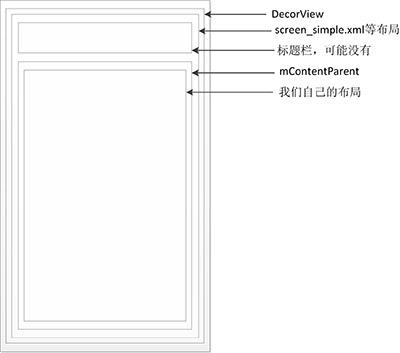
实际的xml布局文件(采用screen_simple.xml为例):
<com.android.internal.policy.impl.PhoneWindow$DecorView
    android:layout_width="match_parent"
    android:layout_height="match_parent">

    <!-- screen_simple.xml -->
    <LinearLayout
        android:layout_width="match_parent"
        android:layout_height="match_parent"
        android:fitsSystemWindows="true"
        android:orientation="vertical">
        <ViewStub android:id="@+id/action_mode_bar_stub"
                  android:inflatedId="@+id/action_mode_bar"
                  android:layout="@layout/action_mode_bar"
                  android:layout_width="match_parent"
                  android:layout_height="wrap_content" />
        <!-- mContentParent实际就是这个FrameLayout -->
        <FrameLayout
             android:id="@android:id/content"
             android:layout_width="match_parent"
             android:layout_height="match_parent"
             android:foregroundInsidePadding="false"
             android:foregroundGravity="fill_horizontal|top"
             android:foreground="?android:attr/windowContentOverlay">
             <!-- 我们的activity_main.xml -->
             <LinearLayout
                android:layout_width="match_parent"
                android:layout_height="match_parent"
                android:orientation="vertical">
                <TextView
                    android:layout_width="wrap_content"
                    android:layout_height="wrap_content"
                    android:text="hello world"/>
            </LinearLayout>
        </FrameLayout>
    </LinearLayout>
</com.android.internal.policy.impl.PhoneWindow>
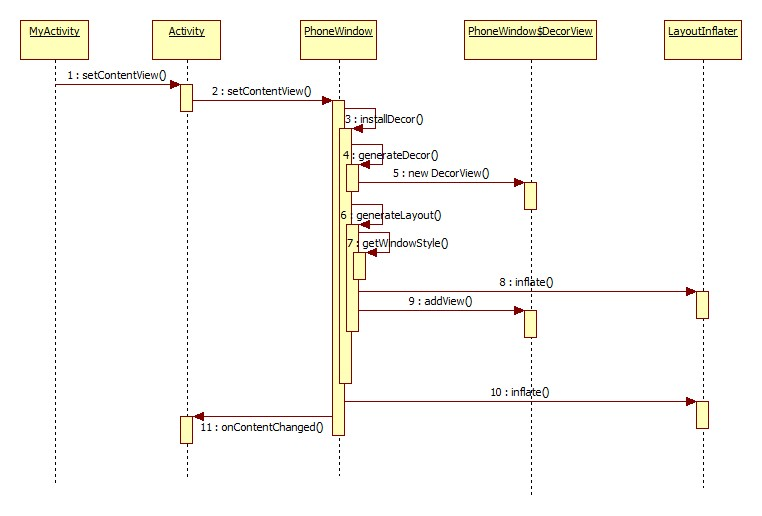
setContentView时序图:
转载请注明出处:blog.csdn.net/u012619640/…[2]
