使用框架的代价
我最近在布莱顿的FFConf大会上说了句话:“你应该用这个,就用这个!就没有比他更好的了!”。所以在这篇文章里,我依旧要做同样的吹捧行为,和大家聊聊在手机应用上使用各种流行框架的代价。
视频的话可以去源文章去看,也可以去这里看幻灯片。当然最好能把本篇文章看完啦。
使用框架的好处
今年早些时候我写了关于React性能的文章,结果回复越来越多,过滤有效信息就花了我很长时间。回复的内容也是千奇百怪,有赞赏的,有提供意见的,也有极端宗教主义的的。当然,最终我还是得到了更有价值的见解,那我现在就试着总结一下适用于所有框架(在某种程度上)的一些通用的看法:
框架用着很有趣。我相信,没有谁会一直去用不友好的框架吧,大家都那么忙是吧。所以,毫无悬念,框架用着舒服对于我们来说,是最重要的。
使用框架会让你的产品构建得更快。这一点很重要,特别是对于小型的初创公司来说,有一个直接拿过来用的框架去搭建你自己的产品原型,就跟有船没船一样,难道你还要自己造船啊,买一艘好不好。(开源的不花钱哈哈
使用框架会更加稳定。早先的前端都很痛苦,还可能在处理IE5和IE6的兼容性BUG,还有更早版本的Firefox、Safari,当然还有Chrome。不过呢现在好多啦,浏览器过去几年来积累了一些不错的标准。:)
如果你熟知某个框架,那你将能得到更多的职业认同。比如你想找工作,跟面试官说你熟知最新的或最了不起的框架,那可不得了。
根据各种回复,我汇总成了一句话就是:对于开发人员而言,最重要的还是框架给他带来的舒适感。【译者:原文是 Ergonomics(人体功效学)生涩不已,则改为舒适感。】
重要的事情我要再说一遍,对于开发人员而言,最重要的还是框架给他带来的舒适感。那怎么解读“舒适”二字,按照我的理解,那感觉就像“如果框架好用的话,我就能分分钟创造出用户想要的东西来”。嗯……这个从表面来看很吸引人,但我认为我们还需要从用户需求这个根本的点上去讨论下。
开发舒适度 vs 用户需求
说到底,开发者的存在是因为用户有各种不同的需求。以下是用户针对于APP比较关心的事情:
网站和APP应该快速展现到用户的眼前。
它要有更顺畅的交互。
它不应该让我手机变慢。
它不应该用着用着就崩溃掉了。
它应该具有我想要的功能。
针对以上的情况,我们很快就坠入鱼和熊掌的漩涡:一方面我们想使用框架方便快捷的去进行开发,另一方面我们还需要满足用户需求。不管你想不想,这都是一件开发人员取舍的事情。归根结底,使用框架,是要付出一定成本的。
相关前提
这里要说一下,类库或工具库我不想把它们纳入讨论范围。至少在我看来,你不能把它当做框架来看待,它如果有问题的话我们可以很快找其他的库来将它替换掉。不喜欢这个日期格式化的库?没问题,我们再找一个好用的。但框架,就很难换掉了,换框架,基本上就是重写程序,所以从量级上来说两个的区别就很明显,框架要大的多,涉及的层面也多得多,以至于选型也是一件很重要的事情,一定要慎重。
代码成本
所有的代码都有使用成本的,但我认为,有些特定的成本是专属于框架的。比如:
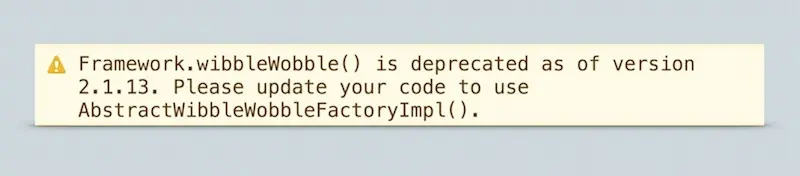
上面的提示是说你使用的某些方法被弃用了,尽快更新为新的方法吧。非常奇怪。
学习成本。 你必须花时间学习这个框架:学习他为什么要这样写代码,为什么要定义“idiomatic”这个关键字;学习它的模板、用例、运行方式。这和学习原生框架本身没什么两样,我们只是把一组问题换成了另一组。
二次学习成本。 有时候你正在磕磕绊绊地开发着你的应用,然后你在控制台上看到一个警告,告诉你需要弃用什么,然后你要更新你的代码。框架的新版本来了,你要重新学习新版本,也就意味着你的项目可能要为框架的新版本重新开发一下了。
调试成本。 框架正如任何其他软件一样,也有BUG。如果是写原生代码,那你修BUG肯定不会有什么太大问题。但是想要补一个框架的BUG,就可能非常难了,甚至是根本不可能的。如果发现了问题,你可能需要具备科学怪人般的钻研精神,然后像个疯猴子扒心扒肺的查找和调试,直到真正的解决办法出现。
除了开发的成本,用户也要为此而支付代价:
时间成本。 启动我们的APP需要多长时间?
带宽成本。 APP运行需要用掉多少带宽?
CPU使用情况(电池)。 它的CPU利用率如何?会不会很耗电。
流畅度。 用户喜欢顺畅的体验,那代码对屏幕的更新情况如何?
内存使用情况。 它占用内存多不多?会影响到其他程序运行吗?会让手机崩溃吗?
把数据摆到台面上
以上述讨论为基础,我想做一些测试,从而能够从数据中得到一些有用的结论。
我决定先测试下各个常用框架的启动时间。我的想法是给出一个用各种框架搭建起来的同一应用,然后看各框架启动所需花费的时长。我选择使用TodoMVC来测试,因为在我看来,它是一个MVP网页应用,而从用户角度来看,功能上都一样,都可以完成他的需求。
TodoMVC:我的各框架启动时间测试用例
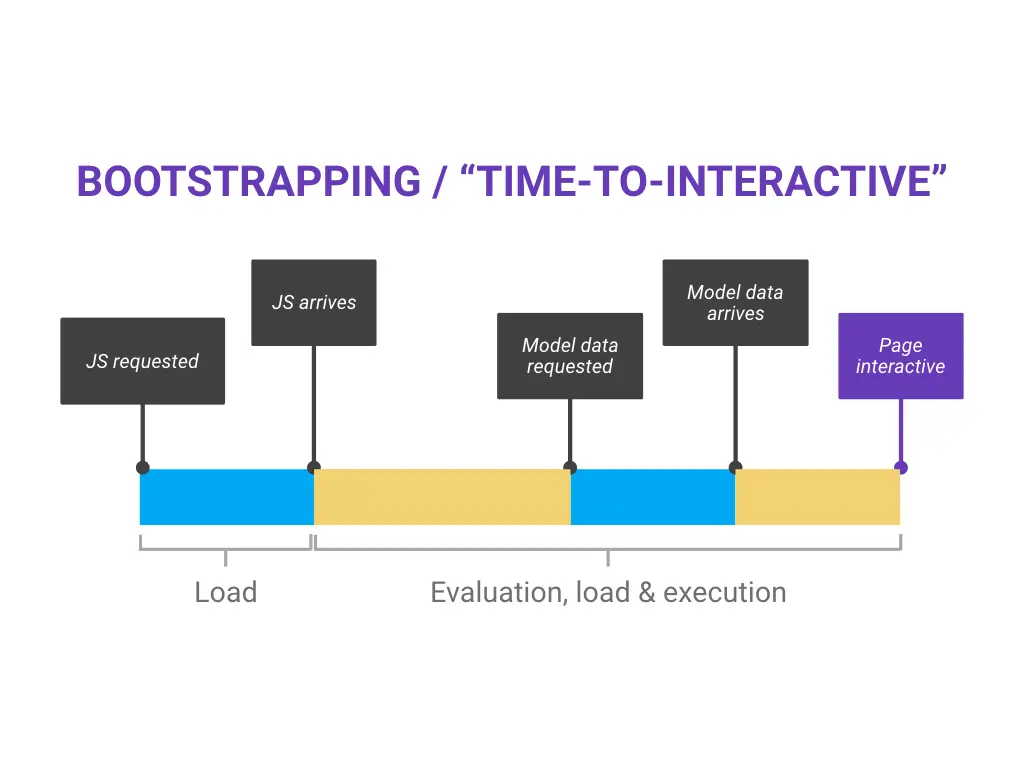
启动时间 / 初始化交互逻辑
我想看看在Nexus5和iPhone 5S上启动某些框架需要的时间、带宽和CPU使用情况。其实就是各框架执行JavaScript所花费的时间。
测试方法
我用 WebPagetest 的Nexus5 装载页面,对每次运行我得到Timeline,然后我把Timeline文件传给Big Rig 来处理。iPhone的测试结果是我自己做的,这个只能手动,因为Safari的Javascript性能分析好像还不支持任何追踪输出。
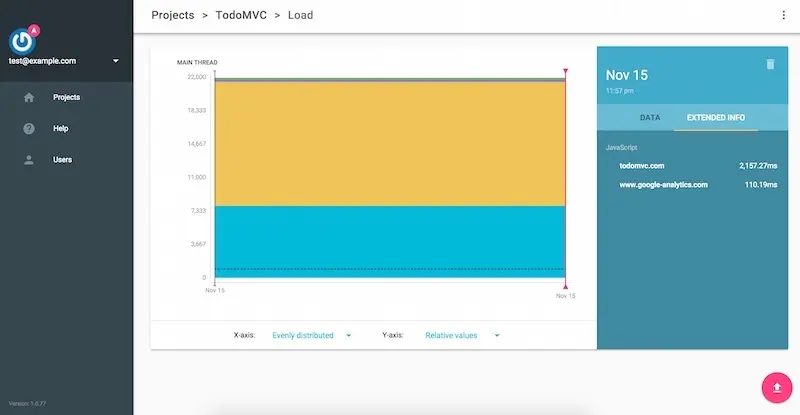
使用Big Rigg快速评估每个框架的TodoMVC启动时间。
顺带提一句,这就是我创建Big Rig的原因。我想让大家可以更容易地快速处理这种数据。
重复测试
如果你想自己做类似这样的测试,比如说在使用Chrome的设备上运行用例,你可以按照下列步骤操作:
安装Big Rig CLI:
npm install -g bigrig。去 WebPagetest.
把地址设定为 Dulles。
把浏览器设定为 Nexus 5 - Chrome (或 Beta/Dev)。
在Chrome设置项下,点击 “Capture Dev Tools Timeline”。
运行测试。
在得到的结果中,下载Timeline文件。
运行
bigrig --file /path/to/timeline.json --pretty-print.
如果你愿意,你可以通过视频观看我怎样从WebPagetest上取得Timeline文件的:
结果显现
以下是我对各种框架的测试结果:
| 框架 | 大小 | N5的启动时间 | iPhone 5S的启动时间 |
|---|---|---|---|
| Polymer v1.1.4 | 41KB5 | 409ms | 233ms |
| Polymer v1.2.2 | 47KB5 | 155ms | 232ms |
| AngularJS v1.4.3 | 324KB | 518ms | 307ms |
| React v0.13.3 [JSX not transformed] | 311KB | 1,201ms | 1,463ms |
| React v0.13.3 [JSX transformed via Babel]4 | 162KB | 509ms | 282ms |
| React v0.13.3 [JSX transformed; prod build]4, 6 | 160KB | 174ms | 118ms |
| Backbone v1.2.2 [inc. jQuery & Underscore] | 139KB | 248ms | 168ms |
| Ember v1.10.0-beta.3 | 580KB | 1,992ms | 1,440ms |
| Vanilla | 16KB | 50ms | 33ms |
在Nexus5上用Chrome 47进行的运行测试。
在iPhone 5S上用Safari 9进行的运行测试。
所有启动时间均包括处理初始数据的时间。
React 分为JSK未转换和已经过Babel转换的版本。
排除Web Components Polyfill(12KB)。
React 分了几个版本,也包括未压缩的版本和已压缩的版本。
对于我来说结果已经非常清楚了:在手机上使用框架真的很沉重,尤其是对比使用原生Javascript来看。最快的是Polymer 1.2.2,这个超级赞,但比起原生Javascript来它还是慢了三倍。 React和Polymer非常相似,但从我另外一篇关于React性能的文章综合起来看,我觉得还是有些问题的。
为了让大家看数据更清晰,大家有几项需要注意的点:
TodoMVC不能直接把JSX转成React,所以我自己转了一下。 为公平起见(因为JSX转换运行时间非常长),我又加了一种更贴近于“生产环境”的版本,然后也对它进行了测试,它并非压缩版的React,因此也有区别,这就形成了表格中的React三个版本。
上述时间不包含转换时间。 我所唯一所测量就是在JavaScript中启动框架的时间,然后得到一些初步观点。事实上,有些的框架还不是压缩版本。关于更多关于框架转换规格的探讨,去找一下Filament组织去年的帖子。
反对意见
我猜对于这个测试可能大家会有一些反对意见,简单说下:
我觉得你的项目可能比TodoMVC的模式要复杂和费时的多。
“TodoMVC模式并不流行”。我已经调查过了,调查中我了解了大部分都是这个模式,如果不是的话,会有架构师来调整成MVC模式。
“TodoMVC并不能代表我的项目”。这可能是事实,但我也可以说你的项目可能比TodoMVC还要费时。Paul Irish最近对Reddit的手机端做出一个性能审查,其中之一就是启动手机上React组件的时间是22秒!
“我们用户不用Nexus 5 / iPhone 5S。” 这没关系,我也更倾向于使用比较好的硬件。但数据表明大部分手机用户并不会使用太高端的手机,因此我更觉得此等情况不容乐观。
“新版的肯定会好一些的”。这可能是事实,但这对你现在使用的版本并没什么帮助。
价值六十万美金的问题
因此,不可避免的,你得面对这个问题了,“你应该用框架去做APP吗?”
我无法回答这个问题,我认为这完全取决于你的选择。你认为你需要使用框架的理由可能有一百万零一个。但对于值不值得,我的想法是:
框架作为一种设计模式或一种创意,是没问题的。框架是理解哪种办法可行的关键部分,而这最终会体现在系统平台层上,它是驱动技术革新的重要环节。
框架是一种反向控制机制。作为函数类库你可以随时把它干掉,但是框架反向控制着全局,它控制着此应用的整个生命周期。虽然你可以写你的代码,你仍要为你的功能实现负责,但运行时的过程,已经不再你的控制之中了。
对于我来说,手机上的前端框架费时严重,至少比起原生代码而言是这样的。
用原生代码写功能本身就是最长远有益的选择。
当我看框架时我看到了什么,我看到的是开发效率(是的,这是最重要的,我同意这点)但我禁不住会想,对于大多数开发人员来说,用原生代码写功能本身就是最长远有益的选择。铁打的WEB,流水的框架,正如我前面说到的,框架确实可以贡献创意和设计模式。但一旦你发现你现在用的框架已经不合适你的项目了,或有个漏洞一直解决不了,你最终还是要依赖原生代码的。
更多信息
今年早些时候我写关于React的帖子时,我说:
在我看来,舒适开发固然很重要,但应该还是以我们的用户需求为中心。
现有我仍然这么认为。尽管我也希望能让自己的生活过的更加美好,可我不想我的APP在用户手里出现问题,我也不想让用户来因此而付出更多的代价。但现在,我深表顾虑。
我担心使用框架在手机上会有更多的问题。
当然,我的测试仅仅是第一步。除了启动还有很多其他的点,这里我没有更详细去检测,比如:对内存使用情况 、长期CPU使用情况、流畅度的影响等等。总体而言,我认为我们还有很多工作要做。
如果我们能做出启动快速、内存占有少、运行顺畅的框架,同时又兼具自己的开发效率和舒适感,那我们就离成功不远了。到那时候,或这个时候,至少在手机方面,我会忠于原生代码。
The Cost of Frameworks
I recently delivered a talk at FFConf in Brighton, called "You should use , it's the bestestest!". I wanted to do a write-up of the presentation's content here, hopefully so it can start a broader conversation that I think we need to have, mainly around the cost of modern frameworks on mobile devices.
#frameworks,
#perf
Update: Nov 16th 2015 - Added an extra row in the table for React under production conditions. The good news: it’s 3x slower than vanilla, yes, but in actual terms I’d say it’s fast for TodoMVC! The Polymer TodoMVC sample was also updated to version 1.2.2 today, and that, too, is faster.
If you prefer watching to reading, here’s the video of the talk (you can also get the slides, too, if you like):
If you prefer reading to watching, well, keep reading…
The benefits of frameworks
Earlier in the year I wrote about React’s performance characteristics as the tree size it has to manage gets larger (TL;DR the bigger the tree, the more computation work it has to do). The responses I got to that post really varied, from appreciative and constructive to, well, the other end of the spectrum. The responses gave me some additional insight, though, which I think applies to all frameworks (to a greater or lesser extent), and which I’ll now try and summarize:
Frameworks are fun to use. I don’t think I know any developer who actively seeks out a more challenging and less fun experience! And yes, absolutely, ergonomics are important.
Frameworks make it quicker to build an MVP. This one is important, particularly for smaller, fledgling organizations or companies. Having a fast bootstrap may be the difference between shipping and not shipping.
Frameworks work around lumps / bugs in the platform. I think this is less of an issue these days (though not irrelevant) as browsers have rallied around standards very well in the past few years. Certainly this is less painful compared to my early career, where we were dealing with IEs 5 and 6, and early versions of Firefox, Safari and, of course, Chrome.
Knowing [insert framework] means I get paid. If you’re looking to get hired, saying that you know the latest and greatest framework(s) may be the difference maker.
The key message I heard over and over, sometimes explicitly, and often implicitly, is that ergonomics are the most important factor for many developers.
The key message I heard over and over, sometimes explicitly, and often implicitly, is that ergonomics are the most important factor for many developers. If I can paraphrase, the sentiment was “if I have an easier time I’ll build something better for my users”. At face value that sounds appealing, but I think it misses a lot of important points.
Developer Ergonomics vs User Needs
Users have needs, too, though. Here are a few of them that come to mind:
Sites and apps should load quickly.
They should have smooth interactions.
They shouldn’t slow down my phone.
They shouldn’t crash.
They should have features I want.
So immediately we’re into a potential trade-off situation: on the one hand we have our convenience, our ergonomics, and on the other hand we have our users’ needs. And we have to trade, whether we like it or not, since frameworks aren’t free.
A quick side step
At this point I’m going to park libraries, and leave them out of this discussion. The reason is that, in my view at least, libraries can be swapped out and replaced if they prove problematic. Don’t like the way a library does date formatting? No problem, just switch it for something else. Frameworks, on the other hand, tend to be a lot more difficult to swap, often requiring a rebuild of the app in question. And, by their nature, they’re a lot bigger and more involved.
The cost of code
All code has costs, but I think there are particular costs that are unique to frameworks.
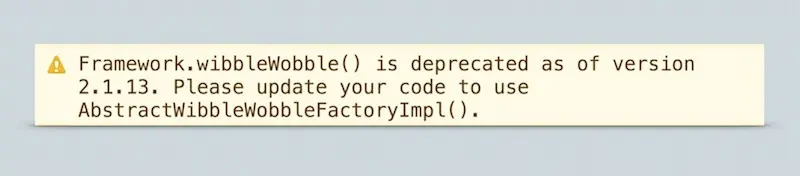
That magical moment where an framework tells you something is deprecated. Apparently it was superseded by Java. Weird.
Learning it. You have to take time out to learn any new framework: what it means to write “idiomatic” code for that framework; its patterns, practices, and ways of doing things. This is no different to the web platform itself. There’s no free ride, you’re just swapping one set of issues for another.
Re-learning it. One day you’re just bimbling along, developing your app, and in the console you see a warning telling you that there’s been a deprecation, and that you need to update your code. That often requires figuring out what the latest version of the framework needs you to do differently, and that may also mean updating projects that shipped with older versions of the framework.
Debugging it. Frameworks, like any software, have bugs. That’s to be expected, and it wouldn’t be any different if you went vanilla and wrote your own. Debugging a framework, however, often ranges from difficult to impossible. If you find the issue, you may have to keep your own frankensteined version around with a monkey patch applied until the real fix lands in the framework’s production build.
Aside from the developer costs, there are costs to the user, too:
Time. How long does it take to bootstrap the thing we sent down the wire?
Bandwidth. How much bandwidth does it use up?
CPU usage (battery). How CPU intensive is it? CPU utilization is going to correlate to battery usage: burn the CPU and the battery will get drained.
Frame rate. How well does the code update the screen? (We know that users like smooth interactions.)
Memory usage. How much memory does it use? Will it cause other apps to be evicted from memory? Perhaps even crash a tab?
Bringing data to the table
So with all that in mind, I wanted to start off a conversation about measuring some of those costs, and my hope is that together we can build up more of a picture about the trade-offs we choose to make.
I decided to take a look at the bootstrapping time for frameworks on mobile. The theory being that, given a like-for-like app, one should be able to see how long it takes each framework to boot. I opted to use TodoMVC for the test, because in my view it’s an MVP web app, and from a user’s point of view, each variant is functionally identical.
TodoMVC: source of my bootstrapping test.
Bootstrapping / Time-to-interactive
Of the costs listed above, I decided to take a look at the Time, Bandwidth, and CPU usage for booting up some frameworks on a Nexus 5 and iPhone 5S.
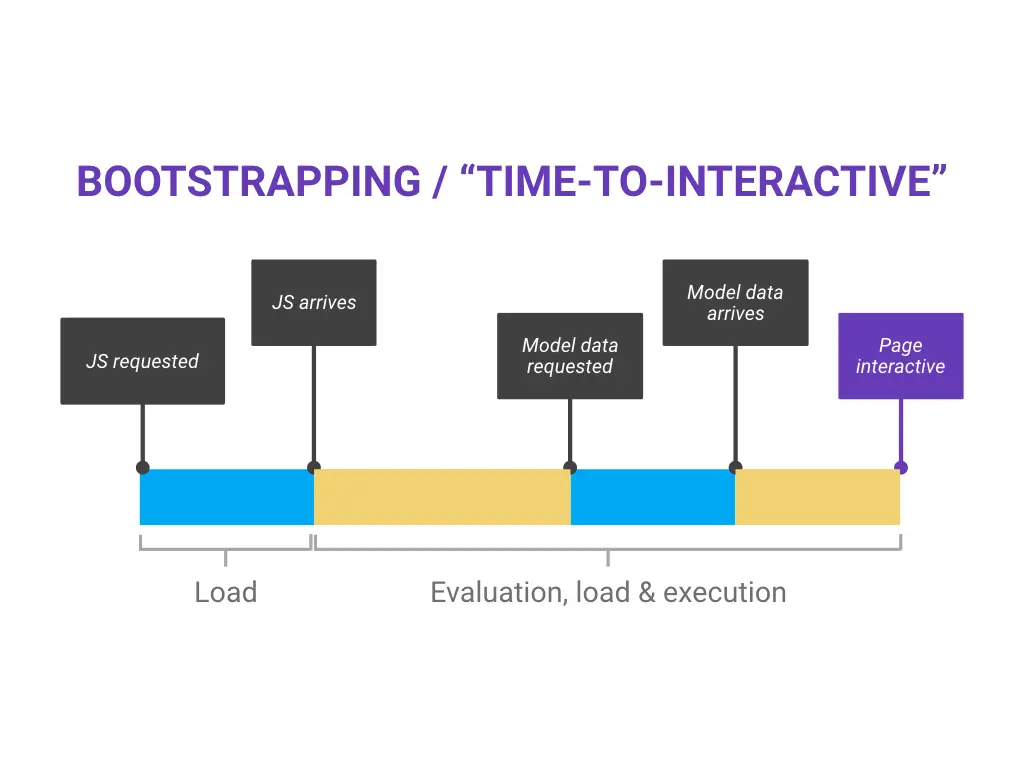
Time to interactive: measuring how long it takes for an app to get to a state where someone can interact with it.
I decided to measure the time it takes to evaluate and execute each framework’s initial payload of JavaScript, and the processing and setup of the initial data set into a model. I decided to ignore the cost of styles, layout, paint and so on since they shouldn’t vary all that much between the different TodoMVC implementations. I was also not testing transfer time.
Methodology
I used WebPagetest to load the pages on a Nexus 5, and I requested a timeline file for each run, which I then passed to Big Rig for processing. The iPhone results I did myself, and had to tally up manually, because unfortunately Safari’s JavaScript profiling doesn’t seem to support any timeline / trace file export.
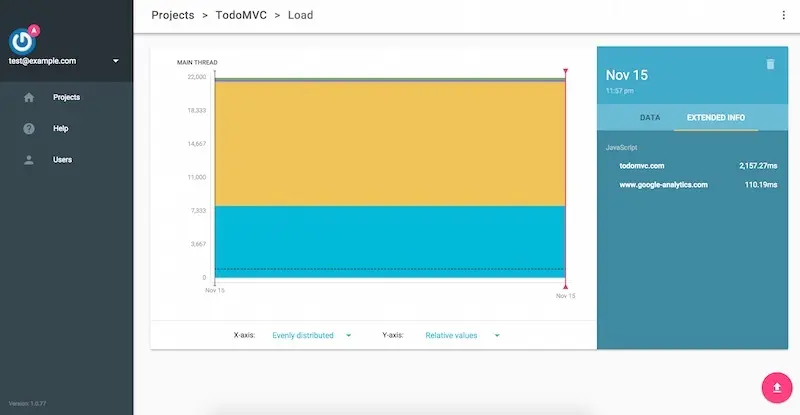
Using Big Rig to quickly assess the TodoMVC bootup time per framework.
This, incidentally, is why I built Big Rig. I wanted to make it easier for all of us to start processing this kind of data quickly.
Repeating the test
If you want to do your own test like this, at least for a device running Chrome, you should do the following:
Install the Big Rig CLI:
npm install -g bigrig.Go to WebPagetest.
Set the location to Dulles.
Set the browser to Nexus 5 - Chrome (or Beta/Dev).
Under the Chrome settings, check “Capture Dev Tools Timeline”.
Run the test.
Download the Timeline file on the left hand side of the results.
Run
bigrig --file /path/to/timeline.json --pretty-print.
If you prefer, you can watch me getting a Timeline file from WebPagetest:
The results
Here’s how the various frameworks stacked up in my tests:
Framework Size Bootstrap time N51,3 Bootstrap time iPhone 5S2,3
Polymer v1.1.4 41KB5 409ms 233ms
Polymer v1.2.2 47KB5 155ms 232ms
AngularJS v1.4.3 324KB 518ms 307ms
React v0.13.3 [JSX not transformed] 311KB 1,201ms 1,463ms
React v0.13.3 [JSX transformed via Babel]4 162KB 509ms 282ms
React v0.13.3 [JSX transformed; prod build]4, 6 160KB 174ms 118ms
Backbone v1.2.2 [inc. jQuery & Underscore] 139KB 248ms 168ms
Ember v1.10.0-beta.3 580KB 1,992ms 1,440ms
Vanilla 16KB 50ms 33ms
Tests done on a Nexus 5 running Chrome 47.
Tests done on an iPhone 5S running Safari 9.
All bootstrapping time includes handling initial todo list data.
JS Transformer stripped; JSX files transformed via Babel.
Excludes Web Components Polyfill (12KB).
React switched for minified production build.
For me the results are pretty clear: there appears to be a pretty hefty tax to using Frameworks on mobile, especially compared to writing vanilla JavaScript. The fastest is Polymer 1.2.2, which is awesome, but it’s still 3x slower than Vanilla. React is pretty similar to Polymer, but I still have concerns over its scaling properties.
To make things super clear, here are a couple of notes:
TodoMVC doesn’t JSX Transform React, so I did. The reason there are three entries for React is that the TodoMVC example doesn’t transform JSX, and instead includes the JSX Transformer library. To make things fairer (because the runtime JSX transformation is expensive!), I made a more ‘productionized’ version of the example, and tested that, too. The downside is that it’s not the minified version of React, which is different again. So I also switched out the build of React for the production version, and that’s the third build in the table.
These times do not include transfer time. The only thing I was measuring was the time in JavaScript to bootstrap the framework and get the initial view built. In fact, some of the frameworks in TodoMVC aren’t minified. For a more discussion on framework transfer sizes, check out the Filament Group’s post from last year.
Possible Objections
I figure there’s likely to be some objections to the test, which are definitely worth talking through:
I’d argue your use-case is probably more expensive than TodoMVC.
“TodoMVC isn’t idiomatic.” I checked this one out, and from what I understand every implementation is idiomatic, and framework experts file PRs against them when they aren’t.
“TodoMVC isn’t my use-case.” That’s probably true, but I’d argue your use-case is probably more expensive than TodoMVC. Paul Irish recently did a performance audit on Reddit’s mobile site, and he discovered, amongst other things, that 22 seconds were going into just booting up React’s components on mobile!
“A Nexus 5 / iPhone 5S isn’t what our users use.” That’s also probably true. I have the privilege of using good hardware, and I would imagine that many people don’t have access to top end phones, so I’d expect these numbers to be even worse in those cases.
“It’ll be better in the next version of .” This may well be true, but it doesn’t do much for anything you’ve shipped with the current version.
The $64k question
So, inevitably, the question comes: “Should you use a framework?”
I can’t answer that question, because I think it’s entirely your call. There are a million and one reasons why you may feel you need to use one. But, for what it’s worth, here are my thoughts:
Frameworks contribute ideas and concepts. Frameworks are a crucial part of understanding what approaches work, and what don’t, and that ultimately drives improvements at the platform level. In that regard I think they serve as important testing grounds for the platform changes of tomorrow and let us figure things out before they become embedded in the web permanently.
Frameworks are an inversion of control. The reason I parked libraries earlier on is that you can swap them out. Frameworks, on the other hand, invert control. They control the lifecycle of the app, and give you entry points where your code runs. You’re still responsible for the final code, but you’re not in control.
Frameworks are expensive on mobile. Compared to vanilla, at least. For me, prohibitively so, but everyone has their own limits of what they’re willing to tolerate.
Investing in knowledge of the web platform itself is the best long-term bet.
As I look at frameworks, I see the ergonomic benefits (and those are important, I agree!), but I can’t help but feel that, for many developers, investing in knowledge of the web platform itself is the best long-term bet. Frameworks come and go, it just seems to be the ebb and flow of the web, and, as I said above, they do contribute ideas and patterns. But if you ever find that the one you use no longer works for you, or has a bug that remains unfixed, being able to understand the platform that underpins it will help enormously.
The bigger conversation
When I wrote the post earlier in the year about React, I said this:
It seems to me that developer ergonomics should be less important than our users’ needs.
I still believe that. As much as I love the idea of having an easier life, I don’t want to ship something to people that doesn’t run well, and I don’t want them to pay the cost. Today I’m concerned by the costs of booting up frameworks on mobile.
I’m concerned by the costs of booting up frameworks on mobile.
This is only a first step. There are other metrics besides bootstrapping I’ve barely had chance to look into: memory usage, long-term CPU usage, and impact on frame rate to name three. Overall, I think we have more to do to properly assess the impact of code that we ship to our users and the costs we pass on to them.
If we can achieve fast-booting, low-memory, smooth-executing frameworks with good ergonomics we’ll be onto a winner. Until then, for mobile at least, I’ll be sticking to the vanilla web platform.