尊重版权,未经授权不得转载
本文来自:江清清的技术专栏(www.lcode.org)
(一)前言
在我们Android或者iOS原生开发中,经常回去进行调用系统分享,例如把文字,链接或者图片文件等等,只需要简单的几行代码就可以实现调用出系统中所有符合条件的应用,然后让你选择其他具体应用进行分享你的信息。今天我们就来看一下React Native中已经给我们封装好的Share模块的具体使用方法。
刚创建的React Native交流九群:536404410,欢迎各位大牛,React Native技术爱好者加入交流!同时博客右侧欢迎微信扫描关注订阅号,移动技术干货,精彩文章技术推送!
在iOS中,通过调用一个包含'action','activityType'的对象,然后返回一个Promise对象。如果用户点击关闭弹框,那么调用Share.dismissedAction方法。在Android中,该会调用Share.sharedAction方法,然后返回一个Promise对象。
(二)属性
2.1.Content(内容)-Android,iOS通用
message 需要进行分享的信息
title 分享的标题
2.2.url(地址)-iOS适配
分享的地址,url和message至少需要设置其中一个
2.3.可选参数
excludedActivityTypes和tintColor 这两个适配iOS版本
dialogTitle 这个适配Android版本
(三)方法
3.1.share(content:Content,option:Options{}) 静态方法,进行弹出分享弹框
(四)实例演示
上面只是对于Share模块的一些基本介绍,下面我们采用具体实例进行演示一下效果,具体代码如下:
/**
 * Sample React Native App
 * https://github.com/facebook/react-native
 * @flow
 */

import React, { Component } from 'react';
import {
  AppRegistry,
  StyleSheet,
  Text,
  View,
  Share,
  TouchableHighlight
} from 'react-native';

class ShareDemo extends Component {
  constructor(props) {
    super(props);
    this._shareMessage = this._shareMessage.bind(this);
    this._shareText = this._shareText.bind(this);
    this._showResult = this._showResult.bind(this);
    this.state = {
      result: ''
    };
  }

  render() {
    return (


            点击分享文本


            点击分享文本,URL和标题


        {this.state.result}

    );
  }

  _shareMessage() {
    Share.share({
      message: '我是被分享的本文信息'
    })
    .then(this._showResult)
    .catch((error) => this.setState({result: 'error: ' + error.message}));
  }

  _shareText() {
    Share.share({
      message: '我是被分享的本文信息',
      url: 'http://www.lcode.org',
      title: 'React Native'
    }, {
      dialogTitle: '分享博客地址',
      excludedActivityTypes: [
        'com.apple.UIKit.activity.PostToTwitter'
      ],
      tintColor: 'green'
    })
    .then(this._showResult)
    .catch((error) => this.setState({result: 'error: ' + error.message}));
  }

  _showResult(result) {
    if (result.action === Share.sharedAction) {
      if (result.activityType) {
        this.setState({result: 'shared with an activityType: ' + result.activityType});
      } else {
        this.setState({result: 'shared'});
      }
    } else if (result.action === Share.dismissedAction) {
      this.setState({result: 'dismissed'});
    }
  }
}

const styles = StyleSheet.create({
  wrapper: {
    borderRadius: 5,
    marginBottom: 5,
  },
  button: {
    backgroundColor: '#eeeeee',
    padding: 10,
  },
});

AppRegistry.registerComponent('ShareDemo', () => ShareDemo);
运行效果:
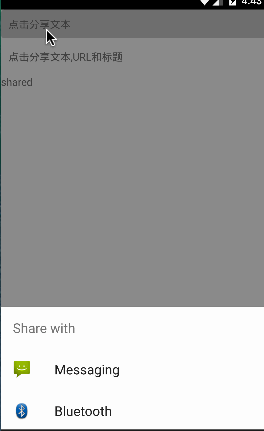
看了上面的代码可能大家会有疑问,上面方法中出现action和activityType的获取,为什么会出现这两个属性呢?前面讲解过share方法最终会进行Promise回调,具体看一下Share.share()方法中的实现代码:
static share(content: Content, options: Options = {}): Promise {
invariant(
typeof content === 'object' && content !== null,
'Content must a valid object'
);
invariant(
typeof content.url === 'string' || typeof content.message === 'string',
'At least one of URL and message is required'
);
invariant(
typeof options === 'object' && options !== null,
'Options must be a valid object'
);
if (Platform.OS === 'android') {
invariant(
!content.title || typeof content.title === 'string',
'Invalid title: title should be a string.'
);
return ShareModule.share(content, options.dialogTitle);
} else if (Platform.OS === 'ios') {
return new Promise((resolve, reject) => {
ActionSheetManager.showShareActionSheetWithOptions(
{...content, ...options, tintColor: processColor(options.tintColor)},
(error) => reject(error),
(success, activityType) => {
if (success) {
resolve({
'action': 'sharedAction',
'activityType': activityType
});
} else {
resolve({
'action': 'dismissedAction'
});
}
}
);
});
} else {
return Promise.reject(new Error('Unsupported platform'));
}
}
大家看一下上面Promise最终采用resolve回调的时候会包含action以及activityType字段
(五)最后总结
今天我们主要讲解了Share模块调用系统分享的方法,该使用比较简单,就是一些注意点平时开发中多多注意一下就行了。
刚创建的React Native交流九群:536404410,欢迎各位大牛,React Native技术爱好者加入交流!同时博客右侧欢迎微信扫描关注订阅号,移动技术干货,精彩文章技术推送!
关注我的订阅号(codedev123),每天推送分享移动开发技术(Android/iOS),React Native技术文章,项目管理,程序猿日常点滴以及精品技术资讯文章(欢迎关注,精彩第一时间推送)。
关注我的微博,可以获得更多精彩内容