

updated@2016-08-28
本文為追求自我進步與英文練習的前提下,翻譯自 Nessim Btesh 的好文章 React Best Practices and Useful Functions。
React 近來已經成為一種被開發者用來建立從單頁式應用程式、到移動端應用程式的新工具。但是,自從我越來越深入 React,我發現所有感覺很屌的 Node modules 都開寫得不怎麼樣。這些 modules 幾乎沒有遵循任何規則,component 都太肥大了。它們幾乎把所有東西都放進 state 裡,同時也沒有善用 dumb component 帶來的正面效益。隨便一個有足夠經驗的人,都知道每次渲染時都管控每一個 component 的狀態對瀏覽器來說是多大的負載。在本文中,我會帶你走過幾個如何讓 React 做得快又好的最佳實踐案例。
請注意,我會持續更新本文(翻註:此處指原文,本文會盡量一起更新。)以便整理新出現的絕佳實踐案例。
寫在開始之前:請注意 React 是一種 functional programming (FP) 函式庫。如果你不了解什麼是 FP,請先閱讀這篇 Stack Exchange response
使用 ES6(由Babel轉譯):
ES6 會讓你(在JS世界裡)活得更輕鬆寫意。它讓 JavaScript 用起來、看起來更潮。幾個絕佳的 ES6 使用範例是 Generators 以及 Promises。還記得你需要做一大堆的 callback 才能正常執行一段非同步的呼叫嗎?嗯,現在我很榮幸的為你介紹 --- ”同步的非同步 JS“(是的,它真的跟它聽起來一樣酷!),一個超棒的範例是使用 generators:
getJSON(url, function(response) {
    getJSON(url, function(response) {
      console.log(response);
    });
});
function* getStockValue() {
    var entry1 = yield request('http://myrl.com/stock/key');
    var data1  = JSON.parse(entry1);
    var entry2 = yield request('http://myurl/stock/value');
    var data2  = JSON.parse(entry2);
}
是不是看起來超棒的?
使用 Webpack:
讓你決定使用 Webpack 的理由很簡單:Hot reloading, minified files, node modules :) 而且,你可以把你的整個應用程式分裝成小區塊,並且 lazy load 它們。
永遠注意你的 bundle 檔案大小:
一個關於保持你的 bundle 纖細苗條的注意點是,直接從 node module 的跟目錄 import 你需要的東西。
例如,原本你這樣做...
但你其實該這樣做...
import Foo from ‘foo/Foo’
使用 JSX:
如果你原先有 Web 的開發背景,JSX 格式可能會讓你覺的再也自然不過。不過,如果你並沒有相關背景,也不要太擔心;JSX 很好學。
請注意,如果你不使用 JSX,你的應用程式會很難維護。
確保你的 Component 很小(是超級小!):
經驗法則是:如果你的 render() 函式有超過 10 行,那應該這個 component 就是太大了。
整個運用 React 的中心思想是程式碼必須有足夠的可重用性,所以如果你把所有東西都扔進同一個檔案,那你就體會不到 React 之美了。
使用 ShouldComponentUpdate():
React 是一種當一個 component 的 props/state 改變時都重繪的模板語言。所以,想像如果你每次都要在某個 action 裡重繪整個頁面,將會替瀏覽器帶來相當大的負荷。
這也就是 ShouldComponentUpdate() 為何而來。每當 React 需要重繪頁面時,都會檢查看看 shouldComponentUpdate 回傳值是 false/true。所以,如果你有個靜態的、不需要變動的 component,就幫你自己個忙,回傳 False 吧。或是,如果它不是純靜態的,那依據它的 props/state 是否改變來決定回傳值。
使用 Smart 以及 Dumb Component 概念:
實在沒什麼好說的:你不需要讓每個物件都有自己的 state。理想的情況下,你會有一個聰明的(smart) parent view,以及一大堆附屬於它的 dumb component。後者並不包含任何邏輯,只負責接收由 parent 傳來的 props。
你可以像這樣做一個 dumb component:
const DumbComponent = ({props}) => {
  return ();
}
Dumb component 相對來說也比較好除錯,因為它是一種強迫性的、由上而下的方法;同時,也是 React 的全部。
永遠在建構子(constructor)中綁定(bind)函式(function):
每當搞一個有 state 的 compoment 時,你應該試著在建構子(constructor)中綁定(bind)函式(function)。
export default class BindFunctionExample extends React.Component { constructor() { super(); this.state = { hidden: true, }; this.toggleHidden = this.toggleHidden.bind(this); } toggleHidden() { const hidden = !this.state.hidden; this.setState({hidden}) } render(){ return(); } }
使用 Redux/Flux:
處理資料時你一定會想要用 Redux 或是 Flux。Redux/Flux 讓你更輕易的處理資料,也幫你跟處理前端快取的痛苦說再見。我個人使用 Redux,因為它強迫你必須有一個更好控制的檔案結構。
使用 normalizr:
現在我們正在討論資料,我要為你介紹處理複雜資料方面的聖杯:Normalizr,它可以動態地把你巢狀的 JSON 物件簡化成比較簡單的結構。
(比較好的)檔案結構:
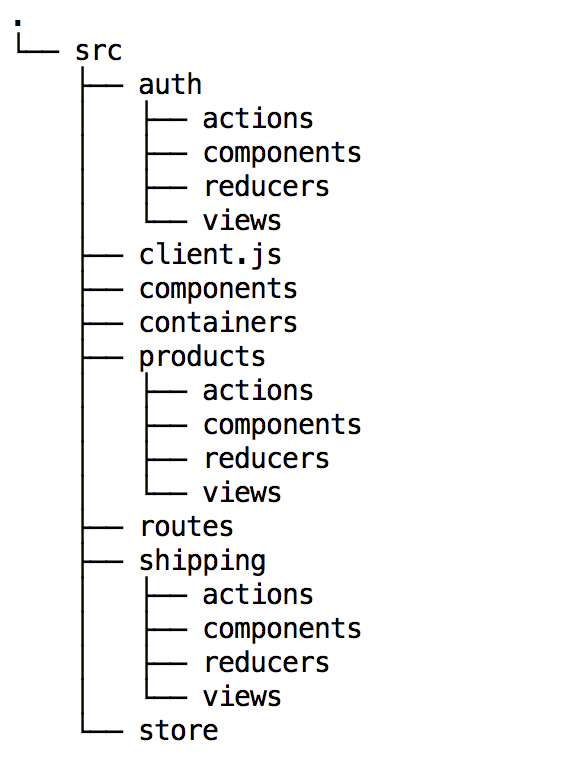
講句不客氣的,React/Redux 讓事情更簡單,(整個專案)我只有兩層的檔案結構。
第一層:
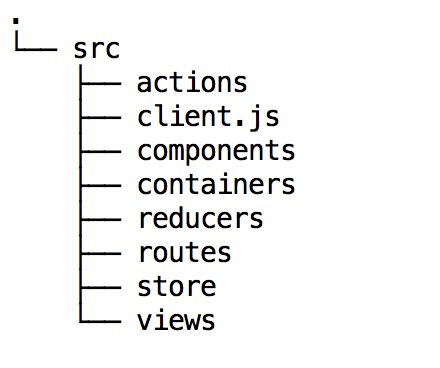
第二層:
使用 Containers:
你應該使用 containers 的理由是:向下傳遞資料。因為當應用 Flux/Redux 時,你會想要避免讓每個 view 都跟 store 有連結。
建立兩個 containers 可能是最好的方式,一個包含所有的 secure views(意指所有需要認證/授權的 view),另外一個則包含全部的 insecure views。
建立 parent container 最好的方式是:clone 子元件,並且把需要的 props 傳遞下去。
class Container extends React.Component {
    render(){
        var { props } = this;
        return(

                    {
                        React.Children.map(this.props.children, function(child) {
                            return React.cloneElement(
                                child,
                                { ...props }
                            );
                        })
                    }

        );
    }
}

const mapStateToProps = (state) => {
    return state;
};

function mapDispatchToProps(dispatch) {
    return {
        actions: bindActionCreators(actions, dispatch)
    };
}

export default connect(
    mapStateToProps,
    mapDispatchToProps
)(Container);
其他:
我想強調的是,你應該把你所有的 component 分割成獨立的單一文件。
使用 router:
實在沒什麼好說的;如果你要做一個單頁面 App 你就是需要一個 router。我個人使用 React Router。
如果你使用 flux,記得要 unbind change events 的 store listening,你不會想要造成 memory leaks 吧。
如果你想要動態的更改你應用程式的標題,你可以類似這樣做:
componentDidMount(){
  document.title = "Store Profile"
}
這個 repo是個很棒的實作 React/Redux 認證的範例。
使用 helper 函式:
以下是個比較物件的的函式,用法:當 state/props 在 shouldComponentUpdate() 週期變更時觸發。
export const isObjectEqual = (obj1, obj2) => {
if(!isObject(obj1) || !isObject(obj2)) {
    return false;
}

if (obj1 === obj2) {
   return true;
}

const item1Keys = Object.keys(obj1).sort();
const item2Keys = Object.keys(obj2).sort();

if (!isArrayEqual(item1Keys, item2Keys)) {
    return false;
}
return item2Keys.every(key => {
   const value = obj1[key];
   const nextValue = obj2[key];

   if (value === nextValue) {
       return true;
   }
   return Array.isArray(value) &&
       Array.isArray(nextValue) &&
       isArrayEqual(value, nextValue);
});
};
動態的產生 reducer:
export function createReducer(initialState, reducerMap) {
    return (state = initialState, action) => {
        const reducer = reducerMap[action.type];

        return reducer
            ? reducer(state, action.payload)
            : state;
    };
}
import {createReducer} from '../../utils';
// Add the following for IE compatability
Object.assign = Object.assign || require('object-assign');

const initialState = {
   'count': 0,
   'receiving': false,
   'pages': 0,
   'documents': []
};

export default createReducer(initialState, {
    ['RECEIVED_DOCUMENTS']: (state, payload) => {
        return {
            'count': payload.count,
            'pages': payload.pages,
            'documents': payload.documents,
            'receiving': false
        };
    },
    ['RETRIVING_DOCUMENTS']: (state, payload) => {
        return Object.assign({}, state, {
            'receiving': true
        });
    }
});
