

canvas 是 H5 一个超棒的元素,能创造好多漂亮的效果。现在就用它最简单的几个方法,画一只酷炫的熊本熊(恩,酷炫是因为熊本熊本来就是一种酷炫的生物)。
成果
先来看一下本文的成果。用后文中几个封装好的函数加一点别的小功能,可以做成一个生成熊本熊图片的网页小应用。(目前只推荐下载png格式的图片)
戳这里看效果:用canvas画熊本熊
准备工作
支持 canvas 的现代浏览器,html 页面、css 文件、js 文件。
HTML & CSS
先写结构和样式:
kumamon
为了清楚地看到画布位置,我们来给画布加个黑色边框:
/*css文件*/
.kumamon{
    border: 1px solid #000;
}
JS
JavaScript 脚本是绘制熊本的重要部分。在动手前,我们先找一张成品图进行模仿:
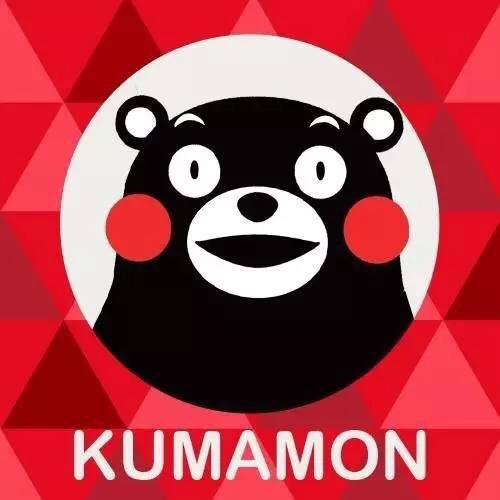
这个大体能分成三部分:背景、圈里的熊、文字。
框架
画整幅图的函数:
function drawKumamon() {
    var ku = document.getElementById("kumamon");
    if (ku.getContext) {
        var ctx = ku.getContext("2d");
        //绘图代码
    }
}
文档加载后绘图(防止getElementById()取到空值):
window.onload = function() {
    drawKumamon();
}
跨浏览器的事件监听方法(本例中只会用到 addHandler):
var EventUtil = {
    addHandler: function(ele, type, handler) {
        if (ele.addEventListener) {
            ele.addEventListener(type, handler, false);
        } else if (ele.attachEvent) {
            ele.attachEvent("on" + type, handler);
        } else {
            ele["on" + type] = handler;
        }
    },
    removeHandler: function(ele, type, handler) {
        if (ele.removeEventListener) {
            ele.removeEventListener(type, handler, false);
        } else if (ele.detachEvent) {
            ele.detachEvent("on" + type, handler);
        } else {
            ele["on" + type] = null;
        }
    }
};
背景
为了让接下来的白色圈等效果更加明显,我们先涂背景。这里背景用纯色,暂定为深红色,颜色值为rgb(174,0,0)。
我们把制作背景色的代码封装成一个函数,然后在主函数中调用。这类工具绘图类函数我们以 paintXXX 命名。
function paintBackground(ctx, sColor) {
    v_color = sColor;
    ctx.fillStyle = sColor;
    ctx.fillRect(0, 0, 500, 500);
}
var v_color = "rgb(174,0,0)";
在主函数drawKumamon()中调用:
paintBackground(ctx, v_color);
圆圈
熊本住在一个白色的圆圈里,它脸上的腮红也是圆圈。所以同样的,我们把画圆的代码封装成一个函数。
function paintCircle(ctx, x, y, r, i, sColor) {
    ctx.beginPath();
    ctx.moveTo(x - r, y);
    ctx.arc(x, y, r, 0, i * Math.PI, false);
    ctx.fillStyle = sColor;
    ctx.fill();
}
在主函数中调用:
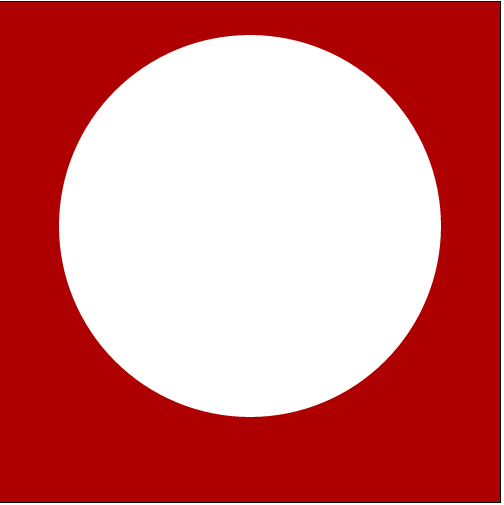
paintCircle(ctx, 250, 224, 191, 2, "#fff");
这样,就在画布中间偏上的位置上有一个住着熊本熊的圆了。
目前效果:
熊本熊各器官顺序
因为 canvas 默认的遮盖效果是source-over,即新画的源图像遮挡原先画的目标图像。观察熊本,发现它的脸在耳朵上面,五官在脸上面,头在身体上面。所以如果把熊本拆成这几块的话,绘图顺序应该是身体 → 耳朵 → 脸 → 五官 。
不过身体的宽度要根据头上五官的位置来确定,所以还是先画头,把画熊本每个位置的代码各自封装成函数,在调用时注意顺序即可。
耳朵
熊本熊的两只耳朵就是黑色圆上面画一个小一点的白色圆。这两个圆的圆心是同一点。
//左耳朵
paintCircle(ctx, 138, 120, 28, 2, "#000");
paintCircle(ctx, 138, 120, 15, 2, "#fff");
//右耳朵
paintCircle(ctx, 365, 120, 28, 2, "#000");
paintCircle(ctx, 365, 120, 15, 2, "#fff");
脸
熊本熊的脸是个椭圆。我们先来建一个绘制椭圆的工具函数。
function paintOval(ctx, x, y, a, b, i, sColor) {
    ctx.save();
    var r = (a > b) ? a : b;
    var ratioX = a / r;
    var ratioY = b / r;
    ctx.scale(ratioX, ratioY);
    ctx.beginPath();
    ctx.arc(x / ratioX, y / ratioY, r, 0, i * Math.PI, false);
    ctx.closePath();
    ctx.restore();
    ctx.fillStyle = sColor;
    ctx.fill();
}
参数中的(x,y)组成了椭圆中心点的坐标,a,b 是椭圆的长短半径。i 的值为2时可以画出椭圆;sColor 是为椭圆上色的颜色的字符串表示。
像这样调用:
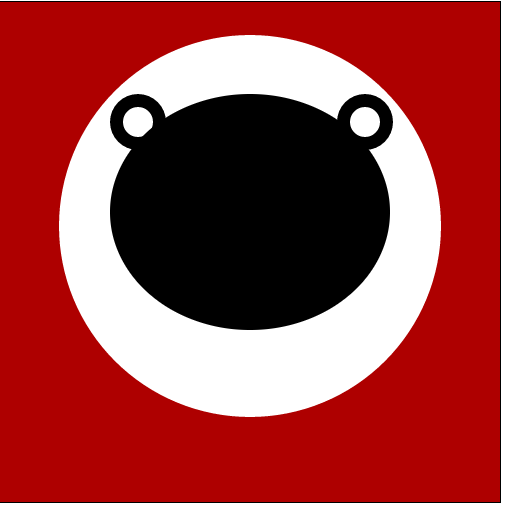
paintOval(ctx, 250, 210, 140, 118, 2, "#000");
目前效果:
眉毛
眉毛是两条起末点直线距离(称为底边)相同,弧线最高点到底边的距离不同的二次贝塞尔曲线构成的封闭图形。
function bearEyebrow(ctx, h1, h2, x0, y0, y1, d, sColor) {
    ctx.beginPath();
    ctx.moveTo(x0, y0);
    var x1 = x0 + d;
    var cp1x = x0 + d / 2;
    var cp1y = y0 - h1;
    var cp2y = y0 - h2;
    ctx.quadraticCurveTo(cp1x, cp1y, x1, y1);
    ctx.quadraticCurveTo(cp1x, cp2y, x0, y0);
    ctx.fillStyle = sColor;
    ctx.fill();
}
调用:
bearEyebrow(ctx, 20, 10, 168, 133, 130, 32, "#fff");
bearEyebrow(ctx, 20, 10, 298, 130, 133, 32, "#fff");
因为眉毛宽度和位置不一样显得俏皮一点,所以传入的参数没有设置成对称的。
眼睛
眼黑、眼白都是立起来的椭圆。需要写一个旋转椭圆的函数。
function paintRotatedOval(ctx, x, y, a, b, i, sColor, ang) {
    ctx.save();
    var r = (a > b) ? a : b;
    var ratioX = a / r;
    var ratioY = b / r;
    ctx.translate(x / ratioX, y / ratioY);
    ctx.rotate(ang * Math.PI / 180);
    ctx.scale(ratioX, ratioY);
    ctx.beginPath();
    ctx.arc(0, 0, r, 0, i * Math.PI, false);
    ctx.closePath();
    ctx.restore();
    ctx.fillStyle = sColor;
    ctx.fill();
}
↑↑ 最后一个参数是椭圆旋转角度。
调用:
//左眼
ctx.moveTo(160, 170);
paintRotatedOval(ctx, 186, 170, 26, 27, 2, "#fff", 90);
ctx.moveTo(182, 170);
paintOval(ctx, 192, 170, 4, 10, 2, "#000");
//右眼
ctx.moveTo(273, 170);
paintRotatedOval(ctx, 300, 170, 26, 27, 2, "#fff", 90);
ctx.moveTo(308, 170);
paintOval(ctx, 312, 170, 4, 10, 2, "#000");
嘴
嘴的部分有椭圆形的白色区域和黑色的两条闭合的二次贝塞尔曲线组成的嘴巴。
给被二次贝塞尔围成的闭合区域着色:
function paintQuadratic(ctx, cpy, x0, y0, d, sColor) {
    ctx.beginPath();
    ctx.moveTo(x0, y0);
    var x1 = x0 + d;
    var cpx = x0 + d / 2;
    ctx.quadraticCurveTo(cpx, cpy, x1, y0);
    ctx.closePath();
    ctx.fillStyle = sColor;
    ctx.fill();
}
调用:
//嘴区域
ctx.moveTo(186, 243);
paintOval(ctx, 251, 243, 65, 52, 2, "#fff");
//嘴
paintQuadratic(ctx, 240, 196, 253, 110, "#000");
paintQuadratic(ctx, 290, 196, 253, 110, "#000");
鼻子
鼻子能拆成两半,是短半径不同的半椭圆。
//鼻子
ctx.moveTo(228, 217);
paintOval(ctx, 248, 217, 20, 17, 1, "#000");
ctx.moveTo(228, 142);
paintRotatedOval(ctx, 248, 142, 20, 13, 1, "#000", 180);
腮红
腮红是红色的圆。
//腮红
ctx.moveTo(99, 227);
paintCircle(ctx, 133, 227, 34, 2, "rgb(255,0,2)");
paintCircle(ctx, 366, 227, 34, 2, "rgb(255,0,2)");
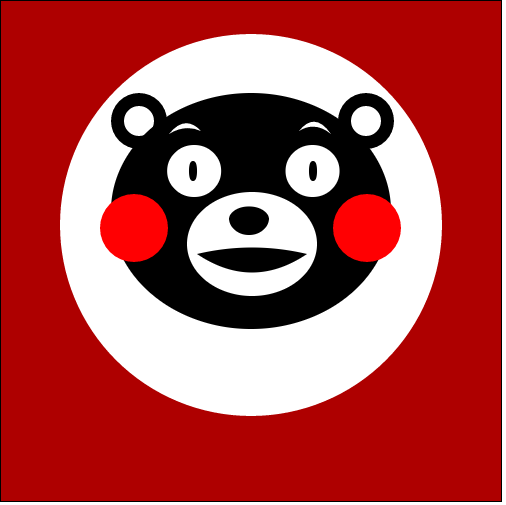
完成上述步骤,头部长这样:
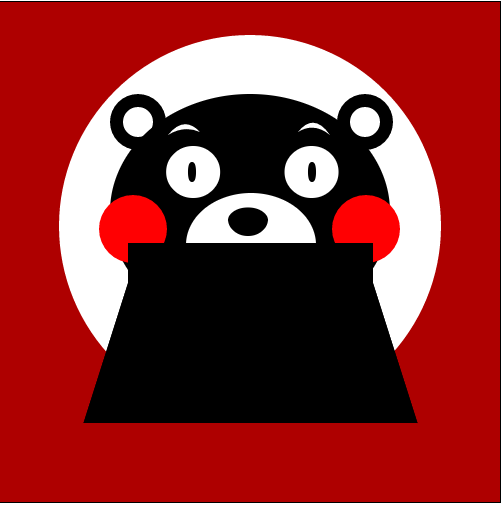
身体
为了让熊本熊头和身体的线条有所区别,身体的构造采用直线。
在下巴的地方放一个矩形,营造一点熊本熊(也许有)的短脖子的感觉,然后矩形下面放一个上底和矩形长相同长度的等腰梯形。
function bearBody(ctx, x0, y0, rectW, rectH, trapW, trapH, sColor) {
    var x1 = x0 - (trapW - rectW) / 2;
    var y1 = y0 + rectH + trapH;
    ctx.beginPath();
    ctx.moveTo(x0, y0 + rectH);
    ctx.lineTo(x1, y1);
    ctx.lineTo(x1 + trapW, y1);
    ctx.lineTo(x0 + rectW, y0 + rectH);
    ctx.closePath();
    ctx.fillStyle = sColor;
    ctx.globalCompositeOperation = "source-atop";
    ctx.fill();
    ctx.moveTo(x0, y0);
    ctx.lineTo(x0 + rectW, y0);
    ctx.lineTo(x0 + rectW, y0 + rectH);
    ctx.lineTo(x0, y0 + rectH);
    ctx.lineTo(x0, y0);
    ctx.fill();
}
调用:
bearBody(ctx, 128, 241, 245, 40, 334, 140, "#000");
现在熊本熊长这样:
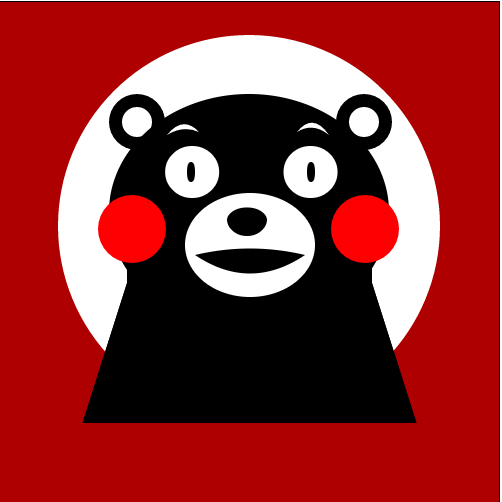
改变 bearBody 的调用位置,放在绘制熊头之前:
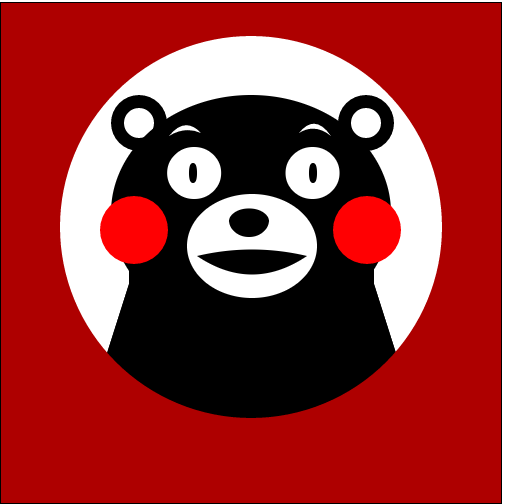
在绘制背景的函数paintBackground()中加上这样一句ctx.globalCompositeOperation = "destination-over";,并把这个函数放在主函数最后调用。
效果为:
文字
function paintText(ctx, txt,sColor) {
    inTxt = txt;
    sColor = txtColor;
    ctx.font = "bold 36px Arial";
    ctx.textAlign = "center";
    ctx.textBaseLine = "middle";
    ctx.fillStyle = sColor;
    ctx.fillText(txt, 250, 462);
}
var inTxt = "你为什么不学习?!";
var txtColor = "#fff";
调用:
paintText(ctx, inTxt,txtColor);
因为之前调用 bearBody 函数时改变过 globalCompositeOperation 为source-atop,也就是说画布上新的绘制将在目标图像顶部显示源图像。源图像位于目标图像之外的部分是不可见的。因为画布上先画的熊本熊待着的那个白色圆圈,所以圆圈以外的部分是不可见的。想看到文字,要在调用 paintText 前先更改 globalCompositeOperation 值为source-over。
drawKumamon.js
function drawKumamon() {
    var ku = document.getElementById("kumamon");
    if (ku.getContext) {
        var ctx = ku.getContext("2d");
        //绘图代码
        paintCircle(ctx, 250, 224, 191, 2, "#fff");
        bearBody(ctx, 128, 241, 245, 40, 334, 140, "#000");
        //左耳朵
        paintCircle(ctx, 138, 120, 28, 2, "#000");
        paintCircle(ctx, 138, 120, 15, 2, "#fff");
        //右耳朵
        paintCircle(ctx, 365, 120, 28, 2, "#000");
        paintCircle(ctx, 365, 120, 15, 2, "#fff");
        //脸
        paintOval(ctx, 250, 210, 140, 118, 2, "#000");
        //眉毛
        bearEyebrow(ctx, 20, 10, 168, 133, 130, 32, "#fff");
        bearEyebrow(ctx, 20, 10, 298, 130, 133, 32, "#fff");
        //左眼
        ctx.moveTo(160, 170);
        paintRotatedOval(ctx, 186, 170, 26, 27, 2, "#fff", 90);
        ctx.moveTo(182, 170);
        paintOval(ctx, 192, 170, 4, 10, 2, "#000");
        //右眼
        ctx.moveTo(273, 170);
        paintRotatedOval(ctx, 300, 170, 26, 27, 2, "#fff", 90);
        ctx.moveTo(308, 170);
        paintOval(ctx, 312, 170, 4, 10, 2, "#000");
        //嘴区域
        ctx.moveTo(186, 243);
        paintOval(ctx, 251, 243, 65, 52, 2, "#fff");
        //嘴
        paintQuadratic(ctx, 240, 196, 253, 110, "#000");
        paintQuadratic(ctx, 290, 196, 253, 110, "#000");
        //鼻子
        ctx.moveTo(228, 217);
        paintOval(ctx, 248, 217, 20, 17, 1, "#000");
        ctx.moveTo(228, 142);
        paintRotatedOval(ctx, 248, 142, 20, 13, 1, "#000", 180);
        //腮红
        ctx.moveTo(99, 227);
        paintCircle(ctx, 133, 227, 34, 2, "rgb(255,0,2)");
        paintCircle(ctx, 366, 227, 34, 2, "rgb(255,0,2)");
        //文字
        ctx.globalCompositeOperation = "source-over";
        paintText(ctx, inTxt,txtColor);
        paintBackground(ctx, v_color);
    }
    }
    function paintBackground(ctx, sColor) {
        v_color = sColor;
        ctx.globalCompositeOperation = "destination-over";
        ctx.fillStyle = sColor;
        ctx.fillRect(0, 0, 500, 500);
    }
    function paintCircle(ctx, x, y, r, i, sColor) {
        ctx.beginPath();
        ctx.moveTo(x - r, y);
        ctx.arc(x, y, r, 0, i * Math.PI, false);
        ctx.fillStyle = sColor;
        ctx.fill();
    }
    function paintOval(ctx, x, y, a, b, i, sColor) {
        ctx.save();
        var r = (a > b) ? a : b;
        var ratioX = a / r;
        var ratioY = b / r;
        ctx.scale(ratioX, ratioY);
        ctx.beginPath();
        ctx.arc(x / ratioX, y / ratioY, r, 0, i * Math.PI, false);
        ctx.closePath();
        ctx.restore();
        ctx.fillStyle = sColor;
        ctx.fill();
    }
    function bearEyebrow(ctx, h1, h2, x0, y0, y1, d, sColor) {
        ctx.beginPath();
        ctx.moveTo(x0, y0);
        var x1 = x0 + d;
        var cp1x = x0 + d / 2;
        var cp1y = y0 - h1;
        var cp2y = y0 - h2;
        ctx.quadraticCurveTo(cp1x, cp1y, x1, y1);
        ctx.quadraticCurveTo(cp1x, cp2y, x0, y0);
        ctx.fillStyle = sColor;
        ctx.fill();
    }
    function paintRotatedOval(ctx, x, y, a, b, i, sColor, ang) {
        ctx.save();
        var r = (a > b) ? a : b;
        var ratioX = a / r;
        var ratioY = b / r;
        ctx.translate(x / ratioX, y / ratioY);
        ctx.rotate(ang * Math.PI / 180);
        ctx.scale(ratioX, ratioY);
        ctx.beginPath();
        ctx.arc(0, 0, r, 0, i * Math.PI, false);
        ctx.closePath();
        ctx.restore();
        ctx.fillStyle = sColor;
        ctx.fill();
    }
    function paintQuadratic(ctx, cpy, x0, y0, d, sColor) {
        ctx.beginPath();
        ctx.moveTo(x0, y0);
        var x1 = x0 + d;
        var cpx = x0 + d / 2;
        ctx.quadraticCurveTo(cpx, cpy, x1, y0);
        ctx.closePath();
        ctx.fillStyle = sColor;
        ctx.fill();
    }
    function bearBody(ctx, x0, y0, rectW, rectH, trapW, trapH, sColor) {
        var x1 = x0 - (trapW - rectW) / 2;
        var y1 = y0 + rectH + trapH;
        ctx.beginPath();
        ctx.moveTo(x0, y0 + rectH);
        ctx.lineTo(x1, y1);
        ctx.lineTo(x1 + trapW, y1);
        ctx.lineTo(x0 + rectW, y0 + rectH);
        ctx.closePath();
        ctx.fillStyle = sColor;
        ctx.globalCompositeOperation = "source-atop";
        ctx.fill();
        ctx.moveTo(x0, y0);
        ctx.lineTo(x0 + rectW, y0);
        ctx.lineTo(x0 + rectW, y0 + rectH);
        ctx.lineTo(x0, y0 + rectH);
        ctx.lineTo(x0, y0);
        ctx.fill();
    }
    function paintText(ctx, txt,sColor) {
        inTxt = txt;
        sColor = txtColor;
        ctx.font = "bold 36px Arial";
        ctx.textAlign = "center";
        ctx.textBaseLine = "middle";
        ctx.fillStyle = sColor;
        ctx.fillText(txt, 250, 462);
    }

    var v_color = "rgb(174,0,0)";
    var inTxt = "你为什么不学习?!";
    var txtColor = "#fff";
    window.onload = function() {
        drawKumamon();
    }
整体效果:
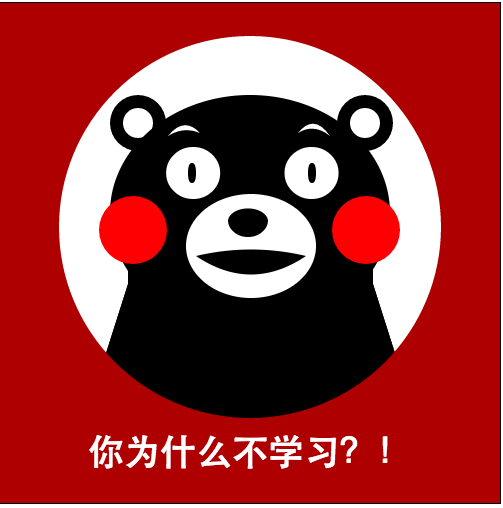
完成!现在已经能接受熊本熊发自灵魂的拷问了——“你为什么不学习?!”
