

引用自:Android蓝牙API
1.简介
通过蓝牙API,可以实现以下内容:
- 扫描其他蓝牙设备
- 查询配对蓝牙设备的本地蓝牙适配器
- 创建RFCOMM通道
- 通过服务发现连接其他设备
- 与其他设备进行数据交互
- 管理多连接
2.基本要素
蓝牙相关的API都存在android.bluetooth包内,主要包括以下几个类和接口:
BluetoothAdapter
代表本地蓝牙适配器。BluetoothAdapter是所有蓝牙设备交互的入口。可以实现查找设备、遍历配对设备、通过已知的MAC地址实例化BluetoothDevice、创建BluetoothServerSocket与其他设备进行通信。
BluetoothDevice
代表一个远程蓝牙设备。可用于,通过BluetoothSocket请求与远程设备的连接,或者查询设备信息(名字、地址、级别与配对状态)。
BluetoothSocket
代表蓝牙socket接口(类似于TCP Socket)。这是允许应用与其他蓝牙设备进行数据交换的连接点,采用InputStream和OutputStream。
BluetoothServerSocket
代表监听外来请求的开放服务socket(类似于TCP ServerSocket)。为连接两个Android设备,其中一个设备用这个类必须开放服务socket。当远程蓝牙设备向此设备进行连接请求时,当连接被接受时,BluetoothServerSocket会返回一个连接的BluetoothSocket。
BluetoothClass
描述一个蓝牙设备的基本特点和性能。它是一个只读的属性集合,定义了设备主要和次要的级别和服务。然而,它并没有完全描述设备所支持的所有的蓝牙配置文件和服务,但是,对于设备类型来说是非常有用的。
BluetoothProfile
代表蓝牙协议的接口。是设备间基于蓝牙通信的无线接口说明。例如Hands-Free Profile (HFP)。
BluetoothHeadset
提供用于手机的蓝牙耳机支持。包括Bluetooth Headset和Hands-Free (v1.5) 协议。
BluetoothA2dp
定义高质量音频可以从一个设备通过蓝牙连接传输到另一个设备。"A2DP" 代表Advanced Audio Distribution Profile.
BluetoothHealth
代表健康设备配置文件协议,控制蓝牙设备。HDP Health Device Profile.
BluetoothHealthCallback
一个抽象类,用于实现BluetoothHealth回调。必须继承这个类并实现回调方法来接受应用注册状态和蓝牙通道状态改变。
BluetoothHealthAppConfiguration
代表一个蓝牙健康的第三方应用与远程蓝牙健康设备注册通信应用配置。
BluetoothProfile.ServiceListener
一个当服务(运行特殊配置文件的内部服务)连接与断开时用于通知BluetoothProfile IPC代理的接口。
3.权限
...
4.配置蓝牙
使用蓝牙进行通信前,必须验证设备支持蓝牙,并且蓝牙可用。主要分为两步:

- 获取BluetoothAdapter
BluetoothAdapter mBluetoothAdapter = BluetoothAdapter.getDefaultAdapter(); if (mBluetoothAdapter == null) { // Device does not support Bluetooth } - 使蓝牙可用
private static final int REQUEST_ENABLE_BT = 1024; if (!mBluetoothAdapter.isEnabled()) { Intent enableBtIntent = new Intent(BluetoothAdapter.ACTION_REQUEST_ENABLE); startActivityForResult(enableBtIntent, REQUEST_ENABLE_BT); } protect void onActivityResult(int requestCode, int resultCode, Intent data){ if(requestCode == REQUEST_ENABLE_BT){ if(resultCode == RESULT_OK) // YES 用户允许 if(resultCode == RESULT_CANCELED) // NO 用户取消 } } - 监听蓝牙状态改变
常量在BluetoothAdapter中定义。String ACTION_STATE_CHANGED = "android.bluetooth.adapter.action.STATE_CHANGED" String ACTION_CONNECTION_STATE_CHANGED = "android.bluetooth.headset.profile.action.CONNECTION_STATE_CHANGED" String ACTION_AUDIO_STATE_CHANGED = "android.bluetooth.headset.profile.action.AUDIO_STATE_CHANGED"
ACTION_STATE_CHANGED
当本地蓝牙适配器的状态改变时,采用此广播发送。intent中包含两个状态EXTRA_STATE 和 EXTRA_PREVIOUS_STATE ,分别表示当前状态和上一个状态。
可能包含 的值为:STATE_OFF, STATE_TURNING_ON, STATE_ON, STATE_TURNING_OFF。
5.查找设备
用BluetoothAdapter可以查询远程蓝牙设备,也可以获取配对设备列表。
- 获取配对列表
Set pairedDevices = mBluetoothAdapter.getBondedDevices(); // If there are paired devices if (pairedDevices.size() > 0) { // Loop through paired devices for (BluetoothDevice device : pairedDevices) { // Add the name and address to an array adapter to show in a ListView mArrayAdapter.add(device.getName() + "\n" + device.getAddress()); } } - 搜索设备
调用boolean startDiscovery ()开始搜索,正确开始搜索时返回true。然后采用广播监听的形式获取蓝牙设备。
调用boolean cancelDiscovery ()停止搜索,一般在有远程设备连接时调用。// Create a BroadcastReceiver for ACTION_FOUND private final BroadcastReceiver mReceiver = new BroadcastReceiver() { public void onReceive(Context context, Intent intent) { String action = intent.getAction(); // When discovery finds a device if (BluetoothDevice.ACTION_FOUND.equals(action)) { // Get the BluetoothDevice object from the Intent BluetoothDevice device = intent.getParcelableExtra(BluetoothDevice.EXTRA_DEVICE); // Add the name and address to an array adapter to show in a ListView mArrayAdapter.add(device.getName() + "\n" + device.getAddress()); } } }; // Register the BroadcastReceiver IntentFilter filter = new IntentFilter(BluetoothDevice.ACTION_FOUND); registerReceiver(mReceiver, filter); // Don't forget to unregister during onDestroy - 使能被发现
最大可查找时间为1小时,如果设为0时表示一直能被发现。private static final int REQUEST_BT_DISCOVERABLE = 102; Intent discoverableIntent = new Intent(BluetoothAdapter.ACTION_REQUEST_DISCOVERABLE); discoverableIntent.putExtra(BluetoothAdapter.EXTRA_DISCOVERABLE_DURATION, 300); startActivityForResult(discoverableIntent,REQUEST_BT_DISCOVERABLE);
在onActivityResult()中监听返回值,如果resultCode为间隔值,说明返回成功,如果返回码为RESULT_CANCELED,返回失败。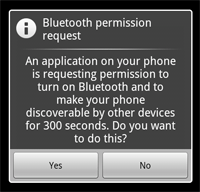
6.连接设备
要在两个设备间创建连接,需要同时实现服务端和客户端机制,因为一个设备必须打开服务socket,另一个必须初始化连接(用服务端设备的MAC地址进行初始化连接)。当服务端和客户端之间在同一个RFCOMM通道存在一个连接的 BluetoothSocket 时被认为是相互连接的。只有这样,每一个设备可以获取输入输出流并数据交换。
服务端和客户端可以采用不同的方式获取需要的BluetoothSocket 。服务端接受外来连接,接收到BluetoothSocket 。客户端想服务端打开一个RFCOMM通道时,接收到BluetoothSocket 。

-
作为服务端连接
1.调用listenUsingRfcommWithServiceRecord(String, UUID) 获取BluetoothServerSocket
String 表示服务的名字;UUID代表Universally Unique Identifier。
2.调用accept()监听连接请求
如果成功,将返回一个连接的BluetoothSocket
3.要接受其他连接是,调用 close()
4.样例private class AcceptThread extends Thread { private final BluetoothServerSocket mmServerSocket; public AcceptThread() { // Use a temporary object that is later assigned to mmServerSocket, // because mmServerSocket is final BluetoothServerSocket tmp = null; try { // MY_UUID is the app's UUID string, also used by the client code tmp = mBluetoothAdapter.listenUsingRfcommWithServiceRecord(NAME, MY_UUID); } catch (IOException e) { } mmServerSocket = tmp; } public void run() { BluetoothSocket socket = null; // Keep listening until exception occurs or a socket is returned while (true) { try { socket = mmServerSocket.accept(); } catch (IOException e) { break; } // If a connection was accepted if (socket != null) { // Do work to manage the connection (in a separate thread) manageConnectedSocket(socket); mmServerSocket.close(); break; } } } /** Will cancel the listening socket, and cause the thread to finish */ public void cancel() { try { mmServerSocket.close(); } catch (IOException e) { } } } -
作为客户端连接
1.调用 BluetoothDevice 的 createRfcommSocketToServiceRecord(UUID) 方法,获取BluetoothSocket 。
2.调用 connect() 初始化连接
3.样例private class ConnectThread extends Thread { private final BluetoothSocket mmSocket; private final BluetoothDevice mmDevice; public ConnectThread(BluetoothDevice device) { // Use a temporary object that is later assigned to mmSocket, // because mmSocket is final BluetoothSocket tmp = null; mmDevice = device; // Get a BluetoothSocket to connect with the given BluetoothDevice try { // MY_UUID is the app's UUID string, also used by the server code tmp = device.createRfcommSocketToServiceRecord(MY_UUID); } catch (IOException e) { } mmSocket = tmp; } public void run() { // Cancel discovery because it will slow down the connection mBluetoothAdapter.cancelDiscovery(); try { // Connect the device through the socket. This will block // until it succeeds or throws an exception mmSocket.connect(); } catch (IOException connectException) { // Unable to connect; close the socket and get out try { mmSocket.close(); } catch (IOException closeException) { } return; } // Do work to manage the connection (in a separate thread) manageConnectedSocket(mmSocket); } /** Will cancel an in-progress connection, and close the socket */ public void cancel() { try { mmSocket.close(); } catch (IOException e) { } } }
7.管理连接
- 调用socket的 getInputStream() 和 getOutputStream() 获得输入输出流
- 通过read(byte[])和write(byte[]) 向流读写数据
-
private class ConnectedThread extends Thread {
 private final BluetoothSocket mmSocket;
 private final InputStream mmInStream;
 private final OutputStream mmOutStream;

 public ConnectedThread(BluetoothSocket socket) {
     mmSocket = socket;
     InputStream tmpIn = null;
     OutputStream tmpOut = null;
     // Get the input and output streams, using temp objects because
     // member streams are final
     try {
         tmpIn = socket.getInputStream();
         tmpOut = socket.getOutputStream();
     } catch (IOException e) { }
     mmInStream = tmpIn;
     mmOutStream = tmpOut;
 }

 public void run() {
     byte[] buffer = new byte[1024];  // buffer store for the stream
     int bytes; // bytes returned from read()
     // Keep listening to the InputStream until an exception occurs
     while (true) {
         try {
             // Read from the InputStream
             bytes = mmInStream.read(buffer);
             // Send the obtained bytes to the UI activity
             mHandler.obtainMessage(MESSAGE_READ, bytes, -1, buffer)
                     .sendToTarget();
         } catch (IOException e) {
             break;
         }
     }
 }

 /* Call this from the main activity to send data to the remote device */
 public void write(byte[] bytes) {
     try {
         mmOutStream.write(bytes);
     } catch (IOException e) { }
 }

 /* Call this from the main activity to shutdown the connection */
 public void cancel() {
     try {
         mmSocket.close();
     } catch (IOException e) { }
 }
}
8.采用Profiles工作
android蓝牙API提供下列协议的实现。
- 获取默认的蓝牙适配器。
- 用 getProfileProxy()
创建与协议对象的连接。 - 设置 BluetoothProfile.ServiceListener。当与服务连接或断开时,监听器通知 BluetoothProfile IPC代理。
- 在 onServiceConnected() 中获取协议代理对象。
- 一旦拥有了协议代理对象,就可以用它管理连接状态,执行与协议相关的其他操作。
- 样例
BluetoothHeadset mBluetoothHeadset;
// Get the default adapter
BluetoothAdapter mBluetoothAdapter = BluetoothAdapter.getDefaultAdapter();
// Establish connection to the proxy.
mBluetoothAdapter.getProfileProxy(context, mProfileListener, BluetoothProfile.HEADSET);
private BluetoothProfile.ServiceListener mProfileListener = new BluetoothProfile.ServiceListener() {
 public void onServiceConnected(int profile, BluetoothProfile proxy) {
     if (profile == BluetoothProfile.HEADSET) {
         mBluetoothHeadset = (BluetoothHeadset) proxy;
     }
 }
 public void onServiceDisconnected(int profile) {
     if (profile == BluetoothProfile.HEADSET) {
         mBluetoothHeadset = null;
     }
 }
};
// ... call functions on mBluetoothHeadset
// Close proxy connection after use.
mBluetoothAdapter.closeProfileProxy(mBluetoothHeadset);
