

如果您通过以下的代码来获取定义的颜色值
context.getResources().getColor(R.color.some_color_resource_id);在 Android Studio 中会有一个 lint 警告,提示您 Resources#getColor(int) 在 Marshmallow 中被废弃了,建议使用主题可知的 Resources#getColor(int, Theme) 函数。 为了避免该警告,则可以使用 ContextCompat:
ContextCompat.getColor(context,R.color.some_color_resource_id);该函数的实现是这样的:
if(Build.VERSION.SDK_INT>=Build.VERSION_CODES.M){

returncontext.getResources().getColor(id,context.getTheme());

}else{

returncontext.getResources().getColor(id);
看起来很简单。但是为什么会这样呢? 为什么会开始使用带主题的函数而废弃之前的函数呢?
Resources#getColor(int) & Resources#getColorStateList(int) 的问题
首先来看看这两个被废弃的函数是干啥的:
– Resources#getColor(int) 返回一个资源 id 对应的颜色值,如果该资源为 ColorStateList 则返回 ColorStateList 的默认颜色值
– Resources#getColorStateList(int) 返回对应的 ColorStateList
上面的代码在什么情况下会破坏我的代码呢?
要理解为何废弃这两个函数,来看个 ColorStateList 的例子。 当在 TextView 中使用自定义的 ColorStateList 的时候, TextView 不可用状态和可用状态的文字颜色分别使用 R.attr.colorAccent 和 R.attr.colorPrimary 表示。
xmlns:android="http://schemas.android.com/apk/res/android">

android:color="?attr/colorAccent"android:state_enabled="false"/>

android:color="?attr/colorPrimary"/>
现在如果您通过如下的代码来获取这个ColorStateList
ColorStateList csl=context.getResources().getColorStateList(R.color.button_text_csl);上面的代码会抛出一个异常(查看logcat 可以看到如下的信息)
W/Resources:ColorStateList color/button_text_csl has unresolved theme attributes!

Consider using Resources.getColorStateList(int,Theme)

orContext.getColorStateList(int)

at android.content.res.Resources.getColorStateList(Resources.java:1011)

...
哪里出错了呢?
问题的根源在于 Resources 对象并没有和一个 Theme 对象关联,当使用 R.attr.colorAccent 和 R.attr.colorPrimary 指代颜色的时候,在代码中通过上面的函数解析的时候没有指定对应的 Theme导致无法解析出结果。 所以在 Marshmallow 中添加了 ColorStateList 对 Theme 的支持并且添加了这两个新的函数:Resources#getColor(int, Theme) 和 Resources#getColorStateList(int, Theme),并使用 Theme 参数来解析里面的 attributes 属性。
在新版本的 Support 库中也有对应的实现,分别位于 ResourcesCompat 和 ContextCompat 类中。
如何解决该问题呢?
使用 AppCompat v24+ 版本可以很容易的解决该问题。
ColorStateList csl=AppCompatResources.getColorStateList(context,R.color.button_text_csl);在 23+ 版本上直接使用系统的函数,在之前的版本上 AppCompat 自己解析这些 xml 文件从里面提取 attr 属性指代的数值。 AppCompat 同时还支持 ColorStateList 新的 android:alpha 属性。
Resources#getDrawable(int) 的问题
Resources#getDrawable(int) 和前面的两个函数的问题是类似的。 在 Lollipop 之前的版本中无法支持 Theme attr 。
为啥我这样用也没有出现异常呢?
异常并不总是会出现。
VectorDrawableCompat 和 AnimatedVectorDrawableCompat 类中添加了和 AppCompatResources 类类似的功能。比如在 矢量图中你可以使用 ?attr/colorControlNormal 来设置矢量图的颜色,VectorDrawableCompat 会自动完成解析该 属性的工作:
xmlns:android="http://schemas.android.com/apk/res/android"

android:width="24dp"

android:height="24dp"

android:viewportWidth="24.0"

android:viewportHeight="24.0"

android:tint="?attr/colorControlNormal">


android:pathData="..."

android:fillColor="@android:color/white"/>
小测试
下面使用一个小测试来回顾一下前面介绍的内容。 假设有下面一个 ColorStateList:
xmlns:android="http://schemas.android.com/apk/res/android">

android:color="?attr/colorAccent"android:state_enabled="false"/>

android:color="?attr/colorPrimary"/>
在应用中定义了如下的 Theme:
@ColorInt

privatestaticintgetThemeAttrColor(Context context,@AttrResintcolorAttr){

TypedArray array=context.obtainStyledAttributes(null,newint[]{colorAttr});

try{

returnarray.getColor(0,0);

}finally{

array.recycle();

privatestaticColorStateList createColorStateList(Context context){

returnnewColorStateList(

newint[][]{

newint[]{-android.R.attr.state_enabled},// Disabled state.

StateSet.WILD_CARD,// Enabled state.

newint[]{

getThemeAttrColor(context,R.attr.colorAccent),// Disabled state.

getThemeAttrColor(context,R.attr.colorPrimary),// Enabled state.

});
在代码中有如下的函数用来解析颜色值并在代码中创建 ColorStateList:
@ColorInt

privatestaticintgetThemeAttrColor(Context context,@AttrResintcolorAttr){

TypedArray array=context.obtainStyledAttributes(null,newint[]{colorAttr});

try{

returnarray.getColor(0,0);

}finally{

array.recycle();

privatestaticColorStateList createColorStateList(Context context){

returnnewColorStateList(

newint[][]{

newint[]{-android.R.attr.state_enabled},// Disabled state.

StateSet.WILD_CARD,// Enabled state.

newint[]{

getThemeAttrColor(context,R.attr.colorAccent),// Disabled state.

getThemeAttrColor(context,R.attr.colorPrimary),// Enabled state.

});
看看是否能猜出在 API 19 和 API 23 版本上文字禁用状态和正常状态的颜色,实现代码如下(5和8的情况,在TextView xml 中指定了 android:theme=”@style/CustomButtonTheme” ):
Resources res=ctx.getResources();

// (1)

intdeprecatedTextColor=res.getColor(R.color.button_text_csl);

button1.setTextColor(deprecatedTextColor);

// (2)

ColorStateList deprecatedTextCsl=res.getColorStateList(R.color.button_text_csl);

button2.setTextColor(deprecatedTextCsl);

// (3)

inttextColorXml=

AppCompatResources.getColorStateList(ctx,R.color.button_text_csl).getDefaultColor();

button3.setTextColor(textColorXml);

// (4)

ColorStateList textCslXml=AppCompatResources.getColorStateList(ctx,R.color.button_text_csl);

button4.setTextColor(textCslXml);

// (5)

Context themedCtx=button5.getContext();

ColorStateList textCslXmlWithCustomTheme=

AppCompatResources.getColorStateList(themedCtx,R.color.button_text_csl);

button5.setTextColor(textCslXmlWithCustomTheme);

// (6)

inttextColorJava=getThemeAttrColor(ctx,R.attr.colorPrimary);

button6.setTextColor(textColorJava);

// (7)

ColorStateList textCslJava=createColorStateList(ctx);

button7.setTextColor(textCslJava);

// (8)

Context themedCtx=button8.getContext();

ColorStateList textCslJavaWithCustomTheme=createColorStateList(themedCtx);

button8.setTextColor(textCslJavaWithCustomTheme);
下面是对应的实现截图:
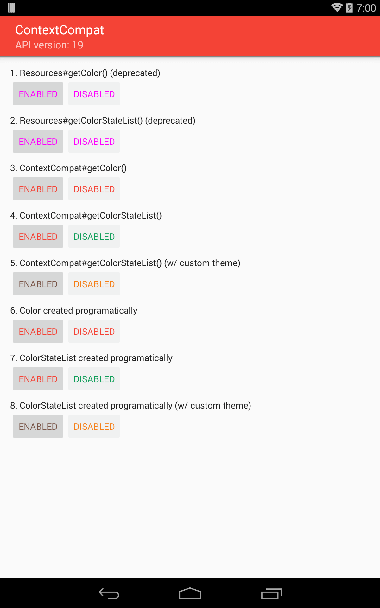
示例项目代码位于github,原文位于androiddesignpatterns
RxJava 在 Android 应用开发中越来越流行,但是由于其门槛稍高,初次使用不免遇到很多问题,例如在 RxJava 常见的错误用法 和 不该使用 RxJava 的一些情况 中所描述的情况。为了避免这些常见的问题,很多民间高手开发了很多在 Android 应用中可以使用的 Rx 扩展类库,组合使用这些类库,可以更方便的使用 RxJava 并且可以避免一些常见的错误用法。 本文来介绍一些使用 RxJava 必备的扩展库。
RxAndroid
RxAndroid 这个就毫无疑问了, Android 开发中使用 RxJava 必备元素,虽然里面只是提供了简单的两个功能。 AndroidSchedulers.mainThread() 和 AndroidSchedulers.handlerThread(handler) ,但这确是 Android 开发中最核心的功能之一。
RxBinding
RxBinding 是把 Android 中各种 UI 控件的事件转换为 RxJava 中的数据流。这样就可以把 UI 控件的事件当做 RxJava 中的数据流来使用了。 比如 View 的 onClick 事件,使用 RxView.clicks(view) 即可获取到一个 Observable 对象,每当用户点击这个 View 的时候,该 Observable 对象就发射一个事件(onNext 被调用), Observable 的 Observer 订阅者就可以通过 onNext 回调知道用户点击了 View。
RxLifecycle
RxLifecycle 配合 Activity/Fragment 生命周期来管理订阅的。 由于 RxJava Observable 订阅后(调用 subscribe 函数),一般会在后台线程执行一些操作(比如访问网络请求数据),当后台操作返回后,调用 Observer 的 onNext 等函数,然后在 更新 UI 状态。 但是后台线程请求是需要时间的,如果用户点击刷新按钮请求新的微博信息,在刷新还没有完成的时候,用户退出了当前界面返回前面的界面,这个时候刷新的 Observable 如果不取消订阅,则会导致之前的 Activity 无法被 JVM 回收导致内存泄露。 这就是 Android 里面的生命周期管理需要注意的地方,RxLifecycle 就是用来干这事的。比如下面的示例:
myObservable .compose(RxLifecycle.bindUntilEvent(lifecycle,ActivityEvent.DESTROY)) .subscribe(); |
在 Activity 销毁的时候, RxLifecycle 会自动取消订阅这个 Observer。 这样就不用自己手动管理了。
Retrofit
现在几乎大部分的 Android 应用都需要请求网络获取数据,而 Retrofit 就是用来简化网络请求的一个库,并且支持 RxJava。比如:
@GET("/users/{user}") Observableuser(@Path("user")Stringuser); |
上面的代码定义了一个 GET 请求,请求的路径是 /users/{user}并且带有一个用户名的参数。 返回的结果为 一个 Observable 。 这样配合前面的 RxBinding,就可以很容易的实现一个 用户点击一个刷新按钮去请求服务器数据的操作。
RxView.clicks(view).flatMap(v -> githubService.user(user)).subscribe();
SqlBrite
如果您的应用使用了 Sqlite 来保存数据的话,则 SqlBrite 是个很好的配合 RxJava 使用的库。
除了上面这些主要的类库外,还有一些封装其他 Android 服务的库:
Rx Preferences 通过 RxJava 的方式来访问 SharedPreferences。
RxPermissions 用于支持 Android M 动态权限申请的库。
还有一些配合 Google Play Service 服务的库:
RxFit 封装了 Fitness API 的调用。
RxNotification 封装了 firebase 通知 api。
Android-ReactiveLocation 封装了 Google Play Service API 中和位置相关的 api。
如果您要是开发 Android Wear 应用的话,会使用到 Wearable API 来实现手表和手机直接的数据通信,则可以使用 RxWear 库。
RxJava 用起来很爽,特别是和 retrofit 一起用了请求网络数据。对于大部分初学者呢,都会出现这样的用法:
service=GithubService.createGithubService(githubToken);

view.setOnClickListener(v->service.user(name)

.subscribeOn(Schedulers.io())

.observeOn(AndroidSchedulers.mainThread())

.subscribe(System.out::println));
当点击一个按钮的时候,去请求服务器数据然后使用返回的结果刷新 UI。(比如当前显示用户信息的界面上有个刷新按钮,点击一下就去请求数据并刷新界面)。
笔者就曾经写过这样的代码。但是经过简单的测试就发现这是有问题的!
1. 由于网络请求是在后台线程发生的,并且需要时间,如果网络请求没有完成,用户点击了返回按键退出了当前界面则会引起 Activity 泄露
2. 每次点击刷新按钮都会触发一个新的网络请求,同时网络请求返回的顺序是不确定的,可能导致收到的数据问题
3. 如果把收到的数据保存到一个集合中,多次点击刷新按钮会导致同样的结果出现在数据集合中
比如输入一个用户名并点击刷新按钮查看其详细资料,在结果没有返回的时候,再次输入一个新的用户名并点击刷新按钮,则有可能第二次请求先返回,然后第一个请求结果才返回,这样用户最终看到的是第一个用户名对应的详细信息而不是第二个用户的。
其中第一个问题比较好解决,使用一个 CompositeSubscription ,把每个 Subscription 都添加到这里,在 onDestroy 里面取消注册即可(subscriptions.unsubscribe())。
subscriptions=newCompositeSubscription();

service=GithubService.createGithubService(githubToken);

view.setOnClickListener(v->{

Subscription sub=service.user(name)

.subscribeOn(Schedulers.io())

.observeOn(AndroidSchedulers.mainThread())

.subscribe(System.out::println);

subscriptions.add(sub);

});
但是另外两个问题呢?
这里就要使用 Subject 来转发 View 的onClick 事件了。例如下面使用 PublishSubject:
subject=PublishSubject.create();

subscriptions=newCompositeSubscription();

service=GithubService.createGithubService(githubToken);

view.setOnClickListener(v->subject.onNext(v));

Subscription sub=subject.flatMap(v->service.user(name))

.subscribeOn(Schedulers.io())

.observeOn(AndroidSchedulers.mainThread())

.subscribe(System.out::println);

subscriptions.add(sub);
这样可以避免每次点击刷新按钮都创建一个新的 Subscription。
而第三种情况,可以使用 switchMap 来解决
subject=PublishSubject.create();

subscriptions=newCompositeSubscription();

service=GithubService.createGithubService(githubToken);

view.setOnClickListener(v->subject.onNext(v));

Subscription sub=subject.switchMap(v->service.user(name))

.subscribeOn(Schedulers.io())

.observeOn(AndroidSchedulers.mainThread())

.subscribe(System.out::println);

subscriptions.add(sub);
另外为了避免用户快速的点击同一个按钮,则可以使用 throttleFirst 来过滤掉后面一段时间内的点击事件。
同时如果使用了 RxBinding 和 RxLifecycle 则代码会更加简洁清晰。
RxView.clicks(view)

.subscribeOn(AndroidSchedulers.mainThread())

.doOnNext(aVoid1->_adapter.clear())

.throttleFirst(300,TimeUnit.MILLISECONDS)

.observeOn(Schedulers.io())

.switchMap(aVoid->_githubService.contributors(_username.getText().toString(),_repo.getText().toString()))

.compose(bindUntilEvent(FragmentEvent.DESTROY_VIEW))

.observeOn(AndroidSchedulers.mainThread())

.subscribe(contributors->{

for(Contributorc:contributors){

_adapter.add(format("%s has made %d contributions to %s",

c.login,

c.contributions,

_repo.getText().toString()));

});
上面的代码根据 https://github.com/kaushikgopal/RxJava-Android-Samples/blob/master/app/src/main/java/com/morihacky/android/rxjava/fragments/RetrofitFragment.java 中的代码修改而来,可以把上面的代码插入到 onCreateView 函数的 return 语句之前。同时取消掉 onListContributorsClicked 函数。
同时 RxJava-Android-Samples 这个项目有 3432 人加星 有 639 人 fork。 说明还是有不少人关注的,但是里面的示例用法还是有不少问题的。所以大家在参考示例项目学习的时候,一定要学会思考,不能直接复制粘贴代码就拿来用了,RxJava-Android-Samples 项目只是告诉 Rxjava 初学者 RxJava 可以这么用,那是具体用的对不对就不一定了!
