先看看效果图
这里可以指定显示的宽度,高度随着文字的数量自动增加 看到这些是不是很开心,IM聊天记录基本都是这样的原理。 随着输入的字体自动增加,显示的View的高度自动动态的增加
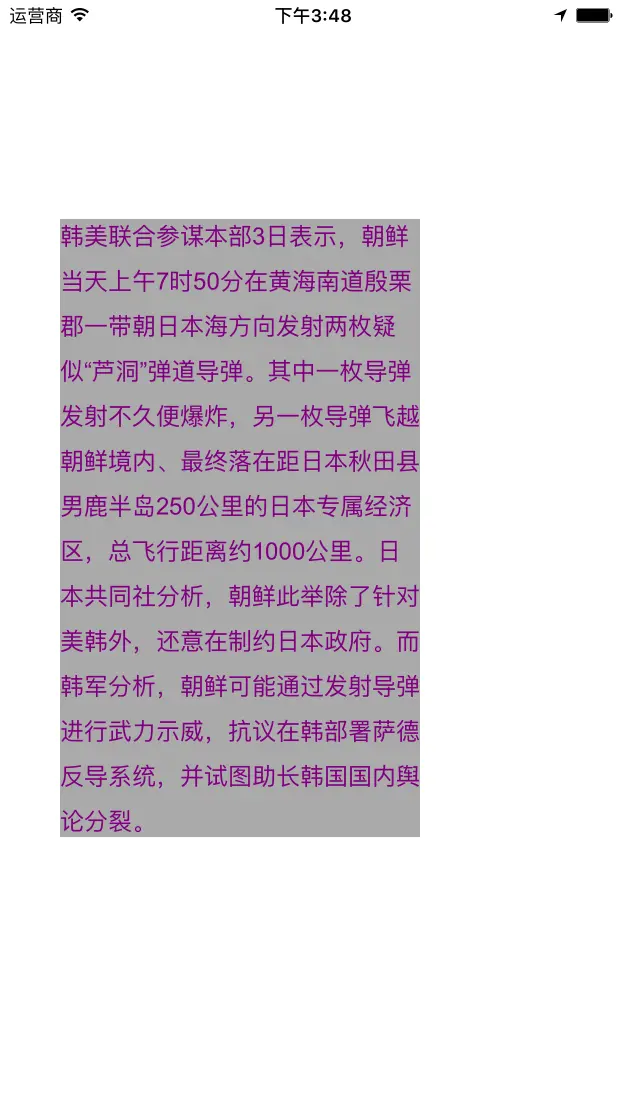
: 这里介绍一下coreText,下面的一段话引用自唐巧博客
CoreText是用于处理文字和字体的底层技术。它直接和Core Graphics(又被称为 Quartz)打交道。Quartz 是一个 2D 图形渲染引擎,能够处理 OSX 和 iOS 中的图形显示。 Quartz 能够直接处理字体(font)和字形(glyphs),将文字渲染到界面上,它是基础库中唯一能够处理字形的模块。因此,CoreText 为了排版,需要将显示的文本内容、位置、字体、字形直接传递给 Quartz。相比其它 UI 组件,由于 CoreText 直接和 Quartz 来交互,所以它具有高速的排版效果。 下图是 CoreText 的架构图,可以看到,CoreText 处于非常底层的位置,上层的 UI 控件(包括 UILabel,UITextField 以及 UITextView)和 UIWebView都是基于 CoreText 来实现的。
搞MVC理念来实现
model里面分三个类
| YYGFrameParserConfig | YYGFrameParser | YYGCoreTextDat |
|---|---|---|
Model
1.YYGFrameParserConfig 类
既然要把内容呈现出来,就必须知道内容呈现的内容的一下呈现方式吧! 该类就是干这个的。
需要知道
要显示的宽度
@property(nonatomic, assign) CGFloat width;需要知道
要显示的字体大小
@property(assign,nonatomic) CGFloat fontSize;需要知道
要显示的行间距离
@property(assign,nonatomic) CGFloat lineSpace;需要知道
要显示的字体颜色
@property(strong,nonatomic) UIColor * textColor;
代码如下
@interface YYGFrameParserConfig : NSObject

/**
 *  view显示的宽度
 */
@property(nonatomic, assign) CGFloat width;

/**
 *  字体大小
 */
@property(assign,nonatomic) CGFloat fontSize;

/**
 *  行间距离
 */
@property(assign,nonatomic) CGFloat lineSpace;

/**
 *  字体颜色
 */
@property(strong,nonatomic) UIColor * textColor;


@end

--------------------
.m文件
#import "YYGFrameParserConfig.h"

@implementation YYGFrameParserConfig

-(id)init
{
    self=[super init];
    if (self)
    {
        _width=200.0f;
        _fontSize=16.0f;
        _lineSpace=8.0f;
        _textColor=RGB(108, 108, 108);
    }
    return self;
}

@end
2.YYGFrameParser类
我们都知道任何呈现在手机屏幕上的信息都是通过底层图形渲染引擎来完成的,而在
UIView里面都是通过CTFrameDraw(CTFrameRef, CGContextRef)来画在画布上的。 所以该类就是生成CTFrameRef它的。 而生成这些要展现在View上的吧!就需要内容!和对内容展现的一些约束,宽度,字体大小啊,而这些在上一个类中我们已经完成啦!! 所以需要如下:需要
内容需要
YYGFrameParserConfig而最开始介绍过,通过内容可以动态的生产
高度这个才是关键啊 所以需要返回高度,和生成的CTFrameRef返回
高度返回
CTFrameRef居然返回俩参数,好吧直接再弄一个
model所以有了下一个model类
本类代码:
#import "YYGFrameParserConfig.h"
#import "YYGCoreTextData.h"


@interface YYGFrameParser : NSObject

+(YYGCoreTextData *)parseContent:(NSString *)content config:(YYGFrameParserConfig *)config;

@end

.m文件

#import "YYGFrameParser.h"

@implementation YYGFrameParser

+(YYGCoreTextData *)parseContent:(NSString *)content config:(YYGFrameParserConfig *)config
{
    NSDictionary * dictionary=[self attributesWithConfig:config];
    NSAttributedString * string=[[NSAttributedString alloc]initWithString:content attributes:dictionary];
    // 创建 CTFramesetterRef 实例
    CTFramesetterRef framesetter=CTFramesetterCreateWithAttributedString((CFAttributedStringRef)string);
    // 获得要绘制的区域的高度
    CGSize restrictSize=CGSizeMake(config.width, CGFLOAT_MAX);
    CGSize coreTextSize=CTFramesetterSuggestFrameSizeWithConstraints(framesetter,CFRangeMake(0, 0), nil, restrictSize, nil);
    CGFloat textHeight=coreTextSize.height;

     // 生成 CTFrameRef 实例
    CTFrameRef frameRef=[self createFrameWithFramesetter:framesetter config:config height:textHeight];
    // 将生成好的 CTFrameRef 实例和计算好的绘制高度保存到 CoreTextData 实例中,最后返回 CoreTextData 实例
    YYGCoreTextData *data=[[YYGCoreTextData alloc]init];
    data.ctFram=frameRef;
    data.height=textHeight;

    CFRelease(frameRef);
    CFRelease(framesetter);

    return data;


}

+(NSDictionary *)attributesWithConfig:(YYGFrameParserConfig *)config
{

    NSMutableDictionary * dict=[NSMutableDictionary dictionary];
    //1
    CGFloat fontSize=config.fontSize;
    CTFontRef fontRef=CTFontCreateWithName((CFStringRef)@"ArialMT", fontSize, NULL);
    dict[(id)kCTFontAttributeName]=(__bridge id)fontRef;

    CFRelease(fontRef);
    //2
    CGFloat lineSpace=config.lineSpace;
    const CFIndex kNumberOfSetting=3;
    CTParagraphStyleSetting theSettings[kNumberOfSetting]={
        {kCTParagraphStyleSpecifierLineSpacingAdjustment,sizeof(CGFloat),&lineSpace},
        {kCTParagraphStyleSpecifierMaximumLineSpacing,sizeof(CGFloat),&lineSpace},
        {kCTParagraphStyleSpecifierMinimumLineSpacing,sizeof(CGFloat),&lineSpace}
    };
    CTParagraphStyleRef thePragraphRef=CTParagraphStyleCreate(theSettings, kNumberOfSetting);
    dict[(id)kCTParagraphStyleAttributeName]=(__bridge id)thePragraphRef;

    CFRelease(thePragraphRef);
    //3
    UIColor * textColor=config.textColor;
    dict[(id)kCTForegroundColorAttributeName]=(__bridge id)textColor.CGColor;

    return dict;
}

+(CTFrameRef )createFrameWithFramesetter:(CTFramesetterRef)framesetter config:(YYGFrameParserConfig *)config height:(CGFloat)height
{
    CGMutablePathRef path=CGPathCreateMutable();
    CGPathAddRect(path, NULL, CGRectMake(0, 0, config.width, height));

    CTFrameRef frame=CTFramesetterCreateFrame(framesetter, CFRangeMake(0, 0), path, NULL);

    CFRelease(path);

    return frame;
}


@end
3.YYGCoreTextData
它的出现来理由来自于上面的介绍
存储生产的
CTFrameRef
@property(assign,nonatomic) CTFrameRef ctFram;存储生产的
动态生成的高度
@property(assign,nonatomic) CGFloat height;
.m文件
#import "YYGCoreTextData.h"

@implementation YYGCoreTextData

-(void)setCtFram:(CTFrameRef)ctFram
{
    if (_ctFram!=ctFram)
    {
        if (_ctFram!=nil)
        {
            CFRelease(_ctFram);
        }
        CFRetain(ctFram);
        _ctFram=ctFram;
    }
}

-(void)dealloc
{
    if (_ctFram!=nil)
    {
        CFRelease(_ctFram);
        _ctFram=nil;
    }

}

@end
View
.h文件
@property(strong,nonatomic) YYGCoreTextData * data;

.m文件
- (void)drawRect:(CGRect)rect
{
    [super drawRect:rect];
    CGContextRef context=UIGraphicsGetCurrentContext();
    CGContextSetTextMatrix(context, CGAffineTransformIdentity);
    CGContextTranslateCTM(context, 0, self.bounds.size.height);
    CGContextScaleCTM(context, 1.0, -1.0);
    if (self.data)
    {
        CTFrameDraw(self.data.ctFram, context);
    }
}
好吧还需要从写 UIView 的Category方法
在来一个类
#import <UIKit/UIKit.h>

@interface UIView (YYGView)

-(CGFloat)x;
-(void)setX:(CGFloat)x;

-(CGFloat)y;
-(void)setY:(CGFloat)y;

-(CGFloat)wide;
-(void)setWide:(CGFloat)wide;

-(CGFloat)height;
-(void)setHeight:(CGFloat)height;

@end

.m文件

#import "UIView+YYGView.h"

@implementation UIView (YYGView)

-(CGFloat)x
{
    return self.frame.origin.x;
}
-(void)setX:(CGFloat)x
{
    self.frame=CGRectMake(x, self.y, self.wide, self.height);
}

-(CGFloat)y
{
    return self.frame.origin.y;
}
-(void)setY:(CGFloat)y
{
    self.frame=CGRectMake(self.x, y, self.wide, self.height);
}

-(CGFloat)wide
{
    return self.frame.size.width;
}
-(void)setWide:(CGFloat)wide
{
    self.frame=CGRectMake(self.x, self.y, wide, self.height);
}

-(CGFloat)height
{
    return self.frame.size.height;
}
-(void)setHeight:(CGFloat)height
{
    self.frame=CGRectMake(self.x, self.y, self.wide, height);
}


@end
YYGDisplayView 类
什么
Model啊,UIview的category的方法啊,都是为了把东西画在画面上,就是为YYGDisplayView打辅助的,辅助其实很很重要!!!
.m文件

#import "YYGDisplayView.h"

@implementation YYGDisplayView

- (void)drawRect:(CGRect)rect
{
    [super drawRect:rect];
    CGContextRef context=UIGraphicsGetCurrentContext();

    CGContextSetTextMatrix(context, CGAffineTransformIdentity);
    CGContextTranslateCTM(context, 0, self.bounds.size.height);
    CGContextScaleCTM(context, 1.0, -1.0);
    if (self.data)
    {
        CTFrameDraw(self.data.ctFram, context);

    }

}

@end
Controller现在开始调用了
    YYGFrameParserConfig * config=[[YYGFrameParserConfig alloc]init];
    config.textColor=[UIColor purpleColor];
    config.width=self.YYGView.wide;

    YYGCoreTextData * data=[YYGFrameParser parseContent:@"韩美联合参谋本部3日表示,朝鲜当天上午7时50分在黄海南道殷栗郡一带朝日本海方向发射两枚疑似“芦洞”弹道导弹。其中一枚导弹发射不久便爆炸,另一枚导弹飞越朝鲜境内、最终落在距日本秋田县男鹿半岛250公里的日本专属经济区,总飞行距离约1000公里。日本共同社分析,朝鲜此举除了针对美韩外,还意在制约日本政府。而韩军分析,朝鲜可能通过发射导弹进行武力示威,抗议在韩部署萨德反导系统,并试图助长韩国国内舆论分裂。" config:config];
    self.YYGView.data=data;
    self.YYGView.height=data.height;
    self.YYGView.backgroundColor=[UIColor lightGrayColor];