Spring MVC简单上手体验。本文参考自 Building a RESTful Web Service ,并做简单修改
为什么使用 Spring MVC
Spring helps development teams everywhere build simple, portable, fast and flexible JVM-based systems and applications.
- BUILD ANYTHING
- RUN ANYWHERE
- REST ASSURED
 以上内容摘自 Sping官网
并且重要的是,Spring MVC使用广泛,各大公司基本都有在用,掌握了它无疑可以更好地工作。
开始
以下文档将会指导你用Spring实现一个 “hello world” web 应用。
你将会创建
创建一个 HTTP GET 请求:
http://localhost:8080/greeting
然后回得到以下的响应:
{"id":1,"content":"Hello, World!"}你也可以自定义可选参数 name 的值:
http://localhost:8080/greeting?name=User
该 name 的值将会覆盖默认的 “World”,并显示在页面上:
{"id":1,"content":"Hello, User!"}你所需要具备的
创建 Maven 工程
官方提供了使用 Gradle 创建项目以及直接从 Git 下载源码 的方式。
我们使用 Maven 创建项目。
官网提供的方法是自己创建对应的目录结构:
mkdir -p src/main/java/hello
而我们可以用 IDE 来创建一个 Maven 项目,这样会更快,也不容易出错。
- 依次选择 IDEA->File->NEW->Maven->Next
- 输入GroupId, ArtifactId,Version默认即可
- 输入 Project name,Finish
GroupId:
定义了项目属于哪个组,一般来说这个网网和公司或组织关联,比如说,你所在的公司为mycom.那就应该定义为com.mycom.mymaven,mymaven为项目名称
ArtifactId:
定义了当前Maven项目在组中的唯一id
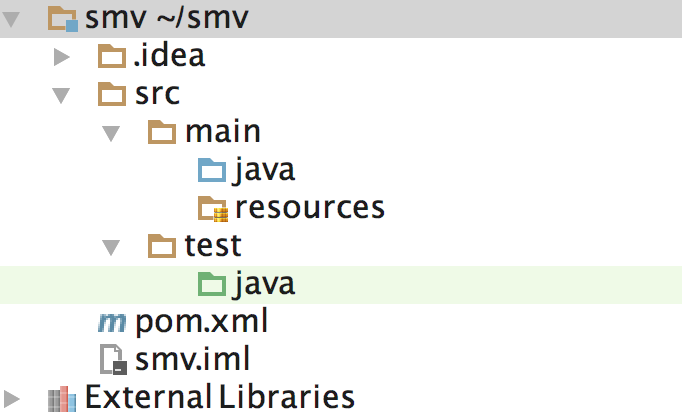
至此,我们就用 IDEA 创建了一个 Maven 工程,项目结构如下图所示:
然后我们需要更改 pom.xml 文件。
将以下 pom.xml 替换项目生成的 pom.xml
    4.0.0

    org.springframework
    gs-serving-web-content
    0.1.0


        org.springframework.boot
        spring-boot-starter-parent
        1.4.0.RELEASE


            org.springframework.boot
            spring-boot-starter-thymeleaf


            org.springframework.boot
            spring-boot-devtools
            true


        1.8


                org.springframework.boot
                spring-boot-maven-plugin
然后执行:
mvn clean
mvn compile
就会将所依赖的 jar 下载下来(前提是需要安装好 Maven,Linux可以通过 yum install maven 进行安装,Mac 可以通过 brew install maven 进行安装)。
创建一个 web 服务器
Spring 创建的项目中,HTTP 请求是通过 controller 进行处理的。你可以很容易通过 @Controller 注解来识别这些请求。在下面的例子中,我们将以 JSON 的形式响应 /greeting 请求。如下所示:
{
    "id": 1,
    "content": "Hello, World!"
    }
首先创建 Greeting.java
package hello;
public class Greeting {
    private final long id;
    private final String content;
    public Greeting(long id, String content) {
        this.id = id;
        this.content = content;
    }
    public long getId() {
        return id;
    }
    public String getContent() {
        return content;
    }
    }
package hello;
import java.util.concurrent.atomic.AtomicLong;
import org.springframework.web.bind.annotation.RequestMapping;
import org.springframework.web.bind.annotation.RequestParam;
import org.springframework.web.bind.annotation.RestController;
public class GreetingController {
    private static final String template = "Hello, %s!";
    private final AtomicLong counter = new AtomicLong();
    ("/greeting")
    public Greeting greeting(@RequestParam(value="name", defaultValue="World") String name) {
        return new Greeting(counter.incrementAndGet(),
                            String.format(template, name));
    }
    }
这个控制器很简洁,但是包含了大量的信息。
这个 @RequestMapping 注解确保了 HTTP 的 /greeting 请求映射到 greeting() 方法。
上面的例子没有区别 GET, PUT, POST 等等,因为 @RequestMapping 默认匹配所有的 HTTP 请求。如果想具体指明是哪种请求,可以使用 @RequestMapping(method=RequestMethod.GET)
@RequestParam 会将请求过来的查询字符串中的 name 绑定到 greeting() 方法中。该值并不是必须的,当没有传入值时,将会使用默认的 “World” 来代替。
传统的 MVC 控制器和 RESTful web service 控制器的一个主要区别是 RESTful web service 创建了 HTTP response body,对象可以直接以 JSON 的形式写入到 HTTP 响应体中,而不需要依赖模板引擎在服务器端渲染数据。
该 Greeting 对象必须转换成 JSON,Spring 会自动使用 Jackson 2 进行转换。
最后我们需要创建启动器,启动我们的 Web 服务。 创建 Application.java
package hello;
import org.springframework.boot.SpringApplication;
import org.springframework.boot.autoconfigure.SpringBootApplication;
public class Application {
    public static void main(String[] args) {
        SpringApplication.run(Application.class, args);
    }
    }
@SpringBootApplication 是一个很方便的注解,它相当于添加了以下所有注解:
- @Configuration
- @EnableAutoConfiguration
- @EnableWebMvc
- @ComponentScan
执行应用
然后我们会在后台看到服务启动的日志,大概十几秒后就可以了。
测试应用
浏览器访问 http://localhost:8080/greeting ,你将会看到:
{"id":1,"content":"Hello, World!"}访问 http://localhost:8080/greeting?name=User ,你将会看到:
{"id":2,"content":"Hello, User!"}我们会看到 id 从 1 变为 2,这也证明了不同的请求访问的是同一个 GreetingController 实例,并且 counter 也像我们期望的一样自增。