

转载请标明出处:一片枫叶的专栏
上一篇文章中我们讲解了android中的异步消息机制。主要讲解了Handler对象的使用方式,消息的发送流程等。android的异步消息机制是android中多任务处理的基础,Handler是整个android应用层体系异步消息传递的基础组件,通过对Handler源码的解析的解析相信大家对android中的异步消息机制有了一个大概的了解。更多关于android中的异步消息机制的知识可参考我的:android源码解析之(二)–>异步消息机制
android的异步任务体系中还有一个非常重要的操作类:AsyncTask,其内部主要使用的是java的线程池和Handler来实现异步任务以及与UI线程的交互。本文我们将从源码角度分析一下AsyncTask的基本使用和实现原理。
基本使用:
首先我们来看一下AsyncTask的基本使用:
/**
 * 自定义AsyncTask对象
 */
class MAsyncTask extends AsyncTask {
        @Override
        protected void onPreExecute() {
            super.onPreExecute();
            Log.i(TAG, "onPreExecute...(开始执行后台任务之前)");
        }

        @Override
        protected void onPostExecute(Integer i) {
            super.onPostExecute(i);
            Log.i("TAG", "onPostExecute...(开始执行后台任务之后)");
        }

        @Override
        protected Integer doInBackground(Integer... params) {
            Log.i(TAG, "doInBackground...(开始执行后台任务)");
            return 0;
        }
    }
我们定义了自己的MAsyncTask并继承自AsyncTask;并重写了其中的是哪个回调方法:onPreExecute(),onPostExecute(),doInBackground();
然后开始调用异步任务:
/**
 * 开始执行异步任务
 */
new MAsyncTask().execute();
怎么样?AsyncTask的使用还是比较简单的,通过简单的几段代码就是实现了异步消息的调用与执行,下面我们将从这里的使用方式开始分析一下其内部的实现原理。
源码解析:
好了,下面我们开始分析异步任务的执行过程,由于我们是首先new出了一个AsyncTask对象,然后才执行了execute方法,所以我们首先查看一下异步任务的构造方法:
/**
     * Creates a new asynchronous task. This constructor must be invoked on the UI thread.
     */
    public AsyncTask() {
        mWorker = new WorkerRunnable() {
            public Result call() throws Exception {
                mTaskInvoked.set(true);

                Process.setThreadPriority(Process.THREAD_PRIORITY_BACKGROUND);

                Result result = doInBackground(mParams);
                Binder.flushPendingCommands();
                return postResult(result);
            }
        };

        mFuture = new FutureTask(mWorker) {
            @Override
            protected void done() {
                try {
                    postResultIfNotInvoked(get());
                } catch (InterruptedException e) {
                    android.util.Log.w(LOG_TAG, e);
                } catch (ExecutionException e) {
                    throw new RuntimeException("An error occurred while executing doInBackground()",
                            e.getCause());
                } catch (CancellationException e) {
                    postResultIfNotInvoked(null);
                }
            }
        };
    }
咋一看AsyncTask的构造方法代码量还是比较多的,但是仔细一看其实这里面只是初始化了两个成员变量:mWorker和mFuture。
他们分别是:WorkerRunnable和FutureTask对象,熟悉java的童鞋应该知道这两个类其实是java里面线程池相关的概念。其具体用法大家可以在网上查询,这里具体的细节不在表述,我们这里的重点是对异步任务整体流程的把握。
所以:异步任务的构造方法主要用于初始化线程池先关的成员变量。
接下来我们在看一下AsyncTask的开始执行方法:execute
@MainThread
    public final AsyncTask execute(Params... params) {
        return executeOnExecutor(sDefaultExecutor, params);
    }
这里发现该方法中添加一个@MainThread的注解,通过该注解,可以知道我们在执行AsyncTask的execute方法时,只能在主线程中执行,这里可以实验一下:
/**
 * 测试代码,测试在子线程中通过MAsyncTask执行异步操作
 */
new Thread(new Runnable() {
                    @Override
                    public void run() {
                        Log.i("tag", Thread.currentThread().getId() + "");
                        new MAsyncTask().execute();
                    }
                }).start();
                Log.i("tag", "mainThread:" + Thread.currentThread().getId() + "");
然后执行,但是并没有什么区别,程序还是可以正常执行,我的手机的Android系统是Android5.0,具体原因尚未找到,欢迎有知道答案的童鞋可以相互沟通哈。
但是这里需要主要的一个问题是:onPreExecute方法是与开始执行的execute方法是在同一个线程中的,所以如果在子线程中执行execute方法,一定要确保onPreExecute方法不执行刷新UI的方法,否则:
@Override
        protected void onPreExecute() {
            super.onPreExecute();
            title.setText("########");
            Log.i(TAG, "onPreExecute...(开始执行后台任务之前)");
        }
执行这段代码之后就会抛出异常,具体的异常信息如下:
Process: com.example.aaron.helloworld, PID: 659
                                                                           android.view.ViewRootImpl$CalledFromWrongThreadException: Only the original thread that created a view hierarchy can touch its views.
                                                                               at android.view.ViewRootImpl.checkThread(ViewRootImpl.java:6981)
                                                                               at android.view.ViewRootImpl.requestLayout(ViewRootImpl.java:1034)
                                                                               at android.view.View.requestLayout(View.java:17704)
                                                                               at android.view.View.requestLayout(View.java:17704)
                                                                               at android.view.View.requestLayout(View.java:17704)
                                                                               at android.view.View.requestLayout(View.java:17704)
                                                                               at android.widget.RelativeLayout.requestLayout(RelativeLayout.java:380)
                                                                               at android.view.View.requestLayout(View.java:17704)
                                                                               at android.widget.TextView.checkForRelayout(TextView.java:7109)
                                                                               at android.widget.TextView.setText(TextView.java:4082)
                                                                               at android.widget.TextView.setText(TextView.java:3940)
                                                                               at android.widget.TextView.setText(TextView.java:3915)
                                                                               at com.example.aaron.helloworld.MainActivity$MAsyncTask.onPreExecute(MainActivity.java:53)
                                                                               at android.os.AsyncTask.executeOnExecutor(AsyncTask.java:587)
                                                                               at android.os.AsyncTask.execute(AsyncTask.java:535)
                                                                               at com.example.aaron.helloworld.MainActivity$1$1.run(MainActivity.java:40)
                                                                               at java.lang.Thread.run(Thread.java:818)
若在子线程中执行execute方法,那么这时候如果在onPreExecute方法中刷新UI,会报错,即子线程中不能更新UI。
PS:为什么在子线程中不能更新UI呢?这里暂时记住这个问题,后续的文章中我们将介绍这个问题。
继续看刚才的execute方法,我们可以发现其内部调用了executeOnExecutor方法:
@MainThread
    public final AsyncTask executeOnExecutor(Executor exec,
            Params... params) {
        if (mStatus != Status.PENDING) {
            switch (mStatus) {
                case RUNNING:
                    throw new IllegalStateException("Cannot execute task:"
                            + " the task is already running.");
                case FINISHED:
                    throw new IllegalStateException("Cannot execute task:"
                            + " the task has already been executed "
                            + "(a task can be executed only once)");
            }
        }

        mStatus = Status.RUNNING;

        onPreExecute();

        mWorker.mParams = params;
        exec.execute(mFuture);

        return this;
    }
可以看到其具体的内部实现方法里:首先判断当前异步任务的状态,其内部保存异步任务状态的成员变量mStatus的默认值为Status.PENDING,所以第一次执行的时候并不抛出这两个异常,那么什么时候回进入这个if判断并抛出异常呢,通过查看源代码可以知道,当我们执行了execute方法之后,如果再次执行就会进入这里的if条件判断并抛出异常,这里可以尝试一下:
final MAsyncTask mAsyncTask = new MAsyncTask();
        title.setOnClickListener(new View.OnClickListener() {
            @Override
            public void onClick(View v) {


                new Thread(new Runnable() {
                    @Override
                    public void run() {
                        Log.i("tag", Thread.currentThread().getId() + "");
                        mAsyncTask
                                .execute();
                    }
                }).start();
                Log.i("tag", "mainThread:" + Thread.currentThread().getId() + "");

            }
        });
这里我们可以看到我们定义了一个AsyncTask的对象,并且每次执行点击事件的回调方法都会执行execute方法,当我们点击第一次的时候程序正常执行,但是当我们执行第二次的时候,程序就崩溃了。若这时候第一次执行的异步任务尚未执行完成则会抛出异常:
Cannot execute task:the task is already running.若第一次执行的异步任务已经执行完成,则会抛出异常:
Cannot execute task:the task has already been executed (a task can be executed only once)继续往下看,在executeOnExecutor中若没有进入异常分之,则将当前异步任务的状态更改为Running,然后回调onPreExecute()方法,这里可以查看一下onPreExecute方法其实是一个空方法,主要就是为了用于我们的回调实现,同时这里也说明了onPreExecute()方法是与execute方法的执行在同一线程中。
然后将execute方法的参数赋值给mWorker对象那个,最后执行exec.execute(mFuture)方法,并返回自身。
这里我们重点看一下exec.execute(mFuture)的具体实现,这里的exec其实是AsyncTask定义的一个默认的Executor对象:
private static volatile Executor sDefaultExecutor = SERIAL_EXECUTOR;那么,SERIAL_EXECUTOR又是什么东西呢?
public static final Executor SERIAL_EXECUTOR = new SerialExecutor();继续查看SerialExecutor的具体实现:
private static class SerialExecutor implements Executor {
        final ArrayDeque mTasks = new ArrayDeque();
        Runnable mActive;

        public synchronized void execute(final Runnable r) {
            mTasks.offer(new Runnable() {
                public void run() {
                    try {
                        r.run();
                    } finally {
                        scheduleNext();
                    }
                }
            });
            if (mActive == null) {
                scheduleNext();
            }
        }

        protected synchronized void scheduleNext() {
            if ((mActive = mTasks.poll()) != null) {
                THREAD_POOL_EXECUTOR.execute(mActive);
            }
        }
    }
可以发现其继承Executor类其内部保存着一个Runnable列表,即任务列表,在刚刚的execute方法中执行的exec.execute(mFuture)方法就是执行的这里的execute方法。
这里具体看一下execute方法的实现:
首先调用的是mTasks的offer方法,即将异步任务保存至任务列表的队尾
判断mActive对象是不是等于null,第一次运行是null,然后调用scheduleNext()方法
在scheduleNext()这个方法中会从队列的头部取值,并赋值给mActive对象,然后调用THREAD_POOL_EXECUTOR去执行取出的取出的Runnable对象。
在这之后如果再有新的任务被执行时就等待上一个任务执行完毕后才会得到执行,所以说同一时刻只会有一个线程正在执行。
这里的THREAD_POOL_EXECUTOR其实是一个线程池对象。
然后我们看一下执行过程中mWorker的执行逻辑:
mWorker = new WorkerRunnable() {
            public Result call() throws Exception {
                mTaskInvoked.set(true);

                Process.setThreadPriority(Process.THREAD_PRIORITY_BACKGROUND);

                Result result = doInBackground(mParams);
                Binder.flushPendingCommands();
                return postResult(result);
            }
        };
可以看到在执行线程池的任务时,我们回调了doInBackground方法,这也就是我们重写AsyncTask时重写doInBackground方法是后台线程的原因。
然后在任务执行完毕之后会回调我们的done方法:
mFuture = new FutureTask(mWorker) {
            @Override
            protected void done() {
                try {
                    postResultIfNotInvoked(get());
                } catch (InterruptedException e) {
                    android.util.Log.w(LOG_TAG, e);
                } catch (ExecutionException e) {
                    throw new RuntimeException("An error occurred while executing doInBackground()",
                            e.getCause());
                } catch (CancellationException e) {
                    postResultIfNotInvoked(null);
                }
            }
        };
这里我们具体看一下postResultIfNotInvoked方法:
private void postResultIfNotInvoked(Result result) {
        final boolean wasTaskInvoked = mTaskInvoked.get();
        if (!wasTaskInvoked) {
            postResult(result);
        }
    }
其内部还是调用了postResult方法:
private Result postResult(Result result) {
        @SuppressWarnings("unchecked")
        Message message = getHandler().obtainMessage(MESSAGE_POST_RESULT,
                new AsyncTaskResult(this, result));
        message.sendToTarget();
        return result;
    }
这里可以看到起调用了内部的Handler对象的sendToTarget方法,发送异步消息,具体handler相关的内容可以参考:
android源码解析之(二)–>异步消息机制
追踪代码,可以查看AsyncTask内部定义了一个Handler对象:
 private static class InternalHandler extends Handler {
        public InternalHandler() {
            super(Looper.getMainLooper());
        }

        @SuppressWarnings({"unchecked", "RawUseOfParameterizedType"})
        @Override
        public void handleMessage(Message msg) {
            AsyncTaskResult result = (AsyncTaskResult) msg.obj;
            switch (msg.what) {
                case MESSAGE_POST_RESULT:

                    result.mTask.finish(result.mData[0]);
                    break;
                case MESSAGE_POST_PROGRESS:
                    result.mTask.onProgressUpdate(result.mData);
                    break;
            }
        }
    }
可以看到起内部的handleMessage方法,有两个处理逻辑,分别是:更新进入条和执行完成,这里的更新进度的方法就是我们重写AsyncTask方法时重写的更新进度的方法,这里的异步任务完成的消息会调用finish方法:
private void finish(Result result) {
        if (isCancelled()) {
            onCancelled(result);
        } else {
            onPostExecute(result);
        }
        mStatus = Status.FINISHED;
    }
这里AsyncTask首先会判断当前任务是否被取消,若被取消的话则直接执行取消的方法,否则执行onPostExecute方法,也就是我们重写AsyncTask时需要重写的异步任务完成时回调的方法。
其实整个异步任务的大概流程就是这样子的,其中涉及的知识点比较多,这里总结一下:
异步任务内部使用线程池执行后台任务,使用Handler传递消息;
onPreExecute方法主要用于在异步任务执行之前做一些操作,它所在线程与异步任务的execute方法所在的线程一致,这里若需要更新UI等操作,则execute方法不能再子线程中执行。
通过刚刚的源码分析可以知道异步任务一般是顺序执行的,即一个任务执行完成之后才会执行下一个任务。
doInBackground这个方法所在的进程为任务所执行的进程,在这里可以进行一些后台操作。
异步任务执行完成之后会通过一系列的调用操作,最终回调我们的onPostExecute方法
异步任务对象不能执行多次,即不能创建一个对象执行多次execute方法。(通过execute方法的源码可以得知)
所有源码基于android23,中间有什么疏漏欢迎指正。
另外对android源码解析方法感兴趣的可参考我的:
android源码解析之(一)–>android项目构建过程
android源码解析之(二)–>异步消息机制
本文以同步至github中:github.com/yipianfengy…,欢迎star和follow
转载请标明出处:一片枫叶的专栏
上一篇文章中我们讲解了android项目的构件流程,apk文件的生成过程,其实只要是记住那那张构建图基本上就对apk构建流程有了大概的了解了,更多关于apk构建流程的知识点可以参考我的:android源码解析之(一)–>android项目构建过程
前段时间在知乎上看了一篇非常不错的博文:有没有必要阅读ANDROID源码
痛定思过,为了更好的深入android体系,决定学习android framework层源码,就从最简单的android异步消息机制开始吧。所以也就有了本文:android中的异步消息机制。本文主要从源码角度分析android的异步消息机制。
(一)Handler的常规使用方式
/**
 * 测试Activity,主要用于测试异步消息(Handler)的使用方式
 */
public class MainActivity extends AppCompatActivity {

    public static final String TAG = MainActivity.class.getSimpleName();
    private TextView texttitle = null;

    /**
     * 在主线程中定义Handler,并实现对应的handleMessage方法
     */
    public static Handler mHandler = new Handler() {
        @Override
        public void handleMessage(Message msg) {
            if (msg.what == 101) {
                Log.i(TAG, "接收到handler消息...");
            }
        }
    };

    @Override
    protected void onCreate(Bundle savedInstanceState) {
        super.onCreate(savedInstanceState);
        setContentView(R.layout.activity_main);

        texttitle = (TextView) findViewById(R.id.texttitle);
        texttitle.setOnClickListener(new View.OnClickListener() {
            @Override
            public void onClick(View v) {
                new Thread() {
                    @Override
                    public void run() {

                        mHandler.sendEmptyMessage(101);
                    }
                }.start();
            }
        });
    }
}
可以看出,一般handler的使用方式都是在主线程中定义Handler,然后在子线程中调用mHandler.sendEmptyMessage();方法,然么这里有一个疑问了,我们可以在子线程中定义Handler么?
(二)如何在子线程中定义Handler?
我们在子线程中定义Handler,看看结果:
/**
 * 定义texttitle的点击事件处理
 */
texttitle.setOnClickListener(new View.OnClickListener() {
            @Override
            public void onClick(View v) {
                /**
                 * 定义在子线程中执行handler的创建
                 */
                new Thread() {
                    @Override
                    public void run() {
                        Handler mHandler = new Handler() {
                            @Override
                            public void handleMessage(Message msg) {
                                if (msg.what == 101) {
                                    Log.i(TAG, "在子线程中定义Handler,并接收到消息。。。");
                                }
                            }
                        };
                    }
                }.start();
            }
        });
点击按钮并运行这段代码:
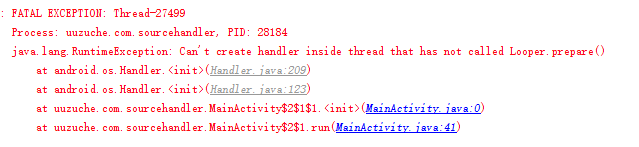
可以看出来在子线程中定义Handler对象出错了,难道Handler对象的定义或者是初始化只能在主线程中?
其实不是这样的,错误信息中提示的已经很明显了,在初始化Handler对象之前需要调用Looper.prepare()方法,那么好了,我们添加这句代码再次执行一次:
/**
 * 定义texttitle的点击事件处理
 */
texttitle.setOnClickListener(new View.OnClickListener() {
            @Override
            public void onClick(View v) {
                new Thread() {
                    @Override
                    public void run() {
                        Looper.prepare();
                        Handler mHandler = new Handler() {
                            @Override
                            public void handleMessage(Message msg) {
                                if (msg.what == 101) {
                                    Log.i(TAG, "在子线程中定义Handler,并接收到消息。。。");
                                }
                            }
                        };
                    }
                }.start();
            }
        });
再次点击按钮执行该段代码之后,程序已经不会报错了,那么这说明初始化Handler对象的时候我们是需要调用Looper.prepare()的,那么主线程中为什么可以直接初始化Handler呢?
其实不是这样的,在App初始化的时候会执行ActivityThread的main方法:
public static void main(String[] args) {
        Trace.traceBegin(Trace.TRACE_TAG_ACTIVITY_MANAGER, "ActivityThreadMain")
        SamplingProfilerIntegration.start()

        // CloseGuard defaults to true and can be quite spammy.  We
        // disable it here, but selectively enable it later (via
        // StrictMode) on debug builds, but using DropBox, not logs.
        CloseGuard.setEnabled(false)

        Environment.initForCurrentUser()

        // Set the reporter for event logging in libcore
        EventLogger.setReporter(new EventLoggingReporter())

        AndroidKeyStoreProvider.install()

        // Make sure TrustedCertificateStore looks in the right place for CA certificates
        final File configDir = Environment.getUserConfigDirectory(UserHandle.myUserId())
        TrustedCertificateStore.setDefaultUserDirectory(configDir)

        Process.setArgV0("")

        Looper.prepareMainLooper()

        ActivityThread thread = new ActivityThread()
        thread.attach(false)

        if (sMainThreadHandler == null) {
            sMainThreadHandler = thread.getHandler()
        }

        if (false) {
            Looper.myLooper().setMessageLogging(new
                    LogPrinter(Log.DEBUG, "ActivityThread"))
        }

        // End of event ActivityThreadMain.
        Trace.traceEnd(Trace.TRACE_TAG_ACTIVITY_MANAGER)
        Looper.loop()

        throw new RuntimeException("Main thread loop unexpectedly exited")
    }
可以看到原来Looper.prepare()方法在这里调用了,所以在其他地方我们就可以直接初始化Handler了。
并且我们可以看到还调用了:Looper.loop()方法,通过参考阅读其他文章我们可以知道一个Handler的标准写法其实是这样的:
Looper.prepare();
Handler mHandler = new Handler() {
   @Override
   public void handleMessage(Message msg) {
      if (msg.what == 101) {
         Log.i(TAG, "在子线程中定义Handler,并接收到消息。。。");
       }
   }
};
Looper.loop();
(三)查看Handler源码
1)查看Looper.prepare()方法
    static final ThreadLocal sThreadLocal = new ThreadLocal();

/** Initialize the current thread as a looper.
      * This gives you a chance to create handlers that then reference
      * this looper, before actually starting the loop. Be sure to call
      * {@link #loop()} after calling this method, and end it by calling
      * {@link #quit()}.
      */
    public static void prepare() {
        prepare(true);
    }

    private static void prepare(boolean quitAllowed) {
        if (sThreadLocal.get() != null) {
            throw new RuntimeException("Only one Looper may be created per thread");
        }
        sThreadLocal.set(new Looper(quitAllowed));
}可以看到Looper中有一个ThreadLocal成员变量,熟悉JDK的同学应该知道,当使用ThreadLocal维护变量时,ThreadLocal为每个使用该变量的线程提供独立的变量副本,所以每一个线程都可以独立地改变自己的副本,而不会影响其它线程所对应的副本。具体参考:彻底理解ThreadLocal
由此可以看出在每个线程中Looper.prepare()能且只能调用一次,这里我们可以尝试一下调用两次的情况。
/**
 * 这里Looper.prepare()方法调用了两次
*/
Looper.prepare();
Looper.prepare();
Handler mHandler = new Handler() {
   @Override
   public void handleMessage(Message msg) {
       if (msg.what == 101) {
          Log.i(TAG, "在子线程中定义Handler,并接收到消息。。。");
       }
   }
};
Looper.loop();
再次运行程序,点击按钮,执行该段代码:
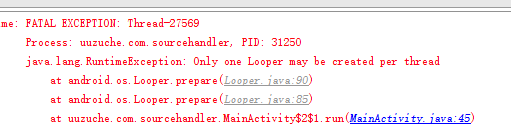
可以看到程序出错,并提示prepare中的Excetion信息。
我们继续看Looper对象的构造方法,可以看到在其构造方法中初始化了一个MessageQueue对象:
private Looper(boolean quitAllowed) {
        mQueue = new MessageQueue(quitAllowed);
        mThread = Thread.currentThread();
    }
综上小结(1):Looper.prepare()方法初始话了一个Looper对象并关联在一个MessageQueue对象,并且一个线程中只有一个Looper对象,只有一个MessageQueue对象。
2)查看Handler对象的构造方法
public Handler(Callback callback, boolean async) {
        if (FIND_POTENTIAL_LEAKS) {
            final Class klass = getClass();
            if ((klass.isAnonymousClass() || klass.isMemberClass() || klass.isLocalClass()) &&
                    (klass.getModifiers() & Modifier.STATIC) == 0) {
                Log.w(TAG, "The following Handler class should be static or leaks might occur: " +
                    klass.getCanonicalName());
            }
        }

        mLooper = Looper.myLooper();
        if (mLooper == null) {
            throw new RuntimeException(
                "Can't create handler inside thread that has not called Looper.prepare()");
        }
        mQueue = mLooper.mQueue;
        mCallback = callback;
        mAsynchronous = async;
    }
可以看出在Handler的构造方法中,主要初始化了一下变量,并判断Handler对象的初始化不应再内部类,静态类,匿名类中,并且保存了当前线程中的Looper对象。
综上小结(2):Looper.prepare()方法初始话了一个Looper对象并关联在一个MessageQueue对象,并且一个线程中只有一个Looper对象,只有一个MessageQueue对象。而Handler的构造方法则在Handler内部维护了当前线程的Looper对象
3)查看handler.sendMessage(msg)方法
一般的,我们发送异步消息的时候会这样调用:
mHandler.sendMessage(new Message());通过不断的跟进源代码,其最后会调用:
private boolean enqueueMessage(MessageQueue queue, Message msg, long uptimeMillis) {
        msg.target = this;
        if (mAsynchronous) {
            msg.setAsynchronous(true);
        }
        return queue.enqueueMessage(msg, uptimeMillis);
    }
原来msg.target就是Handler对象本身;而这里的queue对象就是我们的Handler内部维护的Looper对象关联的MessageQueue对象。查看messagequeue对象的enqueueMessage方法:
boolean enqueueMessage(Message msg, long when) {
        if (msg.target == null) {
            throw new IllegalArgumentException("Message must have a target.");
        }
        if (msg.isInUse()) {
            throw new IllegalStateException(msg + " This message is already in use.");
        }

        synchronized (this) {
            if (mQuitting) {
                IllegalStateException e = new IllegalStateException(
                        msg.target + " sending message to a Handler on a dead thread");
                Log.w(TAG, e.getMessage(), e);
                msg.recycle();
                return false;
            }

            msg.markInUse();
            msg.when = when;
            Message p = mMessages;
            boolean needWake;
            if (p == null || when == 0 || when < p.when) {

                msg.next = p;
                mMessages = msg;
                needWake = mBlocked;
            } else {


                needWake = mBlocked && p.target == null && msg.isAsynchronous();
                Message prev;
                for (;;) {
                    prev = p;
                    p = p.next;
                    if (p == null || when < p.when) {
                        break;
                    }
                    if (needWake && p.isAsynchronous()) {
                        needWake = false;
                    }
                }
                msg.next = p;
                prev.next = msg;
            }


            if (needWake) {
                nativeWake(mPtr);
            }
        }
        return true;
    }
可以看到这里MessageQueue并没有使用列表将所有的Message保存起来,而是使用Message.next保存下一个Message,从而按照时间将所有的Message排序;
4)查看Looper.Loop()方法
/**
     * Run the message queue in this thread. Be sure to call
     * {@link #quit()} to end the loop.
     */
    public static void loop() {
        final Looper me = myLooper();
        if (me == null) {
            throw new RuntimeException("No Looper; Looper.prepare() wasn't called on this thread.");
        }
        final MessageQueue queue = me.mQueue;


        Binder.clearCallingIdentity();
        final long ident = Binder.clearCallingIdentity();

        for (;;) {
            Message msg = queue.next();
            if (msg == null) {

                return;
            }


            Printer logging = me.mLogging;
            if (logging != null) {
                logging.println(">>>>> Dispatching to " + msg.target + " " +
                        msg.callback + ": " + msg.what);
            }

            msg.target.dispatchMessage(msg);

            if (logging != null) {
                logging.println("<<<<< Finished to " + msg.target + " " + msg.callback);
            }


            final long newIdent = Binder.clearCallingIdentity();
            if (ident != newIdent) {
                Log.wtf(TAG, "Thread identity changed from 0x"
                        + Long.toHexString(ident) + " to 0x"
                        + Long.toHexString(newIdent) + " while dispatching to "
                        + msg.target.getClass().getName() + " "
                        + msg.callback + " what=" + msg.what);
            }

            msg.recycleUnchecked();
        }
    }
可以看到方法的内容还是比较多的。可以看到Looper.loop()方法里起了一个死循环,不断的判断MessageQueue中的消息是否为空,如果为空则直接return掉,然后执行queue.next()方法:
Message next() {
        // Return here if the message loop has already quit and been disposed.
        // This can happen if the application tries to restart a looper after quit
        // which is not supported.
        final long ptr = mPtr;
        if (ptr == 0) {
            return null;
        }

        int pendingIdleHandlerCount = -1; // -1 only during first iteration
        int nextPollTimeoutMillis = 0;
        for (;;) {
            if (nextPollTimeoutMillis != 0) {
                Binder.flushPendingCommands();
            }

            nativePollOnce(ptr, nextPollTimeoutMillis);

            synchronized (this) {
                // Try to retrieve the next message.  Return if found.
                final long now = SystemClock.uptimeMillis();
                Message prevMsg = null;
                Message msg = mMessages;
                if (msg != null && msg.target == null) {
                    // Stalled by a barrier.  Find the next asynchronous message in the queue.
                    do {
                        prevMsg = msg;
                        msg = msg.next;
                    } while (msg != null && !msg.isAsynchronous());
                }
                if (msg != null) {
                    if (now < msg.when) {
                        // Next message is not ready.  Set a timeout to wake up when it is ready.
                        nextPollTimeoutMillis = (int) Math.min(msg.when - now, Integer.MAX_VALUE);
                    } else {
                        // Got a message.
                        mBlocked = false;
                        if (prevMsg != null) {
                            prevMsg.next = msg.next;
                        } else {
                            mMessages = msg.next;
                        }
                        msg.next = null;
                        if (DEBUG) Log.v(TAG, "Returning message: " + msg);
                        msg.markInUse();
                        return msg;
                    }
                } else {
                    // No more messages.
                    nextPollTimeoutMillis = -1;
                }

                // Process the quit message now that all pending messages have been handled.
                if (mQuitting) {
                    dispose();
                    return null;
                }

                // If first time idle, then get the number of idlers to run.
                // Idle handles only run if the queue is empty or if the first message
                // in the queue (possibly a barrier) is due to be handled in the future.
                if (pendingIdleHandlerCount < 0
                        && (mMessages == null || now < mMessages.when)) {
                    pendingIdleHandlerCount = mIdleHandlers.size();
                }
                if (pendingIdleHandlerCount <= 0) {
                    // No idle handlers to run.  Loop and wait some more.
                    mBlocked = true;
                    continue;
                }

                if (mPendingIdleHandlers == null) {
                    mPendingIdleHandlers = new IdleHandler[Math.max(pendingIdleHandlerCount, 4)];
                }
                mPendingIdleHandlers = mIdleHandlers.toArray(mPendingIdleHandlers);
            }

            // Run the idle handlers.
            // We only ever reach this code block during the first iteration.
            for (int i = 0; i < pendingIdleHandlerCount; i++) {
                final IdleHandler idler = mPendingIdleHandlers[i];
                mPendingIdleHandlers[i] = null; // release the reference to the handler

                boolean keep = false;
                try {
                    keep = idler.queueIdle();
                } catch (Throwable t) {
                    Log.wtf(TAG, "IdleHandler threw exception", t);
                }

                if (!keep) {
                    synchronized (this) {
                        mIdleHandlers.remove(idler);
                    }
                }
            }

            // Reset the idle handler count to 0 so we do not run them again.
            pendingIdleHandlerCount = 0;

            // While calling an idle handler, a new message could have been delivered
            // so go back and look again for a pending message without waiting.
            nextPollTimeoutMillis = 0;
        }
    }
可以看到其大概的实现逻辑就是Message的出栈操作,里面可能对线程,并发控制做了一些限制等。获取到栈顶的Message对象之后开始执行:
msg.target.dispatchMessage(msg)那么msg.target是什么呢?通过追踪可以知道就是我们定义的Handler对象,然后我们查看一下Handler类的dispatchMessage方法:
/**
     * Handle system messages here.
     */
    public void dispatchMessage(Message msg) {
        if (msg.callback != null) {
            handleCallback(msg);
        } else {
            if (mCallback != null) {
                if (mCallback.handleMessage(msg)) {
                    return;
                }
            }
            handleMessage(msg);
        }
    }
可以看到,如果我们设置了callback(Runnable对象)的话,则会直接调用handleCallback方法:
private static void handleCallback(Message message) {
        message.callback.run();
    }
即,如果我们在初始化Handler的时候设置了callback(Runnable)对象,则直接调用run方法。比如我们经常写的runOnUiThread方法:
runOnUiThread(new Runnable() {
            @Override
            public void run() {

            }
        });
看其内部实现:
public final void runOnUiThread(Runnable action) {
        if (Thread.currentThread() != mUiThread) {
            mHandler.post(action);
        } else {
            action.run();
        }
    }
而如果msg.callback为空的话,会直接调用我们的mCallback.handleMessage(msg),即handler的handlerMessage方法。由于Handler对象是在主线程中创建的,所以handler的handlerMessage方法的执行也会在主线程中。
总结:
1)主线程中定义Handler,直接执行:
Handler mHandler = new Handler() {
        @Override
        public void handleMessage(Message msg) {
               super.handleMessage(msg);
        }
};
而如果想要在子线程中定义Handler,则标准的写法为:
                Looper.prepare();

                Handler mHandler = new Handler() {
                    @Override
                    public void handleMessage(Message msg) {
                        super.handleMessage(msg);
                    }
                };

                Looper.loop();
2)一个线程中只存在一个Looper对象,只存在一个MessageQueue对象,可以存在N个Handler对象,Handler对象内部关联了本线程中唯一的Looper对象,Looper对象内部关联着唯一的一个MessageQueue对象。
3)MessageQueue消息队列不是通过列表保存消息(Message)列表的,而是通过Message对象的next属性关联下一个Message从而实现列表的功能,同时所有的消息都是按时间排序的。
4)android中两个子线程相互交互同样可以通过Handler的异步消息机制实现,可以在线程a中定义Handler对象,而在线程b中获取handler的引用并调用sendMessage方法。
5)activity内部默认存在一个handler的成员变量,android中一些其他的异步消息机制的实现方法:
Handler的post方法:
mHandler.post(new Runnable() {
                    @Override
                    public void run() {

                    }
                });
查看其内部实现:
public final boolean post(Runnable r)
    {
       return  sendMessageDelayed(getPostMessage(r), 0);
    }
可以发现其内部调用就是sendMessage系列方法。。。
view的post方法:
public boolean post(Runnable action) {
        final AttachInfo attachInfo = mAttachInfo;
        if (attachInfo != null) {
            return attachInfo.mHandler.post(action);
        }

        ViewRootImpl.getRunQueue().post(action);
        return true;
    }
可以发现其调用的就是activity中默认保存的handler对象的post方法。
activity的runOnUiThread方法:
public final void runOnUiThread(Runnable action) {
        if (Thread.currentThread() != mUiThread) {
            mHandler.post(action);
        } else {
            action.run();
        }
    }
判断当前线程是否是UI线程,如果不是,则调用handler的post方法,否则直接执行run方法。
参考文章:
Android异步消息处理机制完全解析,带你从源码的角度彻底理解
Android异步消息处理机制详解及源码分析
另外对android源码解析方法感兴趣的可参考我的:
android源码解析之(一)–>android项目构建过程
本文以同步至github中:github.com/yipianfengy…,欢迎star和follow
