A tour of HTML5 animation techniques width CSS3, SVG, Canvas and WebGL.
CSS3 Transitions and Animations

Demo
Basic Knowledge
Transitions
-webkit-transition:
-webkit-transition-delay:
-webkit-transition-timing-function:
-webkit-transition-proerty:
Animations
-webkit-animation:
-webkit-animation-delay:
-webkit-animation-name: foo => @keyframes foo { from {} to {}}
-webkit-animation-direction:
-webkit-animation-fill-mode:
-webkit-animation-iteration-count:
组合效果动画示例:
.move { -webkit-animation: anim2 ease-in-out 3s infinite alternate; }

@-webkit-keyframes anim2
{
  from
  {
    left: 0px;
    -webkit-transform: scale(0.8) rotate(0deg);
  }
  50%
  {
    left: 250px;
    -webkit-transform: scale(1.0) rotate(10deg);
  }
  to
  {
    left: 500px;
    -webkit-transform: scale(1.2) rotate(-20deg);
  }
}
2D Geometric transtions
一些 2D 的几何变换效果;
-webkit-transform: rotate / scale / skew / translate / matrix示例:
-webkit-transform: rotate(90deg);-webkit-transform: scale(0.5);-webkit-transform: skew(20deg, 20deg);3D Transforms in CSS3
尝试用 CSS3 Transforms 制作一个 3D 魔方:
实现对立两面旋转的效果:
-webkit-transform: translateZ(150px)  /* first picture */
-webkit-transform: translateZ(-150px) /* second picture */
-webkit-transform: rotateY(360deg)    /* their container */
Perspective 透视法
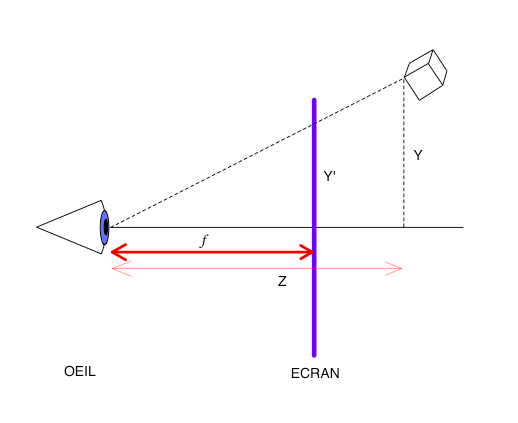
-webkit-perspective: f还有一个比较重要的属性:
-webkit-transform-style: preserve-3d完整的魔方效果代码:
.SCENE {
    -webkit-perspective: 1000px;
    width: 600px;
    height: 340px;
}
.OBJECT {
    -webkit-transform-style: preserve-3d;
    -webkit-transform: rotateX(0deg) rotateY(0deg) rotateZ(0deg);
    position: absolute;
    width: 100%;
    height: 100%;
}
.FACE {
    position: absolute;
    left: 165px;
    top: 15px;
}
.FACE.im1 { -webkit-transform: translateZ(150px); }
.FACE.im2 { -webkit-transform: translateZ(-150px); }
.FACE.im3 { -webkit-transform: translateX(150px) rotateY(90deg);}
.FACE.im4 { -webkit-transform: translateX(-150px) rotateY(-90deg);}
.FACE.im5 { -webkit-transform: translateY(150px) rotateX(90deg);}
.FACE.im6 { -webkit-transform: translateY(-150px) rotateX(-90deg);}
效果图:

Scalable Vector Graphics
使用 SVG 可以比较方面的实现一些超级吸引人的小动画,例如这个 presention 中演示:
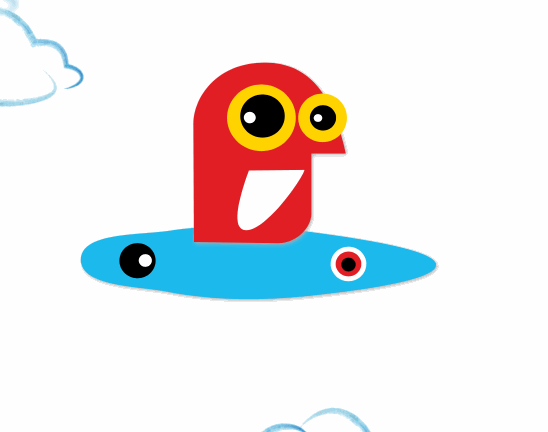
SVG DEMO
SVG: primitives 基本元素
![]() # Example
# stroke 可以理解为画笔,需要指定画笔的颜色及宽度,其他的都比较好理解
# Example
# stroke 可以理解为画笔,需要指定画笔的颜色及宽度,其他的都比较好理解
重点解释一下如何使用 path 绘制图形,学过 PS 或者设计的应该比较好理解:)
path 有以下的一些指令:
M = moveto 可理解为移动到起点
L = lineto
H = horizontal lineto
V = vertical lineto
C = curveto
S = smooth curveto
Q = quadratic Bézier curve 二次方贝塞尔曲线
T = smooth quadratic Bézier curveto
A = elliptical Arc 椭圆弧
Z = closepath 关闭 path,连接到起点
上面这些命令也都可以用小写字母,不过需要注意的是这两者是有区别的,大写字母代表的是 absolutely positioned, 小写字母代表的是 relatived positioned
这是两个来自 w3schools 的示例:
绘制三角形:
步骤:
-
M150 0画笔起点移动到 (150, 0) 的位置 -
L75 200从起点开始画一条到 (75, 200)的直线 -
L225 200画一条 (75, 200) 到 (225, 200)的直线 -
Z结束绘制,连接当前点 (225, 200) 和起点 (150, 0)
结果:

绘制曲线图形,以创建 quadratic Bézier curve 为例,通常需要需要两个点作为端点(endpoint),以及一个点来作为控制点(control point):

A、C 为端点,C 为控制点
代码:
    A
    B
    C
哈哈,超级复杂对不对,不过还是需要你实践了解一下,在开发的时候,会有一些 svg 编辑器来帮助我们处理这些工作~
了解更多 SVG 的基础知识:W3SCHOOL | SVG | MDN
2D transforms and SMIL : 让绘制的图形的动起来
可以在 svg 的图形原型上设置一些 2D transform 的效果,例如:
# full list of 2D transforms:
translate, rotate, scale, skewX, skewY, matrix
不过我们讲解的重点还是放到 SMIL 上来,先看个示例:
还是挺好的理解的对吧,我们绘制了一个直径为 80 的圆形,然后添加了一个 animate 来修改图形的属性:
attributeName="r" values="80; 150; 80"结果:

同样的思路,我们可以修改其他的图形:
结果:
甚至去可以修改一组 svg 的动画:
...
除了 animate、animationTransform, 还有 animationMotion 这个用法:
...
结果:

在本章节的演示动画中,你会注意到这个卡通形象的滑板的运动规律,如何实现它呢?这时候需要用到 keySplines 这个属性,这个小工具可以让你简单模拟一些 keySplines 的效果;
示例:

keySplines DEMO
我们使用 javascript 控制动画的播放、停止:
pauseAnimations()
unpauseAnimations()
setCurrentTime(0)

# javascript
...
推荐阅读:
Canvas & Javascript
Canvas 的绘制过程其实和 svg 有点类似,不过需要和 Javascript 结合的来使用:
# HTML:


# Javascript
var canvasElement = document.getElementById("my-canvas");

var ctx = canvasElement.getContext("2d");

ctx.clearRect(0, 0, ctx.canvas.width, ctx.canvas.height);

ctx.strokeStyle = "red"; // CSS color
ctx.fillStyle = "blue"; // CSS color
ctx.lineWidth = 5; // pixels
ctx.globalAlpha = 0.5;

ctx.beginPath();

ctx.moveTo(x, y);
ctx.lineTo(x, y);
ctx.rect(x1, y1, w, h);
ctx.arc(x, y, r, bAng, eAng, dir);
ctx.bezierCurveTo(vx, vy, wx, wy, x, y);

ctx.closePath();

# 怎么样,是不是很熟悉,不过我们还需要绘制一下
ctx.stroke();
ctx.fill();
也可以使用 canvas 来显示图片,例如显示一张位图:
var image = new Image();
window.onload = function () {
  ctx.drawImage(img, x, y, w, h)
};
image.src = 'canvas.png'
显示 svg 格式的图片略微复杂一点(Chrome Only):
var data = "..."
var svg = new Blob([data], {type: "image/svg+xml"})
var DOMURL = self.url || self.webkitURL
var url = DOMURL.createObjectURL(svg)
var img = new Image();

window.onload = function () {
  ctx.drawImage(img, x, y, w, h)
};
image.src = url
利用 canvas 使用简单的几何变换,以及一个 Box2D(这是什么?Link) 的 Javascript 物理引擎,可以实现一个有趣的互动动画效果:

比如 presentation 中的小人运动的动作就可以这样实现:

WebGL + Three.js
What is Three.js ?
The aim of the project is to create a lightweight 3D library with a very low level of complexity — in other words, for dummies. The library provides , , CSS3D and WebGL renderers.
From: github.com/mrdoob/thre…
查看教程和文档: threejs.org
Summary

View Code @ GitHub, From Jobslong's Gitbook