最近公司的项目要绑定苹果健康,所以研究了一下
请看大屏幕,(^__^) 嘻嘻……
一起来看一下步骤吧
1.获得HealthKit授权
首先新建一个名为HealthKit——demo的新工程,名字随你起啦。
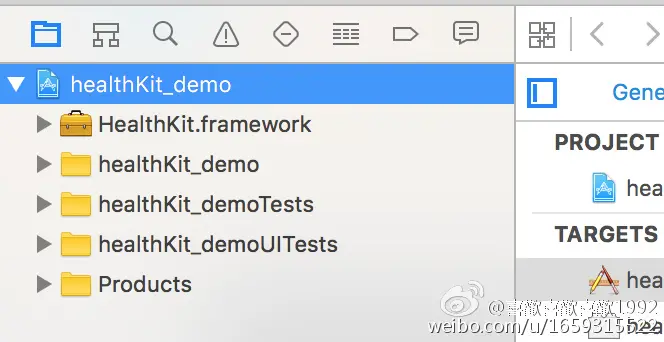 点击工程
点击工程
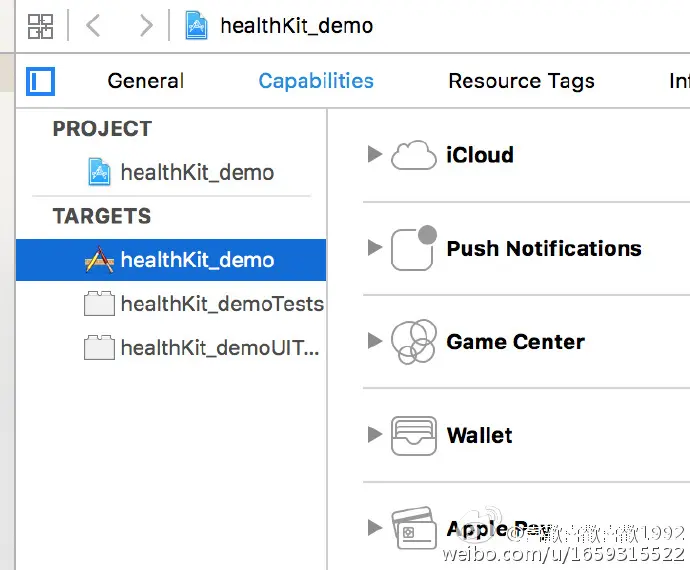 查看一下capabitlites
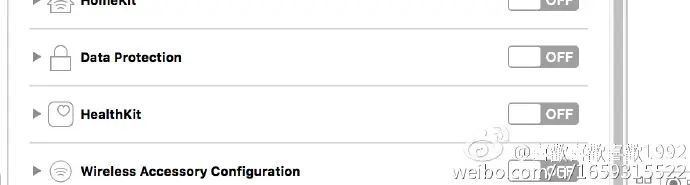 将HealthKit的switch打开
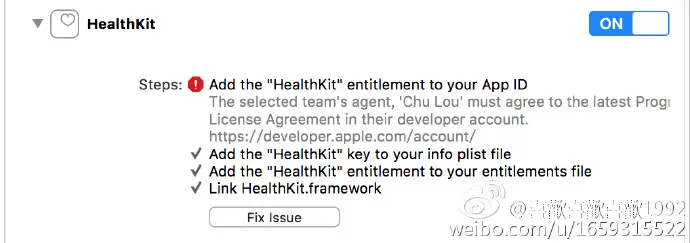 家里的笔记本没放公司的证书 所以给你看一下正常情况下的图片

2.获得HealthKit许可 导入HealthKit
添加一个HKHealthStore类的实例,接下来的所有步骤基本上都需要他
@interface ViewController ()
@property (nonatomic,strong) HKHealthStore      *healthStore;
@end
询问当前设备是否支持HealthKit,目前只支持iphone以及iwathch,且只支持iOS8以上系统
if (![HKH ealthStore isHealthDataAvailable]) {
       NSLog(@"设备不支持healthKit");
   }
设置需要获取权限的类型(这里以呼吸速率,睡眠分析,心率为例,还有很多其他类型)
    HKObjectType *heartRate = [HKObjectType quantityTypeForIdentifier:HKQuantityTypeIdentifierHeartRate];
     HKObjectType *breath = [HKObjectType quantityTypeForIdentifier:HKQuantityTypeIdentifierRespiratoryRate];
    HKObjectType *sleep = [HKObjectType categoryTypeForIdentifier:HKCategoryTypeIdentifierSleepAnalysis];
    NSSet *healthSet = [NSSet setWithObjects:heartRate,breath,sleep, nil];
因为我设置的读写权限类型都一个,所以都放在同一个set里了,如果需求不一样的话,可以单独设一个shareSet和一个readSet
然后获取权限
[self.healthStore requestAuthorizationToShareTypes:healthSet readTypes:healthSet completion:^(BOOL success, NSError * _Nullable error) {
        if (success)
        {
         NSLog(@"获取权限成功");
        }
        else
        {
            NSLog(@"%@",error);
        }
    }];
    }
###3.获取(read)样本数据 设置样本类型
HKSampleType *sampleType = [HKCategoryType categoryTypeForIdentifier:HKCategoryTypeIdentifierSleepAnalysis];
排序:
NSSortDescriptor *sortDescriptor = [NSSortDescriptor sortDescriptorWithKey:HKSampleSortIdentifierEndDate ascending:NO];
查询的样本:limit:要查询的样本数量 HKObjectQueryNoLimit :没有限制 如果只查20条的话就写20
HKSampleQuery *sleepSample = [[HKSampleQuery alloc]initWithSampleType:sampleType predicate:nil limit:HKObjectQueryNoLimit sortDescriptors:@[sortDescriptor] resultsHandler:^(HKSampleQuery * _Nonnull query, NSArray<__kindof hksample="" *=""> * _Nullable results, NSError * _Nullable error) {
     NSLog(@"resultCount = %ld result = %@",results.count,results);
  }];
执行查询
[self.healthStore executeQuery:sleepSample];
4.获取(read)统计数据 系统提供的统计数据只只试用于HKQuantityType,其他类型需要我们自己统计 步骤跟上面的很类似
dateComponents:统计的单位,我这里设置的是每两个小时的统计结果
    HKQuantityType *quantityType = [HKQuantityType quantityTypeForIdentifier:HKQuantityTypeIdentifierStepCount];
    NSDateComponents *dateComponents = [[NSDateComponents alloc] init];
    dateComponents.hour = 2;
quantitySamplePredicate:设定采样时间 设置一下startDate和endDate,如果startDate和endDate都写nil的话,就说明统计所有的数据,类似于nolimit
NSTimeInterval secondsPerDay = 24 * 60 * 60;
NSDate *date1 = [NSDate date];
NSDate *date2 = [date1 dateByAddingTimeInterval: -secondsPerDay];
NSPredicate *predicate = [HKQuery predicateForSamplesWithStartDate:date2 endDate:date1 options:HKQueryOptionStrictStartDate];
anchorDate:锚点 在此时间之后统计数据,我不明白的是已经设定采样时间了,为什么还要这个?? options:HKStatisticsOptionCumulativeSum 获取时间段的步数 HKStatisticsOptionSeparateBySource 根据数据来源进行统计
    HKStatisticsCollectionQuery *collectionQuery = [[HKStatisticsCollectionQuery alloc] initWithQuantityType:quantityType quantitySamplePredicate:predicate options: HKStatisticsOptionCumulativeSum | HKStatisticsOptionSeparateBySource anchorDate:[[NSDate date]dateByAddingTimeInterval:-secondsPerDay ] intervalComponents:dateComponents];
    collectionQuery.initialResultsHandler = ^(HKStatisticsCollectionQuery *query, HKStatisticsCollection * __nullable result, NSError * __nullable error) {
        for (HKStatistics *statistic in result.statistics) {
            for (HKSource *source in statistic.sources) {
                if ([source.name isEqualToString:[UIDevice currentDevice].name]) {
                    NSLog(@"%@至%@%@ -- 走了%.f步",statistic.startDate, statistic.endDate,source.name, [[statistic sumQuantityForSource:source] doubleValueForUnit:[HKUnit countUnit]]);
                }else if ([source.name isEqualToString:@"healthKit_demo"]){
                }
            }
        }
    };
执行统计
[self.healthStore executeQuery:collectionQuery];
5.写入(share)数据 类似于上面的。
HKCategoryType *mySleep = [HKCategoryType categoryTypeForIdentifier:HKCategoryTypeIdentifierSleepAnalysis];
value:1表示的是睡眠时间 value:0 表示的是在床休息 睡眠分析只能储存这两个值 详细情况:https://developer.apple.com/library/ios/documentation/HealthKit/Reference/HealthKit_Constants/index.html#//apple_ref/c/tdef/HKCategoryValueSleepAnalysis */
    HKCategorySample *sleep = [HKCategorySample categorySampleWithType:mySleep value:0 startDate:[[NSDate date]  dateByAddingTimeInterval:- 4*60*60 ] endDate:[NSDate date]];
    [self.healthStore saveObject:sleep withCompletion:^(BOOL success, NSError * _Nullable error) {
        if (success) {
            NSLog(@">>>>>>>>>>>");
        }
        else
        {
        }
    }];
这里再举一个写入呼吸速率的例子
HKQuantityType *respiratory = [HKQuantityType quantityTypeForIdentifier:HKQuantityTypeIdentifierRespiratoryRate];
关注一下Unit 这里涉及到单位的概念,比如速率的单位是次每分,所以这里的数据的结果应该是遵循这个单位的unit HKUnit提供的unit有关于时间、数量、容量、压力等等等的,因为次每分需要用数量的unit除以分钟的unit
HKQuantity *respiratoryCount = [HKQuantity quantityWithUnit:[[HKUnit countUnit] unitDividedByUnit:[HKUnit minuteUnit]] doubleValue:26];
HKQuantitySample *sample = [HKQuantitySample quantitySampleWithType:respiratory quantity:respiratoryCount startDate:[[NSDate date] dateByAddingTimeInterval:- 8*60*60 ] endDate:[[NSDate date] dateByAddingTimeInterval:-1*60*60 ]];
[self.healthStore saveObject:sample withCompletion:^(BOOL success, NSError * _Nullable error) {
    if (success) {
        NSLog(@"respiratory>>>>>>>");
    }
    else
    {
    }
    }];
6.删除数据 删除数据非常简单,可以先查询楚你要的数据,然后根据条件删除
 HKSampleType *heartRate = [HKQuantityType quantityTypeForIdentifier:HKQuantityTypeIdentifierHeartRate];
    NSSortDescriptor *sortDescriptor = [NSSortDescriptor sortDescriptorWithKey:HKSampleSortIdentifierEndDate ascending:NO];
    HKSampleQuery  *sampleQuery = [[HKSampleQuery alloc]initWithSampleType:heartRate predicate:nil limit:20 sortDescriptors:@[sortDescriptor] resultsHandler:^(HKSampleQuery * _Nonnull query, NSArray<__kindof hksample="" *=""> * _Nullable results, NSError * _Nullable error) {
        NSLog(@"resultCount = %ld result = %@",results.count,results);
    }];
    [self.healthStore executeQuery:sampleQuery];
7.跟你的项目集成 项目集成时、建议获取健康数据的权限写在AppDelegate中