- 由于gif图太大的原因,我将图放在了github,如果博客中显示不出来图,传送门
- 由于我是事先写在md上的,导致代码的可读性差,大家将就着看吧。
1. 前言
在上一篇博客中,我们介绍了Retrofit的文件上传,文件下载以及进度监听,这篇博客我们来了解下批量上传以及上传进度的监听。
2.批量上传
要想实现批量上传,我们要考虑下HTML中实现批量上传的方法,借助Form表单,所以,我们也可以通过借助Form表单来实现批量上传。
2.1 HTML FORM 表单的写法
  First name:
  First name:
  First name:
- action form表单提交的地址
- enctype 表示如何对表单进行编码,multipart/form-data表示有file
- input标签中的name必须是xxx[]的格式,表示是数组中的一个元素(ps:我也不知道正确不正确,但是去掉[],我php就接收不到了)
2.2 php接收代码
 $error) {
        if ( $error == UPLOAD_ERR_OK ) {
            $temp_name = $fileArray['tmp_name'][$key];
            $file_name = $fileArray['name'][$key];
            move_uploaded_file($temp_name, $upload_dir.$file_name);
            echo '上传[文件'.$file_name.']成功!
';
        }else {
            echo '上传[文件'.$key.']失败!
';
        }
}- 所有的文件都会存在$_FILES全局变量中,多个文件的情况下,格式如下
 array(1) {
         ["file"]=> array(5) {
                   ["name"]=> array(3) {
                            [0]=> string(5) "1.txt"
                            [1]=> string(5) "2.txt"
                            [2]=> string(5) "3.txt" }
         ["type"]=> array(3) {
                           [0]=> string(10) "text/plain"
                           [1]=> string(10) "text/plain"
                           [2]=> string(10) "text/plain" }
         ["tmp_name"]=> array(3) {
                          [0]=> string(27) "C:\Windows\Temp\phpB829.tmp"
                          [1]=> string(27) "C:\Windows\Temp\phpB82A.tmp"
                          [2]=> string(27) "C:\Windows\Temp\phpB82B.tmp" }
        ["error"]=> array(3) {
                         [0]=> int(0)
                         [1]=> int(0)
                         [2]=> int(0) }
        ["size"]=> array(3) {
                         [0]=> int(11)
                         [1]=> int(13)
                         [2]=> int(13) }
 }
* 由于我php只会点皮毛中的皮毛,所以上面有的内容可能描述的不清楚或者不正确,请指出 *
* 由于我php只会点皮毛中的皮毛,所以上面有的内容可能描述的不清楚或者不正确,请指出 *
* 由于我php只会点皮毛中的皮毛,所以上面有的内容可能描述的不清楚或者不正确,请指出 *
2.3 演示结果
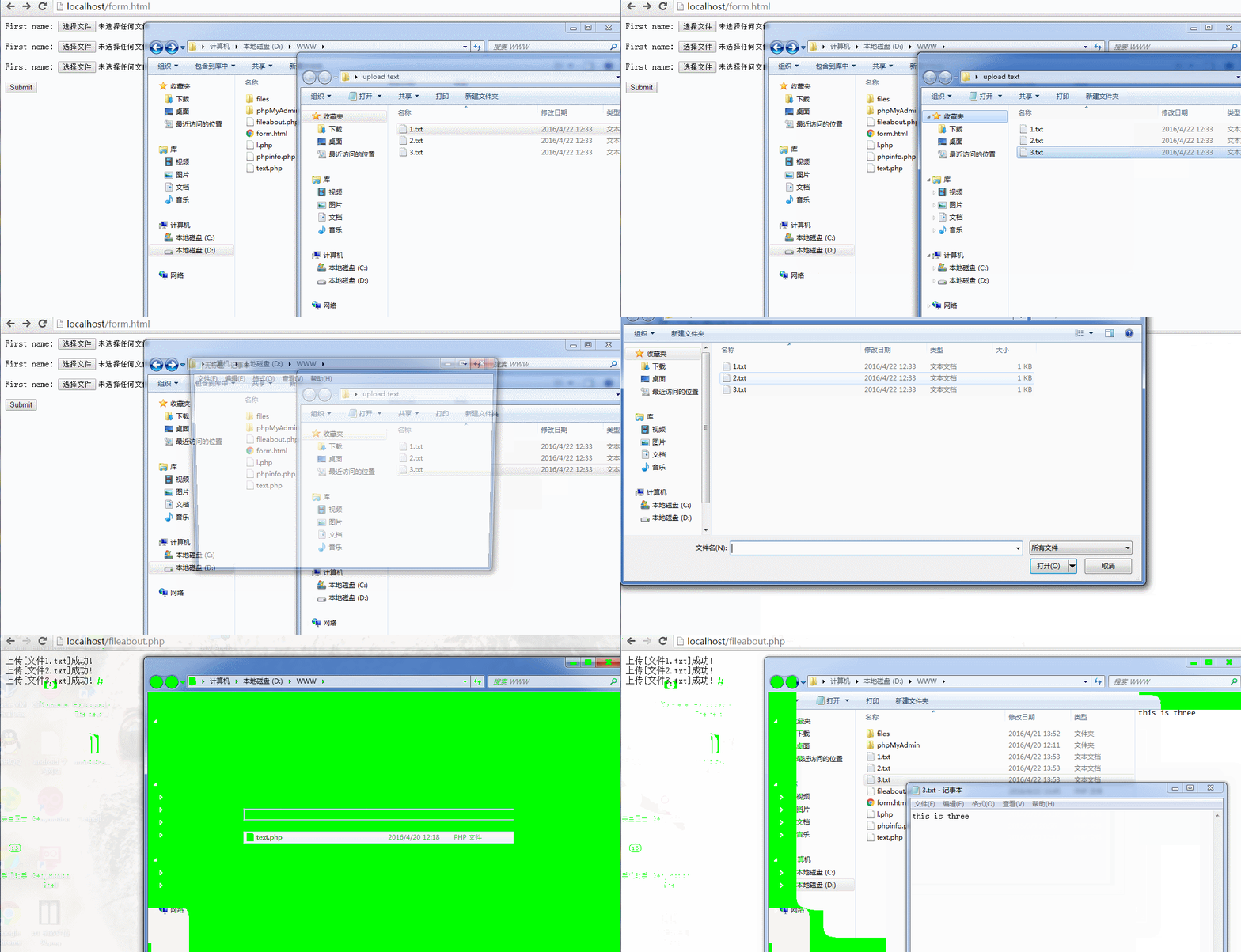
2.4 Android中的实现-方法一(low)
```
@Multipart
@POST("/fileabout.php")
Call upload_2(@Part("filedes") String des,@Part("file[]\"; filename=\"1.txt") RequestBody imgs,@Part("file[]\"; filename=\"2.txt") RequestBody imgs_2,@Part("file[]\"; filename=\"3.txt") RequestBody imgs_3);- 在api接口中写死,灵活性差,没有实用价值
- 注意file[] 注意file[] 注意file[]
发送请求的相关代码
File file = new File(Environment.getExternalStorageDirectory() + "/" + "1.txt");
File file2 = new File(Environment.getExternalStorageDirectory() + "/" + "2.txt");
File file3 = new File(Environment.getExternalStorageDirectory() + "/" + "3.txt");
final RequestBody requestBody =
                        RequestBody.create(MediaType.parse("multipart/form-data"),file);
final RequestBody requestBody2 =
                        RequestBody.create(MediaType.parse("multipart/form-data"),file2);
final RequestBody requestBody3 =
                        RequestBody.create(MediaType.parse("multipart/form-data"),file3);
Call model = service.upload_2("this is txt",requestBody,requestBody2,requestBody3);
上面的这种办法没有灵活性科研,所以是不具有使用价值的,那么,我们需要用下面这种办法。
2.5 Android中的实现方法(二)
相应的api接口变成了这个样子
@Multipart
@POST("/fileabout.php")
Call upload_3(@Part("filedes") String des,@PartMap Map params);那么,客户端就可以通过下面这种方法进行配置了,
Map params = new HashMap();
params.put("file[]\"; filename=\""+file.getName()+"", requestBody);
params.put("file[]\"; filename=\""+file2.getName()+"", requestBody2);
params.put("file[]\"; filename=\""+file3.getName()+"", requestBody3);
Call model = service.upload_3("hello",params);
灵活性是不是有所提升?这样才像form表单,可以随意配置了。
2.6 结果展示
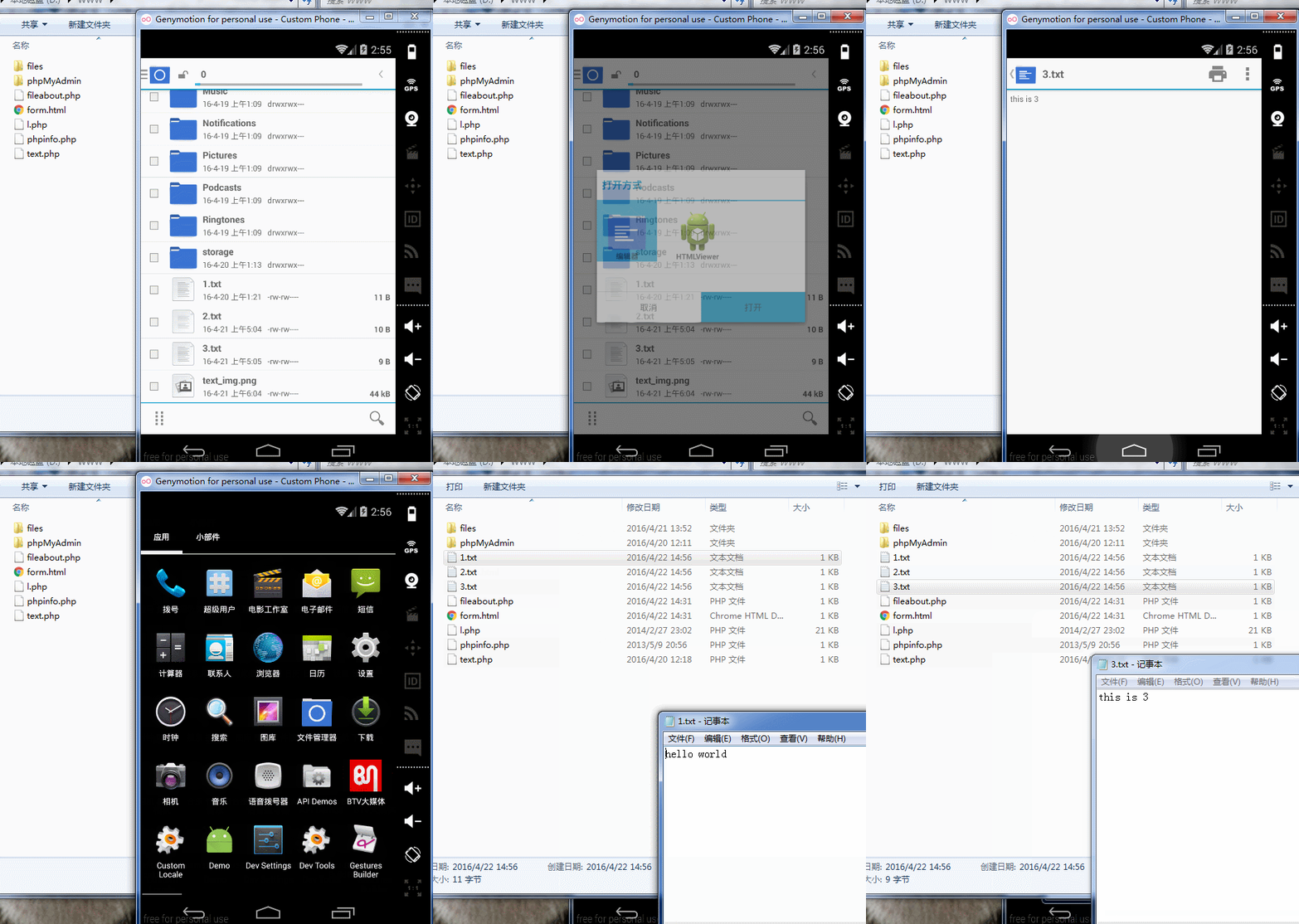
博客看不到?点我看图
到这里,我们的批量上传就结束了,如果各位朋友有什么更好的办法,请教教我。。。
3.上传进度的监听
当想到这个问题的时候,完全没有思路,那就尴尬了。仔细想想,好吧,还是没有思路,那么,咱们去看看github上官方给出的几个类,。就看这个类 就看这个类
恩,我给出2张图,大家自己观察下
博客看不到?点我看图
博客看不到?点我看图
发现没?转化器中出现了RequestBody,这让我瞬间有了想法,没错,我们模仿下载的办法,同样的,将这个类改造下。
3.1 改造ChunkingConverterFactory
首先,我们抛弃里面的RequestBody,我们手动往里传,也就是,去掉下面这行代码。
final RequestBody realBody = delegate.convert(value)第二步,我们发现,在return new RequestBody()相关代码中,没有长度信息。,所以添加一下代码。
@Override
public long contentLength() throws IOException {
    return requestBody.contentLength();
}
第三部 模仿下载的过程,写上传的过程,代码如下
@Override
public void writeTo(BufferedSink sink) throws IOException{
//                        realBody.writeTo(sink);
    if (bufferedSink == null) {
         //包装
         bufferedSink = Okio.buffer(sink(sink));
     }
     //写入
     requestBody.writeTo(bufferedSink);
     //必须调用flush,否则最后一部分数据可能不会被写入
     bufferedSink.flush();

}

private Sink sink(Sink sink) {
    return new ForwardingSink(sink) {
          //当前写入字节数
          long bytesWritten = 0L;
          //总字节长度,避免多次调用contentLength()方法
          long contentLength = 0L;

}

private Sink (Sink sink) {
    return  ForwardingSink(sink) {
          //当前写入字节数
           bytesWritten = L;
          //总字节长度,避免多次调用contentLength()方法
           contentLength = L;

          @Override
          public  write(Buffer source,  byteCount) throws IOException {
               super.write(source, byteCount);
                (contentLength == ) {
                    //获得contentLength的值,后续不再调用
                    contentLength = contentLength();
                }
                //增加当前写入的字节数
                bytesWritten += byteCount;

                listener.onProgress(bytesWritten, contentLength, bytesWritten == contentLength);
              }
         };
}最后,这个类变成了这个样子。大家也可以去我github上将这个类下载来下。链接地址
public class ChunkingConverterFactory extends Converter.Factory {

    @Target(PARAMETER)
    @Retention(RUNTIME)
    @interface Chunked {

    }

    private BufferedSink bufferedSink;
    private final RequestBody requestBody;

    private final ProgressListener listener;

    public ChunkingConverterFactory(RequestBody requestBody,ProgressListener listener){
        this.requestBody = requestBody;
        this.listener = listener ;
    }

    @Override
    public Converter requestBodyConverter(Type type, Annotation[] parameterAnnotations, Annotation[] methodAnnotations, Retrofit retrofit) {

        boolean isBody = false;
        boolean isChunked = false;

        for (Annotation annotation : parameterAnnotations){
            isBody |= annotation instanceof Body;
            isChunked |= annotation instanceof Chunked;
        }

        final Converter delegate = retrofit
                .nextRequestBodyConverter(this,type,parameterAnnotations,methodAnnotations);

        return new Converter() {
            @Override
            public RequestBody convert(Object value) throws IOException {


                return new RequestBody() {
                    @Override
                    public MediaType contentType() {
                        return requestBody.contentType();
                    }


                    @Override
                    public long contentLength() throws IOException {
                        return requestBody.contentLength();
                    }

                    @Override
                    public void writeTo(BufferedSink sink) throws IOException {

                        if (bufferedSink == null) {

                            bufferedSink = Okio.buffer(sink(sink));
                        }

                        requestBody.writeTo(bufferedSink);
                        //必须调用flush,否则最后一部分数据可能不会被写入
                        bufferedSink.flush();

                    }

                    private Sink (Sink sink) {
                        return  ForwardingSink(sink) {
                            //当前写入字节数
                             bytesWritten = L;
                            //总字节长度,避免多次调用contentLength()方法
                             contentLength = L;

                            @Override
                            public  write(Buffer source,  byteCount) throws IOException {
                                super.write(source, byteCount);
                                 (contentLength == ) {
                                    //获得contentLength的值,后续不再调用
                                    contentLength = contentLength();
                                }
                                //增加当前写入的字节数
                                bytesWritten += byteCount;

                                listener.onProgress(bytesWritten, contentLength, bytesWritten == contentLength);
                            }
                        };
                    }
                };
            }
        };
    }


}
3.2 监听上传进度
像下载一下,我们还是通过builder去build对象,当然 也可以使用普通的方法,但是得RequestBody 写在前面,这样看起来有点怪怪的。整个代码如下
private void uploadProgress(){
        Retrofit.Builder builder = new Retrofit.Builder()
                .baseUrl("http://192.168.56.1");
        File file = new File(Environment.getExternalStorageDirectory() + "/" + "text_img.png");
        final RequestBody requestBody =
                RequestBody.create(MediaType.parse("multipart/form-data"),file);
        uploadfileApi api = builder.addConverterFactory(new ChunkingConverterFactory(requestBody, new ProgressListener() {
            @Override
            public void onProgress(long progress, long total, boolean done) {
                Log.e(TAG, "onProgress: 这是上传的 " + progress + "total ---->"  + total );
                Log.e(TAG, "onProgress: " + Looper.myLooper());
            }
        })).addConverterFactory(GsonConverterFactory.create()).build().create(uploadfileApi.class);
        Call model = api.upload("hh",requestBody);
        model.enqueue(new Callback() {
            @Override
            public void onResponse(Call call, Response response) {

            }

            @Override
            public void onFailure(Call call, Throwable t) {

            }
        });
    }
3.3 结果演示
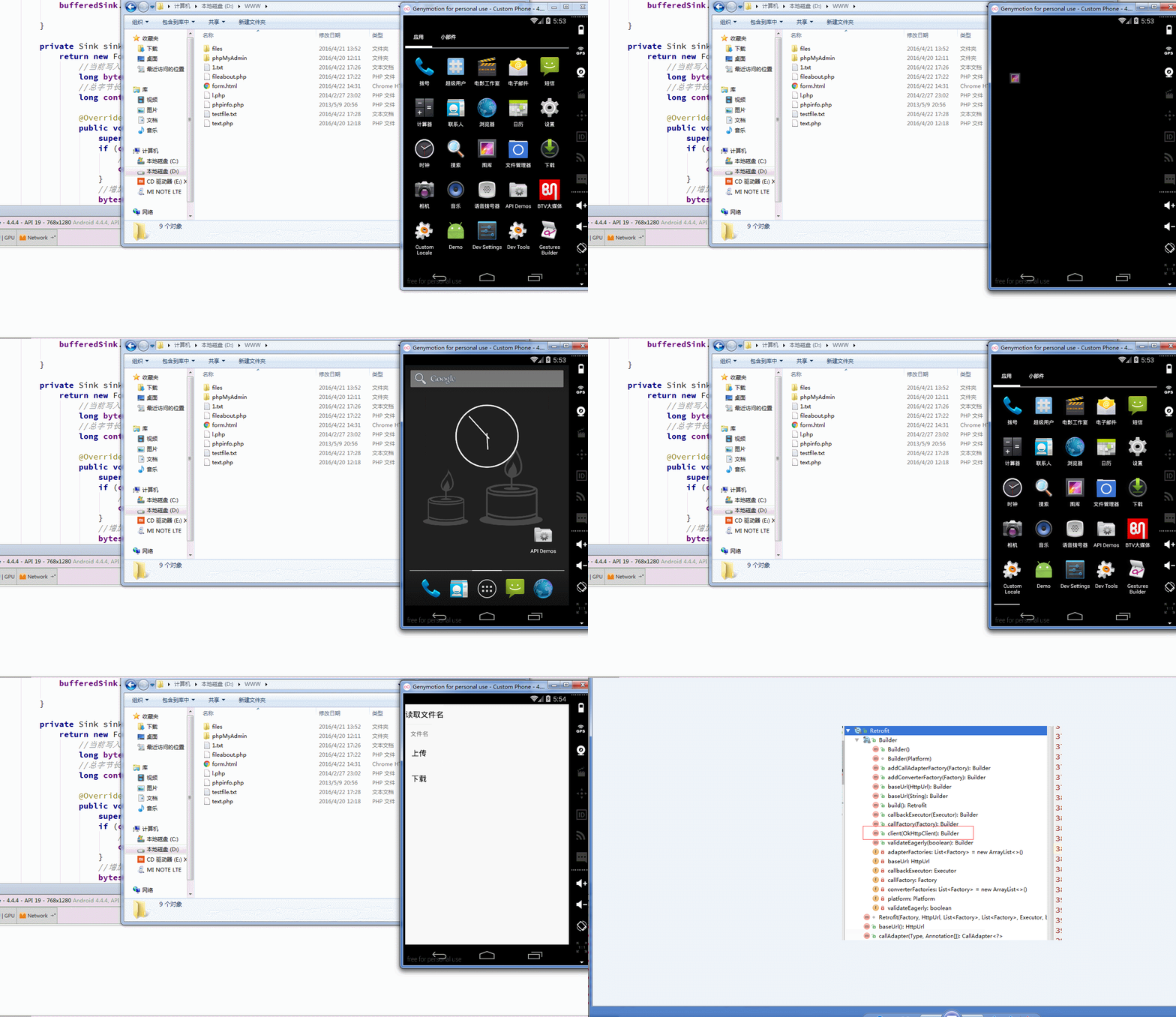
3.4 批量上传的进度监听
我们知道了如何监听单个文件的上传进度,多个文件,恩,就不说了啊,(添加多个转换器喽)。
4. 总结
Retrofit很强大 很强大,有的同学想让我配合上Rxjava写,哎,朋友,给个面子啊,好歹把我第一篇基础用法看看哪。还剩下许多许多的功能没介绍,看朋友们有什么需求了,可以给我留言,完了一起研究啊。