


Last week, at Google I/O, Google announced a number of interesting new features in Firebase. The new Firebase is said to be a “Unified app platform for mobile developers” adding new tools to help develop faster, improve app quality, engage users and monetize apps. You can check out this intro video here.
Some of the new features in the Firebase upgrade include: 1. Firebase Analytics. 2. Firebase Cloud Messaging. 3. Firebase Test Lab and Crash Reporting. 4. Firebase Notifications, Dynamic Links, App Indexing, AdWords, Firebase Invites etc
I’ve been playing around the new product and it’s been amazing. In this post, I’m going to share how to use Firebase for Crash reporting.
The new Firebase works with the new Google Play Services 9.0, and to use it in Android Studio, you need to follow these steps:
Ensure your development environment meets the pre-requisite requirements. The Pre-requisites as seen here are:
- An Android device running Google Play services 9.0.0 or later
- The Google Play services SDK from the Android SDK Manager
- Android Studio 1.5 or higher
- An Android Studio project and its package name.
Next step is to add Firebase to your app. To do this, you need to create a project on the Firebase console.
- Click on Create New Project (if you’re starting a new project) or import Google Project if you’re importing an existing project, and follow through the steps.
- Now, within your app, click on click on Add Firebase to your Android app.
You’ll be prompted to add your package name, and also to download a config file. This is the usual google-services.json file. Be sure to add it to your app module’s directory. (e.g /app)
To use Firebase in your app, you need to add and setup the SDK within your Android app. First, include the following lines to your root-level build.gradle file:
buildscript {
   //...
   dependencies {
       // ...
       classpath 'com.google.gms:google-services:3.0.0'
   }
 }
And then at your app-module’s build.gradle file, apply the google services plugin at the bottom of the file. Your build.gradle should look like this:
apply plugin: 'com.android.application'
android {
   // ...
 }
dependencies {
   // ...
   compile 'com.google.firebase:firebase-core:9.0.0'
}
// ADD THIS AT THE BOTTOM
apply plugin: 'com.google.gms.google-services'Now, to setup the crash reporting, you need to add the Firebase crash reporting dependency. Add this line to your module build.gradle file.
compile 'com.google.firebase:firebase-crash:9.0.0'Now, that we’ve finished setting up, let’s proceed to create our first crash report. Add the following lines to your activity:
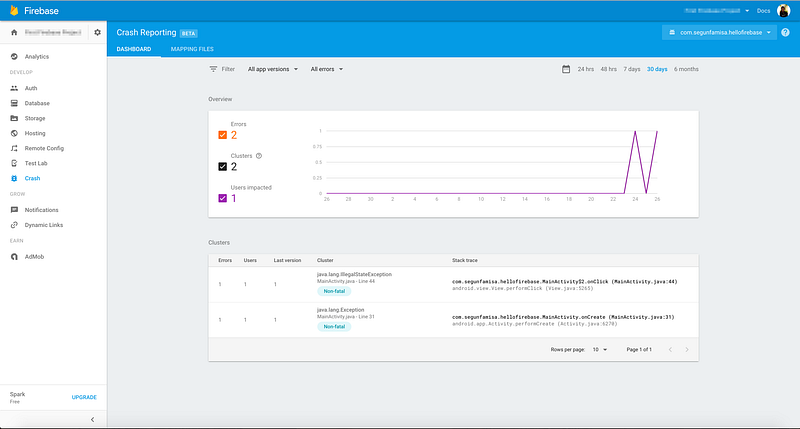
FirebaseCrash.report(new Exception("My first Firebase non-fatal error on Android"));After a few minutes (about 20 minutes according to the Firebase docs), the crash will appear on the console dashboard looking like:
There are other interesting things to do with Firebase crash reporting.
You can create custom logs for events in the reports. Using a line like:
FirebaseCrash.log("MainActivity started");If you’re interested in making that log show on your logcat, use:
FirebaseCrash.logcat("MainActivity started");Firebase crash reporting is still in beta, so, there are definitely some issues for now, and I hope they continue to improve the product.
- While debugging my test app, I noticed something; the crash reporting seems to be a separate process, as seen in the screenshot below:

This may lead to some concurrency issues, and it’s filed under the known issues here firebase.google.com/docs/crash/…
- Unlike many other crash reporting platforms, that only require you to add one line of code, Firebase crash doesn’t seem to have that “utility” setup method. Instead, to log all unhandled exceptions, you probably want to add lines like:
Thread.setDefaultUncaughtExceptionHandler(
  new Thread.UncaughtExceptionHandler() {
    @Override
    public void uncaughtException(Thread thread, Throwable ex) {
        FirebaseCrash.report(ex);
    }
  });
One really cool thing about Firebase crash reporting is the Cluster feature. Basically, firebase arranges errors in clusters of similar stack traces and by the severity of impact on your users. It makes it easier to prioritize and see what errors have most impact on users.
In summary, I think the Firebase crash reporting is a pretty neat feature of the new Firebase product, and I look forward to it getting more matured, and stable.
I intend to try out the other new parts of Firebase and share my findings.
If you have thoughts, suggestions, or corrections to share, please feel free to drop a comment below or tweet at me :)
Sincerely, Segun.
Originally published at segunfamisa.com.
