Android 代码规范利器: Checkstyle

6,523 阅读2分钟

程序代码向来都不仅仅是用来运行的,写的一手好代码,易读,可维护应该是每个程序员所追求的。

每个团队都(应该)有一套优良统一的代码规范,而规范的检查依赖于人工检测就不太现实,好在我们有一些分析工具可以辅助我们做这件事。

checkstyle是一个帮助我们检查java代码规范的工具。checkstyle具有很强的配置性。本文将简单介绍一些实用的checkstyle知识。

配置checkstyle

如下修改Project的build.gradle文件

allprojects {
    repositories {
        jcenter()
    }
    apply plugin: 'checkstyle'
    task checkstyle(type: Checkstyle) {
        source 'src'
        include '**/*.java'
        exclude '**/gen/**'
        exclude '**/R.java'
        exclude '**/BuildConfig.java'
        configFile new File(rootDir, "checkstyle.xml")
        // empty classpath
        classpath = files()
    }
}

设置checkstyle配置文件

  • 每一个checkstyle配置文件必须包含Checker作为根module
  • TreeWalker module用来遍历java文件,并定义一些属性。
  • ThreeWalker module包含了多个子module,用来进行检查规范。

一个简单的checkstyle配置文件如下,包含了检测import,whitespace,blocks等module.


DOCTYPE module PUBLIC
    "-//Puppy Crawl//DTD Check Configuration 1.2//EN"
    "http://www.puppycrawl.com/dtds/configuration_1_2.dtd">


一些关于checkstyle配置的链接

使用

在终端使用checkstyle很简单,操作如下。

10:31:36-androidyue~/coding/CheckstyleSample$ ./gradlew checkstyle
:checkstyle UP-TO-DATE
:app:checkstyle
BUILD SUCCESSFUL
Total time: 10.819 secs

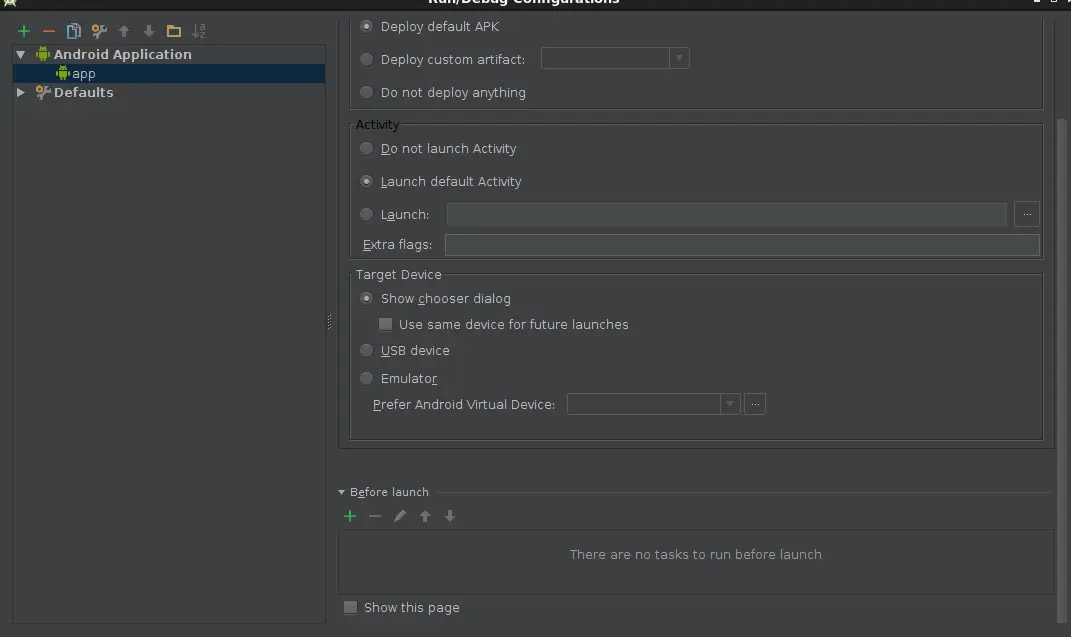
Android Studio Run之前执行checkstyle

1.选择菜单Run--Edit Configurations
2.选择Android Application--app,然后点击Before Launch区域的绿色加号 Checkstyle Before Run
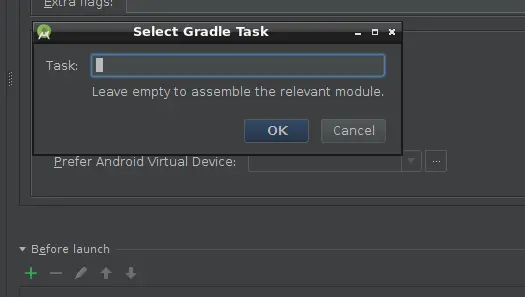
3.点击下拉菜单Gradle-aware Make,出现如下输入对话框 Input Checkstyle
4.输入checkstyle,然后从联想列表中选择对应的checkstyle,保存。
5.再次运行就可以从Gradle Console中看到有checkstyle任务先执行了。

注意:如果上面的checkstyle失败,则不进行后续的run操作。

每次git commit执行checkstyle

除此之外,我们还可易利用git的hooks,进行一些很cool的事情。比如在每次commit之前自动执行checkstyle检测代码规范。

思路就是,利用git的pre-commit hook,执行checkstyle,如果没有违背规范的地方,就继续执行commit,否则不执行。

关键代码如下:

SCRIPT_DIR=$(dirname "$0")
SCRIPT_ABS_PATH=`cd "$SCRIPT_DIR"; pwd`
$SCRIPT_ABS_PATH/../../gradlew checkstyle
if [ $? -eq 0   ]; then
    echo "checkstyle OK"
else
    exit 1
fi

hook文件路径为.git/hooks/pre-commit

完整的pre-commit脚本

#!/bin/sh
#
# An example hook script to verify what is about to be committed.
# Called by "git commit" with no arguments.  The hook should
# exit with non-zero status after issuing an appropriate message if
# it wants to stop the commit.
#
# To enable this hook, rename this file to "pre-commit".
if git rev-parse --verify HEAD >/dev/null 2>&1
then
  against=HEAD
else
  # Initial commit: diff against an empty tree object
  against=4b825dc642cb6eb9a060e54bf8d69288fbee4904
fi
SCRIPT_DIR=$(dirname "$0")
SCRIPT_ABS_PATH=`cd "$SCRIPT_DIR"; pwd`
$SCRIPT_ABS_PATH/../../gradlew checkstyle
if [ $? -eq 0   ]; then
    echo "checkstyle OK"
else
    exit 1
fi
# If you want to allow non-ASCII filenames set this variable to true.
allownonascii=$(git config --bool hooks.allownonascii)
# Redirect output to stderr.
exec 1>&2
# Cross platform projects tend to avoid non-ASCII filenames; prevent
# them from being added to the repository. We exploit the fact that the
# printable range starts at the space character and ends with tilde.
if [ "$allownonascii" != "true" ] &&
  # Note that the use of brackets around a tr range is ok here, (it's
  # even required, for portability to Solaris 10's /usr/bin/tr), since
  # the square bracket bytes happen to fall in the designated range.
  test $(git diff --cached --name-only --diff-filter=A -z $against |
    LC_ALL=C tr -d '[ -~]\0' | wc -c) != 0
then
  cat 

完整下载地址为:pre-commit

注意,放入本地后,需要确保该文件具有可执行权限。如chmod a+x pre-commit

——————————————-华丽的风格线——————————————————–

想要写出更规范优秀的代码,推荐阅读Bob大叔的《代码整洁之道》

本书不仅仅是告诉你要做什么,还教会你什么不能做。书中有关于代码味道的一个章节,全面列举了大多数程序员遇到的各种错误,其后的章节则详细描述如何纠正这些错误。比如如何将过长的switch声明转换成遵循开放闭合原则的模型,如何利用集成和多态。再次啰嗦一下,这本书确实值得每个程序员拥有。书中的例子使用Java语言,但依然适合使用其他面向对象编程语言的开发者阅读。想要撸的一手好码,这本书必不可少。