本文已经翻译成中文《深入浅出Android权限(二)》,欢迎参加「掘金翻译计划」,翻译优质的技术文章。
With Marshmallow a new permissions model was added to Android which requires developers to take a somewhat different approach to permissions on Android. In this series we’ll take a look at ways to handle requesting permissions both from a technical perspective, and in term of how to provide a smooth user experience.

Previously we looked at how we could check whether we had already been granted our required permissions, but we had no mechanism in place to request any missing permissions. In this article we’ll look at how we can include the necessary permissions checking and requesting in all of our Activities without having large amounts of duplicate code.. Please bear in mind that everything that follows is specific to Marshmallow and later (earlier OS levels have permissions granted implicitly from the Manifest declarations) but that you’ll need to implement this kind of checking if you are specifying targetSdkVersion=23 or higher in your builds.
So the first thing we need to understand is how the permissions request model works. As we have already discussed, normal permissions will be granted implicitly but dangerous permissions will require the user to explicitly grant that permission. Things are easy enough when the user grants us the required permission but we need to defend against instances where the user denies us permission. For the app we’re going to eventually be developing it may not be obvious to the user why we require the RECORD_AUDIO permission, so we need to make some provision to inform the user of why this will be needed.
From the users’ perspective, the way this works is that the user will be asked for the require permission the first time they run the app:
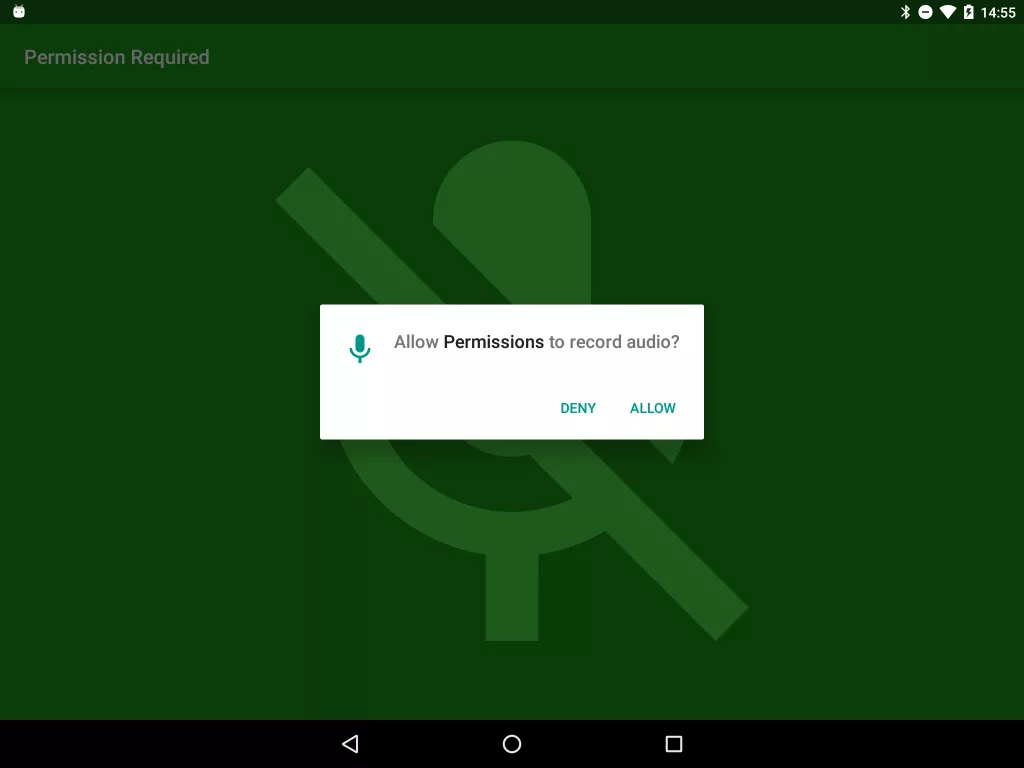
If they allow the permission then everything is fine and we can carry on. However, if they deny the permission then we can repeatedly ask them for the required permission:
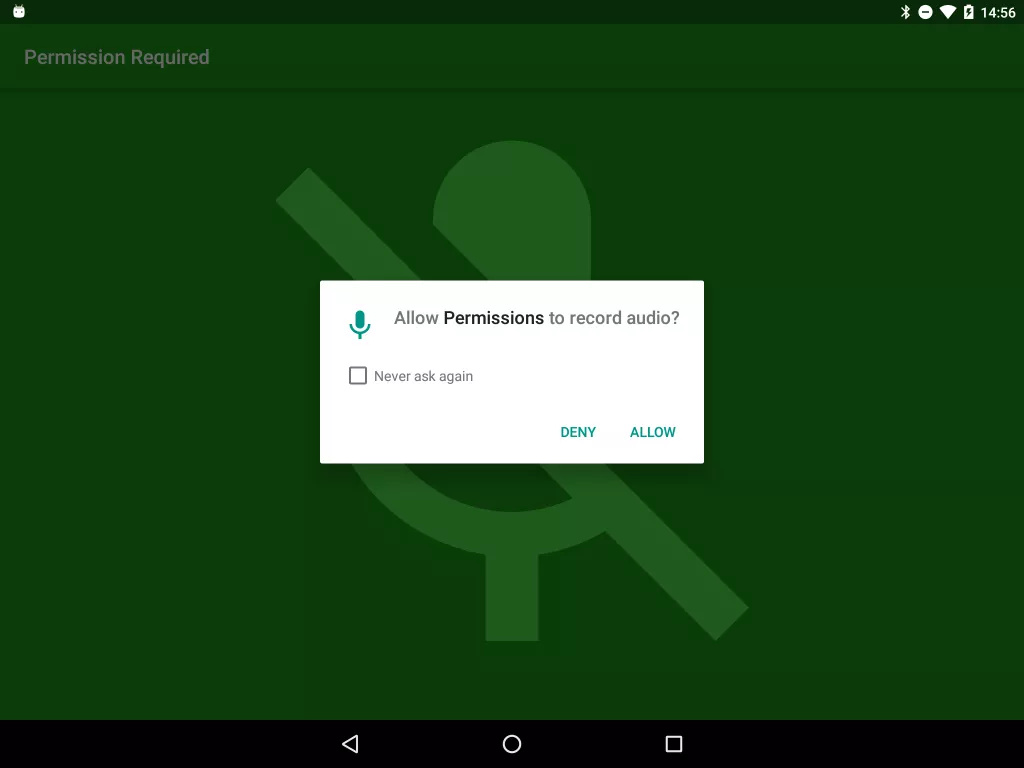
But note that if the user has previously denied the permission being requested they will be given the option to never be asked for the permission again. If the user selects this option then any further attempts by our code to request the permission will automatically be denied without prompting the user. Clearly this can be problematic for us as developers, so we need to make allowance for it.
This can further be compounded because the user can, at any time, go in to the Settings page for our app and grant or deny any permissions required by our app. This is why it is important to check that required permissions have been granted not only at app startup, but also in each Activity as the permissions could potentially change at any time.
So the pattern that we’re going to use to manage this is to have a separate Activity which is responsible for requesting permissions, and all of the other Activities within our app will need to check that they have the permissions they require, and pass control back to the PermissionsActivity if they have not been granted.
So let’s update our MainActivity slightly:
MainActivity.java
public class MainActivity extends AppCompatActivity {

    static final String[] PERMISSIONS = new String[]{Manifest.permission.RECORD_AUDIO, Manifest.permission.MODIFY_AUDIO_SETTINGS};
    private PermissionsChecker checker;

    @Override
    protected void onCreate(Bundle savedInstanceState) {
        super.onCreate(savedInstanceState);
        setContentView(R.layout.activity_main);

        Toolbar toolbar = (Toolbar) findViewById(R.id.toolbar);
        setSupportActionBar(toolbar);

        checker = new PermissionsChecker(this);
    }

    @Override
    protected void onResume() {
        super.onResume();

        if (checker.lacksPermissions(PERMISSIONS)) {
            startPermissionsActivity();
        }
    }

    private void startPermissionsActivity() {
        PermissionsActivity.startActivity(this, PERMISSIONS);
    }
}
We’ve moved the actual permissions check to onResume(). This is to cover the case where the user might pause our app, switch to Settings, deny a permission, and then resume our app. OK this is something of an edge case but it’s worth defending against crashes which could occur from this.
So the basic pattern that we’re implementing here is that whenever our Activity is resumed we confirm that we have the required permissions for that Activity to operate. If we don’t then we pass control to the PermissionsActivity which is responsible for obtaining the required permissions. Although this feels like a really defensive approach I feel that it really is a sensible approach which doesn’t actually require an awful lot of code. All of the checking logic in encapsulated within PermissionsChecker, and the request logic is handled in PermissionsActivity.
Having the permissions check as a relatively lightweight component is important because we can check for required permissions relatively cheaply and only make the rather more expensive Activity change to request missing permissions where absolutely necessary.
In the next article we’ll take a look at PermissionsActivity to see how we actually handle the permission requests and explore how to further inform the user why a permission is required if they deny a permission that we’re requested.
The source code for this article is available here. There’s a placeholder PermissionsActivity in the code which we’ll expand upon in the next article, so it’s not fully functional code, I’m afraid.