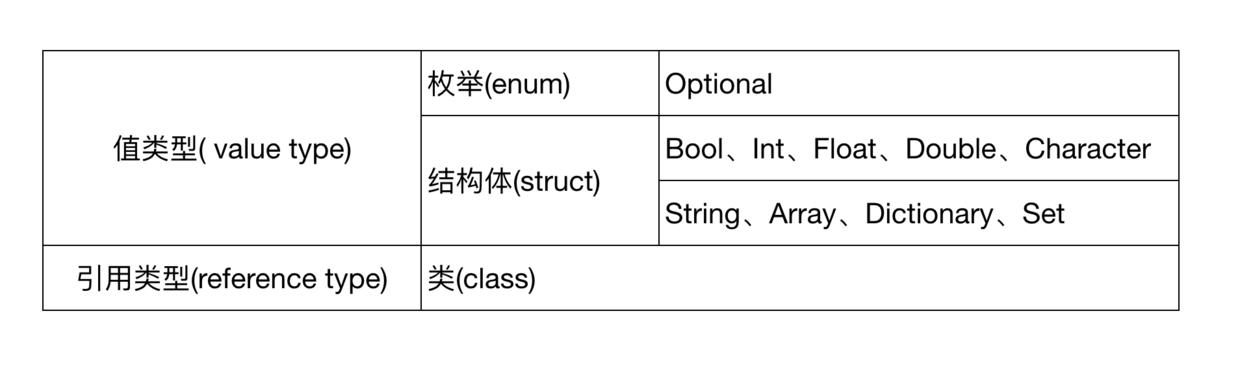
大家好,我是Mars。更新了Xcode 11 正式版后,对 Swift UI 做了一些简单的尝试,功能很强大,需要更深入的研究。之前在工作中业余时间自学了Swift,尝试重构了我司线上项目。后来因为项目赶进度,对Swift的研究也就搁浅下来。Swift 5 发布以后, ABI更加稳定,苹果今年又推出了 Swift UI ,所以是时候好好研究一下 Swift 这门语言了。后续会通过一系列的文章来分享和总结学习 Swift 的整个过程,希望大家多多支持和关注。
#语法篇
一、基础语法
分号
Swift不要求在每行语句的结尾使用分号; ,当在同一行书写多条语句时,必须用分号隔开:
var str = "Hello, swift"print(str)
let name = "Mars"; let age = 18;
print(http404Error.0) // 打印输出404
print(http404Error.1) // 打印输出Not Found
当然我们也可以用一个元组来接收已经定义好的元组类型常量 http404Error:
let (statusCode, statusMessage) = http404Error
print("The status code is \(statusCode)") // 打印输出The status code is 404
如果只想不想接收其中某部分数据,使用 _ 替代即可:
let (justTheStatusCode, _) = http404Error // 只接收了 http404Error 中Int类型数据
在定义元组类型变量时,也可以给具体值指定标签 标签名+: ,获取时通过点语法即可获取具体值:
let http200Status = (statusCode: 200, description: "success")
print("The status code is \(http200Status.statusCode)") // 打印输出The status code is 200
七、if-else
Swift中,if 后面的条件可以省略小括号,但大括号不可省略。条件只能是Bool类型。
let grade = 99
if grade >= 90 {
print("Grade is A")
}elseif grade >= 80 {
print("Grade is B")
}elseif grade >= 70 {
print("Grade is C")
}else {
print("Grade is D")
} // 打印输出Grade is A
八、while
Swift中,while 后面的条件可以省略小括号,但大括号不可省略。
var num = 5
while num > 0 {
    print("num is \(num)")
    num -= 1
} // 打印输出num is 5 num is 4 num is 3 num is 2 num is 1
注意这里没有使用num--,是因为在 Swift 3.0 中,就去掉了自增++和自减--运算符。
Swift中还提供了repeat - while语句,相当于C语言中的do - while语句:
var num1 = -1
repeat {
    print("num is \(num1)")
}while num > 0 // 打印输出 num is -1
九、for-in 循环
Swift 中使用for-in 循环用于遍历一个集合里面的所有元素。
var arr = [1, 2, 3, 4, 5]
for index in arr {
    print(index)
} // 打印输出 1 2 3 4 5
例子中,index默认是常量,也可以声明为变量:
var arr = [1,2,3,4,5]
for var index in arr {
    print(index)
} // 打印输出 1 2 3 4 5
如果在循环中不需要index,也可以用 _替代:
var arr = [1,2,3,4,5]
for _ in arr {
    print("hello")
} // 打印输出 hello hello hello hello hello
闭区间运算符 ...
闭区间运算符表示取值范围,例如:
a...b //a <= 取值 <= b
上面for-in 循环的例子就可以写成:
for index in 1...5 {
    print(index)
} // 打印输出 1 2 3 4 5
半开区间运算符 ..<
半开区间运算符表示取值范围,例如:
a..<b //a <= 取值 < b
运用到for-in 循环中:
for index in 1..<5 {
    print(index)
} // 打印输出 1 2 3 4
区间运算符运用在数组上
上面讲述的区间运算符也可以用在数组上,表示下标值范围:
var names = ["tom", "jack", "mars", "thomas"]
for name in names[0...3] {
    print(name)
} // 打印输出tom jack mars thomas
也可以使用单侧区间来指定范围:
// ...2 表示 0 1 2
var names = ["tom", "jack", "mars", "thomas"]
for name in names[...2] {
    print(name)
} // 打印输出tom jack mars
使用半开区间运算符:
// ..<2 表示 0 1
var names = ["tom", "jack", "mars", "thomas"]
for name in names[..<2] {
    print(name)
} // 打印输出tom jack
十、switch
Swift 中 switch 语句,必须要保证能处理所有情况。switch 语句中case、default后面不能写大括号{}。默认可以不用写 break,也不会贯穿到后面的条件:
var number = 1
switch number {
case 1:
    print("number is 1")
case 2:
    print("number is 2")
default:
    print("number is other")
} // 打印输出 number is 1
可以使用fallthrough关键字实现贯穿效果(复合条件):
var number = 1
switch number {
case 1:
    print("number is 1")
    fallthrough
case 2:
    print("number is 2")
default:
    print("number is other")
} // 打印输出 number is 1 number is 2
复合条件
除了使用fallthrough关键字实现复合条件,也可以在条件中写入多个条件并用逗号分隔开。另外,switch也支持字符串 String 和字符 Character 类型:
let stri = "Mars"
switch stri {
case"Mars", "Tom":
print("He is my friend")
default:
break
} // 打印输出 He is my friend
switch中的区间匹配
区间运算符同样也可以运用到switch语句中:
let count = 89
switch count {
case 0:
    print("none")
case 1..<10:
    print("a few")
case 10..<100:
    print("a lot")
default:
    print("many")
} // 打印输出 a lot
十一、where
swift中可以使用where关键字来过滤筛选条件:
var numbers = [10, 20, -10, 30, -20]
var sum = 0
for num in numbers where num > 0 {
    sum += num
}
print(sum) // 打印输出60