

1.填坑的缘由
移动端的播放器真的是很蛋疼,android和ios完全是两种风格,产品看了不满意,设计看了更是不用说了,自己设计的图那么漂亮,怎么一到你这就成了这样呢?(设计还是全面屏android,和我的小iphone比起来,效果可以说是天差地别)宝宝我委屈呀,这是系统自带的呀,我能怎么办~产品在禅道就指了一个bug给我,简简单单几个字: 自己写!
EXM?!你他妈是在逗我吗?好吧好吧,你是领导,你牛逼,自己写就自己写吧...
2.开始准备
1).要不写写ui吧
先上样式
.video-player {
    width: 100%;
    min-height: 180px;
    background: #000;
    position: relative;
    overflow: hidden;
    .load-icon {
        position: absolute;
        font-size: 30px;
        color: #fff;
        top: 50%;
        left: 50%;
        margin-left: -15px;
        margin-top: -15px;
    }
    video::-webkit-media-controls{
        display: none !important;
    }
    video {
        width: 100%;
        margin: auto 0;
    }
    .controls {
        width: 100%;
        position: absolute;
        height: 42px;
        bottom: 0;
        display: flex;
        align-items: center;
        justify-content: center;
        background: rgba(0, 0, 0, 0.7);
        z-index: 1;
        font-size: 12px;
        color: #fff;
        padding: 0 18px;
        transition: all 0.3s;
        &.show-controls {
            transform: translateY(0);
        }
        &.hide-controls {
            transform: translateY(45px);
        }
        .fa {
            display: block;
            height: 14px;
            width: 14px;
        }
        .fa-icon {
            font-size: 16px;
            margin-right: 8px;
        }
        .fa-play {
            background: url(/static/im/icon_bfbf@2x.png) no-repeat;
            background-size: 100% 100%;
            margin-right: 8px;
        }
        .fa-pause {
            background: url(/static/im/icon_bfzt@2x.png) no-repeat;
            background-size: 100% 100%;
            margin-right: 8px;
        }
        .fa-expand {
            background: url(/static/im/icon_shoushuo@2x.png) no-repeat;
            background-size: 100% 100%;
            margin-left: 18px;
        }
        .fa-noExpand {
            background: url(/static/im/icon_shuofang@2x.png) no-repeat;
            background-size: 100% 100%;
            margin-left: 18px;
        }
        .progress {
            flex: 1;
            margin: 0 10px;
            position: relative;
            .line {
                width: 100%;
                position: absolute;
                height: 2px;
                background: #8d8d8d;
                z-index: 1;
            }
            .loaded {
                position: absolute;
                background: #32d092;
                height: 2px;
                top: 0;
                left: 0;
                z-index: 2;
            }
            .bar {
                position: absolute;
                top: -9px;
                left: -2px;
                z-index: 3;
                height: 20px;
                width: 20px;
                background: url(/static/im/icon_bfqjdt@3x.png) no-repeat;
                background-size: 100% 100%;
            }
        }
    }
}
pug 布局(因为比较懒,写pug能够少写好多字符,哈哈)
<template lang="pug">
  .video-player
    video(:src="url" :poster="poster" @click="toggleControls" id="currentVideo" x-webkit-airplay="true" x5-playsinline="true" x5-video-player-type="h5" x5-video-orientation="portraint" webkit-playsinline="true" playsinline="true")
    //- canvas#canvas
    .controls(:class="{'show-controls': isShow, 'hide-controls': !isShow}")
      //- 暂停和播放
      .fa(@click="toggle" :class="{'fa-play': !isPlay, 'fa-pause': isPlay}" v-if="isCanplay")
      i.fa-icon.el-icon-loading(v-else)
      //- 当前时间
      span.time.current {{currentTime}}
      //- 进度条
      .progress
        .loaded(:style="`width:${touch? touchPoint : progress * 100}%;`")
        .line
        .bar(:style="`left:${touch? touchPoint : progress * 100}%;`" @touchstart="touchstart" @touchmove="touchmove" @touchend="touchend")
      //- 总时长
      span.time.total {{totalTime}}
      //- 全屏
      .fa(@click="expand" :class="{'fa-expand': isExpand, 'fa-noExpand': !isExpand}")
</template>
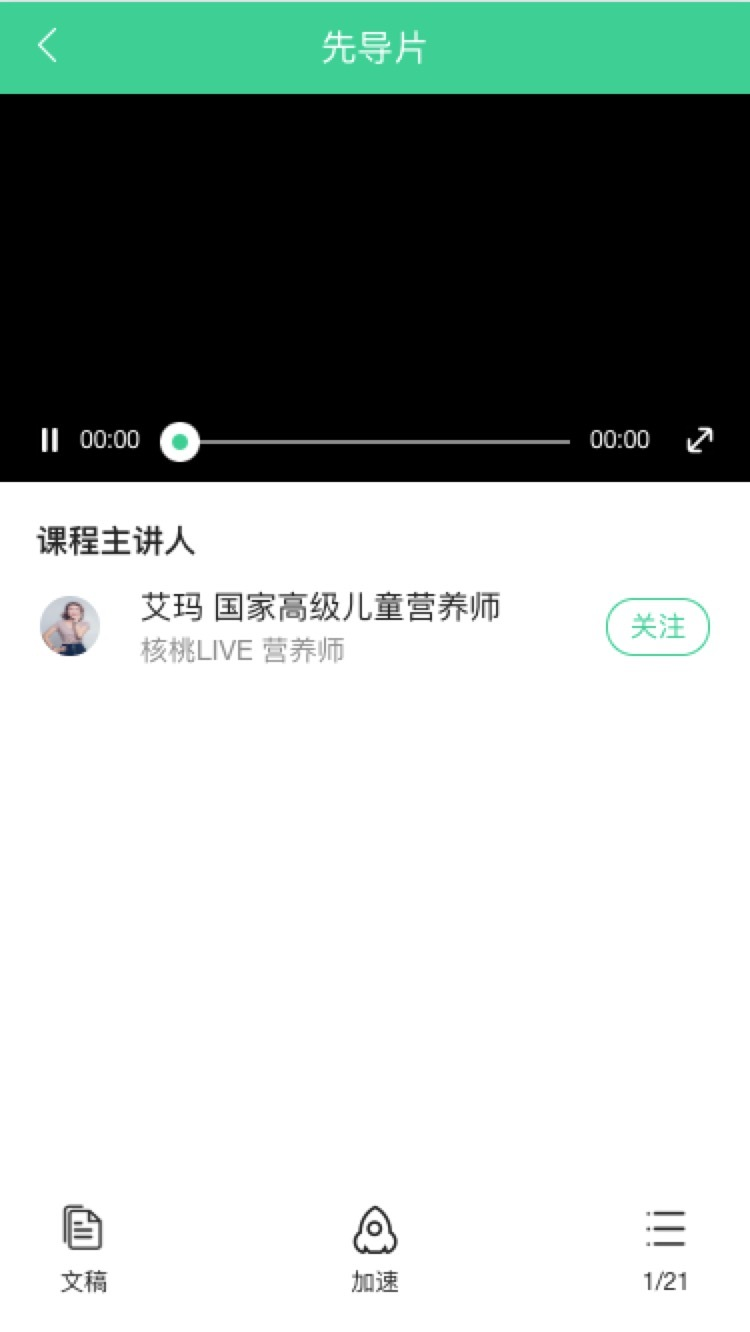
确实是像是那么一回事儿,不过,最大的坑准备到来啦!!!
2). 对应的vue编码实现
import utils from '@/libs/utils'
import bus from '@/libs/bus'
export default {
  name: 'videoPlayer',
  props: {
    url: {
      type: String,
      default: ''
    },
    poster: {
      type: String,
      default: ''
    }
  },
  data () {
    return {
      currentVideo: '',
      currentTime: '00:00',
      totalTime: '00:00',
      isPlay: false,
      isExpand: false,
      isShow: true,
      progress: 0,
      duration: 0,
      isCanplay: false,
      touch: false,
      lineWidth: 240,
      touchPoint: 0
    }
  },
  created () {
    // 监听加速事件触发
    bus.$on('playbackRate', (speed) => {
      this.currentVideo.playbackRate = parseFloat(speed)
    })
    // 监听选择章节事件触发
    bus.$on('init', () => {
      this.init()
    })
    this.$nextTick(() => {
      this.currentVideo = document.getElementById('currentVideo')
      this.currentVideo.controls = false
      // 播放时
      this.currentVideo.ontimeupdate = () => {
        this.timeUpDate()
      }
      if (!utils.isAndroid) {
        this.isCanplay = true
        this.currentVideo.onplay = () => {
          this.isCanplay = false
        }
        this.currentVideo.onplaying = () => {
          if (!this.isCanplay) {
            this.isCanplay = true
            this.duration = isNaN(this.currentVideo.duration) ? 0 : this.currentVideo.duration
            this.totalTime = this.getFormatTime(this.duration)
          }
        }
      } else {
        // ios不触发
        this.currentVideo.oncanplay = () => {
          this.isCanplay = true
          this.duration = isNaN(this.currentVideo.duration) ? 0 : this.currentVideo.duration
          this.totalTime = this.getFormatTime(this.duration)
        }
      }
    })
  },
  methods: {
    // 初始化播放器
    init () {
      this.currentTime = '00:00'
      this.totalTime = '00:00'
      this.isPlay = false
      this.isExpand = false
      this.isShow = true
      this.progress = 0
      this.duration = 0
      this.isCanplay = false
      this.touch = false
      this.touchPoint = 0
      this.currentVideo.currentTime = 0
      if (!utils.isAndroid) {
        this.isCanplay = true
        this.currentVideo.onplay = () => {
          this.isCanplay = false
        }
        this.currentVideo.onplaying = () => {
          if (!this.isCanplay) {
            this.isCanplay = true
            this.duration = isNaN(this.currentVideo.duration) ? 0 : this.currentVideo.duration
            this.totalTime = this.getFormatTime(this.duration)
          }
        }
      } else {
        // ios不触发
        this.currentVideo.oncanplay = () => {
          this.currentVideo.play()
          this.isPlay = true
          this.isCanplay = true
          this.duration = isNaN(this.currentVideo.duration) ? 0 : this.currentVideo.duration
          this.totalTime = this.getFormatTime(this.duration)
          setTimeout(() => {
            this.duration = isNaN(this.currentVideo.duration) ? 0 : this.currentVideo.duration
            this.totalTime = this.getFormatTime(this.duration)
          }, 1000)
        }
      }
    },
    // 控制条的显示与隐藏
    toggleControls () {
      this.isShow = !this.isShow
    },
    // 播放暂停切换
    toggle () {
      this.isPlay = !this.isPlay
      if (this.isPlay) {
        this.currentVideo.play()
      } else {
        this.currentVideo.pause()
      }
    },
    // 全屏
    expand () {
      this.isExpand = !this.isExpand
      // if (!this.isExpand) {
      //   this.currentVideo.webkitRequestFullScreen()
      // }
    },
    // 播放时
    timeUpDate () {
      this.updateProgress(this.currentVideo.currentTime)
      this.currentTime = this.getFormatTime(this.currentVideo.currentTime)
    },
    // 更新进度条
    updateProgress (p) {
      this.progress = p / this.duration
    },
    getFormatTime (seconds) {
      let time = seconds ? seconds : 0
      let m = parseInt(time/60)
      let s = parseInt(time%60)
      m = m < 10 ? "0" + m : m
      s = s < 10 ? "0" + s : s
      return m + ":" + s
    },
    // touch事件
    touchstart (e) {
      let clientX = e.changedTouches[0].clientX
      this.touch = true
      this.touchPoint = this.getTouchPoint(clientX)
    },
    touchmove (e) {
      let clientX = e.changedTouches[0].clientX
      this.touchPoint = this.getTouchPoint(clientX)
    },
    touchend (e) {
      let clientX = e.changedTouches[0].clientX
      this.touchPoint = this.getTouchPoint(clientX)
      if (this.currentVideo.seeking) {
        this.touchcancel(e)
        return
      }
      this.seek(this.touchPoint)
    },
    touchcancel(e) {
      this.touch = false
      this.touchPoint = 0
    },
    getTouchPoint (clientX) {
      let point = (clientX - 90) / this.lineWidth * 100
      if (point >= 100) {
        point = 100
      } else if (point <= 0) {
        point = 0
      }
      return point
    },
    // 跳转到某个播放位置
    seek (position) {
      let dom = this.currentVideo
      let seconds = position * dom.duration * 0.01
      if (dom.buffered.end(0) < seconds < dom.buffered.start(0)) {
        return
      } else {
        if ('fastSeek' in dom) {
          dom.fastSeek(seconds)
        } else {
          dom.currentTime = Math.floor(seconds)
        }
      }
    }
  },
  mounted(){
    this.lineWidth = $('.line').innerWidth()
  }
}
用浏览器模拟播放,我靠,那么棒,流畅且漂亮,感觉要爱上自己了!感觉到手机里面看看效果!
3.手机填坑
1).自动播放是不可能的了,android在oncanplay里面我也添加了play,可是并无卵用,只能通过click或tap点击事件,才能进行播放。
2).为了想让视频加载时显示菊花,iphon的oncanplay压根不执行,iphone想用oncanplay是不可能的。也试过用durationchange,ios也没有效果。所以我用了另一种极端方法,android用canplay没问题,ios的话,可以在onplay事件里将播放按钮变成菊花,然后在onplaying事件中再将菊花隐藏,这样就可以有加载中的效果啦~
3).进度条拖拉偶尔会失效,至今我还是搞不明白是怎么回事,难道是网速问题,导致没反应过来?这个我还真不知道。
4). 最最坑的来了,android机播放以后自动全屏播放。如果用canvas渲染,那真的是卡爆了,大神们求指点呀。
5). 全屏会变为系统自带的播放器,自定义的bar和一系列的事件都没用了。我在想可不可以不用原生的全屏,而是自己写方法实现。在点击全屏的时候,将视频旋转,填充屏幕,实现模拟全屏,这样的兼容性会不会好一点?
