主要步骤
- 使用html2canvas/dom-to-image将页面元素转成图片(dom-to-image会比html2canvas快一些) blog.csdn.net/HYeeee/arti…
- 使用jspdf生成pdf页面
- 把图片加到pdf页面上
主要代码
import i18n from '@/Common/i18n/index';
import * as JsPDF from 'jspdf';
import html2Canvas from 'html2canvas';
import domtoimage from 'dom-to-image';
const pagePaddingLeft = 40;
const pagePaddingTop = 40;
const A4Height = 841.89;
const A4Width = 592.28;
const A4PageWidth = A4Width - 2 * pagePaddingLeft;
const A4PageHeight = A4Height - pagePaddingTop;
const addOneImg = (
{ src, marginTop = 0, imgWidth, imgHeight },
{ usedHeight = 0 },
PDF) => {
return new Promise((resolve) => {
if (!src || src === '') {
resolve();
return;
}
let pageData = src;
let position = usedHeight + marginTop;
PDF.addImage(
pageData,
'JPEG',
pagePaddingLeft,
position,
imgWidth,
imgHeight
);
resolve();
});
};
const getImgCanvas = (el, params = {}) => {
return domtoimage.toPng(el, { cacheBust: true }).then((dataUrl)=>{
return dataUrl;
});
};
const getImgByCanvas = (canvas) => {
return new Promise((resolve) => {
const img = new Image();
img.src = canvas;
if (!canvas || canvas === '') {
resolve();
return;
}
img.onload = () => {
resolve(img);
};
img.onerror = () => {
resolve(img);
};
});
};
const getHtmlImgList = async (elConfigs, isFitA4 = false) => {
let imgList = [];
let usedHeight = 0;
for (let i = 0; i < elConfigs.length; i++) {
const config = elConfigs[i];
const canvas = await getImgCanvas(config.el, { scale: 1 });
const img = await getImgByCanvas(canvas);
let imgWidth = img.width;
let imgHeight = img.height;
if (isFitA4) {
let contentWidth = img.width;
let contentHeight = img.height;
imgWidth = A4PageWidth;
imgHeight = (imgWidth / contentWidth) * contentHeight;
}
let tempUsedHeight = usedHeight + config.marginTop + imgHeight;
if (tempUsedHeight > A4Height) {
usedHeight = 0;
}
imgList.push({
canvas,
src: img,
imgWidth,
imgHeight,
marginTop: usedHeight === 0 ? 40 : config.marginTop,
usedHeight: usedHeight
});
usedHeight = usedHeight + config.marginTop + imgHeight;
}
return imgList;
};
const html2Pdf = async (elConfigs = [], fileName = '', isFitA4 = true) => {
if (elConfigs.length === 0) {
return;
}
const imgList = await getHtmlImgList(elConfigs, isFitA4);
const pdfWidth = isFitA4 ? A4Width : imgList[0].imgWidth + 2 * pagePaddingLeft;
const { imgHeight, marginTop, usedHeight: allHeight } = imgList[imgList.length - 1];
const pdfHeight = isFitA4 ? A4Height : allHeight + imgHeight + marginTop + pagePaddingTop * 2;
let PDF = new JsPDF('', 'pt', [pdfWidth, pdfHeight]);
for (let i = 0; i < imgList.length; i++) {
const { canvas, imgWidth, imgHeight, marginTop, usedHeight } = imgList[i];
if (i > 0 && usedHeight === 0) {
PDF.addPage();
}
await addOneImg({ src: canvas, imgWidth, imgHeight, marginTop }, { usedHeight }, PDF);
}
const exportFileName = fileName ? `${fileName}.pdf` : `${i18n.t('hcp_eduInspect_record_name')}_${new Date().format('yyyyMMddHHssmm')}.pdf`;
PDF.save(exportFileName);
};
export {
addOneImg,
html2Pdf
};
import { html2Pdf } from '@/EduInspect/view/Components/html2Pdf.js';
exportPdf() {
this.showExport = false;
this.$nextTick(()=>{
const exportDate = new Date();
this.exportTime = exportDate.format('yyyy/MM/dd HH:mm:ss');
const exportFileName = this.$t('hcp_eduInspect_record_name') + exportDate.format('yyyyMMddHHssmm');
this.$nextTick(async () => {
let exportData = [
{ el: this.$refs['top-course-title'], marginTop: 40 },
{ el: this.$refs['course-info-detail'], marginTop: 0},
{ el: this.$refs['comment-title'], marginTop: 0}
];
for (let i = 0; i <= this.EvaluateRecordList.length - 1; i++) {
exportData.push(
{el: this.$refs['comment-record-item' + i][0], marginTop: i === 0 ? 20 : 0}
);
}
await html2Pdf(exportData, exportFileName);
this.showExport = true;
});
});
},
<div class="detail-content" id="inspect_course_record" ref="inspect_course_record">
<div class="top-course-title" ref="top-course-title">
<div class="left-title">{{ $t('hcp_eduInspect_courseTitle_name') }}</div>
<div class="right-export">
<el-button icon="h-icon-export" v-if="showExport" @click="exportPdf">{{ $t('hcp_eduInspect_export_button') }}</el-button>
</div>
</div>
<div class="course-info-detail" ref="course-info-detail">
<div class="detail-item" v-for="(item,index) in courseInfo" v-show="item.value" :key="item.label+index">
<div class="label-name record-overflow-line" :title="item.label">{{ item.label }} : </div>
<div class="record-value record-overflow-line" :title="item.value">{{ item.value }}</div>
</div>
</div>
<div class="comment-title" ref="comment-title">{{ $t('hcp_eduInspect_inspect_course_name') }}</div>
<div class="comment-record">
<div class="comment-record-item" :ref="`comment-record-item`+index" v-for="(item,index) in EvaluateRecordList" :key="item.time+index">
<div class="top-line">
<div class="cirle"></div>
<div class="time">{{ item.time }}</div>
<div class="inspector record-overflow-line" :title="InspectRecord.InspectUserName">{{ $t('hcp_eduInspect_inspector_name').replace('{0}',InspectRecord.InspectUserName) }}</div>
</div>
<div class="comment-content" :class="index===EvaluateRecordList.length-1?'no-border':''">
<div class="text-line">{{ item.EvaluateRecord }}</div>
<div class="picture-line">
<div class="pic-box" v-for="(ele,index1) in item.PictureInfoList" :key="index+''+index1">
<img :src="ele.PictureURL" alt="">
<div class="picture-mask">
<div class="btn-box">
<el-button icon="h-icon-zoom_in" size="mini" @click="previewPic(index,index1,true)" />
</div>
</div>
</div>
</div>
</div>
</div>
</div>
</div>
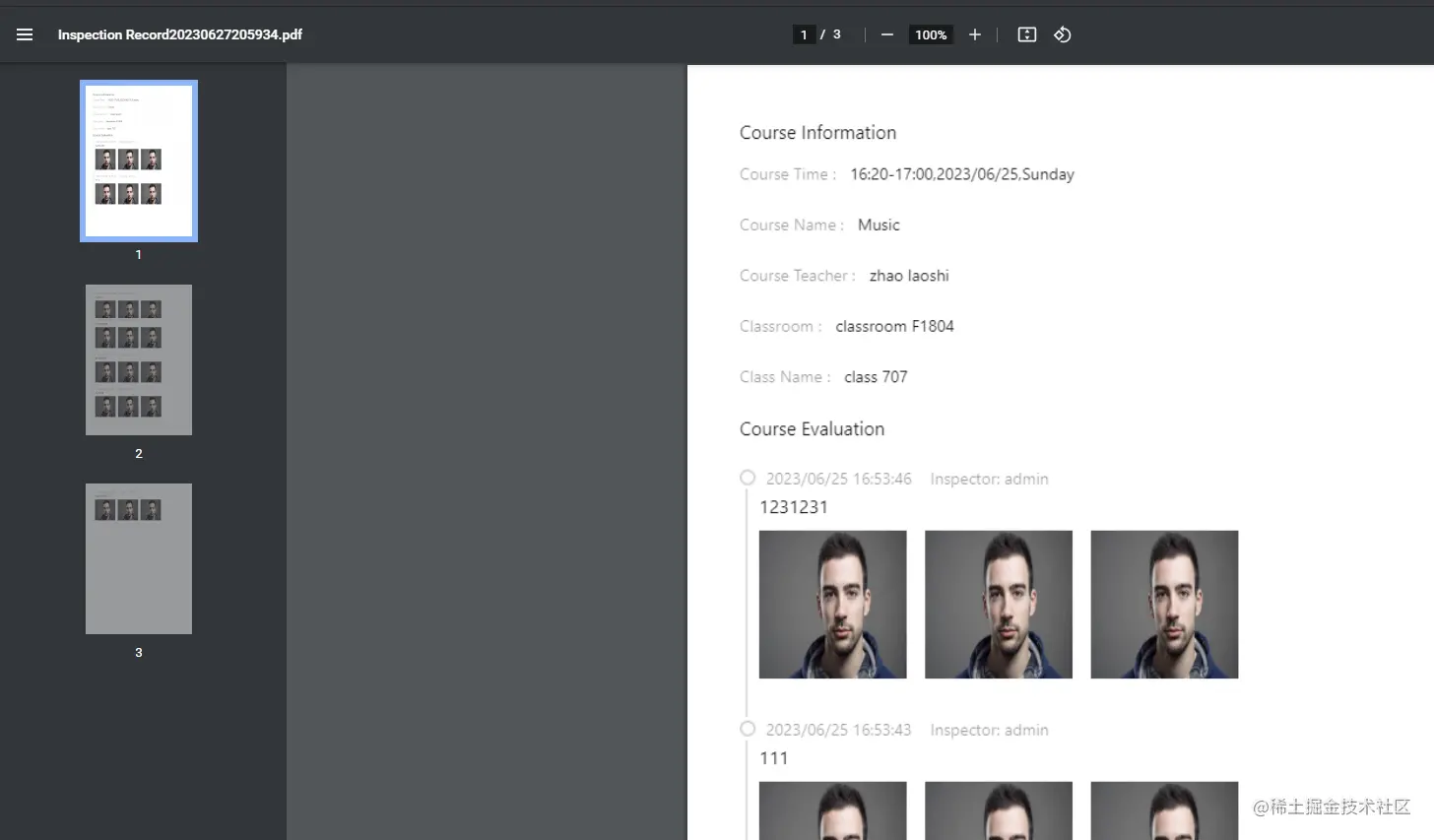
demo导出结果展示
总结
- 因为需要考虑pdf分页时,页面元素是否会被截断,所以需要提前考虑好页面元素的布局,如果元素高度固定的话,可以提前计算好一页高度能包含多少元素,然后放到一个div盒子里面,这样的话,可以少截几次图片,适当提高效率;如果确定元素高度,可以像我demo那样,多截几次图,然后再把多张图片组合成一页pdf。
- 因为截图时对图片的处理花费时间较长,所以图片数量较多时,整个过程会有点慢。



