视频教程
一、概述
1. I/O模型
- I/O 模型:就是用什么样的通道或者说是通信模式和架构进行数据的传输和接收,很大程度上决定了程序通信的性能,Java 共支持 3 种网络编程的/IO 模型:BIO、NIO、AIO
二. BIO
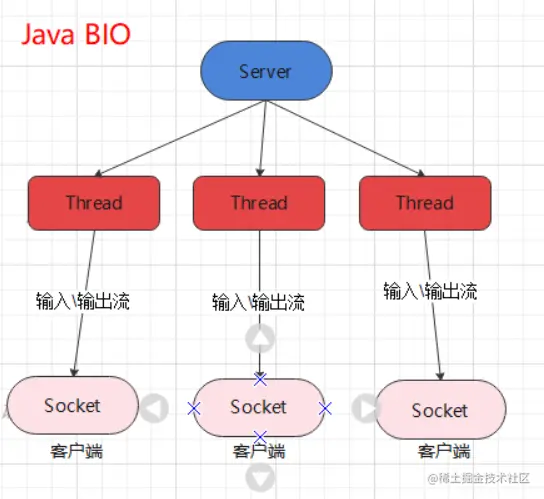
- 简单来说,就是一个会话使用一个线程处理。服务端有一个线程专门监听客户端的连接,当有新的连接过来了,那就开启一个新的线程去监听并处理。
1. 代码模拟一个服务端多个客户端操作
public class Server {
public static void main(String[] args) throws IOException {
ServerSocket server = new ServerSocket(9999);
for (; ; ) {
Socket socket = server.accept();
InputStream inputStream = socket.getInputStream();
BufferedReader reader = new BufferedReader(new InputStreamReader(inputStream));
new Thread(() -> {
String msg;
try {
while ((msg = reader.readLine()) != null) {
System.out.println(Thread.currentThread().getName() + " : " + msg);
}
} catch (IOException e) {
e.printStackTrace();
}
}).start();
}
}
}
public class Client {
public static void main(String[] args) throws IOException {
Socket socket = new Socket("127.0.0.1", 9999);
OutputStream outputStream = socket.getOutputStream();
PrintStream printStream = new PrintStream(outputStream);
Scanner scanner = new Scanner(System.in);
while (true) {
System.out.print("请说:");
printStream.println(scanner.nextLine());
printStream.flush();
}
}
}
1.1 小结
- 1.每个Socket接收到,都会创建一个线程,线程的竞争、切换上下文影响性能;
- 2.每个线程都会占用栈空间和CPU资源;
- 3.并不是每个socket都进行IO操作,无意义的线程处理;
- 4.客户端的并发访问增加时。服务端将呈现1:1的线程开销,访问量越大,系统将发生线程栈溢出,线程创建失败,最终导致进程宕机或者僵死,从而不能对外提供服务。
2. 伪异步方式
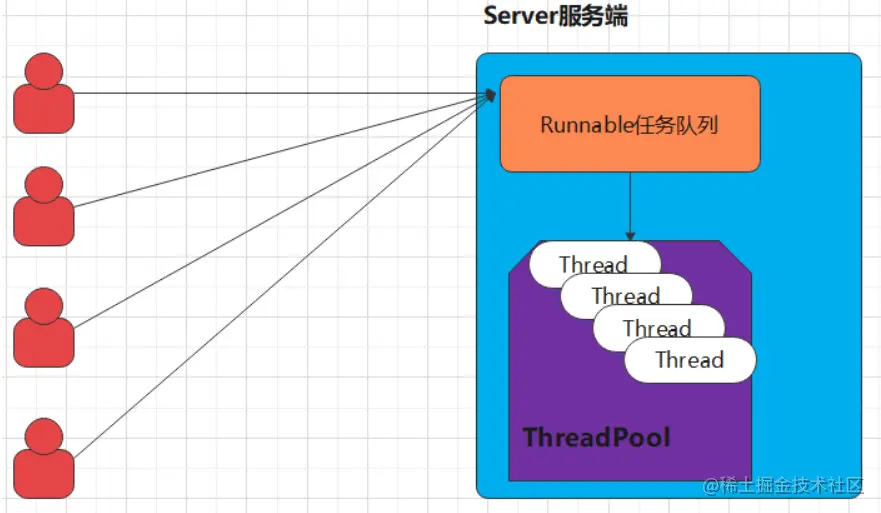
- 之前的方式,针对每个会话都需要有一个线程进行处理,容易很浪费资源。这里可以利用线程池的机制,固定处理线程数,并且通过阻塞队列让其余会话等着,直到有会话结束。
public class Server {
public static void main(String[] args) throws IOException {
ServerSocket serverSocket = new ServerSocket(9999);
ExecutorService threadPool = createThreadPool(3, 1000);
for (; ; ) {
Socket socket = serverSocket.accept();
System.out.println("接收到一个新的连接");
threadPool.execute(() -> {
try {
BufferedReader reader = new BufferedReader(new InputStreamReader(socket.getInputStream()));
String msg;
while ((msg = reader.readLine()) != null) {
System.out.println(Thread.currentThread().getName() + "接收到信息 :" + msg);
}
} catch (IOException e) {
e.printStackTrace();
}
});
}
}
private static ExecutorService createThreadPool(int maxPoolSize, int queueSize) {
return new ThreadPoolExecutor(maxPoolSize, maxPoolSize, 120L, TimeUnit.SECONDS, new LinkedBlockingQueue<>(queueSize));
}
}
- 目前线程池只能处理3个连接,当第4个连接过来的时候,没办法处理,只能在队列里面等着,有一个连接断开之后,就可以处理第4个了。
2.1 小结
- 伪异步io采用了线程池实现,因此避免了为每个请求创建一个独立线程造成线程资源耗尽的问题,但由于底层依然是采用的同步阻塞模型,因此无法从根本上解决问题。
- 如果单个消息处理的缓慢,或者服务器线程池中的全部线程都被阻塞,那么后续socket的i/o消息都将在队列中排队。新的Socket请求将被拒绝,客户端会发生大量连接超时。
三. NIO
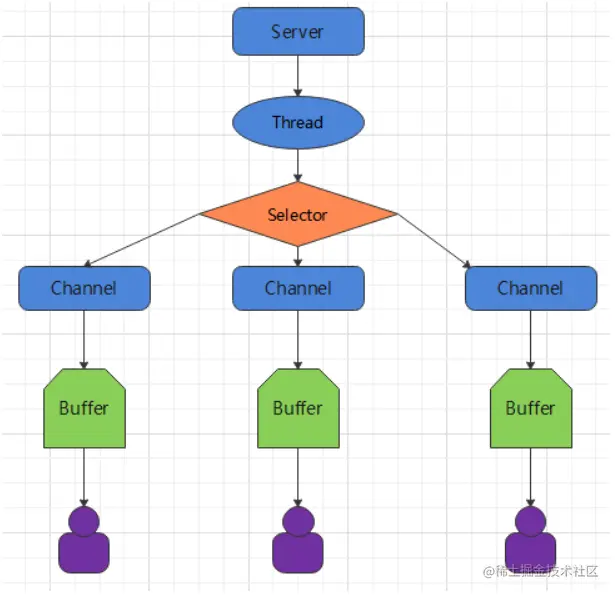
- NIO与原来的IO有同样的作用和目的,但是使用的方式完全不同,NIO支持面向缓冲区的、基于通道的IO操作。NIO将以更加高效的方式进行文件的读写操作。NIO可以理解为非阻塞IO,传统的IO的read和write只能阻塞执行,线程在读写IO期间不能干其他事情,比如调用socket.read()时,如果服务器一直没有数据传输过来,线程就一直阻塞,而NIO中可以配置socket为非阻塞模式。
- NIO 有三大核心部分:Channel( 通道) ,Buffer( 缓冲区), Selector( 选择器)
- 简单来说,NIO不需要每个连接都一个处理线程。NIO可以在每次连接的时候,生成一个缓存区Buffer,通过通道Channel与缓存区读写,并将通道注册到一个选择器上。可以给选择器开启一个新的线程,选择器的工作就是轮询所有通道,看它们的缓存区有没有新内容,如果有就进行处理,没有就跳过。
1. NIO和BIO比较
- BIO 以流的方式处理数据,而 NIO 以块的方式处理数据,块 I/O 的效率比流 I/O 高很多
- BIO 是阻塞的,NIO 则是非阻塞的
- BIO 基于字节流和字符流进行操作,而 NIO 基于 Channel(通道)和 Buffer(缓冲区)进行操作,数据总是从通道读取到缓冲区中,或者从缓冲区写入到通道中。Selector(选择器)用于监听多个通道的事件(比如:连接请求,数据到达等),因此使用单个线程就可以监听多个客户端通道
2. 三大核心
- NIO 有三大核心部分:Channel( 通道) ,Buffer( 缓冲区), Selector( 选择器)
2.1 缓冲区
- 其实就是一块内存,也可以理解成一个数组。被包装成NIO的Buffer对象
- 可以根据不同类型的缓存区,建立不同的类。比如说,ByteBuffer、CharBuffer、ShortBuffer、IntBuffer、LongBuffer、FloatBuffer、DoubleBuffer
- 值得一提的是,这块内存可以选择是堆内存,也可以选择直接内存(也就是程序外的内存,与IO流直接接触的内存)。
- 缓存区重要概念
- 容量 (capacity) :作为一个内存块,Buffer具有一定的固定大小,也称为"容量",缓冲区容量不能为负,并且创建后不能更改。
- 限制 (limit):表示缓冲区中可以操作数据的大小(limit 后数据不能进行读写)。缓冲区的限制不能为负,并且不能大于其容量。 写入模式,限制等于buffer的容量。读取模式下,limit等于写入的数据量。
- 位置 (position):下一个要读取或写入的数据的索引。缓冲区的位置不能为 负,并且不能大于其限制
- 标记 (mark)与重置 (reset):标记是一个索引,通过 Buffer 中的 mark() 方法 指定 Buffer 中一个特定的 position,之后可以通过调用 reset() 方法恢复到这 个 position.
标记、位置、限制、容量遵守以下不变式: 0 <= mark <= position <= limit <= capacity
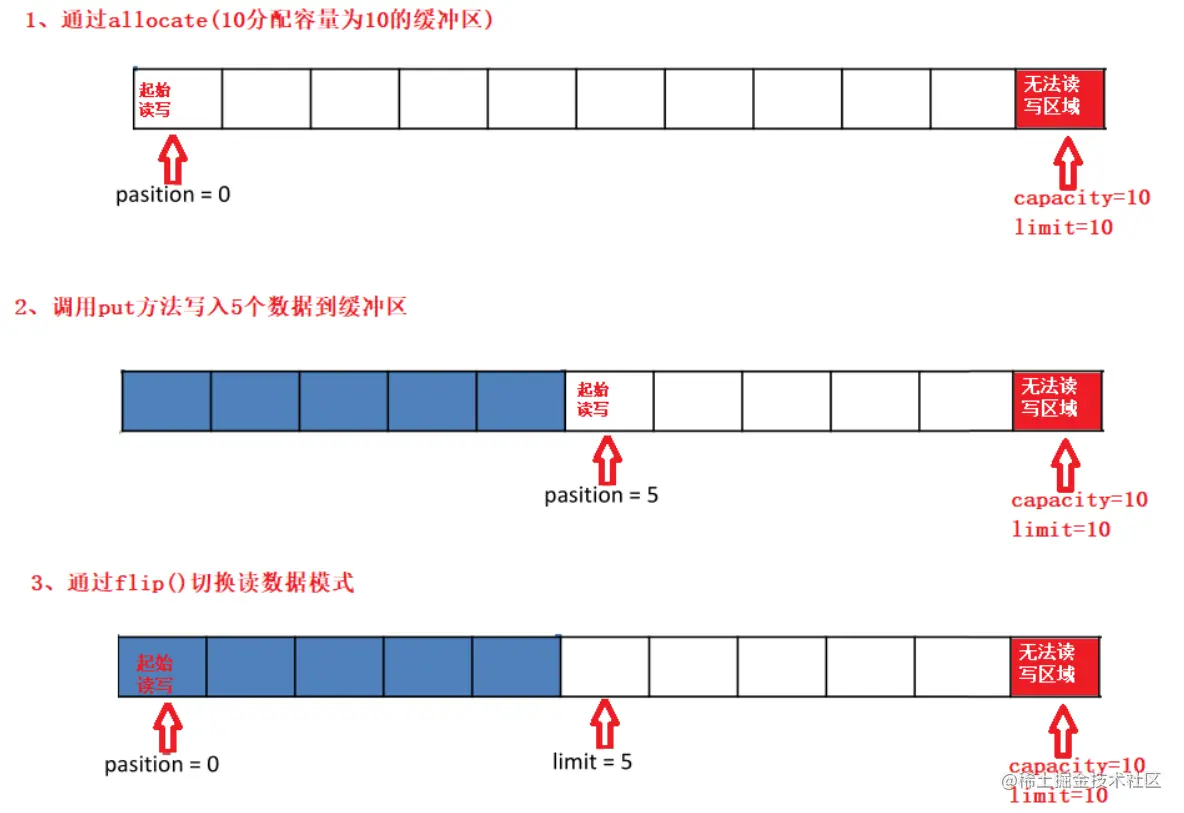
- 基本操作
Buffer clear()
Buffer flip()
int capacity()
boolean hasRemaining()
int limit()
Buffer limit(int n)
Buffer mark()
int position()
Buffer position(int n)
int remaining()
Buffer reset()
Buffer rewind()
Buffer 所有子类提供了两个用于数据操作的方法:get()put() 方法
取获取 Buffer中的数据
get() :读取单个字节
get(byte[] dst):批量读取多个字节到 dst 中
get(int index):读取指定索引位置的字节(不会移动 position)
放到 入数据到 Buffer 中 中
put(byte b):将给定单个字节写入缓冲区的当前位置
put(byte[] src):将 src 中的字节写入缓冲区的当前位置
put(int index, byte b):将指定字节写入缓冲区的索引位置(不会移动 position)
@Test
public void testBuffer() {
ByteBuffer byteBuffer = ByteBuffer.allocate(10);
byteBuffer.put("curley".getBytes());
System.out.println("byteBuffer.position(): " + byteBuffer.position());
System.out.println("byteBuffer.limit(): " + byteBuffer.limit());
System.out.println("byteBuffer.capacity(): " + byteBuffer.capacity());
System.out.println("byteBuffer.hasRemaining(): " + byteBuffer.hasRemaining());
System.out.println("byteBuffer.remaining(): " + byteBuffer.remaining());
System.out.println("*************************");
byteBuffer.flip();
System.out.println("byteBuffer.get():" + (char) byteBuffer.get());
System.out.println("byteBuffer.position(): " + byteBuffer.position());
System.out.println("byteBuffer.limit(): " + byteBuffer.limit());
System.out.println("byteBuffer.capacity(): " + byteBuffer.capacity());
System.out.println("byteBuffer.hasRemaining(): " + byteBuffer.hasRemaining());
System.out.println("byteBuffer.remaining(): " + byteBuffer.remaining());
System.out.println("*************************");
byteBuffer.mark();
byte[] buffer = new byte[3];
byteBuffer.get(buffer);
System.out.println("读到3个字节的内容:" + new String(buffer));
System.out.println("*************************");
byteBuffer.reset();
System.out.println("byteBuffer.position(): " + byteBuffer.position());
System.out.println("byteBuffer.limit(): " + byteBuffer.limit());
System.out.println("byteBuffer.capacity(): " + byteBuffer.capacity());
System.out.println("byteBuffer.hasRemaining(): " + byteBuffer.hasRemaining());
System.out.println("byteBuffer.remaining(): " + byteBuffer.remaining());
System.out.println("*************************");
}
2.1.1 直接与非直接缓存区
byte byffer可以是两种类型,一种是基于直接内存(也就是非堆内存);另一种是非直接内存(也就是堆内存)。对于直接内存来说,JVM将会在IO操作上具有更高的性能,因为它直接作用于本地系统的IO操作。而非直接内存,也就是堆内存中的数据,如果要作IO操作,会先从本进程内存复制到直接内存,再利用本地IO处理。- 从数据流的角度,非直接内存是下面这样的作用链:
本地IO-->直接内存-->非直接内存-->直接内存-->本地IO
本地IO-->直接内存-->本地IO
ByteBuffer byteBuffer = ByteBuffer.allocateDirect(10);
2.2 通道
- 通道(Channel):由 java.nio.channels 包定义 的。Channel 表示 IO 源与目标打开的连接。 Channel 类似于传统的“流”。只不过 Channel 本身不能直接访问数据,Channel 只能与 Buffer 进行交互。
- NIO 的通道类似于流,但有些区别如下:
- 通道可以同时进行读写,而流只能读或者只能写
- 通道可以实现异步读写数据
- 通道可以从缓冲读数据,也可以写数据到缓冲:
- BIO 中的 stream 是单向的,例如 FileInputStream 对象只能进行读取数据的操作,而 NIO 中的通道(Channel)是双向的,可以读操作,也可以写操作。
- Channel 在 NIO 中是一个接口
public interface Channel extends Closeable{}
- FileChannel:用于读取、写入、映射和操作文件的通道。
- DatagramChannel:通过 UDP 读写网络中的数据通道。
- SocketChannel:通过 TCP 读写网络中的数据。
- ServerSocketChannel:可以监听新进来的 TCP 连接,对每一个新进来的连接都会创建一个 SocketChannel。 【ServerSocketChanne 类似 ServerSocket , SocketChannel 类似 Socket】
2.2.1 Channel 输入
@Test
public void testInputChannel() throws IOException {
FileInputStream fis = new FileInputStream("src/main/resources/data.txt");
FileChannel channel = fis.getChannel();
ByteBuffer byteBuffer = ByteBuffer.allocate(1024);
channel.read(byteBuffer);
byteBuffer.flip();
System.out.println(new String(byteBuffer.array(), 0, byteBuffer.remaining()));
}
2.2.2 Channel 输出
@Test
public void testOutputChannel() {
try (FileOutputStream fos = new FileOutputStream("src/main/resources/data0.txt")) {
FileChannel channel = fos.getChannel();
ByteBuffer byteBuffer = ByteBuffer.allocate(20);
byteBuffer.put("你好世界".getBytes());
byteBuffer.flip();
channel.write(byteBuffer);
} catch (Exception e) {
e.printStackTrace();
}
}
2.2.3 通过channel复制文件
@Test
public void testCopyLargeFile() throws IOException {
FileChannel outChannel = new FileOutputStream("src/main/resources/壁纸2.jpg").getChannel();
FileChannel inputChannel = new FileInputStream("src/main/resources/壁纸.jpg").getChannel();
ByteBuffer byteBuffer = ByteBuffer.allocateDirect(1024);
while (inputChannel.read(byteBuffer) != -1) {
byteBuffer.flip();
outChannel.write(byteBuffer);
byteBuffer.clear();
}
outChannel.close();
inputChannel.close();
}
2.2.4 分散和聚集
@Test
public void testScatterAndGather() throws IOException {
RandomAccessFile inputFile = new RandomAccessFile("src/main/resources/data.txt", "rw");
FileChannel inChannel = inputFile.getChannel();
RandomAccessFile outputFile = new RandomAccessFile("src/main/resources/data1.txt", "rw");
FileChannel outputChannel = outputFile.getChannel();
ByteBuffer[] buffers = {ByteBuffer.allocate(4), ByteBuffer.allocate(1024)};
inChannel.read(buffers);
for (ByteBuffer buffer : buffers) {
buffer.flip();
System.out.println("当前buffer读取到的内容:" + new String(buffer.array(), 0, buffer.remaining()));
}
outputChannel.write(buffers);
inChannel.close();
inputFile.close();
}
2.2.5 transferFrom和transferTo
@Test
public void testTransform() throws IOException {
FileChannel outChannel = new FileOutputStream("src/main/resources/壁纸3.jpg").getChannel();
FileChannel inputChannel = new FileInputStream("src/main/resources/壁纸.jpg").getChannel();
inputChannel.transferTo(0, inputChannel.size(), outChannel);
outChannel.close();
inputChannel.close();
}
2.3 选择器
- 选择器(Selector) 是 SelectableChannle 对象的多路复用器,Selector 可以同时监控多个SelectableChannel 的 IO 状况,也就是说,利用 Selector可使一个单独的线程管理多个 Channel。Selector 是非阻塞 IO 的核心
- 创建一个Selector()
Selector selector = Selector.open();
ServerSocketChannel ssChannel = ServerSocketChannel.open();
ssChannel.configureBlocking(false);
ssChannel.bind(new InetSocketAddress(9898));
Selector selector = Selector.open();
ssChannel.register(selector, SelectionKey.OP_ACCEPT);
- 其中,
register(Selector sel, int ops) 的第二个参数,就是选择器对该通道注册监听的事件。
* 读 : SelectionKey.OP_READ (1)
* 写 : SelectionKey.OP_WRITE (4)
* 连接 : SelectionKey.OP_CONNECT (8)
* 接收 : SelectionKey.OP_ACCEPT (16)
* 若注册时不止监听一个事件,则可以使用“位或”操作符连接。
int interestSet = SelectionKey.OP_READ | SelectionKey.OP_WRITE
4. NIO通信案例
- 一开始将接收连接的通道放入选择器,然后开始选择器的监听任务。如果有任务来了,那就看看到底是有新连接,还是有新消息,根据不同的情况进行处理。
public class Server {
public static void main(String[] args) throws IOException {
ServerSocketChannel serverSocketChannel = ServerSocketChannel.open();
serverSocketChannel.configureBlocking(false);
serverSocketChannel.bind(new InetSocketAddress(8888));
Selector selector = Selector.open();
serverSocketChannel.register(selector, SelectionKey.OP_ACCEPT);
System.out.println("开启了");
while (selector.select() > 0) {
Iterator<SelectionKey> iterator = selector.selectedKeys().iterator();
while (iterator.hasNext()) {
System.out.println("有任务来了");
SelectionKey selectionKey = iterator.next();
if (selectionKey.isAcceptable()) {
System.out.println("有新的连接过来了");
SocketChannel newChannel = serverSocketChannel.accept();
newChannel.configureBlocking(false);
newChannel.register(selector, SelectionKey.OP_READ);
} else if (selectionKey.isReadable()) {
System.out.println("有新的数据来了");
SocketChannel channel = (SocketChannel) selectionKey.channel();
ByteBuffer byteBuffer = ByteBuffer.allocate(1024);
while (channel.read(byteBuffer) > 0) {
byteBuffer.flip();
System.out.println(new String(byteBuffer.array(), 0, byteBuffer.remaining()));
byteBuffer.clear();
}
}
iterator.remove();
}
}
serverSocketChannel.close();
selector.close();
}
}
public class Client {
  public static void main(String[] args) throws IOException {
    SocketChannel socketChannel = SocketChannel.open(new InetSocketAddress("127.0.0.1", 8888));
    socketChannel.configureBlocking(false);
    ByteBuffer byteBuffer = ByteBuffer.allocate(1024);
    Scanner scan = new Scanner(System.in);
    while (scan.hasNextLine()) {
      String line = scan.nextLine();
      byteBuffer.put(line.getBytes());
      byteBuffer.flip();
      socketChannel.write(byteBuffer);
      byteBuffer.clear();
    }
    socketChannel.close();
  }
}
5. 群聊案例
public class Server {
private final Integer PORT;
private ServerSocketChannel serverSocketChannel;
private Selector selector;
public Server(Integer PORT) {
this.PORT = PORT;
try {
serverSocketChannel = ServerSocketChannel.open();
serverSocketChannel.configureBlocking(false);
serverSocketChannel.bind(new InetSocketAddress(this.PORT));
selector = Selector.open();
serverSocketChannel.register(selector, SelectionKey.OP_ACCEPT);
System.out.println("开启服务器成功");
} catch (IOException e) {
e.printStackTrace();
}
}
private void listen() {
System.out.println("开始监听");
try {
while (selector.select() > 0) {
Iterator<SelectionKey> iterator = selector.selectedKeys().iterator();
while (iterator.hasNext()) {
System.out.println("有任务来了");
SelectionKey selectionKey = iterator.next();
if (selectionKey.isAcceptable()) {
SocketChannel newChannel = serverSocketChannel.accept();
System.out.println("有新的连接过来了:" + newChannel.getRemoteAddress());
newChannel.configureBlocking(false);
newChannel.register(selector, SelectionKey.OP_READ);
} else if (selectionKey.isReadable()) {
tackleIssue(selectionKey);
}
iterator.remove();
}
}
} catch (IOException e) {
e.printStackTrace();
} finally {
closeResource(selector);
closeResource(serverSocketChannel);
}
}
private static void closeResource(Closeable closeable) {
if (closeable != null) {
try {
closeable.close();
} catch (IOException e) {
e.printStackTrace();
}
}
}
private void tackleIssue(SelectionKey selectionKey) {
SocketChannel channel = (SocketChannel) selectionKey.channel();
ByteBuffer byteBuffer = ByteBuffer.allocate(1024);
try {
while ((channel.read(byteBuffer)) > 0) {
byteBuffer.flip();
String msg = new String(byteBuffer.array(), 0, byteBuffer.remaining());
System.out.println("服务端接收到 " + channel.getRemoteAddress() + " 的信息:" + msg);
sendToOtherClients(byteBuffer, channel);
byteBuffer.clear();
}
} catch (IOException e) {
try {
System.out.println(channel.getRemoteAddress() + "离线了...");
selectionKey.cancel();
closeResource(channel);
} catch (IOException ioException) {
ioException.printStackTrace();
}
e.printStackTrace();
}
}
private void sendToOtherClients(ByteBuffer byteBuffer, SocketChannel channel) throws IOException {
System.out.println("发送给其他客户端");
for (SelectionKey key : selector.keys()) {
SelectableChannel dst = key.channel();
if (dst instanceof SocketChannel && dst != channel) {
byteBuffer.mark();
((SocketChannel) dst).write(byteBuffer);
byteBuffer.reset();
}
}
}
public static void main(String[] args) {
Server server = new Server(8080);
server.listen();
}
}
public class Client {
private final String HOST;
private final Integer PORT;
private SocketChannel socketChannel;
private Selector selector;
private String username;
public Client(String HOST, Integer PORT, String username) {
this.HOST = HOST;
this.PORT = PORT;
this.username = username;
try {
socketChannel = SocketChannel.open(new InetSocketAddress(this.HOST, this.PORT));
socketChannel.configureBlocking(false);
selector = Selector.open();
socketChannel.register(this.selector, SelectionKey.OP_READ);
} catch (IOException e) {
e.printStackTrace();
}
}
public void login() {
System.out.println(username + " 登录成功");
receiveMessage();
sendMessage();
}
private void sendMessage() {
new Thread(() -> {
Scanner scan = new Scanner(System.in);
while (scan.hasNextLine()) {
String msg = scan.nextLine();
msg = username + " : " + msg;
ByteBuffer byteBuffer = ByteBuffer.allocate(1024);
byteBuffer.put(msg.getBytes());
byteBuffer.flip();
try {
socketChannel.write(byteBuffer);
System.out.println("消息发送成功:" + msg);
} catch (IOException e) {
e.printStackTrace();
}
}
}).start();
}
public void receiveMessage() {
new Thread(() -> {
System.out.println("开始读取消息");
try {
while (selector.select() > 0) {
Iterator<SelectionKey> iterator = selector.selectedKeys().iterator();
while (iterator.hasNext()) {
System.out.println("有新消息了");
SelectionKey selectionKey = iterator.next();
if (selectionKey.isReadable()) {
SocketChannel channel = (SocketChannel) selectionKey.channel();
ByteBuffer byteBuffer = ByteBuffer.allocate(1024);
channel.read(byteBuffer);
byteBuffer.flip();
String msg = new String(byteBuffer.array(), 0, byteBuffer.remaining());
System.out.println(msg);
}
iterator.remove();
}
}
} catch (IOException e) {
e.printStackTrace();
}
}).start();
}
public static void main(String[] args) {
Client client = new Client("127.0.0.1", 8080, "张三");
client.login();
}
}