Three.js中的光源
基础光源
- THREE.AmbientLight
- 作用:将颜色作用到全局。
- 场景:配合其他光源使用,用来弱化阴影或者给场景添加额外的颜色。
- 使用方式:
let ambientLight = new THREE.AmbientLight("#0c0c0c")
scene.add(ambientLight)
- THREE.PointLight
| 属性 | 说明 |
|---|
| color | 颜色 |
| distance | 光源照射的距离,默认0 |
| intensity | 光源照射的强度,默认1 |
| position | 光源在场景中的位置 |
| visible | 设置光源是否可见true、false |
let pointLight = new THREE.PointLight("cfcfcf")
pointLight.position.set(x,y,z)
scene.add(pointLight)
- THREE.SpotLight
- 作用:聚光灯效果,适合构建阴影,具有方向和角度
- 属性:
| 常用属性 | 说明 |
|---|
| angle | 发射角度,默认Math.PI/3 |
| castShadow | 设置为true产生阴影 |
| color | 颜色 |
| exponent | 光强衰弱指数,随着值得增大而发射得越远 |
| intensity | 光照强度默认为1 |
| onlyShadow | 为true时,只添加阴影,不会在场景添加光源 |
| position | 位置 |
| shadowDarkness | 阴影暗度,模认0.5 |
| shadowCameraFar | 投影远点 |
| shadowCameraFov | 投影试场 |
| shadowCameraNear | 投影近点 |
| shadowCameraVisible | 投影方式可见 |
| target | 投射目标 |
let spotLight = new THREE.spotLight("cfcfcf")
spotLight.position.set(x,y,z)
spotLight.castShadow = true
spotLight.target = plane
scene.add(spotLight)
- THREE.DirectionalLight
- 作用:强度一样,类似于太阳光
- 属性:和spotLight一样,区别在于不像聚光灯会因距离而产生变化
特殊光源
- THREE.HemisphereLight
- 作用:可以创建出更加贴近自然的户外光照效果
- 属性:
| 属性 | 说明 |
|---|
| groundColor | 从地面发出的光线的颜色 |
| color | 从天空发出的光线的颜色 |
| intensity | 光线照射的强度 |
let hemiLight = new THREE.HemisphereLight(color,groundColor,intensity)
hemiLight.position.set(x,y,z)
scene.add(hemiLight)
- THREE.AreaLight
- 作用:定义一个长方形的发光区域,需要用到扩展库
- 渲染器:使用THREE.WebGLDeferredRenderer对象来渲染复杂性光源
- 扩展库:
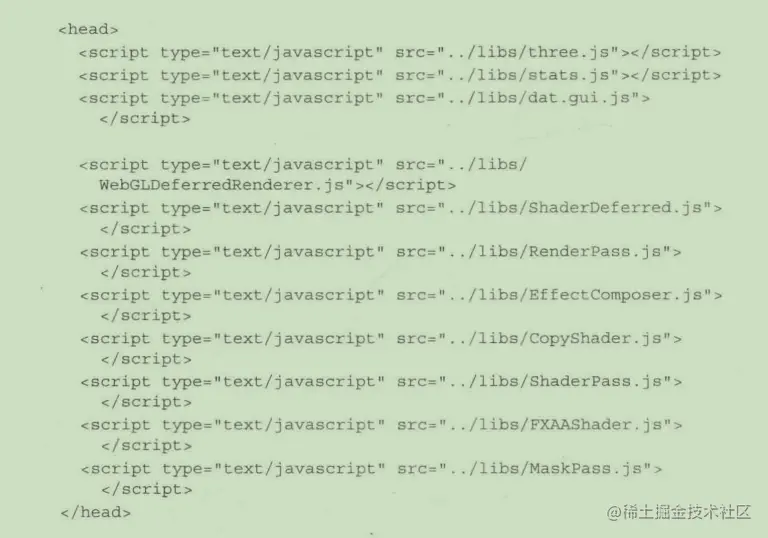
let renderer = new THREE.WebGLDeferreRenderer({
width:window.innerWidth,
height:window.innerHeght,
scale:1,
antialias:true,
tonemapping:THREE.FilmicOperator,
brightness:2.5
})
let areaLight1 = new THREE.AreaLIGHT(0xff0000, 3)
areaLight1.poistion.set(-10, 10, -35)
areaLight1.rotation.set(-Math.PI / 2, 0, 0)
areaLight1.width = 4
areaLight1.height = 9.9
scene.add(areaLight1)
创建镜头光晕
    flare = new  THREE.LensFlare(texture, size, distance, blending, color, opacity)
    flare.position = spotLight.position
    scene.add(flare)
| 属性 | 说明 |
|---|
| texture | 纹理就是一张图片,用来决定光晕的形状 |
| size | 光晕尺寸,单位是像素,如果为-1代表纹理本生的尺寸 |
| distance | 光源0到摄像机1的距离 |
| blending | 多种材质混合 |
| color | 光晕的颜色 |
| opacity | 透明度 |
let textureFlare3  = THREE.ImageUtiles.loadTexture('../img.png')
flare.add(textureFlare3,60,0.6,THREE.AdditiveBlending)
scene.add(flare)