前言
- 花了半天时间整理我平时用的工具库,详细介绍每个方法属性
- 机器猫工具库,就像机器猫的口袋一样有无穷无尽意想不到的的各种道具供我们使用
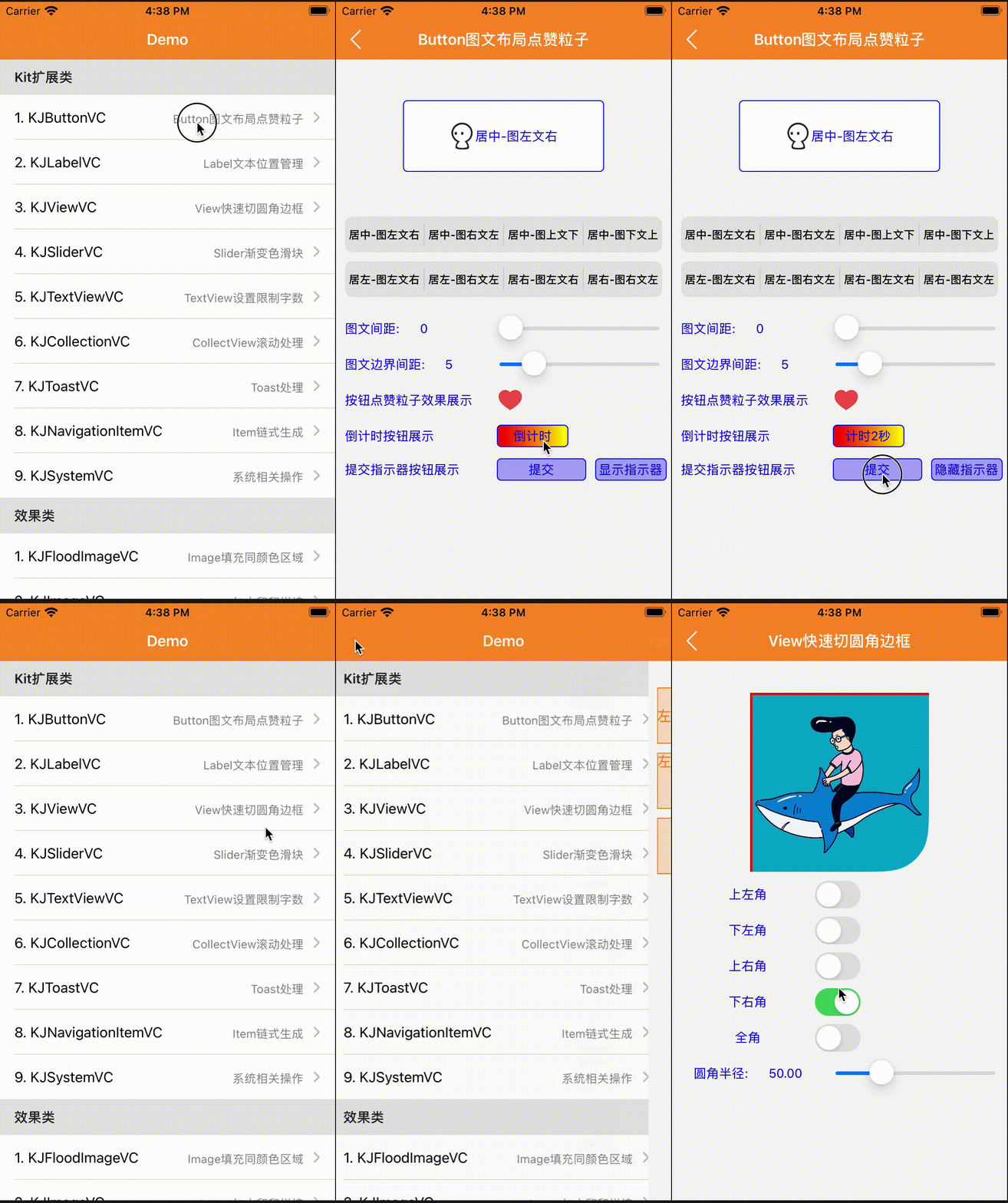
功能介绍
本库主要包含几大板块:UIKit类、Foundation类、Language 多语言类、Classes 粒子效果相关、Control 自定义控件
- UIButton:图文混排、点击事件封装、扩大点击域、时间间隔限制、倒计时、点击粒子效果等
- UIView:手势封装、圆角渐变、Xib属性,基础动画封装等
- UITextView:输入框扩展、限制字数、撤销处理、获取文本内部超链接
- UITextField:占位颜色,线条,图文处理等
- UILabel:富文本,快捷显示文本位置
- UIImage:截图和裁剪、图片压缩、蒙版处理,图片拼接、图片尺寸处理,滤镜渲染、泛洪算法等
- UIImage:二维码、条形码生成,动态图播放,水印处理等等
- Runtime:列表,方法交换,动态继承等
- UIDevice:系统相关属性,
- Language:多语言,支持Xib快捷设置
- Foundation:数组和字典防崩处理,数组算法处理,谓词相关,加密解密等等
- 图片处理封装,霍夫矫正,特征提取,形态学处理,滤镜处理等等
Foundation我还整理封装异常处理Crash防护 Foggy
Cocoapods安装
UIKit模块安装
pod 'KJCategories'
Foundation模块安装
pod 'KJCategories/Foundation'
多语音模块
pod 'KJCategories/Language'
Opencv图片模块
该模块需要引入OpenCV库
pod 'OpencvQueen'
粒子效果模块
pod 'KJCategories/Classes'
自定义控件模块
pod 'KJCategories/Control'
目录
关于类型说明
Property:属性
Class & Property:类属性
Protocol:协议
Instance:实例方法
Class:类方法
Function:函数
UIView
UIView+KJAnimation 简单动画效果链式封装
| 功能 | 类型 | API & Property |
|---|
| 隐式动画 | Instance | kj_animationImplicitDuration:animations: |
| 移动时刻显示阴影效果 | Instance | kj_movingShadow |
| 动画组 | Instance | kj_animationMoreAnimations: |
| 旋转动画效果 | Instance | kj_animationRotateClockwise:makeParameter: |
| 移动动画效果 | Instance | kj_animationMovePoint:makeParameter: |
| 缩放动画效果 | Instance | kj_animationZoomMultiple:makeParameter: |
| 渐隐动画效果 | Instance | kj_animationOpacity:makeParameter: |
UIView+KJXib
| 功能 | 类型 | API & Property |
|---|
| 贝塞尔圆角 | Property | bezierRadius |
| 阴影偏移量 | Property | shadowOffset |
| 阴影透明度 | Property | shadowOpacity |
| 阴影的宽度 | Property | shadowWidth |
| 阴影的圆角 | Property | shadowRadius |
| 阴影颜色 | Property | shadowColor |
| 圆角半径 | Property | cornerRadius |
| 边框宽度 | Property | borderWidth |
| 边框颜色 | Property | borderColor |
| 图片属性 | Property | viewImage |
| 判断是否有子视图在滚动 | Property | anySubViewScrolling |
| 判断是否有子视图在滚动 | Instance | kj_anySubViewScrolling |
| 判断控件是否显示在主窗口 | Property | showKeyWindow |
| 判断控件是否显示在主窗口 | Instance | kj_isShowingOnKeyWindow |
| 顶部控制器 | Property | topViewController |
| 当前的控制器 | Property | viewController |
| 当前的控制器 | Instance | kj_currentViewController |
| Xib创建的View | Class | kj_viewFromXib |
| Xib创建的View | Class | kj_viewFromXibWithFrame: |
UIView+KJRectCorner 进阶版圆角和边框扩展
| 功能 | 类型 | API & Property |
|---|
| 圆角半径 | Property | kj_radius |
| 圆角方位 | Property | kj_rectCorner |
| 边框颜色 | Property | kj_borderColor |
| 边框宽度 | Property | kj_borderWidth |
| 边框方位 | Property | kj_borderOrientation |
UIView+KJGradient 渐变处理 和 指定图形
| 功能 | 类型 | API & Property |
|---|
| 返回渐变layer | Instance | kj_GradientLayerWithColors:Frame:Locations:StartPoint:EndPoint: |
| 生成渐变背景色 | Instance | kj_GradientBgColorWithColors:Locations:StartPoint:EndPoint: |
| 虚线边框 | Instance | kj_DashedLineColor:lineWidth:spaceAry: |
| 画直线 | Instance | kj_DrawLineWithPoint:toPoint:lineColor:lineWidth: |
| 画虚线 | Instance | kj_DrawDashLineWithPoint:toPoint:lineColor:lineWidth:lineSpace:lineType: |
| 画五角星 | Instance | kj_DrawPentagramWithCenter:radius:color:rate: |
| 根据宽高画六边形 | Instance | kj_DrawSexangleWithWidth:LineWidth:StrokeColor:FillColor: |
| 根据宽高画八边形 | Instance | kj_DrawOctagonWithWidth:Height:LineWidth:StrokeColor:FillColor:Px:Py: |
UIView+KJGestureBlock 手势Block
| 功能 | 类型 | API & Property |
|---|
| 单击手势 | Instance | kj_AddTapGestureRecognizerBlock: |
| 手势处理 | Instance | kj_AddGestureRecognizer:block: |
UIView+KJFrame 轻量级布局
| 功能 | 类型 | API & Property |
|---|
| 大小 | Property | size |
| 位置 | Property | origin |
| x坐标 | Property | x |
| y坐标 | Property | y |
| 宽度 | Property | width |
| 高度 | Property | height |
| 中心点x | Property | centerX |
| 中心点y | Property | centerY |
| 左边距离 | Property | left |
| 右边距离 | Property | right |
| 顶部距离 | Property | top |
| 底部距离 | Property | bottom |
| x + width | Property | maxX |
| y + height | Property | maxY |
| Masonry布局后x | Property | masonry_x |
| Masonry布局后y | Property | masonry_y |
| Masonry布局后宽度 | Property | masonry_width |
| Masonry布局后高度 | Property | masonry_height |
| 将视图中心置于其父视图 | Instance | kj_centerToSuperview |
| 距父视图右边距离 | Instance | kj_rightToSuperview: |
| 距父视图下边距离 | Instance | kj_bottomToSuperview: |
| 获取子视图的最高Y | Instance | kj_subviewMaxY |
| 获取子视图的最高X | Instance | kj_subviewMaxX |
| 寻找子视图 | Instance | kj_FindSubviewRecursively: |
| 移除所有子视图 | Instance | kj_removeAllSubviews |
| 隐藏/显示所有子视图 | Instance | kj_hideSubviews:operation: |
| 子控件处理手势事件 | Instance | kj_childHitTest:withEvent: |
UITextView
UITextView+KJBackout 撤销处理,相当于 command + z
| 功能 | 类型 | API & Property |
|---|
| 是否开启撤销功能 | Property | kOpenBackout |
| 撤销输入 | Instance | kj_textViewBackout |
UITextView+KJPlaceHolder
| 功能 | 类型 | API & Property |
|---|
| 占位符文字 | Property | placeHolder |
| 占位符Label | Property | placeHolderLabel |
UITextView+KJLimitCounter 限制处理
| 功能 | 类型 | API & Property |
|---|
| 限制字数 | Property | limitCount |
| 限制区域右边距 | Property | limitMargin |
| 限制区域高度 | Property | limitHeight |
| 统计限制字数Label | Property | limitLabel |
UITextView+KJHyperlink 超链接点击处理
| 功能 | 类型 | API & Property |
|---|
| 识别点击TextView里面的超链接网址地址 | Instance | kj_clickTextViewURLCustom:URLHyperlink: |
UITextField
UITextField+KJExtension 输入框扩展,快速设置账号密码框
| 功能 | 类型 | API & Property |
|---|
| 设置底部边框线条颜色 | Property | bottomLineColor |
| 占位placeholder颜色 | Property | placeholderColor |
| 占位文字字体大小 | Property | placeholderFontSize |
| 最大长度 | Property | maxLength |
| 明文暗文切换 | Property | securePasswords |
| 达到最大字符长度 | Property | kMaxLengthBolck |
| 文本编辑时刻回调 | Property | kTextEditingChangedBolck |
| 设置左边视图,类似账号密码标题 | Instance | kj_leftView: |
| 设置右边视图,类似小圆叉 | Instance | kj_rightViewTapBlock:ImageName:Width:Padding: |
UITabBar
UITabBar+KJBadge 显示小红点
| 功能 | 类型 | API & Property |
|---|
| 当前的TabBar个数 | Protocol | kj_tabBarCount: |
| 显示小红点 | Instance | kj_showRedBadgeOnItemIndex: |
| 隐藏小红点 | Instance | kj_hideRedBadgeOnItemIndex: |
UISlider
KJColorSlider 渐变色滑块
| 功能 | 类型 | API & Property |
|---|
| 颜色数组 | Property | colors |
| 每个颜色对应的位置信息 | Property | locations |
| 颜色的高度 | Property | colorHeight |
| 边框宽度 | Property | borderWidth |
| 边框颜色 | Property | borderColor |
| 回调处理时间 | Property | timeSpan |
| 当前进度,用于外界kvo | Property | progress |
| 移动回调处理 | Property | kValueChangeBlock |
| 移动结束回调处理 | Property | kMoveEndBlock |
| 重新设置UI | Instance | kj_setUI |
UISlider+KJTapValue 滑杆点击改值
| 功能 | 类型 | API & Property |
|---|
| 是否开启滑杆点击修改值 | Property | kTapValue |
UIScrollView
UIScrollView+KJEmptyDataSet DZNEmptyDataSet 基础上再次封装没数据时状态
| 功能 | 类型 | API & Property |
|---|
| 是否正在加载 | Property | loading |
| 视图的垂直位置 | Property | verticalOffset |
| 空数据图片名 | Property | loadedImageName |
| 空数据详情信息 | Property | descriptionText |
| 刷新按钮文字 | Property | kLoadedButton |
| 加载时刻展示的视图 | Property | kLoadingContentView |
| 刷新按钮点击事件 | Property | kLoadedButtonClick |
| 其他视图点击事件 | Property | kLoadedOtherViewClick |
UIResponder
UIResponder+KJChain 响应链处理
| 功能 | 类型 | API & Property |
|---|
| 响应链详情 | Property | kChainDescription |
| 第一响应者 | Property | kFirstResponder |
| Instance | kj_responderWithClass: |
| Instance | kj_responderSendAction:Sender: |
UIResponder+KJAdapt 简单的屏幕比例适配
| 功能 | 类型 | API & Property |
|---|
| 设计图机型 | Protocol | kj_adaptModelType: |
| 水平比例适配 | Function | KJAdaptScaleLevel |
| 竖直比例适配 | Function | KJAdaptScaleVertical |
| 适配CGpoint | Function | KJAdaptPointMake |
| 适配CGSize | Function | KJAdaptSizeMake |
| 适配CGRect | Function | KJAdaptRectMake |
| 适配UIEdgeInsets | Function | KJAdaptEdgeInsetsMake |
UINavigation
UINavigationBar+KJExtension
| 功能 | 类型 | API & Property |
|---|
| 设置navigationBar背景颜色 | Property | kj_BackgroundColor |
| 设置基础的透明度 | Property | kj_Alpha |
| Property | kj_TranslationY |
| 重置 | Instance | kj_reset |
UINavigationItem+KJExtension Item链式生成
| 功能 | 类型 | API & Property |
|---|
| 链式生成 | Instance | kj_makeNavigationItem: |
| ExtendParameterBlock 扩展参数 | Property | kAddBarButtonItemInfo |
| ExtendParameterBlock 扩展参数 | Property | kAddLeftBarButtonItem |
| ExtendParameterBlock 扩展参数 | Property | kAddRightBarButtonItem |
UILabel
UILabel+KJCopy UILabel添加长按复制功能
| 功能 | 类型 | API & Property |
|---|
| 是否可以拷贝 | Property | copyable |
| 移除拷贝长按手势 | Instance | kj_removeCopyLongPressGestureRecognizer |
UILabel+KJExtension 文本位置和尺寸获取
| 功能 | 类型 | API & Property |
|---|
| 设置文字内容显示位置 | Property | customTextAlignment |
| 获取宽度 | Instance | kj_calculateWidth |
| 获取高度 | Instance | kj_calculateHeightWithWidth: |
| 获取高度,指定行高 | Instance | kj_calculateHeightWithWidth:OneLineHeight: |
| 获取文字尺寸 | Class | kj_calculateLabelSizeWithTitle:font:constrainedToSize:lineBreakMode: |
UILabel+KJCreate 快速创建文本
| 功能 | 类型 | API & Property |
|---|
| 快速创建文本 | Class | kj_createLabel: |
UILabel+KJAttributedString 富文本
| 功能 | 类型 | API & Property |
|---|
| Range之间文字行间距 | Instance | kj_AttributedStringTextLineSpace: |
| Range之间文字大小 | Instance | kj_AttributedStringTextFont:Range: |
| Range之间文字颜色 | Instance | kj_AttributedStringTextColor:Range: |
| Range之间文字大小和颜色 | Instance | kj_AttributedStringTextFont:TextColor:Range: |
| Range之间文字相关属性 | Instance | kj_AttributedStringTextAttributes:Range: |
| 富文本文字大小 | Instance | kj_AttributedStringTextFont:Loc:Len: |
| 富文本文字颜色 | Instance | kj_AttributedStringTextColor:Loc:Len: |
| 富文本文字大小和颜色 | Instance | kj_AttributedStringTextFont:TextColor:Loc:Len: |
| 富文本文字相关属性 | Instance | kj_AttributedStringTextAttributes:Loc:Len: |
UIImageView
UIImageView+KJBlur 模糊处理(高斯模糊、Accelerate模糊、毛玻璃、蒙版)
| 功能 | 类型 | API & Property |
|---|
| 模糊处理 | Instance | kj_blurImageViewWithBlurType:BlurImage:BlurRadius: |
UIImageView+KJLetters 文字头像,首字母缩略头像
| 功能 | 类型 | API & Property |
|---|
| 显示文字图片 | Instance | kj_imageViewWithText:LettersInfo: |
| 浏览头像,点击全屏展示 | Instance | kj_headerImageShowScreen |
| 浏览头像,背景颜色 | Instance | kj_headerImageShowScreenWithBackground: |
UIImage
UIImage+KJQRCode 二维码/条形码生成器,特别备注文字不能是中文汉字
| 功能 | 类型 | API & Property |
|---|
| 将字符串转成条形码 | Class | kj_barCodeImageWithContent: |
| 生成二维码 | Class | kj_QRCodeImageWithContent:codeImageSize: |
| 生成指定颜色二维码 | Class | kj_QRCodeImageWithContent:codeImageSize:color: |
| 生成条形码 | Class | kj_barcodeImageWithContent:codeImageSize: |
| 生成指定颜色条形码 | Class | kj_barcodeImageWithContent:codeImageSize:color: |
| 改变图片尺寸,bitmap方式 | Instance | kj_bitmapChangeImageSize: |
| 改变图片内部像素颜色 | Instance | kj_changeImagePixelColor: |
UIImage+KJURLSize 获取网络图片尺寸
| 功能 | 类型 | API & Property |
|---|
| 获取网络图片尺寸 | Class | kj_imageGetSizeWithURL: |
| 异步等待获取网络图片大小,信号量 | Class | kj_imageAsyncGetSizeWithURL: |
UIImage+KJScale 图片尺寸处理
| 功能 | 类型 | API & Property |
|---|
| 通过比例来缩放图片 | Instance | kj_scaleImage: |
| 以固定宽度缩放图像 | Instance | kj_scaleWithFixedWidth: |
| 以固定高度缩放图像 | Instance | kj_scaleWithFixedHeight: |
| 等比改变图片尺寸 | Instance | kj_cropImageWithAnySize: |
| 等比缩小图片尺寸 | Instance | kj_zoomImageWithMaxSize: |
| 不拉升填充图片 | Instance | kj_fitImageWithSize: |
UIImage+KJPhotoshop
| 功能 | 类型 | API & Property |
|---|
| 获取图片平均颜色 | Instance | kj_getImageAverageColor |
| 获得灰度图 | Instance | kj_getGrayImage |
| 改变图片透明度 | Instance | kj_changeImageAlpha: |
| 改变图片背景颜色 | Instance | kj_changeImageColor: |
| 修改图片线条颜色 | Instance | kj_imageLinellaeColor: |
| 图层混合 | Instance | kj_imageBlendMode:TineColor: |
UIImage+KJMask 蒙版处理,图片拼接
| 功能 | 类型 | API & Property |
|---|
| 文字水印 | Instance | kj_waterText:direction:textColor:font:margin: |
| 图片水印 | Instance | kj_waterImage:direction:waterSize:margin: |
| 图片添加水印 | Instance | kj_waterMark:InRect: |
| 蒙版图片处理 | Instance | kj_maskImage: |
| 圆形图片 | Instance | kj_circleImage |
| 椭圆形图片 | Instance | kj_ellipseImage |
| 图片透明区域点击穿透处理 | Instance | kj_transparentWithPoint: |
UIImage+KJJoint 图片拼接相关处理
| 功能 | 类型 | API & Property |
|---|
| 旋转图片和镜像处理 | Instance | kj_rotationImageWithOrientation: |
| 竖直方向拼接随意张图片,固定主图的宽度 | Instance | kj_moreJointVerticalImage: |
| 水平方向拼接随意张图片,固定主图的高度 | Instance | kj_moreJointLevelImage: |
| 图片多次合成处理 | Instance | kj_imageCompoundWithLoopNums:Orientation: |
| 水平方向拼接随意张图片,固定主图的高度 | Instance | kj_moreAccelerateJointLevelImage: |
| 图片拼接艺术 | Instance | kj_jointImageWithJointType:Size:Maxw: |
| 进阶版图片拼接艺术,待完善 | Instance | kj_jointImageWithAdvanceJointType:Size:Maxw:Parameter: |
UIImage+KJGIF 播放动态图
| 功能 | 类型 | API & Property |
|---|
| 本地动态图播放 | Class | kj_gifLocalityImageWithName: |
| 本地动图 | Class | kj_gifImageWithData: |
| 网络动图 | Class | kj_gifImageWithURL: |
UIImage+KJFloodFill 基于扫描线的泛洪算法,获取填充同颜色区域后的图片
| 功能 | 类型 | API & Property |
|---|
| 填充图片 | Instance | kj_FloodFillImageFromStartPoint:NewColor:Tolerance:UseAntialias: |
UIImage+CoreImage CoreImage框架整理
| 功能 | 类型 | API & Property |
|---|
| Photoshop滤镜 | Instance | kj_coreImagePhotoshopWithType:Value: |
| 通用方法 | Instance | kj_coreImageCustomWithName:Dicts: |
| 高光和阴影 | Instance | kj_coreImageHighlightShadowWithHighlightAmount:ShadowAmount: |
| 将图片黑色变透明 | Instance | kj_coreImageBlackMaskToAlpha |
| 马赛克 | Instance | kj_coreImagePixellateWithCenter:Scale: |
| 图片圆形变形 | Instance | kj_coreImageCircularWrapWithCenter:Radius:Angle: |
| 环形透镜畸变 | Instance | kj_coreImageTorusLensDistortionCenter:Radius:Width:Refraction: |
| 空变形 | Instance | kj_coreImageHoleDistortionCenter:Radius: |
| 应用透视校正 | Instance | kj_coreImagePerspectiveCorrectionWithTopLeft:TopRight:BottomRight:BottomLeft: |
| 透视变换 | Instance | kj_coreImagePerspectiveTransformWithTopLeft:TopRight:BottomRight:BottomLeft: |
| 软装专属透视 | Instance | kj_softFitmentFluoroscopyWithTopLeft:TopRight:BottomRight:BottomLeft: |
UIImage+KJCompress 图片压缩处理,提供几种系统API的处理方式
| 功能 | 类型 | API & Property |
|---|
| 压缩图片到指定大小 | Instance | kj_compressTargetByte: |
| 压缩图片到指定大小 | Class | kj_compressImage:TargetByte: |
| UIKit方式 | Instance | kj_UIKitChangeImageSize: |
| Quartz 2D | Instance | kj_QuartzChangeImageSize: |
| ImageIO | Instance | kj_ImageIOChangeImageSize: |
| CoreImage | Instance | kj_CoreImageChangeImageSize: |
| Accelerate | Instance | kj_AccelerateChangeImageSize: |
UIImage+KJCapture 截图和裁剪处理
| 功能 | 类型 | API & Property |
|---|
| 当前视图截图 | Class | kj_captureScreen: |
| 指定位置屏幕截图 | Class | kj_captureScreen:Rect: |
| 自定义质量的截图,quality质量倍数 | Class | kj_captureScreen:Rect:Quality: |
| 截取当前屏幕(窗口截图) | Class | kj_captureScreenWindow |
| 截取当前屏幕(根据手机方向旋转) | Class | kj_captureScreenWindowForInterfaceOrientation |
| 截取滚动视图的长图 | Class | kj_captureScreenWithScrollView:ContentOffset: |
| 裁剪掉图片周围的透明部分 | Class | kj_cutImageRoundAlphaZero: |
| 不规则图形切图 | Class | kj_anomalyCaptureImageWithView:BezierPath: |
| 多边形切图 | Class | kj_polygonCaptureImageWithImageView:PointArray: |
| 指定区域裁剪 | Class | kj_cutImageWithImage:Frame: |
| quartz 2d 实现裁剪 | Class | kj_quartzCutImageWithImage:Frame: |
| 图片路径裁剪,裁剪路径 "以外" 部分 | Class | kj_captureOuterImage:BezierPath:Rect: |
| 图片路径裁剪,裁剪路径 "以内" 部分 | Class | kj_captureInnerImage:BezierPath:Rect: |
UIImage+KJAccelerate Accelerate 框架的图片处理
| 功能 | 类型 | API & Property |
|---|
| 图片旋转 | Instance | kj_rotateInRadians: |
| 模糊处理 | Instance | kj_blurImageSoft |
| 模糊处理 | Instance | kj_blurImageLight |
| 模糊处理 | Instance | kj_blurImageExtraLight |
| 模糊处理 | Instance | kj_blurImageDark |
| 指定颜色线性模糊 | Instance | kj_blurImageWithTintColor: |
| 线性模糊,保留透明区域 | Instance | kj_linearBlurryImageBlur: |
| 模糊处理 | Instance | kj_blurImageWithRadius:Color:MaskImage: |
| 均衡运算 | Instance | kj_equalizationImage |
| 侵蚀 | Instance | kj_erodeImage |
| 形态膨胀/扩张 | Instance | kj_dilateImage |
| 多倍侵蚀 | Instance | kj_erodeImageWithIterations: |
| 形态多倍膨胀/扩张 | Instance | kj_dilateImageWithIterations: |
| 梯度 | Instance | kj_gradientImageWithIterations: |
| 顶帽运算 | Instance | kj_tophatImageWithIterations: |
| 黑帽运算 | Instance | kj_blackhatImageWithIterations: |
| 卷积处理 | Instance | kj_convolutionImageWithKernel: |
| 锐化 | Instance | kj_sharpenImage |
| 锐化 | Instance | kj_sharpenImageWithIterations: |
| 浮雕 | Instance | kj_embossImage |
| 高斯 | Instance | kj_gaussianImage |
| 边缘检测 | Instance | kj_marginImage |
| 边缘检测 | Instance | kj_edgeDetection |
UIDevice
UIDevice+KJSystem 系统相关的操作
| 功能 | 类型 | API & Property |
|---|
| App版本号 | Class & Property | appCurrentVersion |
| App名称 | Class & Property | appName |
| 手机UUID | Class & Property | deviceID |
| 获取App图标 | Class & Property | appIcon |
| 判断App是否支持横屏 | Class & Property | supportHorizontalScreen |
| 获取启动页图片 | Class & Property | launchImage |
| 系统启动图缓存路径 | Class & Property | launchImageCachePath |
| 启动图备份文件路径 | Class & Property | launchImageBackupPath |
| 生成启动图 | Class | kj_launchImageWithPortrait:Dark: |
| 生成启动图 | Class | kj_launchImageWithStoryboard:Portrait:Dark: |
| 对比版本号 | Class | kj_comparisonVersion: |
| 获取AppStore版本号和详情信息 | Class | kj_getAppStoreVersionWithAppid:Details: |
| 跳转到指定URL | Class | kj_openURL: |
| 调用AppStore | Class | kj_skipToAppStoreWithAppid: |
| 调用自带浏览器safari | Class | kj_skipToSafari |
| 调用自带Mail | Class | kj_skipToMail |
| 是否切换为扬声器 | Class | kj_changeLoudspeaker: |
| 保存到相册 | Class | kj_savedPhotosAlbumWithImage:Complete: |
| 系统自带分享 | Class | kj_shareActivityWithItems:ViewController:Complete: |
| 切换根视图控制器 | Class | kj_changeRootViewController:Complete: |
UIControl
UISegmentedControl+KJCustom
| 功能 | 类型 | API & Property |
|---|
| 解决修改背景色和文字颜色 | Instance | kj_ensureBackgroundAndTintColor: |
UIColor
UIColor+KJExtension 颜色相关扩展
| 功能 | 类型 | API & Property |
|---|
| 渐变颜色 | Class | zj_gradientColorWithColors:GradientType:Size: |
| 竖直渐变颜色 | Instance | kj_gradientVerticalToColor:Height: |
| 横向渐变颜色 | Instance | kj_gradientAcrossToColor:Width: |
| 生成附带边框的渐变色图片 | Class | kj_colorImageWithColors:locations: size:borderWidth:borderColor: |
| UIColor转16进制字符串 | Class | kj_hexStringFromColor: |
| 16进制字符串转UIColor | Class | kj_colorWithHexString: |
| 获取图片上指定点的颜色 | Class | kj_colorAtImage:Point: |
| 获取ImageView上指定点的图片颜色 | Class | kj_colorAtImageView:Point: |
UIColor+KJExtension2 颜色相关扩展
| 功能 | 类型 | API & Property |
|---|
| Property | red |
| Property | green |
| Property | blue |
| Property | alpha |
| 色相 | Property | hue |
| 饱和度 | Property | saturation |
| 亮度 | Property | light |
| 获取颜色对应的RGBA | Instance | kj_colorGetRGBA |
| 获取颜色对应的色相饱和度和透明度 | Instance | kj_colorGetHSL |
| 获取颜色的均值 | Class | kj_averageColors: |
UIButton
UIButton+KJBlock 点击事件ButtonBlock
| 功能 | 类型 | API & Property |
|---|
| 是否开启时间间隔的方法交换 | Protocol | kj_openTimeExchangeMethod |
| 添加点击事件 | Instance | kj_addAction: |
| 添加事件,不支持多枚举形式 | Instance | kj_addAction:forControlEvents: |
| 点击事件间隔 | Property | timeInterval |
UIButton+KJContentLayout 图文混排(支持XIB显示)
| 功能 | 类型 | API & Property |
|---|
| 图文样式 | Property | layoutType |
| 图文间距 | Property | padding |
| 图文边界的间距 | Property | periphery |
| 图文样式 | Property | kj_ButtonContentLayoutType |
| 图文间距 | Property | kj_Padding |
| 图文边界的间距 | Property | kj_PaddingInset |
UIButton+KJCountDown 倒计时
| 功能 | 类型 | API & Property |
|---|
| 倒计时结束的回调 | Property | kButtonCountDownStop |
| 设置倒计时的间隔和倒计时文案 | Instance | kj_startTime:CountDownFormat: |
| 取消倒计时 | Instance | kj_cancelTimer |
UIButton+KJCreate 按钮快速创建
| 功能 | 类型 | API & Property |
|---|
| 创建图片按钮 | Class | kj_createButton: |
UIButton+KJEmitter 按钮粒子效果
| 功能 | 类型 | API & Property |
|---|
| 是否开启粒子效果 | Property | openEmitter |
| 粒子,备注 name 属性不要更改 | Property | emitterCell |
| 设置粒子效果 | Instance | kj_buttonSetEmitterImage:OpenEmitter: |
UIButton+KJEnlarge 改变UIButton的响应区域 - 扩大Button点击域
| 功能 | 类型 | API & Property |
|---|
| 设置按钮额外热区 | Property | touchAreaInsets |
| 扩大点击域 | Instance | kj_EnlargeEdgeWithTop:right:bottom:left: |
UIButton+KJIndicator 指示器(系统自带菊花)
| 功能 | 类型 | API & Property |
|---|
| 按钮是否正在提交中 | Property | submitting |
| 指示器和文字间隔 | Property | indicatorSpace |
| 指示器颜色 | Property | indicatorType |
| 开始提交,指示器跟随文字 | Instance | kj_beginSubmitting: |
| 结束提交 | Instance | kj_endSubmitting |
| 显示指示器 | Instance | kj_showIndicator |
| 隐藏指示器 | Instance | kj_hideIndicator |
UICollectionView
UICollectionView+KJTouch 获取touch事件处理
| 功能 | 类型 | API & Property |
|---|
| 开启方法交换 | Property | kOpenExchange |
| Touch里面移动回调 | Property | moveblock |
UIBezierPath
UIBezierPath+KJPoints 获取贝塞尔曲线上面的点
| 功能 | 类型 | API & Property |
|---|
| 获取所有点 | Property | points |
| 获取文字贝塞尔路径 | Class | kj_bezierPathWithText:Font: |
NSObject
KJGeometry 几何方程式相关
| 功能 | 类型 | API & Property |
|---|
| 已知A、B两点和C点到B点的长度,求垂直AB的C点 | Class | kj_perpendicularLineDotsWithA:B:Len:Positive: |
| 已知A、B两点和C点到B点的长度,求垂直AB的C点 | Class | kj_perpendicularLineDotsWithA:B:Length: |
| 已知A、B、C、D 4个点,求AB与CD交点 | Class | kj_linellaeCrosspointWithA:B:C:D: |
| 求两点线段长度 | Class | kj_distanceBetweenPointsWithA:B: |
| 已知A、B、C三个点,求AB线对应C的平行线上的点 | Class | kj_parallelLineDotsWithA:B:C: |
| 椭圆求点方程 | Class | kj_ovalPointWithRect:Angle: |
KJMathEquation 数学算法方程式
| 功能 | 类型 | API & Property |
|---|
| 把弧度转换成角度 | Class | kj_degreeFromRadian: |
| 把角度转换成弧度 | Class | kj_radianFromDegree: |
| 正切函数的弧度值,tan | Class | kj_radianValueFromTanSideA:sideB: |
| 获取具有固定宽度的新size | Class | kj_resetFromSize:FixedWidth: |
| 获取具有固定高度的新size | Class | kj_resetFromSize:FixedHeight: |
| 一元一次线性方程,求k,b | Class | kj_mathOnceLinearEquationWithPointA:PointB: |
| 已知y,k,b 求 x | Class | kj_xValueWithY:LinearEquation: |
| 已知x,k,b 求 y | Class | kj_yValueWithX:LinearEquation: |
NSObject+KJKVO 键值监听封装,自动释放
| 功能 | 类型 | API & Property |
|---|
| kvo监听 | Instance | kj_observeKey:ObserveResultBlock: |
NSObject+KJRuntime Runtime轻量级封装
| 功能 | 类型 | API & Property |
|---|
| 获取该对象的所有属性,包含父类 | Property | propertyTemps |
| 实例变量列表 | Property | ivarTemps |
| 方法列表 | Property | methodTemps |
| 遵循的协议列表 | Property | protocolTemps |
| 归档封装 | Instance | kj_encodeRuntime: |
| 解档封装 | Instance | kj_initCoderRuntime: |
NSObject+KJSemaphore 轻量级解耦工具(信号)
| 功能 | 类型 | API & Property |
|---|
| 发送消息处理 | Instance | kj_sendSemaphoreWithKey:Message:Parameter: |
| 接收消息处理 | Instance | kj_receivedSemaphoreBlock: |
| 代码执行时间处理 | Class | kj_executeTime: |
NSDictionary
NSDictionary+KJExtension
| 功能 | 类型 | API & Property |
|---|
| 是否为空 | Property | isEmpty |
| 转换为Josn字符串 | Property | jsonString |
NSString
NSString+KJExtension 字符串扩展属性
| 功能 | 类型 | API & Property |
|---|
| 是否为空 | Property | isEmpty |
| 转换为URL | Property | URL |
| 获取图片 | Property | image |
| 取出HTML | Property | HTMLString |
| Josn字符串转字典 | Property | jsonDict |
| 生成竖直文字 | Property | verticalText |
| 获取文本宽度 | Instance | kj_maxWidthWithFont:Height:Alignment:LinebreakMode:LineSpace: |
| 获取文本高度 | Instance | kj_maxHeightWithFont:Width:Alignment:LinebreakMode:LineSpace: |
| 文字转图片 | Instance | kj_textBecomeImageWithSize:BackgroundColor:TextAttributes: |
NSString+KJChinese 汉字相关处理
| 功能 | 类型 | API & Property |
|---|
| 汉字转拼音 | Property | pinYin |
| 随机汉字 | Class | kj_randomCreateChinese: |
| 查找数据 | Instance | kj_searchArray: |
| 字母排序 | Instance | kj_letterSortArray: |
NSString+KJPredicate 谓词工具
| 功能 | 类型 | API & Property |
|---|
| 过滤空格 | Instance | kj_filterSpace |
| 验证数字 | Instance | kj_validateNumber |
| 是否有特殊字符 | Instance | kj_validateHaveSpecialCharacter |
| 过滤特殊字符 | Instance | kj_removeSpecialCharacter: |
| 验证手机号码 | Instance | kj_validateMobileNumber |
| 验证邮箱格式 | Instance | kj_validateEmail |
| 验证身份证 | Instance | kj_validateIDCardNumber |
| 验证银行卡 | Instance | kj_validateBankCardNumber |
NSString+KJSecurity 加密解密工具,链式处理
| 功能 | 类型 | API & Property |
|---|
| 生成key | Instance | kj_createKey |
| 生成token | Instance | kj_createToken |
| RSA公钥加密 | Instance | kj_rsaEncryptPublicKey |
| RSA公钥解密 | Instance | kj_rsaDecryptPublicKey |
| RSA私钥加密 | Instance | kj_rsaEncryptPrivateKey |
| RSA私钥解密 | Instance | kj_rsaDecryptPrivateKey |
| AES加密 | Instance | kj_aesEncryptKey |
| AES解密 | Instance | kj_aesDecryptKey |
| Base64编码 | Instance | kj_base64EncodedString |
| Base64解码 | Instance | kj_base64DecodingString |
NSTimer
NSTimer+KJExtension
| 功能 | 类型 | API & Property |
|---|
| 当前线程计时器 | Class | kj_scheduledTimerWithTimeInterval:Repeats:Block: |
| 当前线程 | Class | kj_scheduledTimerWithTimeInterval:Repeats:Block:RunLoopMode: |
| 线程计时器 | Class | kj_timerWithTimeInterval:Repeats:Block: |
| 立刻执行 | Instance | kj_immediatelyTimer |
| 暂停 | Instance | kj_pauseTimer |
| 重启计时器 | Instance | kj_resumeTimer |
| 延时执行 | Instance | kj_resumeTimerAfterTimeInterval: |
| 释放计时器 | Class | kj_invalidateTimer: |
NSArray
NSArray+KJPredicate 谓词工具
| 功能 | 类型 | API & Property |
|---|
| 对比两个数组删除相同元素并合并 | Instance | kj_mergeArrayAndDelEqualObjWithOtherArray: |
| 过滤数组 | Instance | kj_filtrationDatasWithPredicateBlock: |
| 除去数组当中包含目标数组的数据 | Instance | kj_delEqualDatasWithTargetTemps: |
| 按照某一属性的升序降序排列 | Instance | kj_sortDescriptorWithKey:Ascending: |
| 按照某些属性的升序降序排列 | Instance | kj_sortDescriptorWithKeys:Ascendings: |
| 取出 key 中匹配 value 的元素 | Instance | kj_takeOutDatasWithKey:Value: |
| 字符串比较运算符 | Instance | kj_takeOutDatasWithOperator:Key:Value: |
NSArray+KJExtension 对数组里面元素的相关处理
| 功能 | 类型 | API & Property |
|---|
| 是否为空 | Property | isEmpty |
| 筛选数据 | Instance | kj_detectArray: |
| 多维数组筛选数据 | Instance | kj_detectManyDimensionArray: |
| 查找数据 | Instance | kj_searchObject: |
| 映射 | Instance | kj_mapArray: |
| 插入数据到目的位置 | Instance | kj_insertObject: |
| 数组计算交集 | Instance | kj_arrayIntersectionWithOtherArray: |
| 数组计算差集 | Instance | kj_arrayMinusWithOtherArray: |
| 随机打乱数组 | Instance | kj_disorganizeArray |
| 删除数组当中的相同元素 | Instance | kj_delArrayEquelObj |
| 生成一组不重复的随机数 | Instance | kj_noRepeatRandomArrayWithMinNum:maxNum:count: |
| 二分查找 | Instance | kj_binarySearchTarget: |
| 冒泡排序 | Instance | kj_bubbleSort |
| 插入排序 | Instance | kj_insertSort |
| 选择排序 | Instance | kj_selectionSort |
这个真的是手都复制粘贴痛了,老板们点个星星鼓励一下 - -
备注:本文用到的部分函数方法和Demo,均来自三方库**KJCategories**,如有需要的朋友可自行pod 'KJCategories'引入即可
功能介绍就到此完毕,后面有相关再补充,写文章不容易,还请点个**小星星**传送门